

You're probably dealing with some version of the same problem I see across Australian businesses every week.
A product sells online, but the shelf in the warehouse is empty. A team member orders more stock because the spreadsheet says you're low, only to find a pallet sitting in a second location. End-of-month stocktake turns into a late-night exercise in guesswork. Meanwhile, cash is locked up in slow-moving items, and fast-moving lines go out of stock at the worst possible time.
That mix of overstock, stockouts, manual rework, and poor visibility usually isn't a people problem. It's a system problem.
An inventory management system gives you one reliable way to track what you own, where it is, what it costs, and what should happen next. For Australian retailers, manufacturers, logistics operators, and multi-channel sellers, that control matters even more because local freight, warehousing pressure, and compliance needs make inventory mistakes expensive.
If you're comparing options, thinking about an Odoo ERP rollout, planning a Shopify implementation, or trying to connect WooCommerce with back-office operations, the practical issue isn't software features on a brochure. It's whether the system fits the way your business buys, stores, sells, picks, invoices, and reports.
From Warehouse Chaos to Controlled Operations
Manual inventory control usually works right up until the moment the business grows.
At first, a spreadsheet, a shared drive, and a careful store manager can hold things together. Then sales increase, product lines expand, and stock starts moving through more than one channel. A retail business may sell in-store, through Shopify, and by phone. A wholesaler may keep stock in one warehouse but dispatch from another. A manufacturer may need to track raw materials, finished goods, and items reserved for customer orders. That's when cracks show.
The first sign is often confusion, not disaster. Staff ask the same questions repeatedly. Do we have it? Which location has it? Has it been allocated already? Was that customer order picked? Why is the website showing available stock when the shelf is empty?
What chaos looks like in practice
A practical case is a growing distributor that receives stock correctly but records transfers between locations manually. The purchasing team thinks stock is available. Sales promises delivery. Warehouse staff later discover the items are sitting in a different bin or were already committed to another order.
Another common case is eCommerce. A product sells on one channel seconds before another customer buys the same item elsewhere. Without connected systems, the business oversells and then scrambles to apologise, refund, or substitute.
Practical rule: If your team relies on memory to explain stock movements, your process is already too fragile.
This gets harder when supply chains stretch across ports, carriers, and warehouses. Even if your operation is Australia-based, it helps to understand how structured freight visibility supports planning. A useful example is this guide to Container Haulage from Felixstowe, which shows why transport visibility and stock visibility often need to work together.
What control actually means
Control doesn't mean counting more often. It means creating a reliable operating model:
- One source of truth for stock quantities and locations
- Clear movement rules for receiving, transfers, picking, returns, and adjustments
- Connected sales channels so online and offline stock stay aligned
- Useful reporting so managers can act before a problem turns costly
When business owners adopt an inventory management system properly, they stop reacting to surprises and start managing stock as a business asset.
What Is an Inventory Management System?
A practical inventory management system gives your business one reliable record of what stock you own, where it is, what condition it is in, and which transaction changed it.
A useful comparison is a flight control board at an airport. Planes are still moving on runways and in the air, but the control system shows what is arriving, departing, delayed, and assigned to which gate. Stock works the same way. Items are constantly being received, put away, reserved, picked, shipped, returned, or adjusted. The system keeps those movements visible so your team can act on facts instead of assumptions.
An inventory management system records goods from receipt through storage, allocation, picking, dispatch, return, and adjustment. It creates a shared operating record across sales, purchasing, warehouse, finance, and operations. For Australian SMEs, that shared record becomes far more valuable once it connects to the systems already running the business, such as Odoo ERP for purchasing and accounting, or Shopify and WooCommerce for online orders.
Here's the core concept visually.
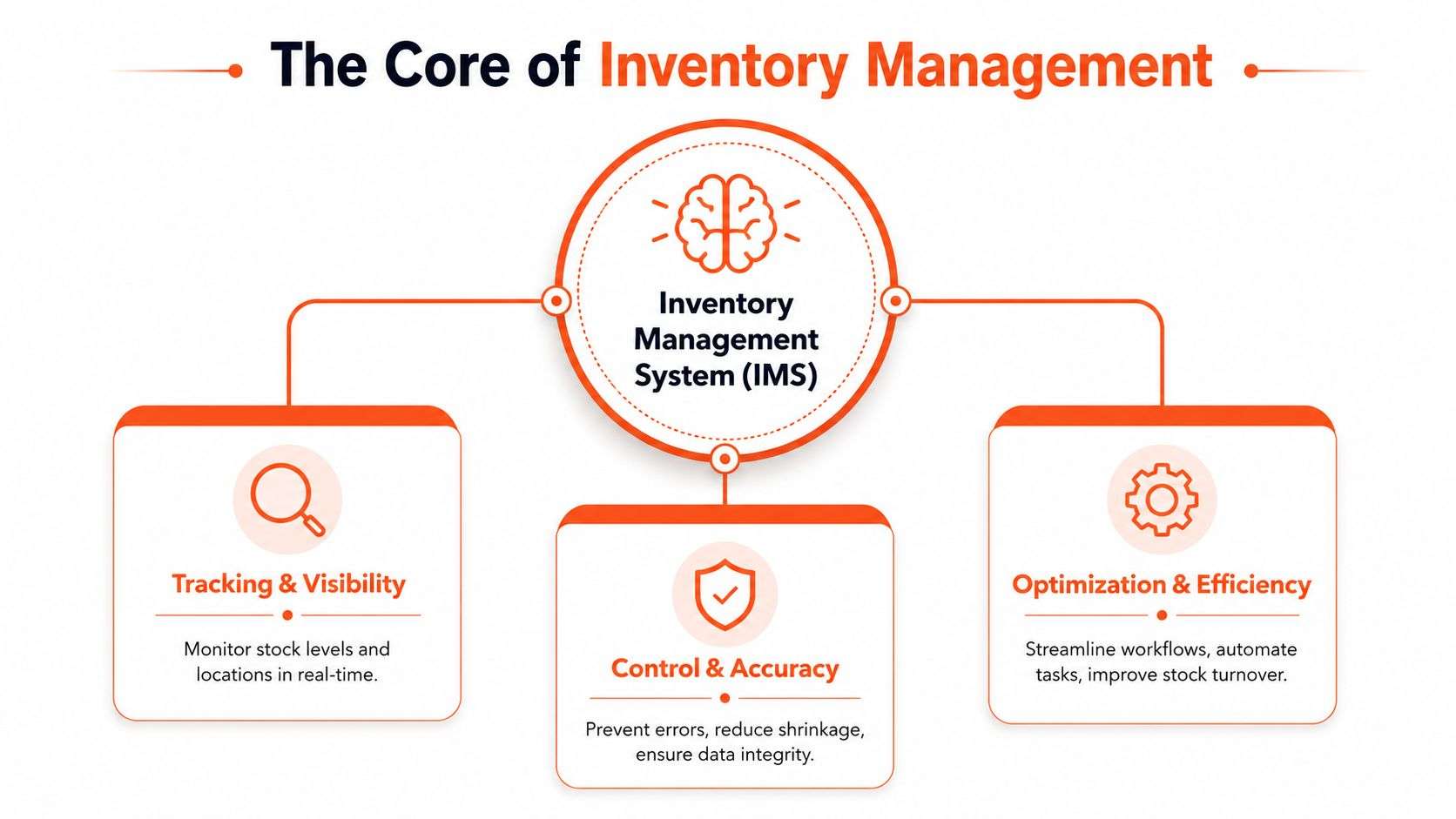
The parts that make the system work in real life
Business owners often assume the software is the whole answer. In practice, the result depends on three connected parts.
| Part | What it includes | Why it matters |
|---|---|---|
| Software | Product records, stock rules, reporting, order links | Stores the logic and current stock record |
| Hardware | Scanners, tablets, label printers, mobile devices | Helps staff process stock accurately and quickly |
| Process | Receiving steps, approvals, transfers, stocktakes, picking rules | Keeps records trustworthy day after day |
If the process is weak, even good software fills up with errors. If the hardware is missing, staff fall back to manual workarounds. If the software does not integrate properly, your warehouse may be accurate while your online store still sells the wrong quantity.
That last point matters for growing Australian retailers and wholesalers. A system that works inside the warehouse but does not stay in sync with Shopify, WooCommerce, or Odoo creates a split view of the business. On paper, you have control. In daily operations, you still have confusion.
What the system is actually tracking
The system is not just counting boxes on shelves. It is recording business events and the status changes that follow.
For example:
- Receiving stock increases available or incoming quantities
- Allocating stock to an order reserves units before dispatch
- Moving stock between bins or sites updates the location record
- Returning goods changes quantity and condition status
- Adjusting stock creates a reasoned record when physical stock and system stock differ
A good system should answer three questions quickly. What do we have, where is it, and what is already committed?
That is why some businesses outgrow spreadsheets even before they outgrow their warehouse. A spreadsheet can list products. It struggles to control timing, status, user permissions, scan-based handling, and channel updates across multiple teams.
What this means for an Australian SME
For a small or mid-sized business in Australia, an inventory management system is usually part of a larger implementation journey, not a standalone app purchase. You may start with better stock visibility, then discover you also need purchase order control, landed cost handling, GST-aligned workflows, multi-location logic, or online channel synchronisation.
This is one reason Wistec often sees businesses begin with a simple stock problem and end up reviewing how inventory should connect to Odoo ERP, Shopify, WooCommerce, freight timing, and fulfilment rules. The software decision is really an operating model decision.
Costs vary because the scope varies. A business with one warehouse and one sales channel needs something very different from a wholesaler supplying B2B customers while also selling direct online. Setup effort, data cleanup, barcode processes, integrations, and staff training usually shape the final cost more than the licence screen does.
You can see a specialised example in vending service stock management, where the challenge is not only knowing total stock, but also knowing what has been loaded into each machine, vehicle, or route at a specific time. The same principle applies across retail, wholesale, manufacturing, and field service. Stock control improves when movements are recorded in the right system, at the right moment, by the right process.
Unlocking Core Features and Business Benefits
Features matter only if they solve an operating problem.
A barcode scanner sounds technical. In practice, it means your receiving clerk doesn't have to type SKU codes by hand. Real-time stock visibility sounds abstract. In practice, it means your Shopify store doesn't promise stock that the warehouse can't ship.
That's the right way to assess an inventory management system. Start with friction. Then ask which capability removes it.
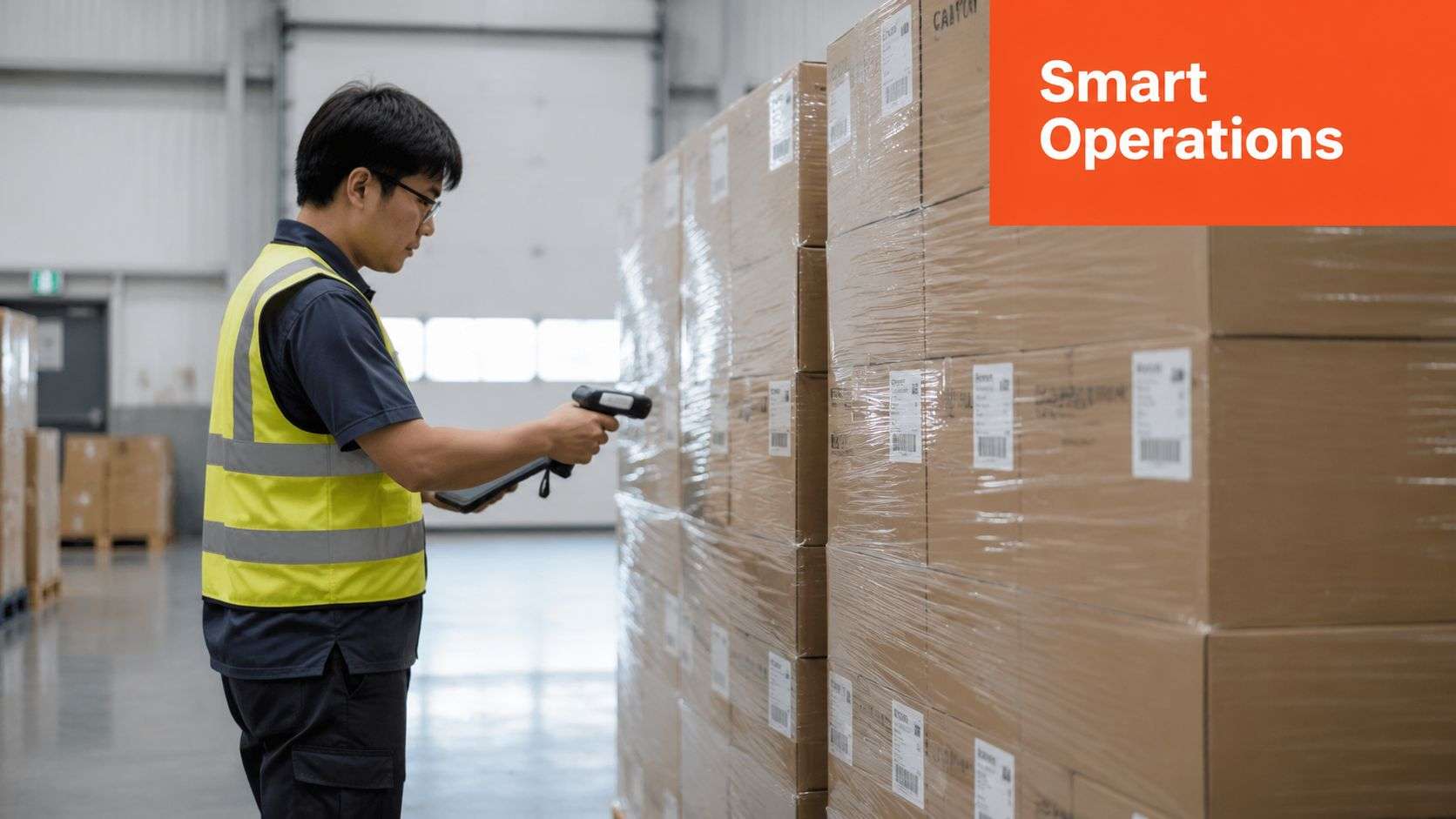
The features that usually change operations first
Real-time stock updates
When stock moves, the record updates immediately. That gives sales staff, warehouse staff, and managers one current view instead of separate guesses.Barcode-based receiving and picking
Scanning reduces manual entry and gives staff a repeatable way to process goods. It's especially useful in busy warehouses where similar products are easy to misread.Reorder logic and purchasing triggers
The system can alert buyers when stock reaches a defined point. That doesn't replace judgement, but it stops reordering from depending on memory.Multi-location management
If you hold stock in a shopfront, warehouse, van, or third-party location, the system can track each place separately.Demand and movement reporting
Reports help you see what sells steadily, what stalls, and what creates stock pressure.
What those features mean for the business owner
The benefit isn't technology. It's fewer avoidable decisions.
A business with accurate stock data can answer customers faster, reduce internal checking, and spot dead stock earlier. A manager can review what's moving and decide whether to buy, bundle, discount, transfer, or stop carrying certain lines. Operations become less reactive.
That same thinking applies in niche environments too. If you want a focused example outside mainstream retail, this guide to vending service stock management shows how location-based replenishment and item visibility matter when stock is spread across machines rather than shelves.
Where owners often get the value calculation wrong
Some businesses look only at licence fees. That's too narrow.
The bigger cost often sits in hidden waste:
- Staff time spent checking discrepancies
- Sales friction when stock availability is uncertain
- Excess holdings that tie up working capital
- Customer service issues from late dispatch or substitutions
Better inventory control usually starts paying off through cleaner daily operations before it appears in a formal ROI spreadsheet.
That's why a strong inventory system often becomes the foundation for wider process improvement. Once stock data is reliable, purchasing gets sharper, fulfilment gets faster, and accounting gets cleaner.
How to Choose the Right System for Your Business
A Melbourne retailer starts with one stockroom, one Shopify store, and a spreadsheet that still feels manageable. Six months later, the same business is holding stock in a warehouse, selling through wholesale as well as online, and fielding calls from customers about items that looked available but were already sold. The problem is no longer “which app has the nicest dashboard?” The problem is whether the system matches the way the business operates.
That is the right starting point for selection. Software should fit your stock movements, sales channels, staff habits, and growth plans. If those pieces are ignored early, the cost shows up later in workarounds, manual checks, and missed orders.
For many Australian SMEs, the decision also sits inside a bigger journey. You may need a system that works now with Shopify or WooCommerce, but can later connect cleanly into Odoo ERP once purchasing, fulfilment, accounting, and reporting need to run from the same data.
Start with the flow of stock, not the feature list
A good selection process begins by tracing how an item moves through your business, much like following a parcel from receiving to dispatch.
Ask practical questions first:
Where does stock physically sit?
One storeroom is straightforward. A warehouse, retail floor, van stock, and third-party fulfilment location need tighter control.Where do sales happen?
A single sales channel is simpler to manage. Shopify, WooCommerce, phone orders, wholesale, and marketplaces create more points where stock can fall out of sync.What level of tracking do you need?
Some businesses only need quantity on hand. Others need batch numbers, serial numbers, expiry dates, kits, or light manufacturing steps.Who needs to use the system each day?
Warehouse staff need speed and clarity. Finance needs clean valuation and adjustment records. Owners need reports they can trust.What has to connect from day one?
eCommerce, accounting, freight tools, point of sale, barcode scanning, and ERP links should be identified before you start comparing vendors.
These questions sound simple, but they prevent a common mistake. A business buys a tool built for basic stock control, then discovers it cannot cope with multi-location stock, channel sync, or future ERP integration.
Judge cost by implementation effort, not licence fees alone
Australian business owners often focus first on the monthly subscription. That matters, but it is only one part of the decision.
The heavier cost usually sits in setup work, data cleanup, integration, training, and the internal time needed to change old habits. A low-cost system can become expensive if your staff are still maintaining spreadsheets on the side, correcting orders manually, or rekeying data between Shopify, WooCommerce, and accounting software.
That is why system fit matters more than a cheap entry price. If your business is likely to move into Odoo later, or already knows that disconnected systems are the core problem, choose with that path in mind.
If you are weighing options at that level, this guide to inventory software choices for Australian businesses is a useful comparison because it looks at fit, scale, and integration requirements rather than just feature counts.
A simple decision filter
| Question | Simpler answer | More complex answer |
|---|---|---|
| Locations | One site or one stockroom | Multiple sites, bins, stores, or 3PL |
| Sales channels | One channel | Shopify, WooCommerce, wholesale, marketplaces |
| Operations | Buy, hold, sell | Kitting, assembly, manufacturing, field stock |
| Growth plans | Stable product range | Expansion, new channels, more staff |
| System needs | Standalone stock control | Odoo ERP connection or broader business workflow |
A simple operation can often use a focused inventory tool successfully.
A growing operation should test whether the system can still work once complexity arrives. That means asking harder questions during selection. Can it support multi-channel orders without duplicate data entry? Can it hand stock and sales information into Odoo cleanly? Can your team learn it without turning every transaction into an exception case?
What good selection looks like in practice
Good selection is methodical. You map your current process, identify where stock accuracy breaks down, test the integrations you need, and review sample data before signing anything.
A polished demo can hide weak implementation fit. For example, a system may look fine in a standard retail demo but struggle once you add Australian GST handling, landed costs, courier workflows, or stock transfers between locations. Those are the details that affect daily operations.
This is also where experienced advice can reduce rework. A consultant who has seen Shopify, WooCommerce, and Odoo projects in Australian SMEs can often spot the gap between “works in theory” and “works for your warehouse on a busy Tuesday.”
Integrating Your System with Odoo ERP
A standalone inventory tool can improve stock control. An integrated ERP changes how the whole business works.
That's where Odoo ERP becomes relevant. Instead of keeping inventory separate from sales, accounting, purchasing, fulfilment, and manufacturing, Odoo connects those functions in one operating environment. For many Australian SMEs, that's the shift from “we can see stock” to “our business processes are finally connected”.
Here's a visual reference from the Wistec website environment.

Why Odoo works well for inventory-led businesses
With Odoo implementation, inventory doesn't sit in isolation. A sale can trigger downstream actions automatically. Purchasing can reflect actual demand. Finance can see cleaner records. Manufacturing can draw from live stock availability rather than stale assumptions.
For example, an order placed through Shopify or WooCommerce can sync into Odoo, reduce stock, create a delivery order, and support invoicing in one connected flow. That matters because many stock problems aren't warehouse problems. They're handoff problems between systems.
If you're reviewing the operational side of this approach, Odoo inventory workflows in practice show how the inventory module fits into broader ERP processes.
What Odoo implementation costs look like in Australia
For budgeting, Australian Odoo costs span a wide range. Small businesses typically spend AUD $5,000 to $20,000, growing SMEs usually invest $20,000 to $60,000, and many Australian SMEs fall between $45,000 and $120,000, with larger deployments exceeding $150,000, according to Jaarvis's Odoo ERP implementation cost guide for Australia.
That doesn't mean every business needs a large deployment. It means scope drives cost. Modules, user counts, custom workflows, and integration depth all change the budget.
Where an Odoo partner adds value
An experienced Odoo partner Sydney Adelaide businesses can work with should focus on process design as much as software setup. That includes:
- Mapping workflows before configuration begins
- Connecting eCommerce platforms during a proper Shopify implementation or WooCommerce rollout
- Aligning inventory rules with purchasing, sales, and fulfilment
- Handling local compliance settings relevant to GST and reporting
- Supporting custom requirements where software development Sydney Adelaide teams may need to extend standard behaviour
A practical example is a retailer selling online and from a physical store. Without integration, the website, accounting package, and stock sheet all drift apart. With Odoo ERP, those records can stay aligned around one set of transactions.
I'd also note one market option here. Wistec provides Australian software development Sydney Adelaide businesses use for ERP, eCommerce, and integration work, including Odoo-based inventory projects. That matters if your implementation needs both platform setup and custom workflow support.
Practical Use Cases for Australian Industries
The value of an inventory management system becomes obvious when you place it inside a real operation.
Different industries don't just use different products. They use different stock logic. A retailer wants channel synchronisation. A manufacturer needs material visibility. A logistics operator cares about movement and location control. The system has to reflect that.
Retail and eCommerce
Take a practical retail case. A business sells through a Sydney storefront and an online store. The owner has completed a Shopify implementation, but stock still gets adjusted manually every day. Overselling happens because online orders and in-store purchases don't update one shared quantity fast enough.
When Odoo ERP is integrated properly, Shopify and WooCommerce can feed stock changes into the same inventory record. That matters because integrating Odoo with those platforms is a core mechanic for modern Australian inventory systems, supporting real-time stock synchronisation across sales channels, as discussed in this Odoo integration strategies article.
The key lesson is simple. Businesses that improve the underlying process, not just digitise the old chaos, usually get better inventory accuracy and faster order fulfilment.
Manufacturing
A manufacturer in Adelaide has a different problem. The owner doesn't just need to know how many finished items are on the shelf. He needs visibility into raw materials, work in progress, and what's already committed to production.
A useful planning approach is to separate inventory into stages:
- Raw materials needed to start jobs
- Work in progress moving through production
- Finished goods ready for customer orders
- Supporting items that keep operations moving
For operations in this category, inventory software for the manufacturing industry is worth reviewing because the stock model has to support production logic, not just simple buying and selling.
Logistics and warehouse operations
A logistics-focused business usually feels pain in movement control first. Goods are received, stored, transferred, picked, and loaded. If location records are weak, staff waste time searching, repicking, and checking.
Clean location data is often more valuable than more reporting. If the bin record is wrong, every dashboard built on top of it is wrong too.
That's why an ODOO partner Sydney Adelaide businesses trust should start by asking operational questions. How do goods arrive? Who confirms them? Where are they stored? How are picks validated? Which exceptions happen every week?
A short planning checklist
Before implementation, each business should document:
- Stock types it needs to track
- Channels where stock can be sold or reserved
- Locations where goods are stored or staged
- Exceptions such as damaged stock, returns, or substitutions
- Approvals needed before purchasing or transfer actions
Those five points usually reveal whether a simple system will do, or whether a fuller odoo implementation is the better fit.
Your Implementation and Data Migration Checklist
Most inventory projects don't fail because the software is weak. They fail because the business tries to load old mess into a new system.
That's the assumption I'd challenge straight away. Many teams think implementation starts with configuration. It doesn't. It starts with process clarity and clean data. If your item master is inconsistent, your locations are unclear, and your staff follow different receiving methods, software won't fix that by itself.
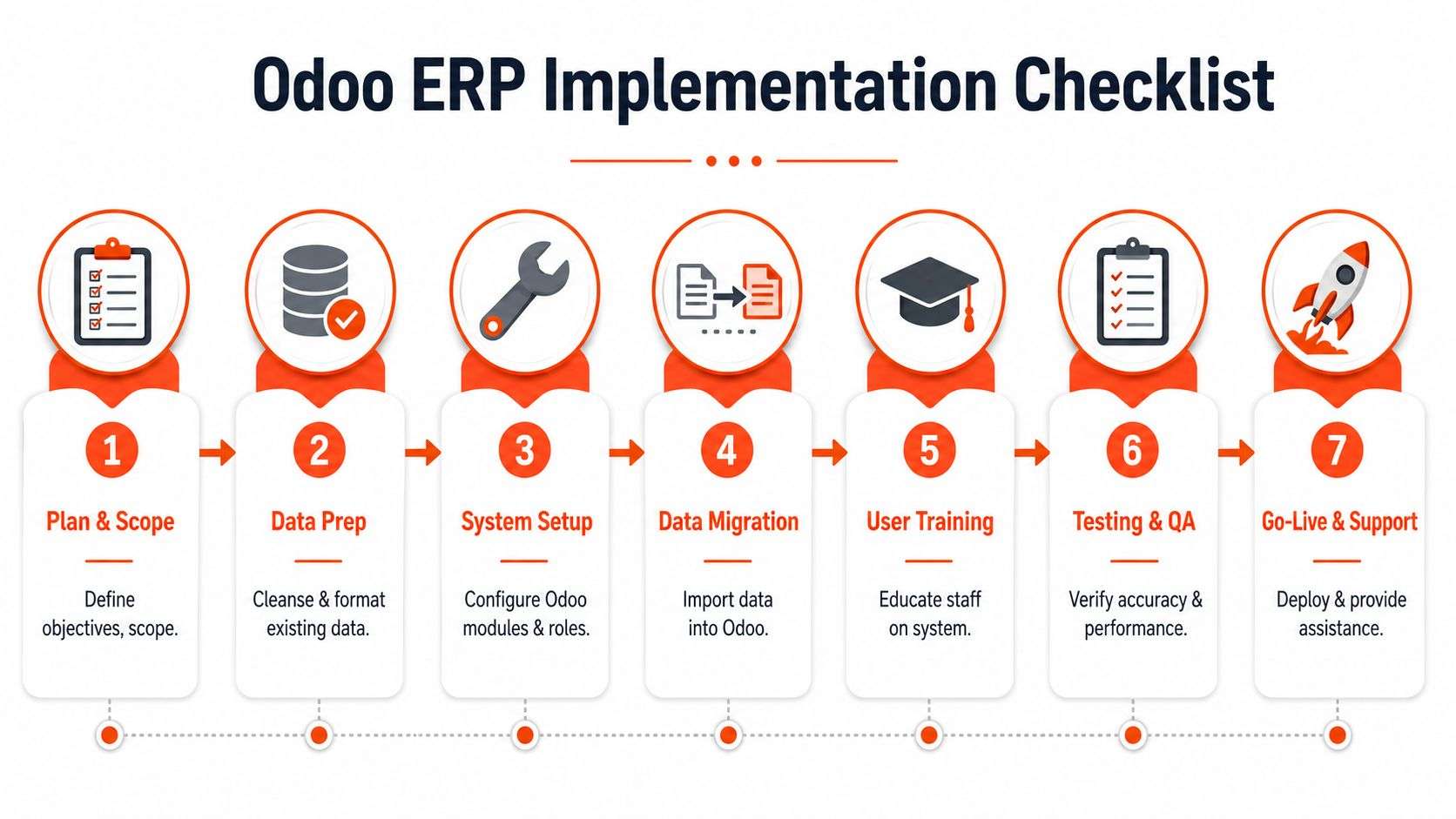
The checklist that prevents expensive rework
Odoo states that successful implementation in Australia requires mapping workflows and cleaning and migrating data strategically. Odoo also reports a 98% implementation success rate when using its Success Pack with a partner, compared with 65% without it, according to Odoo's pricing and implementation packs information.
That tells you something important. Guidance matters.
Here's the checklist I'd use for a practical odoo implementation.
Map the current workflow
Document how stock is received, moved, counted, sold, returned, and adjusted today. Don't describe the ideal future state yet. Capture the actual one.Clean the item data
Remove duplicates. Standardise names, SKUs, units of measure, and categories. Decide which fields are mandatory and which legacy fields should be retired.Define locations and rules
Set up warehouse locations, virtual locations, staging zones, returns areas, and any hold or quarantine logic that your business needs.
Where teams usually stumble
They migrate bad data
If the old spreadsheet has duplicate items, inconsistent naming, and wrong counts, the new system inherits those problems.They skip role-based training
Warehouse staff, sales staff, and managers don't use the system the same way. Training should reflect their actual tasks.They configure too much too early
It's better to stabilise core stock flows first, then layer on advanced rules, reports, or customisations.They test only happy paths
Real operations include damaged stock, split deliveries, returns, substitutions, and urgent transfers.
“Go-live” isn't the finish line. It's the moment your process design meets reality.
A practical rollout sequence
| Stage | What to confirm before moving on |
|---|---|
| Planning | Objectives, scope, users, locations |
| Data preparation | Clean products, suppliers, stock records |
| Configuration | Roles, rules, warehouses, integrations |
| Migration | Test imports and validation checks |
| Training | Staff can complete real tasks correctly |
| Testing | Exceptions are handled properly |
| Go-live | Support plan is ready for early issues |
Why partner support matters
A capable implementation team provides essential support. Businesses often need a mix of ERP setup, eCommerce integration, and custom workflow refinement. For firms needing both process work and technical execution, software development Sydney Adelaide capability becomes relevant because inventory projects rarely stay inside one module.
The best implementations keep things disciplined. Define scope. Clean data. Test exceptions. Train by role. Support the first weeks closely.
Avoiding Pitfalls and Next Steps
A common Australian SME scenario looks like this. Orders are coming in through Shopify and WooCommerce, purchasing sits in one system, finance sits in another, and Odoo is expected to bring the whole process together. Go-live happens, stock figures look better for a week, then the old problems return. Overselling starts online, warehouse staff stop trusting on-hand numbers, and managers go back to spreadsheets to check what is in stock.
That pattern usually points to implementation mistakes, not software failure. Inventory systems change how the business receives, stores, sells, transfers, and counts stock. If those day-to-day habits do not change with the system, the software becomes an expensive mirror of old problems.
Australian businesses also have to test the business case more carefully than many overseas articles suggest. Labour, freight, and warehousing costs put pressure on every stock decision. Generic feature lists do not help much here. What matters is whether the new setup will reduce stock errors, shorten fulfilment time, improve purchasing decisions, and give clearer control across Odoo, Shopify, and WooCommerce. The need to connect inventory improvement to real operating costs is also noted in this Australian inventory software commentary.
Pitfalls that cause trouble later
Choosing a system that fits only the current business
A tool that works for one warehouse and one sales channel can become restrictive once you add a second location, kitting, light manufacturing, or marketplace sales.
Letting IT own the stock model alone
Product data, units of measure, reorder rules, and location logic should be defined with operations, warehouse, purchasing, and finance involved. These are business rules first, technical settings second.
Assuming integrations will sort out process gaps
Connecting Odoo to Shopify or WooCommerce does not fix unclear SKU rules, inconsistent bundles, or poor return handling. The integration passes information through. It does not correct weak process design.
Judging success by reports instead of behaviour
A polished dashboard means very little if receiving is inconsistent, transfers are skipped, or stock adjustments are used as a shortcut for bad discipline on the floor.
Quick answers to common questions
How long does implementation take
Timing depends on scope, data quality, number of locations, and how much process change is involved. A straightforward cloud setup can move relatively quickly. A warehouse-scale program tied to ERP, barcode workflows, and multiple sites takes much longer. For Australian WMS programs, single-site mid-market implementations typically take nine to fourteen months, with extra sites often adding three to six months each, according to Trace Consultants' Australian warehouse and inventory cost analysis. That is a large-project benchmark, but it is a useful reminder that operational change needs planning, testing, and support time.
Can an inventory management system work for a service business
Yes, in many cases. Service businesses often hold parts, consumables, tools, uniforms, loan devices, or resale items. The stock rules may be simpler than retail or wholesale, but the same controls still matter. You still need accurate quantities, clear purchasing triggers, and reliable movement history.
Is Odoo ERP suitable for SMEs
Often yes. Odoo can suit SMEs that want inventory connected to purchasing, sales, accounting, manufacturing, or field operations in one system. The primary question is not whether Odoo is suitable in general. It is whether the configuration matches how your business buys, stores, sells, and fulfils stock across its channels.
What should you do next
Start with a plain-language map of your stock flow. Write down where products enter the business, where they are stored, how they are sold, how returns are handled, and where staff currently override the process. That exercise usually exposes the actual requirement faster than any software demo.
Then check the integration points. If you plan to run Odoo with Shopify or WooCommerce, confirm which system is the source of truth for products, pricing, stock on hand, orders, returns, and customer records. Without that decision, teams often end up with duplicate records and conflicting numbers.
A good next step is to define a first-phase scope that your team can absorb. For many Australian SMEs, that means getting core inventory control stable in Odoo first, then adding tighter Shopify or WooCommerce sync rules, barcode workflows, replenishment logic, and reporting once the basics are working reliably.
If your business needs a clearer path for inventory control, Odoo ERP integration, Shopify or WooCommerce connectivity, or custom software development in Sydney Adelaide, speak with Wistec. We work with Australian businesses to turn disconnected stock processes into practical, usable systems that support day-to-day operations.