

A lot of Australian businesses reach the same point at roughly the same stage of growth. Sales are coming in, the product is solid, and customers are finding you. But behind the scenes, the website is fragile, stock updates are manual, finance is reconciling orders in spreadsheets, and the warehouse team doesn’t trust what the storefront says is available.
That’s usually when “we need a better website” turns into something much bigger. The underlying problem isn’t the homepage design. It’s that the business has outgrown a disconnected setup.
Introduction From Local Ambition to National Success
In Australia, Shopify isn’t a fringe option anymore. As of 2026, there are exactly 170,496 active Shopify websites operating in Australia, making it the dominant infrastructure for the local digital commerce market, according to BuiltWith’s Australia Shopify trends data. That matters because it changes the conversation. Shopify website development is no longer about trying a platform. It’s about using the platform well enough to support serious growth.
For an owner-operator, retailer, wholesaler, or manufacturer, the pressure usually shows up in a few practical ways. Orders increase faster than fulfilment processes. Marketing drives demand that operations can’t keep up with. Customer service spends too much time fixing avoidable issues such as stock mismatches, delayed dispatch updates, or checkout confusion.
A proper Shopify implementation solves more than storefront presentation. It gives the business a stable commerce front end that can connect to inventory, finance, shipping, and reporting. That’s where many Australian companies benefit from pairing Shopify with Odoo ERP, especially when they need one system to handle operations beyond the buy button.
The strongest eCommerce builds don’t treat the website as a standalone channel. They treat it as one layer in a connected business system.
That’s also where teams often compare platforms. Some are moving from WooCommerce because plugin sprawl and maintenance overhead are slowing them down. Others are launching for the first time and want a cleaner path. In both cases, the question isn’t “Can Shopify sell online?” It can. The question is whether your Shopify website development approach is structured for users, operations, and scale.
Australian businesses also carry local realities that generic global guides often skip. Tax handling, fulfilment expectations, integration with accounting platforms, and regional logistics all affect what should be built on day one and what should be phased in later. A user-obsessed mindset means solving those frictions before they become support tickets.
That’s the difference between building a store and building a commerce system that can support national growth.
What Professional Shopify Development Really Means
Upon hearing “Shopify development,” the immediate thought is often of theme selection, product uploads, and a few app installs. That’s setup work. Professional Shopify website development is closer to digital architecture. It shapes how customers buy, how staff work, and how data moves through the business.

Strategic user experience comes first
A high-performing store starts with buying behaviour, not design trends. Navigation, collection logic, filtering, product page structure, and checkout flow should all reduce hesitation. If users can’t find the right variant, understand delivery timing, or trust the payment flow, the visual polish won’t save the sale.
In practice, this means mapping key customer paths before design starts. A fashion retailer, a spare parts supplier, and a B2B wholesaler shouldn’t share the same information hierarchy. Their users arrive with different intent, different urgency, and different expectations.
A user-obsessed build usually focuses on questions like these:
- What blocks the first purchase: unclear shipping, weak product information, poor mobile navigation, or unnecessary checkout steps
- What blocks repeat purchase: account friction, hard reordering, poor stock visibility, or missing delivery updates
- What blocks internal teams: manual order edits, app duplication, disconnected customer records, or unreliable stock sync
Custom functionality should reflect the business
A good Shopify implementation doesn’t force operations into awkward workarounds. It adapts the platform to fit how the business sells. That might include customer-specific pricing logic, bundling rules, trade account workflows, or integration with fulfilment and finance platforms.
Software development in Sydney and Adelaide often goes beyond pure front-end work. Effort sits in middleware, API logic, event handling, and data rules. A retailer with simple direct-to-consumer flows can use Shopify almost out of the box. A business with warehouse rules, trade customers, or catalogue complexity often needs custom development.
Practical rule: If staff are re-entering website data into another system by hand, the build isn’t finished.
When teams are still deciding between enterprise paths, it helps to review a broader platform lens. Quikly’s Shopify Plus vs Magento comparison is useful because it highlights the operational trade-offs behind each approach rather than treating platform choice as a branding exercise.
Performance engineering is part of development
Performance isn’t a final tidy-up task. It has to be built into the theme architecture, app selection, media handling, and third-party script decisions from the start. I’ve seen stores with beautiful interfaces collapse under bloated JavaScript, oversized imagery, and app conflicts that nobody budgeted to clean up.
Professional development usually includes work such as:
- Theme discipline: keeping templates lean and avoiding unnecessary front-end logic
- App restraint: choosing fewer, better-integrated tools rather than stacking overlapping apps
- Content governance: setting rules for image handling, video use, and merchandising blocks
- Integration planning: deciding where data should originate so Shopify isn’t competing with another system for truth
That’s what separates a store that merely launches from one that can support sales, operations, and growth without creating daily friction.
Scoping Your Project Investment and Timeline
The first budgeting mistake is treating all Shopify projects as if they’re the same. They’re not. A clean launch for a simple catalogue is one thing. A migration from WooCommerce with custom data, ERP hooks, and operational redesign is another.
In Australia, professionally built Shopify websites generally range from $10,000 to $50,000 AUD for agency-delivered projects, with hourly developer rates typically between $80 and $200 AUD, according to WP Creative’s Shopify development cost overview. The same source notes that ongoing maintenance retainers start from approximately $1,000 AUD per month. Those numbers are useful because they set expectations around what serious implementation work costs in the local market.
What pushes a project toward the lower or upper end
At the lower end, the business usually has a narrower scope. The catalogue is organised, product rules are straightforward, and the team doesn’t need major integration work. The job is still professional, but there are fewer moving parts.
At the upper end, complexity stacks quickly. Data migration from WooCommerce, custom checkout or catalogue logic, ERP integration, multi-location stock handling, and stakeholder training all increase effort. So does poor source data. Many expensive projects aren’t expensive because developers overbuild them. They’re expensive because the business is carrying years of inconsistent products, duplicate customer records, and undocumented processes.
The trade-off between cheap and effective
A lower quote can still become the more expensive path if it leaves unresolved problems after launch. Businesses often underestimate the cost of rework, delayed operations, or manual handling that persists because the original project only addressed the front end.
Here’s the practical comparison most buyers need.
Shopify Development Approach Comparison
| Approach | Typical Cost (AUD) | Best For | Key Limitation |
|---|---|---|---|
| DIY setup | Lower than agency-led professional builds | Startups with simple catalogues and internal time to manage setup | Usually lacks strategic UX, deep integration, and long-term technical governance |
| Freelancer | Varies by scope and experience | Smaller businesses that need focused help on theme work or selected custom tasks | Can struggle with ERP integration, project coordination, and ongoing support across multiple systems |
| Software development agency | $10,000 to $50,000 AUD for professional builds, with $80 to $200 AUD hourly rates for development work | Businesses that need strategic design, migration, performance work, and integrated operations | Higher upfront investment and more stakeholder involvement during discovery |
The biggest pricing variable is scope clarity. If the brief says “build us a Shopify site” but the business also expects Odoo ERP sync, custom shipping logic, migrated blog content, trade pricing, and finance reconciliation, the budget will drift because the requirements were never surfaced properly.
What to clarify before asking for quotes
A useful project brief answers operational questions, not just design preferences.
- Migration source: Are you moving from WooCommerce, another platform, or a manual catalogue
- System dependencies: Do you need accounting, ERP, warehouse, POS, or shipping integrations
- Catalogue complexity: are products simple, variant-heavy, bundled, or customer-specific
- Internal ownership: who signs off on product data, content, integrations, and test results
- Post-launch expectations: do you need maintenance, optimisation, or only initial delivery
For businesses comparing platforms before budgeting, this guide to Shopify vs WooCommerce in Australia is a practical reference because it frames the decision around maintenance burden, flexibility, and operating model.
Budget for the business you’re becoming, not just the website you can launch this month.
A realistic timeline also depends on the same variables. The fastest projects are clean, focused, and well-governed. The slowest ones usually suffer from unclear ownership, messy source data, and late-stage integration surprises. The timeline follows the quality of decisions made at the start.
Integrating Shopify with Your Core Business Systems
A Shopify store can process orders perfectly and still create chaos inside the business. That happens when the storefront takes payment, but inventory lives elsewhere, finance uses another record, and fulfilment relies on manual exports. Orders come in. Staff then spend the rest of the day repairing the gaps between systems.
That’s why integration matters more than decoration once a business reaches scale. Shopify should sit at the front of the commerce stack, while your operating systems handle stock, accounting, purchasing, fulfilment, and customer records.
Why Odoo ERP fits this conversation
For many Australian SMEs, Odoo ERP is a practical fit because it can centralise multiple operational functions without forcing the business into a patchwork of disconnected tools. Used properly, it can support inventory, purchasing, accounting workflows, CRM, warehouse operations, and service processes alongside eCommerce.
That matters in businesses where the online store isn’t the whole company. A manufacturer might sell online but also manage supply planning. A wholesaler may need customer-specific terms and fulfilment control. A logistics business might need cleaner order status movement from sale through dispatch.
The value of Odoo implementation isn’t the software itself. It’s the removal of repeated manual handling.
What a sound Odoo implementation looks like
A structured rollout matters. In Australia, Odoo implementation requires a seven-step roadmap that starts with reviewing existing processes, followed by gathering requirements, module selection, configuration, testing, thorough user training, and a go-live phase, as outlined in this Odoo Australia implementation roadmap.
That sequence is important because many integration failures start too far downstream. Teams rush into connectors and custom fields before they’ve agreed on process ownership, data rules, or which system should act as the source of truth.
A reliable implementation usually follows this order in practice:
-
Process review
Map how orders, stock, invoicing, returns, and customer service currently work. Don’t automate broken steps. -
Requirements gathering
Separate must-haves from preferences. Businesses often confuse “we’ve always done it this way” with “the system needs to support this.” -
Module selection and configuration
Choose Odoo modules that match real operations. Overloading the ERP creates complexity that users won’t maintain. -
Testing and training
End users need to test realistic workflows, not demo data that hides edge cases. -
Go-live and improvement
Launch is when operational truth starts showing up. The team should expect refinement, not assume the job is over.
If Shopify is the sales counter, Odoo ERP is the back office, warehouse clipboard, and finance desk working from the same record.
Common integration patterns that work
The strongest Shopify and Odoo ERP setups usually establish one clear responsibility for each type of data. For example, product masters and stock may sit in Odoo, while merchandising presentation lives in Shopify. Orders flow from Shopify into Odoo for fulfilment and accounting handling. Customer records can sync in a controlled way depending on service and reporting needs.
Typical gains come from consistency, not complexity:
- Inventory sync: staff stop overselling products that the warehouse can’t fulfil
- Order flow: online purchases move into operational queues without manual re-entry
- Customer visibility: sales and support teams can see order history without jumping between tools
- Financial accuracy: accounting teams reduce reconciliation issues created by disconnected order data
Data migration also deserves more respect than it usually gets. Before any new system goes live, the team should clean and validate the existing data, map fields properly between systems, and run test migrations before full deployment. That approach is strongly reinforced in Envertis’ guidance on Odoo implementation challenges in Australia. Skipping that discipline is one of the fastest ways to poison a new ERP rollout.
Local integrations beyond ERP
Not every integration challenge is ERP-sized. Australian stores often need clean connections to accounting, shipping, and tax-adjacent workflows as well. Finance teams, in particular, usually want fewer manual reconciliation steps between orders and bookkeeping. This practical guide to integrating Shopify with Xero is useful for understanding where those handoffs often break.
For businesses searching for an Odoo partner in Sydney, Adelaide, or broader software development Sydney Adelaide capability, the key isn’t city branding. It’s finding a team that understands both commerce flow and operational systems. A storefront developer alone won’t solve friction in warehousing and finance. An ERP consultant alone won’t fix user experience. You need both perspectives in the same solution.
Optimising for Performance SEO and Conversions
A Shopify store can look polished in a design review and still underperform with real users. That usually happens on mobile, under variable network conditions, with tracking scripts firing, large media assets loading, and impatient customers trying to make a fast decision.
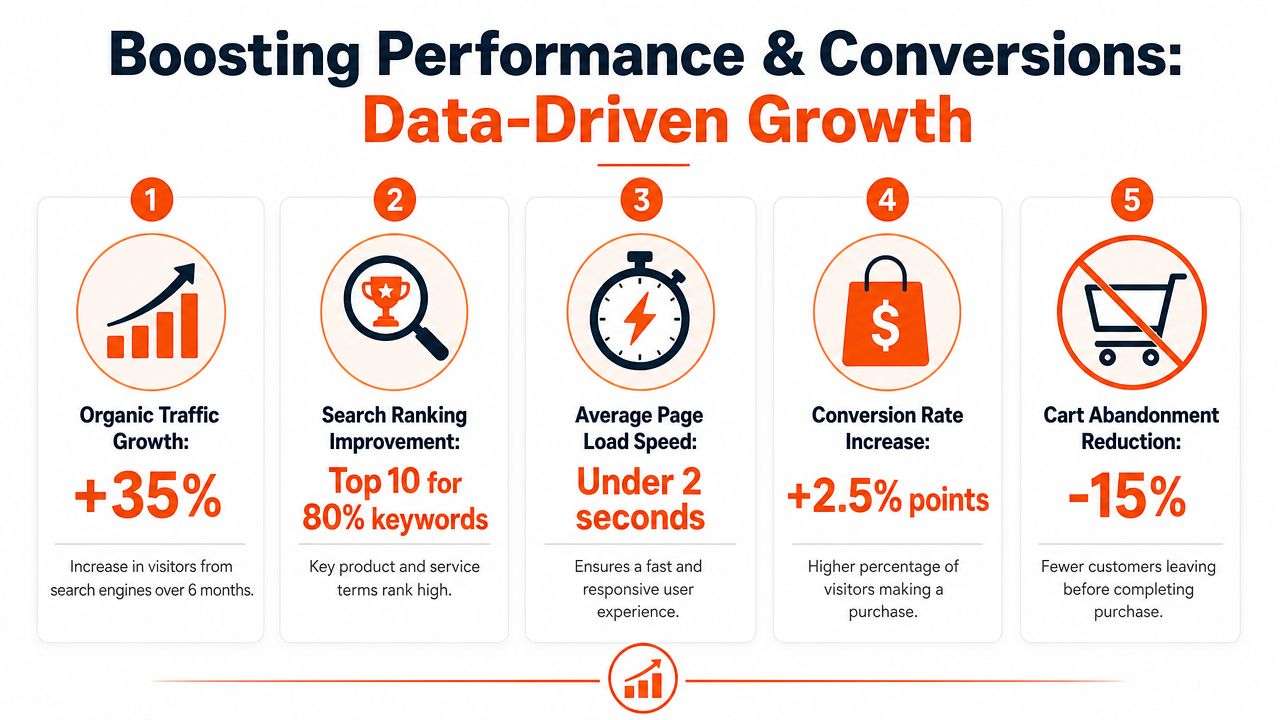
Performance, SEO, and conversion work are tied together. Slow pages reduce trust. Poor structure weakens discoverability. Friction in product pages or checkout kills the intent that marketing already paid to acquire.
Core Web Vitals are business metrics
For Australian Shopify stores aiming for high conversion, performance should meet Google’s Core Web Vitals “good” thresholds at the 75th percentile: Largest Contentful Paint under 2.5 seconds, Interaction to Next Paint under 200 milliseconds, and Cumulative Layout Shift below 0.1, according to Shopify’s website benchmarking guidance.
Those thresholds matter because they force teams to think beyond lab screenshots. A page that feels acceptable on a developer’s laptop may still perform poorly for customers on mobile devices during normal usage. If your hero image jumps, buttons lag, or content loads in unstable waves, the user feels it before any report confirms it.
What usually causes Shopify stores to slow down
In real projects, the same issues appear repeatedly:
- Too many apps: every app promises value, but many add front-end scripts, tracking overhead, or duplicated functionality
- Heavy media: ungoverned product imagery and video are common LCP problems
- Theme bloat: old code, repeated sections, and template workarounds often create hidden load and interaction issues
- Third-party tags: ad platforms, chat widgets, review tools, and personalisation scripts can stack quickly
- Layout instability: banners, dynamic badges, and late-loading assets often trigger CLS issues
SEO also suffers when the technical structure is weak. Collection logic, internal linking, canonical handling, schema implementation, and crawl efficiency all shape how discoverable the catalogue is. A store with poor structure asks search engines to work harder than they should, and they usually won’t.
A beautiful store that loads poorly is asking customers to tolerate friction before they’ve decided to trust you.
What improves both ranking and conversion
The best optimisation work doesn’t chase vanity scores. It removes blockers from the buying journey. Product pages should answer common objections quickly. Search and filtering should narrow options without confusion. Cart and checkout should feel predictable.
A practical optimisation programme often includes:
- Template review: remove unnecessary scripts, duplicate app blocks, and unused code
- Media standards: define image sizing, compression, and placement rules for merchandising teams
- Collection architecture: make categories and filters easier for users and search engines to understand
- Product page refinement: improve scannability, trust content, fulfilment information, and variant clarity
- Check out friction checks: reduce surprises around shipping, availability, and payment flow
Visual merchandising also matters when catalogue selection is part of the buying decision. For teams selling style-driven, fit-sensitive, or image-led products, this piece on how to optimize visual commerce for sales is worth reading because it connects visual presentation to user decision-making rather than treating imagery as pure branding.
Launch is not the finish line
The stores that keep improving usually have governance after launch. Someone owns app approvals. Someone reviews performance regressions. Someone checks whether new campaign landing pages follow the same standards as the core theme. Without that discipline, stores often decay slowly. A script gets added here, a promotional widget there, and the storefront becomes heavier every quarter.
That’s why performance and SEO shouldn’t sit in separate conversations. Both are part of the same job. Help users find the store. Then make it fast and easy to buy.
How to Select the Right Shopify Development Partner
A good partner protects the business from expensive mistakes. A weak one usually creates them early, then hands you a store that looks finished while operations are still held together with manual work.
The easiest way to tell the difference is to ask whether the provider thinks like a designer, a developer, a systems integrator, or an operator. A proper partner should think like all four when the project demands it.
What to look for beyond a polished portfolio
A visually strong portfolio doesn’t prove delivery capability. It proves that somebody can show screenshots. That’s useful, but it doesn’t tell you how they handle migration risk, catalogue complexity, ERP integration, QA discipline, or post-launch support.
Ask practical questions:
- How do you handle source-of-truth decisions between Shopify and Odoo ERP
- What’s your process for migrating products, customers, and orders from WooCommerce or another platform
- Who tests fulfilment, tax logic, refunds, and edge cases before launch
- How do you manage app selection and avoid front-end bloat
- What happens after go-live if performance drops or integrations fail
If the answers stay vague, that’s a warning sign.
Why Odoo capability changes the equation
For businesses running more than a basic storefront, Shopify expertise alone may not be enough. If your site has to connect with operations, finance, warehouse workflows, or customer lifecycle processes, the partner also needs ERP competence.
In Australia, Certified Odoo Partners demonstrate a 90% customer retention rate and have proven capacity to deploy ERP systems for organisations with over 200 users, according to Mplus Software’s Odoo Australia overview. That matters because it signals more than product knowledge. It suggests the partner can support scaling businesses with more operational complexity, especially for companies evaluating an ODOO partner Sydney Adelaide option rather than a narrow front-end vendor.
Choose the team that can explain your operational risks clearly, not the team that only promises a smoother launch.
Red flags that appear in proposals
Some proposals look attractive because they stay high-level. That’s exactly the problem. If pricing is low because critical work is excluded, the project doesn’t become cheaper. The missing work reappears later as change requests, launch delays, or operational pain.
Watch for these proposal issues:
- Undefined migration scope: no mention of data cleanup, redirects, historical order handling, or field mapping
- No integration ownership: “We can connect to your ERP” without naming methods, responsibilities, or limits
- Weak support terms: no maintenance model, no monitoring approach, no post-launch issue process
- Template-first thinking: heavy emphasis on appearance, little discussion of systems, governance, or business workflows
For a broader buyer perspective, Tagada’s piece on building profitable ecommerce stores is helpful because it frames development services around commercial outcomes rather than design alone.
If you’re evaluating providers locally, a practical checkpoint is whether they can speak equally well about storefront architecture and systems integration. This overview of a Shopify expert in Australia gives a useful lens for what that combined capability should look like.
A strong partner doesn’t just ship pages. They reduce risk, improve operating flow, and leave the business with a system that staff can run.
Frequently Asked Questions About Shopify Development
Is Shopify the right choice for an Australian business with complex operations
Yes, often it is, provided the project is treated as a business systems build rather than a simple website refresh. Shopify works well as a commerce front end, but businesses with inventory, fulfilment, finance, or wholesale complexity usually need integration planning from the start.
When should a business connect Shopify to Odoo ERP
Usually, when teams are duplicating work across systems, struggling with stock accuracy, or relying on manual order handling. If the website and the operational back end are drifting apart, that’s the point where Odoo implementation starts making commercial sense.
Is WooCommerce still a valid option
Yes. WooCommerce can still suit businesses that want more direct control over the WordPress stack and have the internal capability to manage it. But many growing teams move away from it when maintenance overhead, plugin conflicts, and operational complexity become too hard to govern reliably.
What usually goes wrong during Shopify implementation
The recurring problems are unclear scope, poor source data, too many apps, and late integration decisions. Businesses also underestimate how much internal input is needed for catalogue structure, testing, and process sign-off.
Do I need a local team in Sydney or Adelaide?
Not always physically local, but you do need a team that understands Australian tax, fulfilment expectations, accounting workflows, and business context. That’s especially important if you’re looking for software development Sydney Adelaide support with both Shopify implementation and Odoo ERP capability.
What should I prepare before speaking to a development partner
Bring your current pain points, platform history, catalogue realities, system list, and internal constraints. It also helps to know who owns product data, order operations, finance workflows, and final approvals.
Is post-launch support optional?
No. Launch is when real operational issues surface. Without maintenance, stores often collect performance debt, content inconsistency, and integration drift that becomes harder to fix later.
Your Next Steps Toward eCommerce Success
Shopify website development isn’t just about getting online. It’s about building a commerce system that customers can use easily, and staff can trust daily. When the front end is fast, the buying journey is clear, and the back end is connected through tools such as Odoo ERP, the business stops spending time on preventable friction.
That’s the shift many Australian companies need. Not another redesign cycle. A better operating model.
If your current setup is slowing down growth, creating manual work, or making reporting unreliable, the next step is to assess the system as a whole. Look at your storefront, your integrations, your data quality, and your internal workflows together. That’s how good Shopify implementation decisions get made.
The businesses that scale cleanly are usually the ones that fix architecture before they try to fix marketing.
If you want help planning a practical Shopify and Odoo solution for your business, talk to Wistec. The team focuses on solution-driven technology for Australian businesses that need more than a basic store build, including Shopify implementation, Odoo implementation, WooCommerce migrations, and software development across Sydney and Adelaide.