

Are you still spending hours every month manually entering Shopify sales into a spreadsheet? Or worse, dreading the moment you have to untangle all that data to lodge your BAS? For any Australian eCommerce business serious about growth, linking Shopify and Xero isn't just a nice-to-have; it's the bedrock of a scalable financial system.
This isn't about just connecting two apps. It's about building a solid financial engine for your store. If you're ready to automate your accounting and focus on growth, contact our team of Shopify implementation experts in Sydney and Adelaide today for a free consultation.
Why Smart Ecommerce Stores Automate with Xero
Let's be honest, wrestling with spreadsheets is a painful reality for too many growing Shopify store owners. You'd rather be focused on marketing, sourcing new products, and delighting your customers. But the bookkeeping quietly snowballs, stealing precious time and energy from the parts of the business you actually love. This is exactly where automating your accounting with Xero gives you a massive operational edge.
The biggest win? Real-time clarity on your numbers. Instead of waiting until the end of the month (or quarter!) to figure out where you stand, you get an accurate, daily snapshot of your cash flow, profit margins, and tax liabilities. This is powerful stuff. It means you can make sharp, data-backed decisions on everything from your ad spend to placing your next big inventory order.
Streamline Your Financial Workflow
A proper Xero integration Shopify setup does more than just dump data from one system to another. It intelligently organises your financial information, which makes tax time a whole lot less painful. Here’s what you can expect to change for the better:
- Simplified Tax Compliance: Sales and GST are automatically sorted and categorised, making your Business Activity Statement (BAS) reporting much more straightforward and accurate. No more manual calculations.
- Effortless Reconciliation: You can match your Shopify payouts from the bank feed directly against the sales summaries pushed to Xero, often with just a few clicks. It’s a game-changer.
- Deeper Performance Insights: Pull detailed reports in Xero to see sales trends, track your real expenses, and understand your true profitability without needing a calculator and a strong coffee.

Xero is built to give you that clear, at-a-glance dashboard of your business's financial health. It replaces guesswork with hard data, empowering you to run your store more effectively.
A Practical Case for Automation
Think about a Sydney-based Shopify store selling handmade leather goods. In the beginning, the owner was burning nearly 10 hours a month exporting sales data, manually separating the GST, and keying everything into a spreadsheet.
After setting up a proper Xero integration, that whole process became automatic. Daily sales summaries now post to Xero overnight. Bank reconciliation, which used to be a multi-hour headache, now takes just a few minutes. All that freed-up time is now poured back into product development and marketing—the things that actually grow the business.
For an eCommerce business, the Xero-Shopify integration delivers up-to-the-minute cash flow visibility. It automatically syncs daily sales summaries, breaking down costs, profits, and GST collections specifically for Australian compliance. This completely transforms manual accounting for retail and professional services.
And if you're selling on more than just Shopify, the need for solid systems becomes even more critical. Understanding the nuances of multi-channel e-commerce accounting is essential for keeping your records clean and accurate. The core principles of automated financial tracking are the same whether you're also running a WooCommerce site or have a more complex Odoo implementation.
Choosing the Right Shopify to Xero Connector
Connecting Shopify and Xero is one of the biggest time-savers you can implement, but picking the right tool for the job is crucial. Get it wrong, and you could end up creating more manual work, not less. The market is flooded with options, and what works for a small startup is completely different from what a high-volume retailer needs.
The choice really comes down to three paths: the official Xero app, a specialised third-party connector, or a fully custom-built solution. Let’s break down which one makes sense for your Australian eCommerce business.
H3: The Official Xero Integration: A Starting Point
For those just dipping their toes in the water, the official ‘Xero’ app in the Shopify App Store is often the first port of call. It’s designed to be simple. It takes your daily sales from Shopify and pushes a summary invoice over to Xero. Job done.
This approach is a good fit if you're:
- A brand-new or very low-volume store where keeping things simple is the number one priority.
- Working with a small product catalogue and straightforward GST requirements.
- Looking for a basic, low-cost way to get started with accounting automation.
But that simplicity comes at a cost. The official app doesn't provide the detailed breakdown you need to accurately track the cost of goods sold (COGS) or reconcile those pesky payment gateway fees. As you grow, that lack of detail can turn into a major headache for you or your bookkeeper.
Third-Party Connectors: The Power Users' Choice
This is where most established Australian eCommerce businesses land, and for good reason. Apps like A2X and Amaka were built from the ground up to fix the exact problems that basic integrations create.
Instead of just one big daily sales number, they create detailed summaries that match the actual payouts you receive from Shopify Payments, PayPal, Afterpay, and others. It makes bank reconciliation a breeze.
This is the way to go for:
- High-volume Shopify stores that need clean, manageable books without flooding Xero with thousands of individual invoices.
- Businesses that need to properly track COGS, shipping costs, and payment gateway fees as separate line items for accurate financial reports.
- Retailers selling across multiple platforms, maybe on WooCommerce as well, who need a unified way to handle their accounting.
Imagine a logistics business in Adelaide with multiple Shopify storefronts—they can use a third-party app to sync everything into one clean Xero account. Or a Sydney-based manufacturer who can map different product categories to specific revenue and COGS accounts, giving them crystal-clear insight into what’s actually profitable.
These tools work their magic using what’s known as an API. To understand more about the technology powering these connections, you can read our guide on what API integration is and how it brings different software together.
Before you decide, it’s worth comparing the top contenders side-by-side. Each has its own strengths, and the best fit often comes down to the specifics of your business operations.
Comparing Popular Xero Shopify Integration Apps
A side-by-side look at the best integration options for Australian Shopify stores, focusing on key features, pricing, and ratings to guide your choice.
| Connector | Best For | Sync Method | Xero App Store Rating | Starting Price (AUD) |
|---|---|---|---|---|
| Amaka | Overall value and ease of use for small to medium businesses. | Daily Summary or Per Order (Invoice) Sync | 5.0 stars (1,200+) | Free plan available |
| A2X | High-volume stores needing precise payout reconciliation. | Payout-based Summary Sync | 4.9 stars (900+) | $30/month |
| OneSaas | Businesses needing connections to a wider ecosystem of apps. | Daily Summary or Per Order (Invoice) Sync | 4.1 stars (150+) | $45/month |
| Xero | New stores needing a very basic, free, and simple daily sales summary. | Daily Summary Only | 3.0 stars (160+) | Free |
As you can see, the user ratings tell a story. While the official app is a starting point, specialised tools like Amaka and A2X are clear favourites among experienced Shopify merchants for their accuracy and reliability.
Custom Solutions: For Highly Unique Needs
Sometimes, an off-the-shelf app just won’t cut it. For businesses with highly specific workflows or complex systems, a custom-built integration is the ultimate answer. This means partnering with a development team to build a connector perfectly tailored to how you operate.
A custom solution is worth considering if:
- You’re linking Shopify to a full-blown ERP system, like an Odoo implementation, and need data to flow in a very specific way.
- You have unique data fields or custom workflows that standard apps simply don't support.
- Your business model involves complex inventory, multi-tiered wholesale pricing, or unique subscription rules that need special handling.
It’s the most powerful option, no doubt, but it's also the biggest investment in both time and money. This path is best for established businesses where a standard solution is causing more friction than it’s worth. A practical case is an Adelaide-based wholesaler using WooCommerce for their retail arm and a complex Odoo implementation for their B2B operations. A custom solution was built by a software development Sydney Adelaide team to unify inventory and sales data into Xero, providing a single source of truth for the entire business.
The data from the Xero App Store is clear. Australian Shopify merchants using top-rated connectors are saving an estimated 15-20 hours per month on bookkeeping by speeding up their bank reconciliations. Amaka's connector, with its perfect 5-star rating from over 1,200 reviews, is a testament to this, while Xero’s own app sits at just 3 stars.
Ultimately, choosing your Xero integration Shopify connector is a strategic business decision. Look beyond the monthly price tag and think about which solution truly aligns with your day-to-day operations and where you plan to be in a few years.
Ready to find the perfect fit for your business? Contact our team of Shopify implementation experts in Sydney and Adelaide today. We can help you assess your needs and guide you toward the best integration strategy to streamline your finances and fuel your growth.
How to Configure Your Integration for Success
Alright, you've picked your connector. Now for the crucial part: getting everything talking to each other properly. A successful Xero integration Shopify setup is more than just clicking a button; it’s about thoughtfully configuring the connection to mirror how your business actually operates. This is where you lay the groundwork for accurate, automated bookkeeping that will save you countless hours down the line.
We’ll walk through the essentials using a third-party app as our example, since this is the go-to path for most growing Australian stores. The aim here is to move beyond a simple data dump and create a smart flow of information that gives you real financial clarity.
This flow chart gives you a bird's-eye view of the main pathways for connecting Shopify and Xero, from the straightforward official app to more tailored custom solutions.
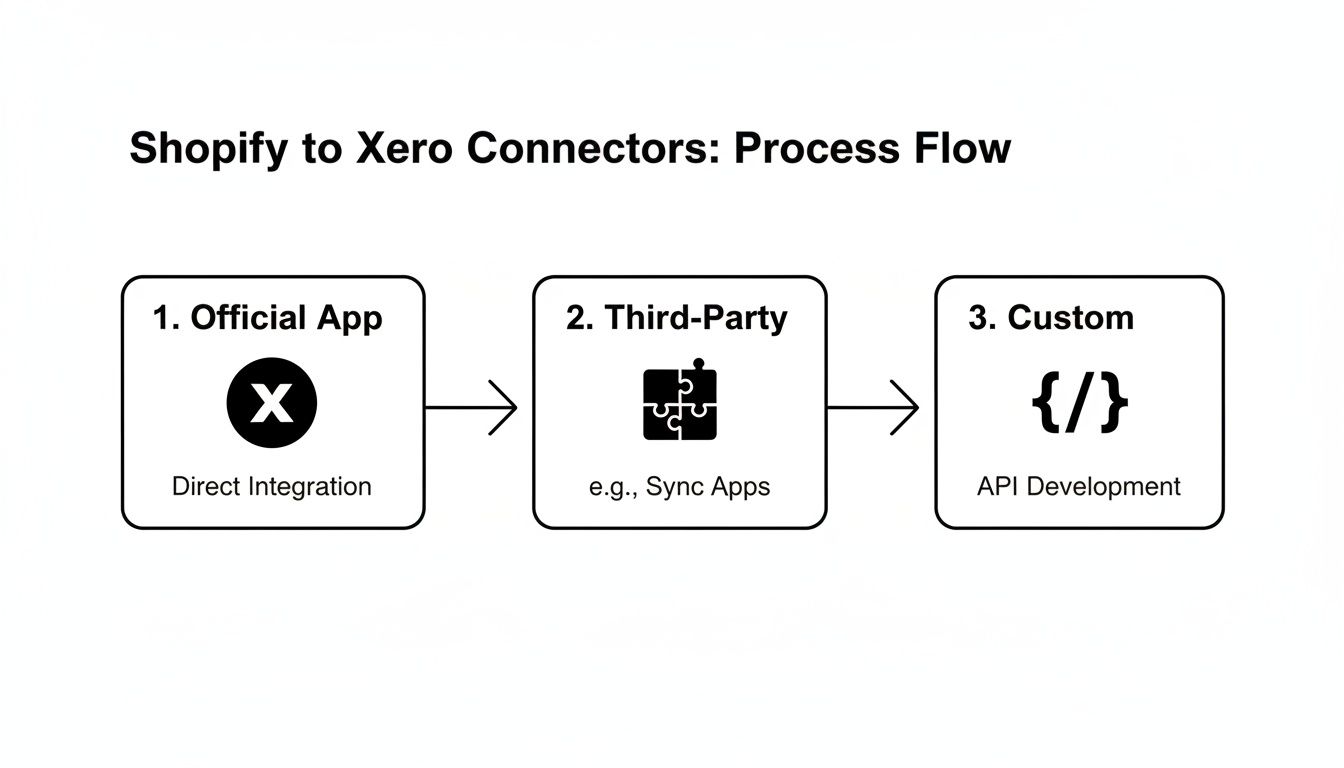
As you can see, while multiple options exist, third-party and custom integrations offer far more control and detail—which is exactly what you need for the configuration steps that follow.
Connecting Your Accounts and Authorising Access
First things first, let's get the handshake right. Inside your chosen app (like Amaka or A2X), you'll be prompted to log into both your Shopify and Xero accounts. This simply gives the app permission to read sales data from Shopify and create entries in Xero.
It’s a simple but vital step. Make sure you’re using administrator-level accounts for both platforms to grant all the necessary permissions. Once you’ve authorised the connection, the app acts as a secure bridge, ready to translate your sales into accounting entries.
The Heart of the Setup: Account Mapping
This is where the real magic happens, and frankly, where most people get it wrong. Account mapping is the process of telling your integration where every single dollar should go. You’re essentially creating rules that direct sales revenue, shipping fees, discounts, taxes, and refunds into the correct accounts in your Xero Chart of Accounts.
A solid integration absolutely depends on a precise real-time order sync setup for Shopify and Xero to kill manual data entry for good. Getting this mapping right from day one is non-negotiable for clean books.
Here’s a practical look at how you might map your accounts:
- Product Sales: Map to a "Sales – Online Store" revenue account in Xero.
- Shipping Charged: Map to a "Shipping Revenue" income account.
- Discounts Given: Map to a "Discounts" expense account.
- GST Collected: Map to your "GST" liability account.
- Shopify Payments Fees: Map to a "Bank Fees – Shopify" expense account.
A common mistake I see is business owners lumping everything into one generic "Sales" account. For much sharper reporting, create specific revenue accounts in Xero. For example, a Sydney-based fashion retailer could map "Clothing Sales," "Accessory Sales," and "Footwear Sales" to different accounts. This gives them granular insight into which product lines are actually driving profit.
This level of detail is simply impossible with basic integrations but is standard fare in leading third-party apps. It turns Xero from a simple ledger into a powerful business intelligence tool.
Mastering Reconciliation with Clearing Accounts
One of the most powerful tools in eCommerce accounting is the clearing account. Instead of desperately trying to match hundreds of individual orders to one lump-sum bank deposit from Shopify, you use a middle-man account in Xero. It sounds technical, but it’s a game-changer.
Here’s how it works for Shopify Payments:
- The integration creates a daily summary invoice in Xero covering all sales, refunds, and fees for that day.
- This summary is posted to a dedicated "Shopify Clearing Account" in your Xero Chart of Accounts (you'll just create this as a new asset account).
- When Shopify deposits the payout into your actual bank account a few days later, you simply reconcile that single bank transaction against the matching entry in the clearing account.
This method keeps your bank reconciliation screen incredibly clean. You're just matching one deposit to one summary. The same logic applies to PayPal, Afterpay, and other gateways—each should have its own clearing account for perfect traceability. This is the best-practice approach used by accountants and expert bookkeepers everywhere.
Configuring Your Sync Settings
Finally, you need to decide how and when your data syncs. Most quality apps give you flexibility here.
- Sync Frequency: Daily is the standard. The app will automatically run at the end of each day, summarising all transactions and pushing them to Xero.
- Sync Method: For 99% of eCommerce stores, a daily summary is the only way to go. It groups all of the day's activity into one clean invoice in Xero. The alternative—syncing every single order as a separate invoice—is a recipe for disaster. It will flood your Xero account with thousands of entries, making reconciliation impossible and slowing your system to a crawl. Only consider it for extremely low-volume B2B stores.
Taking the time to configure these settings thoughtfully is the difference between a set-and-forget system and one that creates constant headaches. As specialists in software development in Sydney and Adelaide, we've seen how a well-configured integration can completely change a business's financial operations, whether for a Shopify implementation, a WooCommerce store, or a more complex Odoo implementation.
Ready to get your configuration right the first time? Reach out to us today for a consultation. As an experienced Odoo Partner in Sydney and Adelaide, we can help you build an accounting workflow that scales with your business.
Best Practices for Flawless Reconciliation and Reporting
Alright, you've got your Shopify and Xero integration up and running. That's a huge step, but the real test of a great system begins now. It’s tempting to 'set and forget', but that's where tiny errors can creep in and quietly snowball. The goal isn't just to connect the apps; it's to build a simple, repeatable workflow that keeps your books immaculate and gives you genuine insight into how your store is performing.
Think of it like a weekly financial check-in. This small habit is your best defence against month-end chaos, helping you catch any oddities before they become a real headache. It ensures the numbers you’re using to make big decisions are always rock-solid.
Building Your Weekly Reconciliation Rhythm
The single most important task you'll do is matching your Shopify payouts to the summaries in Xero. This is where the rubber meets the road—it’s the final check that the money you think you made has actually landed in your bank account, less any fees.
A smooth workflow should feel almost effortless. You'll pop into your Xero bank feed and see the deposits from Shopify Payments, PayPal, Afterpay, or whichever gateways you use. Xero is usually smart enough to suggest a match with the summary invoice your integration app has already created. If the numbers line up, it’s a one-click 'OK', and you're done.
But what if they don't match? That's your early warning signal. It immediately tells you to dig deeper—was there a chargeback you missed, or a refund that didn't sync correctly?
Don't Let Your Account Mapping Go Stale
Your business evolves, and your account mapping needs to keep pace. One of the most common traps we see is businesses adding new products, payment options, or shipping methods in Shopify and completely forgetting to tell their integration app where to send that new data in Xero.
Imagine you launch a new line of gift boxes. If you don't map that product category to a specific "Sales – Gift Boxes" account, all that revenue will likely get dumped into a generic sales account. Suddenly, your reporting is muddy and far less useful.
Set yourself a quarterly reminder to pop into your mapping settings. It's a quick check to make sure everything is still being categorised correctly, keeping your financial reports sharp and insightful.
For Australian eCommerce businesses, a properly configured Xero-Shopify link is a lifesaver for GST compliance. With Shopify collecting the 10% GST at checkout, the integration can automatically pull that data across and group sales by tax rate in Xero. This completely removes the manual, error-prone calculations that so many businesses struggle with. You can see how other Aussie merchants are using this on the Xero App Marketplace.
Turning Xero Data Into Powerful eCommerce Insights
Once you have a steady stream of clean, accurate data flowing from Shopify, Xero transforms from a simple bookkeeping tool into your business intelligence hub. Now you can run reports that tell the real story of your store's financial health.
A few reports we always recommend keeping an eye on:
- Profit and Loss: Thanks to your detailed mapping, you can customise this to compare revenue from different product lines directly against costs like marketing spend and payment processing fees.
- Cash Summary: This gives you a crystal-clear view of your cash flow, which is absolutely critical for managing inventory and funding growth.
- Sales by Item: If your integration syncs individual products, this report is gold for identifying your true top performers and slow-movers.
This kind of disciplined approach to reconciliation is the backbone of any modern retail operation. A solid process is just as crucial as the initial tech setup. The principles are the same whether you're using Shopify, WooCommerce, or another platform—good financial management is universal. For a deeper dive into how different systems can work together, learn more about our expertise in POS software integration.
Need a hand building a bulletproof financial workflow for your eCommerce store? Our team specialises in Shopify implementation and creating accounting processes that just work. Contact us today for a consultation and let's make sure your integration is built for long-term success.
Troubleshooting Common Shopify Sync Errors
Even the most buttoned-up Xero integration Shopify setup can hit a snag now and then. When a sync error pops up, it’s easy to feel a surge of frustration, but these notifications are rarely a sign of a total system failure.
Think of them less as a problem and more as an early warning signal. Something small is out of alignment in your Shopify or Xero settings, and a quick tweak is all that's needed. Tackling these little discrepancies as they happen is the secret to avoiding a monster reconciliation headache come BAS time.
Decoding Sales Tax Mismatches
If I had to bet on the most common reason for a failed sync, it would be a sales tax mismatch. This almost always happens when the GST figure Shopify calculates doesn't perfectly match the tax rates you’ve got configured over in Xero.
Imagine you launch a new product line in Shopify and create a unique tax rule for it. If you forget to mirror that exact tax rate in Xero, the integration will throw its hands up, having no idea where to post the tax. It’s a simple oversight but a common one.
Fixing it starts with a side-by-side audit:
- Check Your Tax Rates: Pull up your tax settings in both platforms. Does every single rate in Shopify (like "GST on Income" or "GST Free") have an identical twin in Xero? The names and percentages must match exactly.
- Review Your Account Mapping: Jump back into your integration app settings. Double-check that each Shopify tax rate is pointing to the correct tax account in your Xero chart of accounts.
This is why a quick quarterly review of your mappings is a great habit to get into, especially after you've added new products or adjusted your pricing.
Tackling Duplicate Invoices or Payouts
Seeing double in your Xero account? It happens. A duplicate entry can sneak in if someone triggers a manual sync while an automatic one is already running, or if there's just a brief communication hiccup between the platforms. It looks alarming, but the clean-up is usually straightforward.
The key here is to move methodically. Don't just start deleting things. First, pinpoint the duplicate by checking the Shopify order number or payout date. Once you're certain you have the right one, void the incorrect invoice in Xero. This is so much better than deleting it because it leaves a clean audit trail for your accountant.
This exact scenario is a perfect illustration of why we almost always recommend a summary-based sync. Finding and fixing one duplicate daily summary is a breeze compared to hunting down dozens of individual duplicate invoices.
Resolving Historical Data Import Failures
When you first connect Shopify and Xero, it’s tempting to pull in years of historical sales data. If this import fails, don't panic. The culprit is almost always "dirty" data from your store's past.
We see it all the time—an old, discontinued product without an SKU, or a transaction that used a payment gateway you disconnected ages ago. These legacy records can easily trip up the import process.
The best approach is to be selective. Your integration app should let you choose a date range for the import. Try just the last 30 days first. If that syncs smoothly, you've confirmed the problem lies in your older data. Honestly, you might find the hours spent cleaning up years of old transactions just isn't worth the effort, especially if your accountant has already closed the books on those periods. For many businesses, simply starting clean from the day of integration is the most practical way forward.
For a deeper dive into some of the platform's inherent quirks, have a look at our guide on Shopify limitations and practical solutions.
If you're stuck on a stubborn error you just can't crack, don't spin your wheels. As an Odoo Partner with deep experience in software development in Sydney and Adelaide, our team is here to sort out even the trickiest integration challenges for your Shopify implementation or WooCommerce store. Contact us today for expert support.
Your Top Shopify and Xero Questions, Answered
Let's tackle some of the most common questions we hear from eCommerce owners trying to connect Shopify and Xero. Getting these details right from the start can save you a world of headaches later on.
Can I Get My Old Shopify Sales into Xero?
Yes, you absolutely can, and it's a great idea to create a clean financial starting point. Most quality integration apps like Amaka or A2X will let you pull in historical sales data, usually from the last 30 to 90 days.
A word of warning, though: before you hit that sync button, do a bit of housekeeping. Tidy up your Shopify data first. You don't want to import errors from old, discontinued products or mess caused by outdated settings. If you need to go back several years for a complete financial history, you'll likely need a custom solution built by a software partner.
How Does the Sync Handle Shopify Payments Fees and Refunds?
A proper integration does much more than just dump your total sales into Xero. It intelligently breaks everything down for you. You'll see a detailed summary that separates your gross revenue, shipping income, discounts, and any refunds processed.
Crucially, it also records the Shopify Payments fees as their own distinct expense line. This gives you a crystal-clear view of your actual profitability. This entire payout summary gets posted to a special 'clearing account' in Xero. When the cash from Shopify finally hits your bank, you just match that deposit against the clearing account. Simple, balanced, and every single fee is tracked perfectly.
What’s the Difference Between a Daily Summary and Individual Invoices?
For almost every single eCommerce store, a daily summary is the way to go. It’s best practice for a reason. It rolls up all of that day's activity—every sale, refund, and fee—into one neat and tidy entry in Xero. This keeps your books clean and makes bank reconciliation a breeze.
Syncing individual invoices, on the other hand, creates a separate invoice in Xero for every single order. While it might sound more detailed, it's a recipe for chaos. This approach can quickly flood your Xero account with thousands of entries, turning it into an unmanageable mess. We only ever recommend this for extremely low-volume stores or specific B2B setups where tracking individual invoices is an absolute must.
A daily summary keeps your Xero account clean and your reconciliation manageable. Flooding it with individual invoices is a common mistake that creates unnecessary complexity for most Shopify stores.
My Business Sells in Multiple Currencies. Can the Integration Cope?
It certainly can, but this is where you need to be careful with the setup. Both Shopify and Xero handle multi-currency transactions, and a good connector app will sync everything in its original currency. It then uses Xero's own exchange rates to get the conversion right and properly accounts for any currency gains or losses.
The key is to make sure your Xero plan actually supports multi-currency and that your integration is mapped correctly to handle it all. If you’re even slightly unsure about this, it’s a smart move to chat with an expert. Their experience with complex systems like Odoo implementation and WooCommerce can ensure your finances are 100% accurate across every platform. For any unique requirements, our software development team in Sydney and Adelaide can assist with your Shopify implementation.
At Wistec, we build technology solutions that drive real results. Whether you need expert guidance on your Xero integration Shopify setup or a fully custom solution, we’re here to help. https://www.wistec.com.au