

You're probably dealing with some version of this already. Finance lives in one system, sales notes sit in email or a CRM nobody updates properly, stock is tracked in spreadsheets, and your website orders come through separately from the rest of the business. By the end of the week, someone has to stitch it all together manually.
That setup works for a while. Then growth makes the cracks obvious. Orders get missed, stock figures don't match reality, invoices go out late, and managers spend more time chasing information than making decisions. That's usually the point where business owners start asking a practical question, not a technical one: what is ERP software, and will it make life easier?
For most Australian SMEs, ERP isn't about buying “big company software”. It's about getting one reliable operating system for the business, so people stop rekeying the same data into multiple tools and start working from the same source of truth.
What Is ERP Software and Why Does It Matter
ERP stands for Enterprise Resource Planning. In plain English, it's software that connects the core parts of your business so they work together instead of separately.
A common scenario looks like this. A retail or wholesale business in Australia sells through a physical location, takes enquiries by phone, runs accounting in one package, tracks inventory in spreadsheets, and pushes online sales through a separate site. Staff spend hours checking whether stock on hand is real, whether a customer has paid, and whether an order has already been dispatched.
That's where ERP matters. It replaces disconnected records with one shared system. When sales, purchasing, inventory, finance, operations, and customer information sit together, your team can stop reconciling and start acting.
What changes when systems are connected
Instead of entering the same information multiple times, one action flows into the next. A sale can update stock. A purchase can affect expected availability. A completed job can trigger invoicing. A manager can review performance without waiting for someone to merge reports.
ERP works best when it removes routine friction that staff have accepted as “just how the business runs”.
This is why ERP often becomes a turning point for growing businesses. While it enhances visibility, its primary benefit is improved control. You can see what's happening in operations without relying on yesterday's spreadsheet.
ERP is a category, not one product
Many owners assume ERP means a single oversized platform built only for large enterprises. That's outdated thinking. ERP is a type of business system, and there are several ways to approach it depending on your size, industry, and complexity. If you're comparing options more broadly, it also helps to understand Dynamics 365 because it shows how another major ERP ecosystem packages finance, operations, and customer processes.
For Australian SMEs, the key question isn't whether ERP exists. It's whether your current setup is still helping the business run cleanly, or whether it's now creating hidden costs in time, errors, and missed opportunities.
Understanding Core ERP Modules and Features
Think of ERP as a central business hub. Each module handles a key function, but all the spokes connect back to the same core data. That's why an update in one area can immediately affect another.
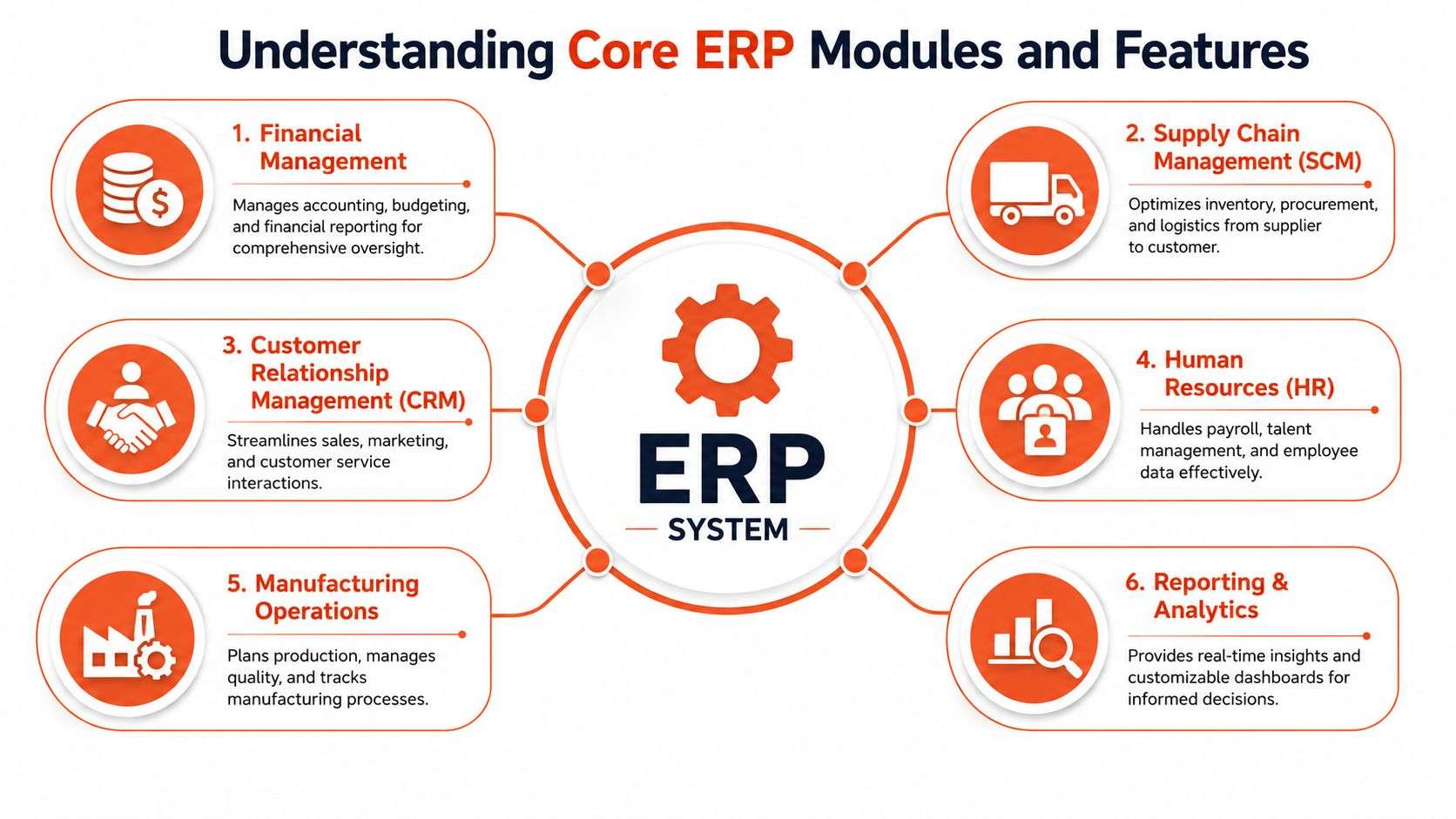
Modern platforms such as Odoo ERP are modular. You don't have to deploy every function on day one. You can start with the parts causing the most pain and expand later, which is one reason many SMEs prefer that model over rigid systems.
The modules most businesses use first
Here are the modules that usually deliver immediate value.
- Finance and accounting handles invoicing, bills, reconciliations, budgeting, and reporting. The benefit is cleaner financial visibility and less duplication between operations and accounts.
- CRM stores leads, customer activity, quotations, and follow-up history. The benefit is that sales staff stop relying on memory or scattered notes.
- Inventory management tracks stock movement, availability, purchasing, and warehouse locations. The benefit is better fulfilment and fewer surprises when demand changes.
- Manufacturing or MRP manages bills of materials, work orders, production planning, and materials usage. The benefit is stronger production control and less manual scheduling.
- Human resources keeps employee records, leave, payroll-related workflows, and internal approvals organised. The benefit is consistency in people processes.
- Project management tracks tasks, delivery stages, resources, and billable work. The benefit is tighter control over deadlines and profitability.
- Reporting and analytics brings live operational data into dashboards and custom reports. The benefit is faster decisions based on current information rather than retrospective guesswork.
If you want a deeper breakdown of how these components fit together, this guide to ERP modules and features is useful.
Why integration matters more than feature lists
A long feature list doesn't mean much if the modules don't work together in practice. The value of ERP comes from connection. A sales order should inform purchasing. Inventory should affect delivery promises. Completed service work should support billing.
That same principle applies outside classic ERP functions. For businesses that run vehicles, equipment, or service fleets, maintenance data can be part of the operational picture too. A practical example is Fleetalyse's fleet management software, which shows how maintenance workflows matter when uptime and scheduling affect customer service.
Practical rule: Start with the modules tied to your biggest operational bottleneck, not the modules that sound the most impressive in a demo.
What doesn't work
What usually fails is buying too much too early. Businesses get sold a giant scope, staff feel overwhelmed, and adoption drops because the system is solving theoretical problems instead of daily ones.
A modular setup is often the better path. Start with finance, CRM, inventory, or projects. Get the process right. Then add manufacturing, HR, eCommerce integration, or custom workflows when the business is ready.
How ERP Drives Growth in Your Industry
ERP becomes easier to understand when you stop looking at menus and start looking at day-to-day work. The benefit is different in each industry, but the pattern is the same. Fewer disconnected steps. Better visibility. Faster decisions.
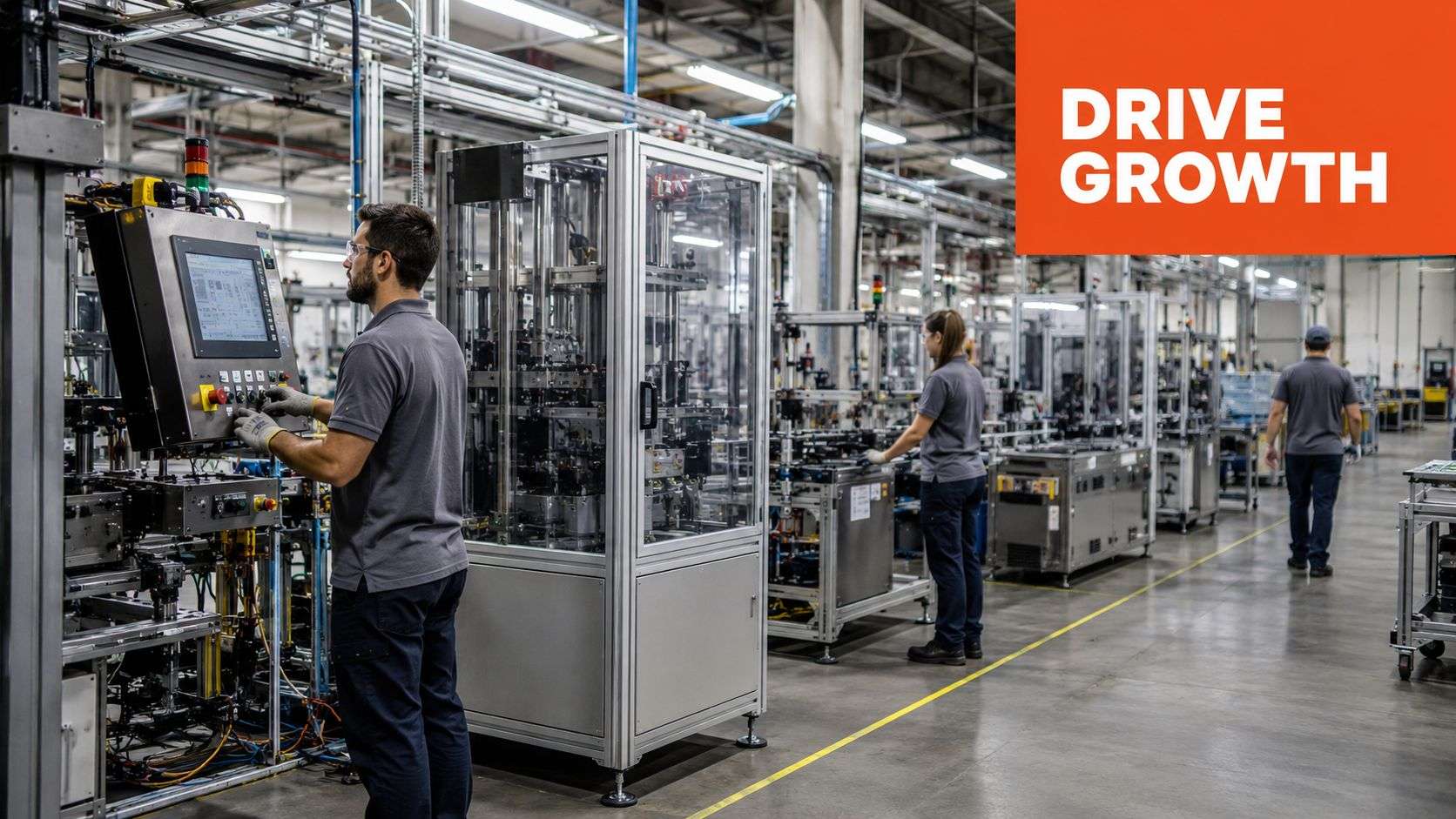
Manufacturing and fabrication
A manufacturer using spreadsheets for production planning often runs into the same problems. Materials are ordered late, workshop staff don't have the latest job status, and managers only discover margin issues after the job is finished.
With Odoo ERP, production, purchasing, inventory, and sales can sit in one system. If a sales order changes, planners can see the impact on materials and scheduling. If raw materials are short, purchasing gets a clearer signal. If a job consumes more labour or stock than expected, that becomes visible earlier.
The practical result isn't just “automation”. It's fewer rushed decisions on the factory floor and less dependence on one experienced person holding everything in their head.
Retail and eCommerce
Retailers often hit a wall when the physical store and online store don't talk properly. Staff sell an item in-store, the website still shows it available, and the customer buys stock that no longer exists. Then someone has to call, apologise, refund, and repair trust.
An ERP changes that by turning inventory into a shared operational record. When combined with Shopify implementation or WooCommerce integration, the same product, customer, order, and stock data can flow across channels more cleanly. That matters whether you sell clothing, industrial parts, health products, or specialty goods.
A practical retail setup often includes:
- Shared stock visibility across warehouse, shopfront, and online channels
- Central order handling so staff don't juggle separate admin queues
- Connected customer history that helps with service, returns, and repeat sales
- Purchasing signals based on actual movement rather than rough estimates
When online and offline sales stay disconnected, the business usually pays for it in customer service time.
Professional services
Accountants, consultants, legal practices, and other service businesses in Sydney or Adelaide usually don't struggle with inventory. They struggle with time capture, project tracking, scope creep, and delayed billing.
ERP helps by linking projects, timesheets, tasks, expenses, approvals, and invoicing. Instead of chasing job status across emails and spreadsheets, managers can see what's in progress, what's billable, and what's drifting. That's especially useful for firms handling multiple client jobs with different billing rules.
For these businesses, the value of a flexible platform is high. A system shouldn't force a rigid workflow if the firm has already developed a workable service model. That's where tailoring matters, especially when combined with broader software development Sydney Adelaide capability for industry-specific processes.
Logistics, healthcare, and education
In logistics, ERP supports dispatch, inventory coordination, service scheduling, and customer communication. It helps teams work from one operational picture instead of passing updates between disconnected tools.
In healthcare clinics, the need is often administrative clarity. Bookings, billing, inventory for supplies, internal approvals, and reporting all benefit from tighter process control, even where clinical systems remain separate.
In education and training organisations, ERP can simplify enrolment administration, invoicing, resource planning, and internal workflows. Staff spend less time moving data manually and more time supporting students and stakeholders.
What growth actually looks like
ERP-driven growth isn't only about getting bigger. Often it starts with becoming more stable. You reduce rework, improve follow-through, and create systems that can handle more volume without relying on overtime or heroics.
That's why good ERP projects tend to feel practical rather than dramatic. Staff stop asking where information lives. They know where to look.
The Typical ERP Implementation Process
ERP implementation feels intimidating when people imagine it as one giant switch-over. In reality, a solid Odoo implementation follows a staged process. Good projects don't rush the software. They shape the system around the business and prepare the business for the change.
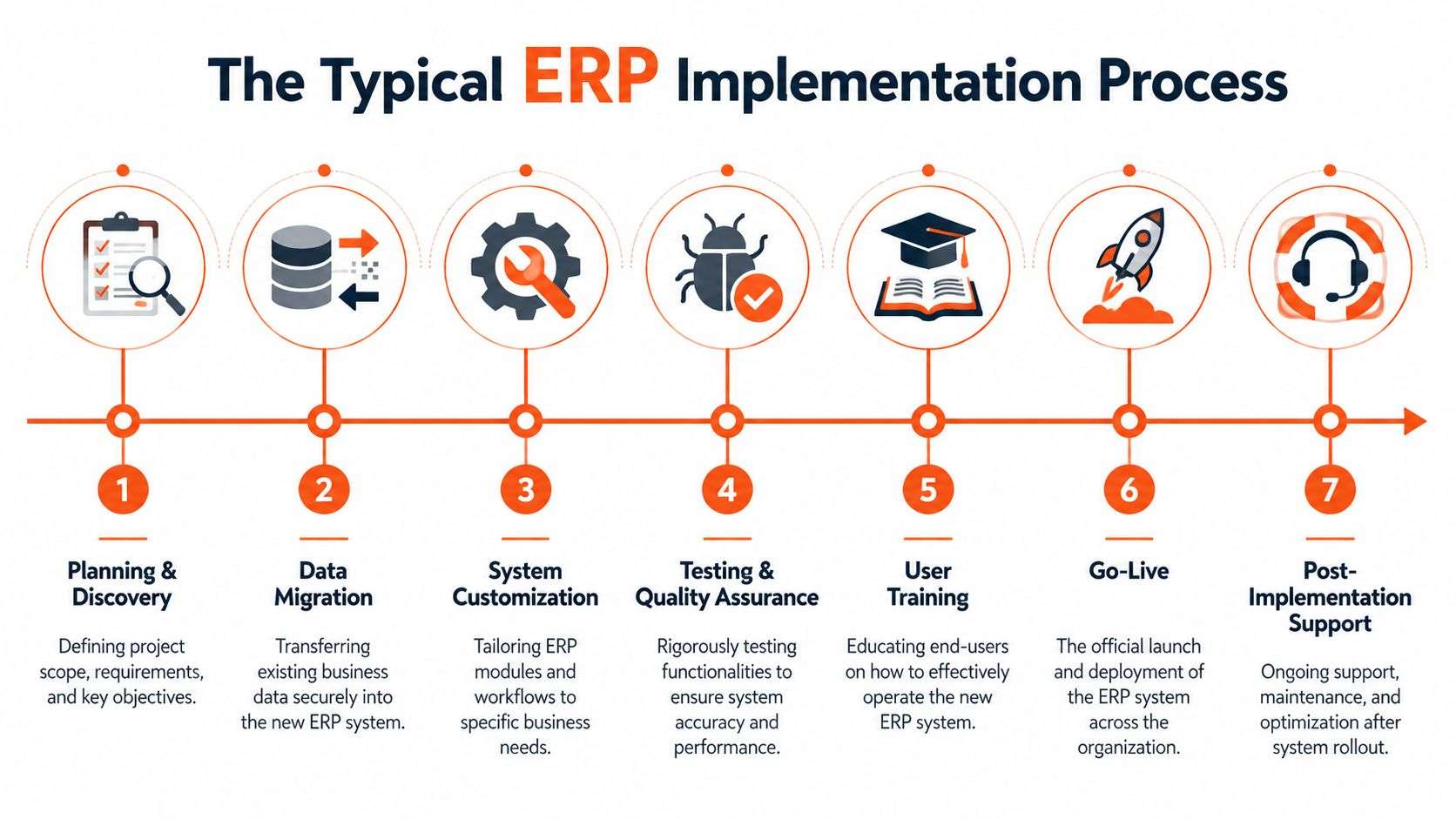
For an SME, the overall journey typically runs over several months, depending on scope, data quality, integrations, and how much customisation is needed. A straightforward rollout can move quickly. A multi-entity or heavily integrated environment takes longer.
For a practical overview of this rollout path, see this guide to ERP system implementation.
Discovery and planning
Experienced teams save businesses from expensive mistakes. The goal is to understand how the business operates today, where the friction is, what must be preserved, and what should be changed.
That means mapping processes such as quoting, ordering, invoicing, fulfilment, purchasing, or project billing. It also means deciding what the first phase should include and what can wait.
Configuration and customisation
Once the scope is clear, the system gets configured. In Odoo, that often means setting up modules, workflows, permissions, products, reporting structures, and approval paths.
Customisation should be used carefully. Some businesses ask for custom work because they want the old process rebuilt exactly as it was. That isn't always wise. The better approach is to customise where the process is unique, and use standard functionality where it's already sound.
A clean implementation doesn't copy every legacy habit. It keeps what works and drops what slows the business down.
Data migration
This step is usually more difficult than owners expect. Old systems and spreadsheets often contain duplicates, inconsistent naming, outdated contacts, and incomplete item records.
Migration isn't just about moving data. It's about cleaning it so the new ERP starts with reliable information. If customer records, inventory items, supplier details, or open transactions are messy, the new system will inherit the same problems.
Training and testing
Users need more than a login and a quick demo. Warehouse staff, accounts teams, sales staff, managers, and admin teams all need role-based training tied to real tasks.
Testing should reflect daily operations. Can your team create a quote, convert it to an order, allocate stock, dispatch, invoice, and report on the transaction accurately? If not, the system isn't ready.
A reliable training and testing phase usually includes:
- Scenario testing based on actual workflows
- User acceptance reviews by the people who'll use the system every day
- Refinement cycles to fix gaps before go-live
Go-live and ongoing support
Go-live is the start of operational use, not the end of the project. The first weeks matter because teams are adjusting to new routines, uncovering edge cases, and needing reassurance.
Support after launch should include issue handling, workflow tuning, and small improvements based on real usage. That's where the value of working with an experienced ODOO partner Sydney Adelaide becomes obvious. Geography alone doesn't solve projects, but local business context, accessible communication, and practical support do.
How to Select the Best ERP for Your Business
Choosing ERP gets easier when you ignore marketing language and focus on fit. The best system isn't the one with the biggest brand or the longest feature sheet. It's the one your team can use, adapt, and grow with.
Four criteria that matter in real projects
Start with these questions.
- Scalability. Can the platform support more users, products, entities, locations, or channels without forcing a complete rebuild?
- Total cost of ownership. Look beyond licence pricing. Consider implementation effort, support needs, future changes, and integration work.
- Customisation capability. Can the system adapt to your workflows, or will your business have to bend awkwardly around the software?
- Vendor and partner support. Who will help when requirements change, training is needed, or the business adds a new channel?
If you're weighing options, this buyer-focused guide on which ERP is best for your business is a useful place to compare thinking.
Why many SMEs lean toward Odoo
Odoo appeals to growing businesses because it's modular, flexible, and practical. You can start with the apps that matter now and expand as operations become more complex. That's often a better fit for SMEs than traditional ERP projects that assume every department needs a full-scale rollout from the start.
It also suits businesses that need more than standard back-office functions. If the business relies on eCommerce, service workflows, custom approvals, field operations, or specialised reporting, Odoo can usually be shaped to fit without forcing a separate patchwork of disconnected apps.
That's one of the biggest differences between a modern system and a rigid legacy platform. The system should support the business model you're building.
Odoo vs Traditional ERP Systems
| Criterion | Odoo ERP | Traditional ERP |
|---|---|---|
| Flexibility | Modular structure makes phased rollout more achievable for SMEs | Often designed around broader enterprise scope from the outset |
| Customisation | Strong fit for businesses that need tailored workflows | Custom work can become heavy, costly, or difficult to maintain |
| User experience | Typically easier for mixed teams to adopt across departments | Can feel more complex, especially for occasional users |
| eCommerce connection | Works well with online sales, including Shopify implementation and WooCommerce workflows | Integration may require extra layers or separate platforms |
| Change over time | Easier to extend with new apps and business processes | Expanding scope can involve larger projects and more disruption |
| Fit for growing firms | Well suited to businesses moving from spreadsheets and siloed apps | Can be too heavy if current processes are still developing |
Don't buy for the demo
Demo sessions are helpful, but they can also mislead. Almost any ERP can look polished in a controlled walkthrough. What matters is whether it handles your approvals, your sales cycle, your product structure, your billing logic, and your reporting needs.
A practical evaluation process usually includes:
- Process walkthroughs using your own examples
- Integration review for website, marketplaces, finance tools, and operations
- Gap analysis to separate must-haves from nice-to-haves
- Implementation realism so expectations match the actual effort involved
Good ERP selection is less about finding the “most powerful” platform and more about finding the system your business can run confidently.
For many Australian businesses, that's why Odoo stands out. It sits in a useful middle ground. More capable than a loose collection of apps, but more adaptable than heavy traditional ERP products. When paired with a team that also understands software development Sydney Adelaide, website platforms, and operational workflow design, it becomes a much stronger long-term option.
Common Pitfalls and Ensuring ERP Success
Most ERP failures don't happen because the software is bad. They happen because the business rushes decisions, underestimates change, or chooses a partner who only talks about features.
The mistakes that cause trouble
One common problem is weak scoping. If no one defines what the first phase must achieve, the project expands in every direction and loses momentum.
Another is poor user buy-in. Staff get told a new system is coming, but they aren't included in process reviews or testing. When go-live arrives, they resist it because the workflow feels imposed rather than useful.
A third issue is trying to preserve every old habit. Businesses ask the ERP to mimic years of workaround processes, which creates unnecessary complexity and slows adoption.
What actually works
Successful projects usually share a few habits.
- Get clear on pain points early. Know whether the actual problem is stock control, billing delays, reporting gaps, eCommerce disconnects, or production planning.
- Involve the people doing the work. Managers don't always see the practical steps staff handle every day.
- Treat training as operational preparation. Teams need hands-on practice with the tasks they'll perform after go-live.
- Choose a partner that challenges bad assumptions. A good Odoo partner won't say yes to every request if the request will create a weaker system.
The safest ERP project isn't the one with the biggest scope. It's the one with the clearest priorities.
Change management is not optional
Owners sometimes assume staff will adapt once the software is live. Sometimes they do. Often they don't. People need to understand why the process is changing, what's expected of them, and how the new workflow helps them do their job more cleanly.
That's especially true in businesses where teams already feel stretched. If the new ERP looks like extra admin, adoption will suffer. If it removes repetitive work and gives staff better visibility, adoption becomes much easier.
ERP success comes from discipline. Clear scope, realistic rollout, clean data, practical training, and the right implementation guidance matter far more than glossy promises.
Taking the Next Step with Your ERP Journey
ERP isn't just back-office software. It's a business decision about how clearly your company runs. When finance, stock, sales, projects, service, and online channels are disconnected, growth gets harder than it should be.
If you've been asking what is ERP software, the better question now is whether your current tools still support the business you're trying to build. If the answer is no, it's worth reviewing the points where work gets delayed, duplicated, or lost between systems.
That first review doesn't need to be complicated. Start with your pressure points. Stock mismatches. Slow invoicing. Website orders that don't align with operations. Project information scattered across too many tools. Those issues usually reveal whether an ERP platform such as Odoo is the right next step.
If you also need connected digital delivery, think beyond ERP alone. Many growing businesses need Odoo implementation, website integration, Shopify implementation, WooCommerce support, and custom software development Sydney Adelaide capability as part of the same operational strategy.
If you're ready to simplify operations and get a clearer view of how your business can run, talk to Wistec . Their team works with Australian businesses on Odoo ERP, Odoo implementation, custom software development, Shopify implementation, WooCommerce projects, and broader digital solutions across Sydney and Adelaide. A practical consultation can help you map the right starting point without overcomplicating the journey.