

You're probably in one of two situations right now. Either you've outgrown a basic website and need a real online store, or you already sell online and the cracks are showing. Orders need to be re-entered, stock goes out of sync, shipping rules are messy, and accounting never quite matches what the storefront says happened.
That's the essence of ecommerce website development in Australia. It isn't just a design job. It's a business systems project with a customer-facing front end.
Most first-time store owners focus on theme choice, product pages, and payments. Those matter. But the projects that stay manageable are the ones that connect the storefront to operations from day one. If you're choosing between Shopify implementation, WooCommerce, and a back-office setup such as Odoo ERP, the right answer usually comes from your workflow, not your logo colours.
Planning Your Australian eCommerce Success Story
If you're investing properly in online sales, treat the project as infrastructure. The broader context matters. The Australian Bureau of Statistics reported that in 2017–18, digital activity accounted for 5.6% of Australia's aggregate value added, equal to $96.9 billion out of $1,725.7 billion total value added, up from 5.4% ($75.6 billion) in 2011–12 according to the Australian Bureau of Statistics digital activity data. That's a practical signal that digital channels aren't a side project anymore.
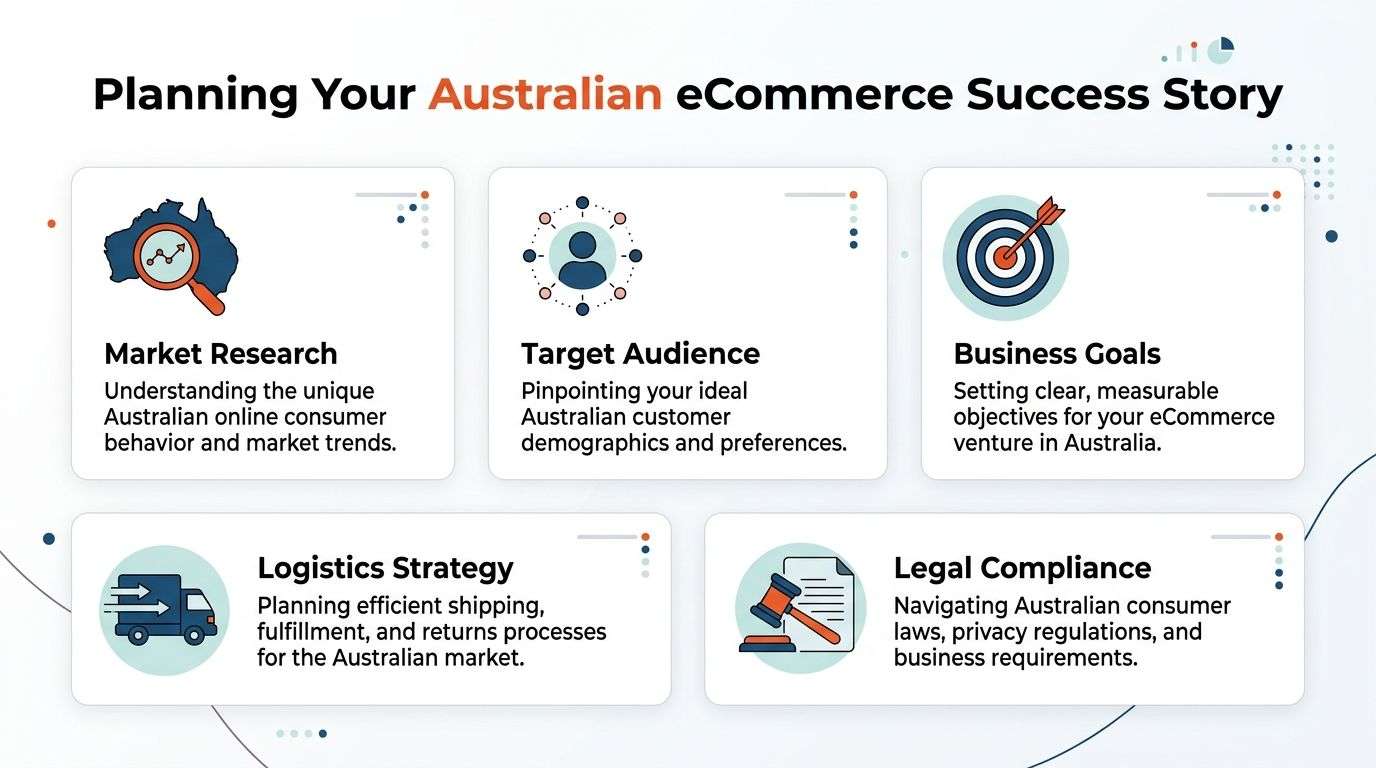
Start with the business model, not the platform
A retailer shipping standard products across metro areas has a different build from a wholesaler with trade pricing, or a clinic selling bookings plus physical goods. Too many businesses jump straight to theme demos and end up rebuilding core processes later.
At planning stage, lock down these decisions early:
- Sales model: Are you selling direct to consumer, wholesale, or both?
- Catalogue structure: Do you have simple SKUs, variants, bundles, subscriptions, or made-to-order products?
- Operations flow: Who updates stock, who fulfils orders, and where does invoicing happen?
- Customer service process: Will staff handle returns, exchanges, and order changes inside the store platform or in an ERP?
If those answers are fuzzy, your scope will drift. That's where budgets blow out.
What usually works in practice
The strongest early plans map three journeys side by side:
- Customer journey from landing page to checkout.
- Internal order journey from payment to picking, packing, and dispatch.
- Data journey from storefront into inventory, CRM, and finance.
That third one is where many projects fail. A store can look polished and still create chaos in the back office.
Practical rule: If your team has to copy order, stock, or customer data between systems by hand, the website isn't finished.
Australian businesses also need to think locally from the start. Delivery expectations, regional shipping realities, GST handling, and payment preferences should shape the architecture, not get bolted on after launch. For practical market-facing advice, this guide on ecommerce tips from AUSFF is useful because it frames expansion in terms of fulfilment and operational readiness, not just website presentation.
The planning outputs worth paying for
A good discovery phase should leave you with tangible decisions, not vague ideas. That usually includes:
| Deliverable | Why it matters |
|---|---|
| Requirements list | Stops assumptions from becoming rework |
| Platform recommendation | Aligns Shopify or WooCommerce with actual needs |
| Integration map | Defines what syncs with Odoo or other systems |
| Content structure | Keeps navigation and category pages usable |
| Launch scope | Separates must-haves from phase-two extras |
Businesses that do this work upfront usually make better decisions later on design, platform choice, and integration depth.
Choosing Your eCommerce Platform Shopify vs WooCommerce
For most Australian businesses, this choice comes down to Shopify or WooCommerce. Both can work. Both can also become expensive in different ways when they're chosen for the wrong reasons.
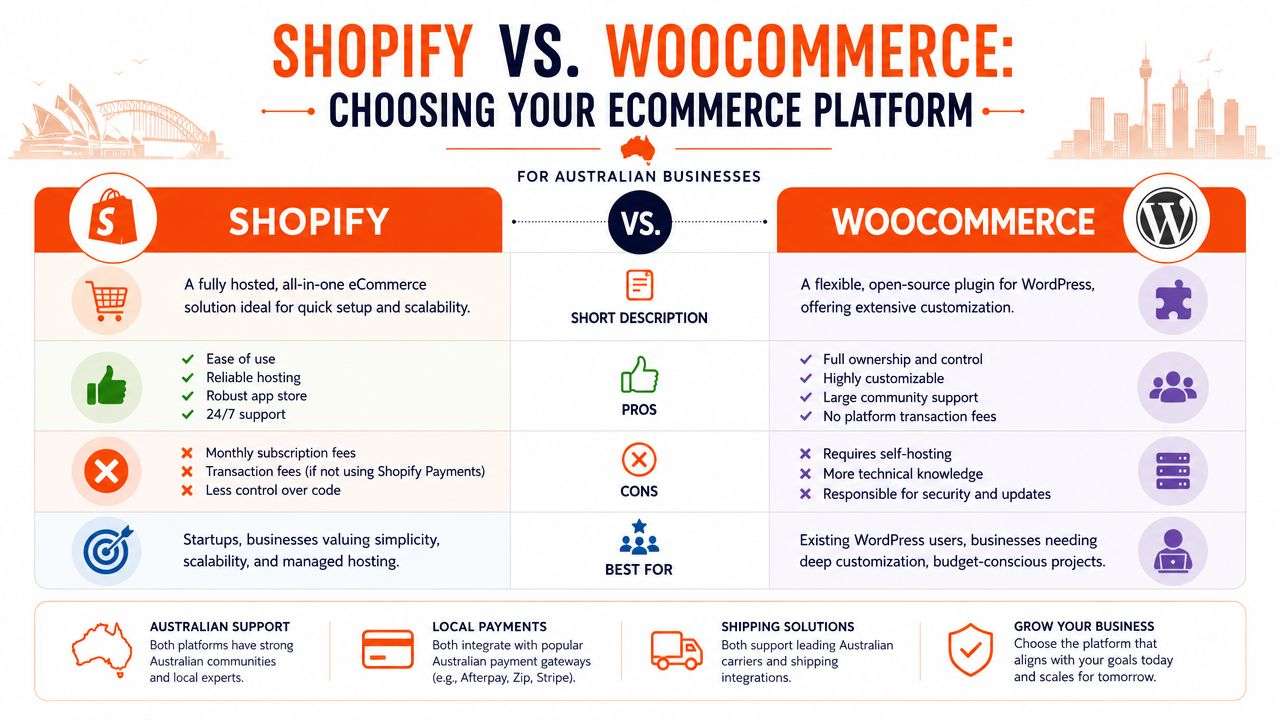
When Shopify is the better fit
Shopify is usually the safer choice when the priority is speed, operational simplicity, and lower technical overhead. It suits founders who want a reliable hosted platform and don't want to manage servers, patching, or plugin conflicts.
It tends to work well for:
- Straightforward retail stores with standard product catalogues
- Teams without in-house developers
- Brands that need to launch cleanly and keep admin simple
- Businesses prioritising a structured shopify implementation over heavy custom logic
The trade-off is control. Shopify gives you guardrails, and those guardrails are useful until you want something highly specific. Complex pricing rules, unusual checkout logic, or deep content customisation can push you into app sprawl or custom development.
When WooCommerce makes more sense
WooCommerce is often the right fit when flexibility matters more than convenience. If your business already runs on WordPress, publishes content heavily, or needs bespoke product behaviour, WooCommerce can be the more natural foundation.
It's a strong option for:
- Content-led brands that rely on SEO and publishing
- Businesses with custom product types or workflow rules
- Teams that want more ownership over code and hosting
- Projects where WooCommerce must connect tightly with external systems
The catch is that flexibility shifts responsibility onto you. Hosting quality, plugin discipline, security updates, and performance tuning all become active concerns. A cheap WooCommerce build can become a maintenance problem fast.
A practical side-by-side view
| Decision factor | Shopify | WooCommerce |
|---|---|---|
| Setup approach | More structured and hosted | More open and configurable |
| Technical overhead | Lower | Higher |
| Customisation depth | Good, but constrained in places | Strong, especially for bespoke builds |
| Content flexibility | Solid | Strong for WordPress-led sites |
| Ongoing maintenance | Simpler platform management | Requires closer technical management |
For a more detailed comparison of ownership, flexibility, and implementation trade-offs, this breakdown of Shopify vs WooCommerce is a useful reference.
A simple store on the wrong platform is still manageable. A complex store on the wrong platform becomes expensive every month.
What business owners often miss
The platform decision isn't just about the storefront. It affects your ERP integration, order flows, content management, and future customisation path.
A practical example. A boutique retailer with a clean catalogue and limited internal complexity often does well on Shopify. A distributor with layered pricing, trade customers, and WordPress content assets often gets more mileage from WooCommerce. Neither is “better” in the abstract. The better platform is the one that reduces friction in your actual business.
If you're speaking with agencies offering software development Sydney Adelaide services, ask them one blunt question: how will this platform choice affect stock sync, fulfilment, accounting, and support workload six months after launch? Their answer will tell you whether they're building a website or solving a business problem.
Integrating Your Storefront with an Odoo ERP
The fastest way to break an online store is to let the storefront and the business office drift apart. Orders come in through Shopify or WooCommerce, someone exports a CSV, stock is adjusted later, and customer service works from yesterday's information. That setup survives at low volume. It doesn't stay clean as the business grows.
An integrated Odoo ERP changes that by making the storefront part of a wider operating system instead of a disconnected sales channel.
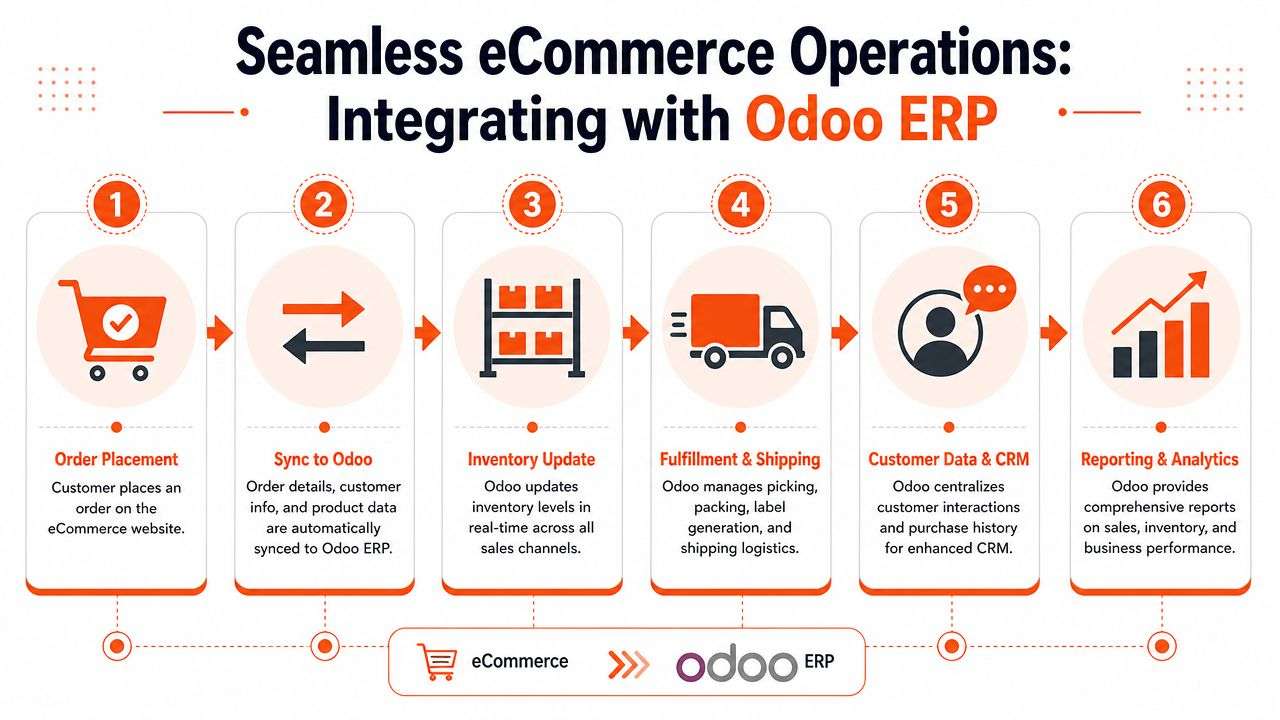
Before integration and after integration
Before a proper odoo implementation, businesses often deal with the same recurring problems:
- Inventory mismatches: The website says in stock, the shelf says otherwise.
- Manual re-entry: Staff copy order data into finance or warehouse tools.
- Slow fulfilment handoff: Orders wait because the process depends on a person.
- Fragmented customer records: Sales, support, and accounts all see different histories.
After integration, the process gets tighter. The customer orders on the storefront. Product, customer, and order data sync into Odoo. Stock adjusts. Fulfilment teams work from a shared record. Accounting isn't waiting on manual imports.
That's the core value. Less duplicated work, fewer avoidable mistakes, and cleaner visibility.
Where Odoo fits best
Odoo is especially useful when the store isn't the whole business. If you also manage warehousing, purchasing, CRM, invoicing, service jobs, or wholesale accounts, an ERP layer starts to make sense quickly.
A typical setup might include:
| Storefront | Back-end role for Odoo |
|---|---|
| Shopify | Orders, inventory sync, fulfilment workflow, invoicing |
| WooCommerce | Product sync, customer records, stock control, reporting |
| Multi-channel sales | Shared inventory and central order management |
Many first projects falter due to a common misstep: businesses buy an ERP too late, after years of workarounds. Then they have to untangle custom plugins, duplicate product logic, and messy data. It's usually cleaner to design the integration path at the start, even if you phase parts of it later.
The trade-offs you should hear upfront
ERP integration adds scope. It adds mapping work, testing, exception handling, and process design. It also forces decisions businesses have often postponed, such as who owns the product master, how returns are handled, and whether pricing is controlled in the storefront or in the ERP.
Those are good problems to solve early.
If Shopify or WooCommerce is where customers buy, Odoo should be where the business decides what's true.
For businesses assessing options, Odoo ERP services are one route to connect storefront sales with inventory, finance, and operations. If you're comparing providers, look for experience with both eCommerce and process mapping. That matters more than flashy integration claims. It's especially relevant if you need an ODOO partner Sydney Adelaide arrangement because local teams usually need workshops with operations, finance, and warehouse staff, not just developers.
Australian Payments Shipping and Legal Essentials
A store that can take orders but can't handle Australian payment preferences, shipping realities, or compliance basics isn't ready for launch. These aren't polish items. They affect trust, conversion, support workload, and risk.
The U.S. International Trade Administration reported that 82% of Australian households made online purchases in 2022, with the strongest growth coming from consumers in rural areas, according to the Australia ecommerce market overview from the U.S. International Trade Administration. For store owners, that has a practical implication. Your website needs to work well for customers outside major metro centres, and your shipping setup needs to reflect that.
Payments that reduce friction
Australian customers expect familiar, low-friction checkout options. In practice, that means choosing gateways and payment methods that fit your platform and your support model.
Focus on:
- Card processing and mainstream gateways: Stripe and bank-linked options are common choices because they're widely supported.
- Buy now pay later: Afterpay and Zip are common considerations for many retail categories.
- Platform fit: Shopify and WooCommerce handle payment setups differently, so your gateway choice should be tested against refunds, partial captures, and reporting needs.
- Chargeback handling: If your category sees disputes, plan the operational side early. Resources such as Disputely's Shopify chargeback solution are worth reviewing when you want a clearer process around evidence and dispute workflows.
Don't judge a payment setup only by transaction flow. Check how it handles refunds, failed payments, reconciliation, and customer support edge cases.
Shipping for a big country
Shipping in Australia gets complicated fast. Metro delivery is one thing. Regional and rural delivery is another. If your store doesn't account for those differences, the friction usually appears at checkout or after purchase, which is worse.
A reliable shipping setup should cover:
- Rate logic that reflects where you ship.
- Carrier integration so fulfilment doesn't rely on manual copy-paste.
- Clear delivery messaging on product and cart pages.
- Return rules that staff can apply consistently.
This is also where storefront performance matters. A slow mobile cart with clunky shipping estimation is frustrating anywhere, but it's especially damaging when buyers are comparing delivery options and trying to complete an order on a phone.
Legal basics that should be built in
You don't need legal theatre. You need operational clarity.
Pay attention to these areas:
- Australian Consumer Law: Your returns, refunds, and product claims need to be stated clearly and followed consistently.
- Privacy obligations: If you collect customer details, newsletter sign-ups, or behavioural data, your privacy policy and consent handling need to match what the site does.
- GST handling: Product pricing, invoices, and order summaries need to be configured properly from day one.
A common mistake is treating legal pages as content tasks for the end of the project. In reality, legal and operational rules affect checkout flow, customer communications, and back-office handling. They belong in requirements and testing.
Bringing Your eCommerce Website to Life
Good builds don't happen in one blur of design and coding. They move through a sequence that forces decisions at the right time. For Australian projects, a practical delivery model is to run discovery and strategy, UI/UX design, development and integration, UAT, then launch and optimization, as outlined in this Australia-focused eCommerce build methodology. That order works because it reduces avoidable friction and catches defects before go-live.

Discovery and design
Discovery is where the project stops being a wish list and becomes a specification. Product structures, shipping rules, payment methods, ERP touchpoints, and content priorities all need to be defined before anyone starts building.
Then design turns that logic into a buying experience. Not just a pretty homepage. Real page templates, collection logic, cart behaviour, mobile layouts, and account flows.
Useful design reviews ask questions like:
- Can a first-time visitor understand the catalogue quickly?
- Are shipping and returns easy to find before checkout?
- Does the mobile product page remove doubt or create it?
- Will staff be able to maintain the content after launch?
Development and integration
This is the point where many businesses underestimate complexity. Front-end build work is only half the job. The rest is integration, settings, business rules, and data handling.
For example, a shopify implementation might look simple until you need product variants to sync cleanly into Odoo, shipping statuses to update correctly, and customer notes to pass through for fulfilment. A WooCommerce build might need tighter control over plugin choices, hosting, and code quality to stay stable over time.
Build only what the business will use in phase one. Leave room for growth, but don't pay for speculative features that nobody is ready to operate.
UAT and launch
User Acceptance Testing is where owners and staff test the site against reality. This isn't just clicking around to see if pages load. It's checking edge cases.
Run scenarios such as:
| Test area | Example |
|---|---|
| Checkout | Mixed carts, failed payments, address variations |
| Operations | Order edits, refunds, cancellations, returns |
| Inventory | Low-stock behaviour, oversell prevention, sync timing |
| Customer comms | Confirmation emails, shipping updates, invoice flow |
Performance also matters after build. If you're looking at technical tasks that affect load speed, crawlability, and storefront health, this guide on optimizing Shopify store performance is a practical companion to launch prep.
Teams offering software development Sydney Adelaide support should be able to run this process cleanly and explain each defect in business terms, not just technical jargon.
Budgeting for Your eCommerce Development in Australia
If you want a realistic budget, stop asking for a single number before the scope exists. Cost depends on complexity, platform choice, integration depth, and how disciplined the project is about phase-one priorities.
The clearest benchmark in the provided source material puts a basic MVP at about AUD $10,000 to $25,000, while more complex builds with integrations, UX demands, and scalability requirements can reach AUD $50,000 to $250,000+, based on Australian eCommerce development cost benchmarks.
Where the budget usually goes
The same benchmark breaks projects into budgetable phases:
- Discovery and architecture: 5–10%
- UX/UI: 10–20%
- Front-end: 15–25%
- Back-end: 15–30%
- Integrations: 10–25%
- QA/UAT: 10–15%
- DevOps and deployment: 5–10%
Those ranges matter because they show where custom projects expand. A basic catalogue store spends less on integration and back-end logic. A store tied into Odoo implementation, custom stock rules, or multi-system workflows spends more there.
What changes the price in real projects
A few factors move budgets more than business owners expect.
Platform complexity
A standard Shopify store with restrained app use is usually more predictable than a heavily customised WooCommerce build. WooCommerce isn't automatically cheaper. It can be more economical in the right scenario, but only when plugin choices, hosting, and custom development are tightly managed.
Integration depth
Connecting Shopify or WooCommerce to Odoo ERP isn't a checkbox feature. It involves field mapping, sync logic, exception handling, and test scenarios. If stock, fulfilment, invoicing, or CRM all need to align, the budget rises for good reason.
Catalogue and content structure
A small product range with tidy variants is easier than layered categories, bundled products, trade accounts, or hybrid service-plus-product setups.
Internal readiness
The less clarity your team has on workflows, the more time the agency spends discovering requirements mid-project. That usually means change requests.
The most expensive feature is the one you approve before the business process behind it is clear.
A better way to budget
Split your thinking into three layers:
Must-have launch scope
Products, payments, shipping, tax, essential integrations, and basic content.Operational efficiency scope
ERP sync, fulfilment automation, reporting, staff workflows.Growth scope
Advanced marketing flows, loyalty, wholesale portal, custom account logic.
That structure keeps first projects from trying to solve every future problem at once. If you want a local reference point for cost planning, this page on ecommerce website development cost gives a useful starting framework for discussing scope and budget.
Your Actionable Launch and Growth Checklist
Launch day isn't the finish line. It's the first day your systems meet real customers. The businesses that grow steadily are the ones that treat launch as the start of measurement, cleanup, and iteration.
Pre-launch checks that catch expensive mistakes
Run a final pass through the store as if you were a customer, a warehouse operator, and an accounts person.
Use this checklist:
- Payments: Test successful orders, failed payments, refunds, and confirmation emails.
- Shipping: Check rate logic, suburb coverage, dispatch notifications, and return instructions.
- Tax and invoices: Confirm GST display, order summaries, and invoice outputs match your process.
- Inventory sync: Place test orders for low-stock items and verify stock movement in the back end.
- Mobile usability: Review home, collection, product, cart, and checkout pages on real phones.
- Content quality: Fix broken links, placeholder copy, sizing issues, and missing policy pages.
- Tracking: Confirm analytics, advertising pixels, and ecommerce events are recording properly.
Don't delegate all of this to developers. Owners and staff should test the workflows they'll live with.
First-month priorities after launch
Once the site is live, the next job is observation. Watch where customers hesitate and where staff still need manual workarounds.
Focus on these signals:
| Area | What to watch |
|---|---|
| Checkout flow | Drop-offs at shipping, payment, or account creation |
| Product pages | Questions customers keep asking before purchase |
| Operations | Delays in fulfilment, sync errors, or refund bottlenecks |
| Support volume | Repeated complaints that point to a UX or policy problem |
If the same issue appears three times in a week, it's probably a systems problem, not a one-off customer issue.
Growth work that actually compounds
A lot of post-launch advice is too broad. In practice, growth usually comes from tightening the basics.
Improve category and product page clarity
Shoppers need quick answers. Product specifications, delivery expectations, returns information, and trust cues should be visible without forcing users to hunt.
Keep the store fast and easy to maintain
A bloated app stack, oversized media, or poor plugin discipline will slow down both the site and your team. Every extra add-on needs a reason to exist.
Use search and content properly
For stores on WooCommerce especially, content structure can become a major advantage if blog, category, and product content are organised around real customer questions. For Shopify stores, tightly written collection and product pages still matter. Search visibility doesn't come from templates alone.
Tighten conversion paths over time
Review:
- Navigation labels
- On-site search behaviour
- Filter usefulness
- Cart friction
- Email sequence gaps after purchase
Small operational improvements often outperform flashy redesigns.
Launch the cleanest useful store you can. Then improve the parts customers actually touch, not the parts internal teams debate endlessly.
When to bring in a longer-term partner
If your team is already juggling fulfilment, marketing, support, and supplier management, someone still needs to own the technical roadmap. That includes platform updates, app review, integration monitoring, and UX improvements.
For businesses running a connected stack across Shopify or WooCommerce plus Odoo, that support matters even more. Storefront changes can affect stock logic, finance workflows, and warehouse operations. A stable eCommerce setup needs ongoing attention from people who understand both the website and the process behind it.
If you're planning your first serious build, or cleaning up a store that's become hard to manage, write down your current pain points before speaking with developers. Include the manual steps your staff hate, the customer complaints you hear most often, and the systems that don't talk to each other. That list is usually more valuable than a feature wish list.
If you need practical help with ecommerce website development in Australia, Wistec can help scope the storefront, platform choice, and back-end integration around how your business operates. That includes Shopify, WooCommerce, and Odoo-based workflows for teams in Sydney, Adelaide, and across Australia.