

If you're juggling separate systems for your sales, inventory, and customer details, you're not just making things harder for yourself—you're leaving money on the table. This is where POS software integration comes in. Think of it as the central nervous system for your business, connecting your point-of-sale terminal to all the other critical software you rely on. It creates a single, unified ecosystem where information flows freely and automatically, exactly where you need it.
Why Your Business Needs a Single Source of Truth
Disconnected operations are a silent killer of profit and growth. I’ve seen it countless times. Picture a Sydney-based retailer running a busy Shopify store alongside a physical shop. Without proper integration, an item sold online isn't immediately removed from the in-store inventory count. This inevitably leads to those awkward "sorry, we're actually out of stock" moments, leaving you with disappointed customers and a frantic scramble to do manual stocktakes.
The core problem here is the lack of a single source of truth—one accurate, real-time view of your entire business.
This chaos isn't just a retail problem. Think about a service business in Adelaide using a powerful ERP like Odoo to manage its finances and projects. If their appointment scheduling software doesn't talk to their POS, staff are stuck manually re-entering payment and client data. This double handling isn't just tedious; it's a recipe for human error, wasted time, and delayed financial reporting.
From Data Silos to Strategic Advantage
Getting your POS integration right means breaking down these frustrating data silos. When your systems can finally communicate, you unlock some seriously powerful benefits that can turn operational headaches into a real competitive edge.
- Automated Inventory Sync: Your stock levels update in real-time across every channel. Whether it's a Shopify implementation, a WooCommerce site, or your brick-and-mortar store, you’ll never oversell again.
- Unified Customer Profiles: Every customer purchase, whether online or in-store, is consolidated into one profile. This gives you the power to create truly personalised marketing campaigns, targeted promotions, and a much better customer experience.
- Streamlined Financials: Sales data flows straight into your accounting software or ERP like Odoo. This eliminates hours of manual reconciliation and gives you a real-time snapshot of your financial health.
A truly integrated system means a sale made on your website instantly updates your inventory, customer records, and accounting ledgers without a single manual keystroke. This isn't just about efficiency; it's about making smarter, faster business decisions based on data you can actually trust.
The Role of an Expert Partner
Architecting this kind of unified system takes real expertise. An experienced Odoo partner or a firm that specialises in software development in Sydney or Adelaide can dig into your unique workflow and build the right connections. Their job is to make sure your POS, eCommerce site, and ERP are all speaking the same language. If you're looking to get your head around the fundamentals, this guide on POS software integration is a great starting point.
Don't let disconnected data hold your business back. Are you ready to swap operational chaos for a streamlined, profitable engine for growth?
Let's discuss how a tailored POS software integration can unify your business. Contact our experts today for a no-obligation consultation.
Choosing Your Integration Method: APIs, Middleware, or Connectors
Picking the right way to connect your POS software is arguably the most important technical decision you'll make in this process. It's not about what's "best" on paper, but what's the best fit for your specific business—your budget, your scale, and where you see yourself in five years.
Let's cut through the jargon and look at the three main paths you can take. Ultimately, this choice boils down to a classic trade-off: custom control versus off-the-shelf convenience. Do you need a solution built from the ground up for your unique workflow, or can a more standardised connection get you where you need to go, faster?
APIs: The Path of Custom Control
Think of an API (Application Programming Interface) as a box of high-quality building blocks. It isn't a finished product; it's a powerful toolkit that gives your developers the ultimate freedom to build a direct, highly specific bridge between your POS and any other system you rely on.
This is the gold standard for businesses whose needs are just too unique for a pre-packaged solution. You'd head down the custom API route if you need to:
- Sync very specific, non-standard data fields between your POS and inventory management system.
- Build a one-of-a-kind customer loyalty program that pulls in data from multiple, disparate sources.
- Create a custom reporting dashboard that tracks the exact metrics that matter to your business, not just the standard ones.
Here’s a practical case: We worked with a large wholesale distributor in Sydney whose entire operation depended on a custom-built warehouse management system (WMS). A standard connector just wouldn't cut it. By building a bespoke API, every single sale rung up on their POS now instantly and accurately triggers the right picking, packing, and shipping logistics in their warehouse, all while factoring in their unique freight calculation rules. That’s the kind of power you get with custom software development in Sydney.
Middleware: The Universal Translator
What if you’re juggling several complex systems that were never designed to speak the same language? This is where middleware shines. It acts like a central hub or a universal translator, sitting right in the middle of your POS, ERP, CRM, and eCommerce platforms.
Instead of building a dozen messy, individual connections, each system plugs into the central middleware. The middleware then does all the heavy lifting—routing, translating, and synchronising data between every connected application. This approach is a lifesaver for larger businesses trying to tame a sprawling software ecosystem.
Connectors: The Plug-and-Play Solution
Connectors (you might also hear them called plugins or apps) are the simplest path forward. These are pre-built, off-the-shelf integrations designed for one specific purpose, like linking your POS directly to popular platforms like Shopify or WooCommerce.
They are by far the fastest and most budget-friendly way to get started. If your business uses widely adopted software and has pretty standard integration needs (like syncing sales and inventory), a connector is often the perfect solution. You can usually find them in app marketplaces and get them up and running with minimal technical fuss.
This shift toward easier, more flexible solutions is a huge trend in Australia. The cloud POS market here hit USD 157.0 million recently and is on track to explode to USD 529.5 million by 2030—that’s a massive 22.5% CAGR. Why? Because over 60% of Aussie retailers are ditching their clunky old on-premise systems for cloud-based POS that integrates seamlessly with everything else they use.
If you’re looking to learn more about how API integration works and what it can do for your business, we’ve put together a detailed guide. And a common first step for many businesses is integrating with payment processors like Stripe, a task that can often be handled by either a connector or a custom API.
Comparing Integration Methods: APIs vs. Middleware vs. Connectors
To help you decide, here’s a quick-glance table comparing the three main approaches. Think about your current needs, budget, and in-house technical skills as you review it.
| Integration Method | Best For | Technical Skill Required | Cost and Time | Example Use Case |
|---|---|---|---|---|
| APIs | Businesses with unique workflows, non-standard data, or a need for deep, custom control over the integration. | High (requires developers) | Highest cost and longest development time, but offers the most powerful result. | A custom connection between a POS and a proprietary warehouse management system (WMS). |
| Middleware | Larger enterprises with multiple, complex systems (ERP, CRM, eCommerce) that all need to communicate. | Medium to High | Moderate to high cost, depending on the complexity of the systems involved. | A central hub that syncs inventory and customer data across a POS, Shopify, and an ERP system. |
| Connectors | Small to medium businesses using popular platforms with standard integration needs. | Low (often no-code) | Lowest cost and fastest to implement—often a simple monthly subscription. | A Shopify app that syncs sales and inventory data with a compatible cloud-based POS. |
No matter which path makes the most sense for you, the end goal is always the same: creating a single, unified system that slashes manual work, eliminates errors, and gives you a reliable source of truth for your business data. Need help deciding? Contact us for a free consultation.
Your Blueprint for a Seamless POS Integration Project
A successful POS software integration is never an accident. It's the result of a deliberate, well-executed plan. If you go in guessing, you're setting yourself up for costly delays and operational chaos. But with a methodical approach, you can ensure every piece of your business puzzle fits together perfectly, from your sales counter right through to your back-end systems.
Think of this as your project's command centre. It's a practical roadmap to guide you from the initial idea to a successful launch, helping you make smart decisions every step of the way. Let's break down how to turn your integration goals into a reality.
Discovery and Strategy: The Foundation of Success
Before a single line of code gets written, the most critical work begins. This discovery and strategy phase is where you meticulously map out the entire project. I can't stress this enough: rushing this stage is the number one reason integrations fail. You have to get granular, defining exactly what you want to achieve and how you'll measure success.
Start by digging deep with detailed questions:
- What specific data needs to move? Are we just talking sales and inventory, or do you need to sync customer loyalty points, employee commissions, or special order details?
- Which direction does the data flow? For example, sales data might flow one way from the POS to your Odoo implementation, while product updates flow the other way, from Odoo back to the POS.
- How often does it need to sync? Is real-time an absolute must, or is a sync every 15 minutes perfectly fine for certain data?
- What are your key performance indicators (KPIs)? Will you measure success by a reduction in manual data entry hours, a drop in stockouts, or faster financial reporting?
A clear discovery phase defines not just the what but the why. A well-defined strategy ensures that every technical decision directly supports a specific business outcome, preventing scope creep and keeping the project focused on delivering real value.
Selecting the Right Implementation Partner
With your strategy in hand, your next move is choosing the right team to bring it to life. This decision is just as crucial as the technology itself. You're not just hiring a vendor; you're finding a partner who will become an extension of your team, responsible for the technical backbone of your operations.
Look for a partner with proven experience in your specific ecosystem. If you're building a connected retail experience, you'll need a team with deep expertise in Shopify implementation or WooCommerce development. For businesses aiming to unify their entire operation, engaging a certified Odoo partner in Sydney or Adelaide is non-negotiable. Their intimate understanding of the ERP's architecture is vital for a smooth integration. For a deeper dive into creating a powerful online presence, you might be interested in our guide on web and eCommerce development.
Data Mapping and Configuration
This is where the technical work really kicks off. Data mapping is the process of telling your systems how a field in one place corresponds to a field in another. For instance, the "Product SKU" field in your POS must be correctly mapped to the "Internal Reference" field in Odoo. It sounds simple on the surface, but tiny inaccuracies here can lead to major data corruption down the line.
A Practical Case: A Multi-Location Retailer
Imagine a fashion retailer with five stores across Australia and a booming WooCommerce website. Their primary goal is to achieve unified stock management.
- Discovery: They identified that a sale in their Melbourne store must instantly update the stock level visible to online shoppers in Perth to prevent overselling.
- Partner Selection: They chose a software development Sydney firm with proven expertise in both POS systems and WooCommerce.
- Data Mapping: The team meticulously mapped the product ID, stock quantity, and location fields between the POS database and the WooCommerce product database.
- Configuration: They configured the integration to trigger an inventory update every time a sale was completed in any location—physical or online. This two-way sync ensures accurate stock visibility across the entire business.
Rigorous Sandbox Testing
You would never test-drive a new car in peak-hour traffic, so don't test a new integration on your live system. A sandbox is a secure, isolated testing environment that mirrors your live setup. This is your chance to try and break the integration in every way imaginable without impacting real customers or sales data.
Your testing checklist should include:
- Processing a variety of transaction types (sales, returns, exchanges, gift cards).
- Testing edge cases, like what happens during an internet outage or a power failure.
- Verifying that data syncs correctly and within the expected timeframe.
- Ensuring reports generated by the integrated systems are accurate and consistent.
Deployment and Go-Live Support
After extensive testing and getting the sign-off from all stakeholders, it's time for deployment. The best practice is to "go live" during a period of low business activity—think overnight or on a quiet weekday—to minimise any potential disruption.
But the project doesn't end the moment you flip the switch. A reputable partner provides go-live support, meaning their team is on high alert to quickly address any unforeseen issues that arise. This post-launch vigilance is critical for ensuring a smooth transition and building your team's confidence in the new system.
Ready to build your own integration blueprint? Contact our software development experts in Sydney and Adelaide today. We’ll help you plan and execute a seamless POS software integration project that drives real results.
Real-World Wins From Integrated POS Systems
It's one thing to talk about the theory and tech specs, but the real magic of POS software integration happens when you see the results in action. A smart integration isn’t just about plugging one system into another; it's about building new capabilities that genuinely drive growth, improve efficiency, and make your customers happier. Let’s look at how Australian businesses are pulling this off.
The whole journey, from that first lightbulb moment to a fully integrated system, usually follows a well-trodden path: discovery, mapping, and testing. It’s a process that makes sure you get it right the first time.
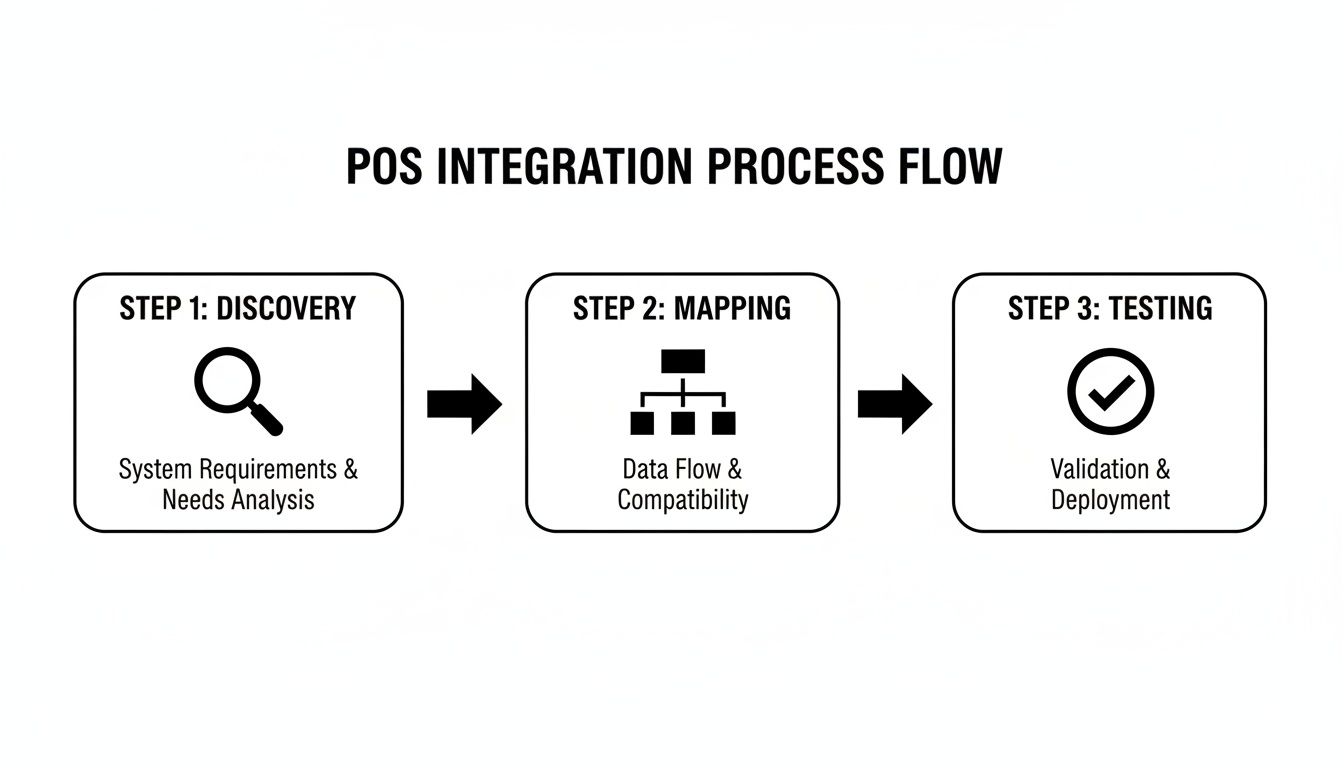
As you can see, a successful project needs a solid foundation. Rushing in without a clear plan is where things tend to go wrong.
eCommerce Success: Putting an End to Overselling
Practical Case: Picture a Melbourne-based online fashion brand using a Shopify implementation. During massive sales events like Black Friday, they were stuck in a familiar nightmare: overselling. The lag between their warehouse inventory and what their Shopify store showed meant they were constantly taking money for items they didn't have. It was a customer service disaster waiting to happen.
The fix? They worked with an Odoo partner in Sydney to integrate their Shopify store directly with their Odoo ERP. Suddenly, they had a single, real-time source of truth for stock levels. An item sells, and the count is updated everywhere, instantly.
The results were dramatic.
- Zero Overselling: The frustration of cancelled orders vanished, protecting their hard-earned brand reputation.
- A Complete Customer Picture: Purchase data from Shopify now flowed straight into Odoo, connecting online orders with their in-person pop-up sales. This gave their marketing team a unified view to craft incredibly targeted campaigns.
- Freed-Up Resources: The tedious manual work of reconciling inventory was gone. Staff could finally focus on what matters—getting orders out the door and helping customers.
Optimising the Factory Floor
The benefits are just as powerful outside of retail. Practical Case: Take a custom furniture business in Adelaide. Their sales were processed through a showroom POS, but that data never made it to the production floor. This disconnect created chaos, leading to guesswork in ordering materials and scheduling staff.
They brought in a local software development Adelaide team to build a bridge. Now, sales data from their POS feeds directly into the production planning module of their ERP. Every time a specific piece of furniture is sold, it kicks off a chain of automated actions.
This Odoo implementation gave them the power to:
- Automate Material Orders: The system calculates the raw materials needed for each order and automatically flags when it's time to restock.
- Smarter Staff Scheduling: With a clear view of the production pipeline, managers can allocate their team more effectively, avoiding both idle time and expensive overtime.
- Real-Time Visibility: Management finally has a live dashboard showing sales trends versus production capacity, allowing for much smarter decisions on what to promote and when.
This is a perfect example of how linking front-end sales with back-end operations creates a leaner, more agile business.
Taking the Hospitality Guest Experience to the Next Level
In the fast-paced world of hospitality, every second counts. A boutique hotel in Sydney was juggling disconnected systems for their restaurant POS, room bookings, and guest management. A guest's dinner bill couldn't be easily tacked onto their room tab, creating awkwardness and delays at checkout.
By integrating these separate platforms, they unified the entire guest journey. Now, from booking a table to ordering room service, every interaction is tracked in one central profile. It’s a seamless experience that feels effortless for the guest and streamlines work for the staff.
The Australian retail landscape is certainly embracing this shift. The market is projected to skyrocket from USD 615.71 million to a massive USD 1,258.11 million by 2030. This growth is being driven by businesses connecting cloud-based systems for everything from inventory to CRM, with 60% of retailers now running omnichannel operations to centralise their control.
These real-world wins prove that a well-designed POS integration is so much more than a technical upgrade. It's a strategic investment that delivers real returns in efficiency, customer loyalty, and bottom-line growth. You can learn more about how technology empowers the food service industry in our guide to the best restaurant POS systems.
Common POS Integration Pitfalls and How to Sidestep Them
Even the most carefully planned POS software integration can hit a roadblock. I’ve seen it happen time and again. Knowing where the common traps are buried is the best way to steer clear of them, making sure your project stays on schedule and actually delivers on its promise. It’s all about being proactive rather than constantly putting out fires.
A successful integration is as much about dodging mistakes as it is about adding new features. If you overlook these potential issues, you’re looking at blown budgets, frustrating delays, and a system that just doesn’t work for your business—creating more headaches than it solves.
The ‘Garbage In, Garbage Out’ Data Problem
Honestly, the single biggest pitfall I see is bad data. If your current product, customer, or inventory information is a messy patchwork of inconsistent formats, duplicates, and outright errors, just dumping it into a new system will only magnify the chaos. Your shiny, sophisticated new platform will be compromised from the get-go.
This is why you absolutely must conduct a thorough data audit and cleanup before a single line of code is written.
- Standardise everything: Make sure your product SKUs, customer addresses, and other key details follow the same format everywhere.
- Hunt down duplicates: Merge those multiple customer profiles and product entries. You need one clean, single source of truth.
- Archive the old stuff: Get rid of obsolete products or inactive customer accounts you no longer need. It’s just clutter.
Any expert Odoo partner Sydney or Adelaide worth their salt will insist on this. It's a non-negotiable step for a successful Odoo implementation because they know from experience that clean data is the bedrock of any reliable system.
Forgetting About the People Who Use It
You can build the most elegant, powerful integrated system imaginable, but if your team doesn't know how to use it properly, the entire project is a write-off. It's a critical mistake to underestimate how much training people will need. Staff will always fall back on their old, inefficient habits if the new tech feels confusing or intimidating.
The only way around this is proactive training. Map out a clear plan that includes hands-on sessions, documentation they can actually find and understand, and an internal "go-to" person who can answer questions on the fly. When connecting a new Shopify implementation or a WooCommerce site, for example, your training should focus specifically on how the new workflow changes daily tasks like fulfilling orders or checking stock levels.
Thinking It's a "Set and Forget" Job
Your integration isn’t finished the day it goes live. Software platforms get updated, APIs change, and your business needs will shift. Without a solid plan for ongoing maintenance, the system you’ve invested in will slowly degrade, leading to broken connections and frustrating data sync errors down the line.
Before you launch, make sure you have a clear support plan. It should spell out who is responsible for monitoring the system, applying updates, and fixing things when they break. This is why partnering with a software development Sydney or Adelaide firm that offers post-launch support is so valuable—it means you have experts on call to keep everything running smoothly, long after the initial project is complete.
Ready to navigate your POS integration with confidence?
Let’s connect. Our expert team can help you anticipate and avoid these common pitfalls, ensuring your project is a success from start to finish. Book your consultation today.
Ready to Build a Truly Connected Business?
You've just walked through the blueprint for genuinely transforming your business with POS software integration. Moving from a tangled mess of separate systems to one unified, data-driven operation isn't just a tech upgrade; it's a fundamental investment in your company's future. When you connect your sales, inventory, and ERP, you’re doing more than just saving time—you’re laying the groundwork for serious, sustainable growth.
We’ve seen it time and time again. Whether it's a clean Shopify implementation, a more complex WooCommerce development project, or a comprehensive Odoo implementation, having the right team in your corner changes everything. Our software development Sydney and Adelaide crews have been in the trenches with countless businesses, helping them turn messy, disconnected data into clear, actionable insights that actually move the needle.
It's time to stop letting operational silos dictate your potential.
An integrated business doesn't just survive; it thrives. A single source of truth across your entire operation is the key to unlocking real agility, boosting profitability, and creating a customer experience people talk about.
As a trusted Odoo partner in Sydney and Adelaide, we've got the hands-on experience to make this happen. Why not book a no-obligation consultation with us? Let's sit down and figure out how a smart integration strategy can drive real-world success for your business.
Got Questions About POS Integration? We've Got Answers.
When you're looking at a POS software integration project, a few questions always come up. It's completely normal. Let's tackle some of the most common ones we hear from businesses just like yours, so you can get the clarity you need to move forward.
So, How Long Does This Actually Take?
This is the classic "how long is a piece of string?" question, and the honest answer is: it depends entirely on the complexity.
If you're doing something straightforward, like plugging your POS into a standard Shopify implementation using a ready-made connector, you could be up and running in a few weeks. But for a more custom job, like a deep Odoo implementation that needs to pull data from different departments and older systems, you're realistically looking at a few months. The only way to get a firm timeline is to map everything out in a proper discovery phase with a team that knows what they're doing.
What’s the Real Pay-Off of Connecting My POS to an ERP like Odoo?
The single biggest win? Getting a single, real-time picture of your entire business. It’s a genuine game-changer.
When your POS is directly linked to Odoo, every single sale automatically updates everything else—inventory, accounting, and customer files—without anyone having to lift a finger.
No more data silos, no more guesswork. Just one source of truth. This means your financial reports are spot-on, you can actually trust your stock levels, and you can make quick, smart decisions backed by solid data. Teaming up with an experienced Odoo partner Sydney or Adelaide is the key to making this connection work flawlessly.
Can I Connect My Existing Shopify or WooCommerce Shop?
Yes, absolutely. In fact, this is one of the most valuable projects we do. Hooking up an existing eCommerce platform like Shopify or WooCommerce to a POS system is a fundamental step for any modern retailer.
The whole point is to make sure your stock, sales figures, and customer details are perfectly synchronised between your online shop and your physical stores. It's how you stop overselling popular items and make your order fulfilment a well-oiled machine. Ultimately, it gives your customers a seamless experience whether they buy from you in-person or online. Our software development Sydney and Adelaide team builds these kinds of essential links every day.
Ready to stop juggling systems and start unifying your operations? Wistec delivers technology that solves real business problems. Let's have a chat—get in touch for a no-obligation consultation today!