

Trying to run your business with a patchwork of disconnected spreadsheets and apps is a recipe for chaos. It’s like your finance, sales, and warehouse teams are all working in different buildings and speaking different languages. An ERP system for small businesses changes all that, acting as a central nervous system that brings every part of your operation into one intelligent, cohesive hub.
The result? Fewer errors, a massive efficiency boost, and a rock-solid foundation for future growth. Ready to explore a tailored solution? Contact our experts today for a free consultation.
Why Your Small Business Needs a Central Nervous System
If you're like most small business owners, your daily routine is probably a frantic juggle of manual tasks. Sales orders from your Shopify store need to be punched into your accounting software. Warehouse staff are still doing stocktakes with a clipboard. Your finance team is pulling their hair out trying to make sense of data from a dozen different sources.
When each department is stuck in its own silo, you create friction, costly mistakes, and a ton of missed opportunities.
This fragmented approach is a dead-end for growth. Without one single source of truth, you simply can't get a clear, real-time snapshot of your business's health. You're forced to make critical decisions based on old data, your customer service takes a hit from inaccurate stock levels, and your team is bogged down in repetitive data entry instead of doing work that actually adds value.
The Before-and-After Transformation
Let's paint a picture with a practical case. Think of a typical Australian SME struggling with these exact problems. Before they got an ERP, their workflow was a mess:
- Sales: Orders from their WooCommerce site had to be manually re-entered into a separate invoicing system. A classic double-handling nightmare.
- Inventory: Stock levels were only updated in a spreadsheet at the end of the day, which meant they were constantly overselling popular items or running out of stock unexpectedly.
- Finance: The accounting team would lose the first week of every month to the painful task of matching sales data with bank statements and inventory reports.
This constant data wrangling wasn't just inefficient—it was actively holding the business back.
Now, fast forward to the "after" scenario, once they brought in an expert Odoo partner in Sydney for an Odoo implementation. A customer places an order online. Instantly, the ERP deducts the item from inventory, creates a sales order, generates an invoice in the accounting module, and flags the item for picking in the warehouse. No manual steps. No delays. Everything just works.
An integrated ERP system replaces disconnected spreadsheets and point solutions with one source of truth. With dashboards that update instantly and automation that handles routine tasks, your team spends less time reconciling data and more time acting on insights.
Building a Foundation for Growth
This seamless integration is what ERP systems for small businesses are all about. They're no longer the exclusive, eye-wateringly expensive platforms for huge corporations. Modern cloud-based systems like Odoo are affordable, flexible, and built to scale right alongside your business. To truly get the most out of an ERP, you need to align it with your operations, and this detailed business process optimization guide is a fantastic resource for learning how.
By connecting every piece of your operational puzzle, an ERP gives you the control and visibility you need to make smarter, faster decisions. Ready to build a foundation for real growth? Our expertise in software development in Sydney and Adelaide is here to help you make it happen.
Contact us today for a no-obligation consultation to see how a tailored ERP solution can become your business's central nervous system.
Choosing the Right ERP Modules for Your Business
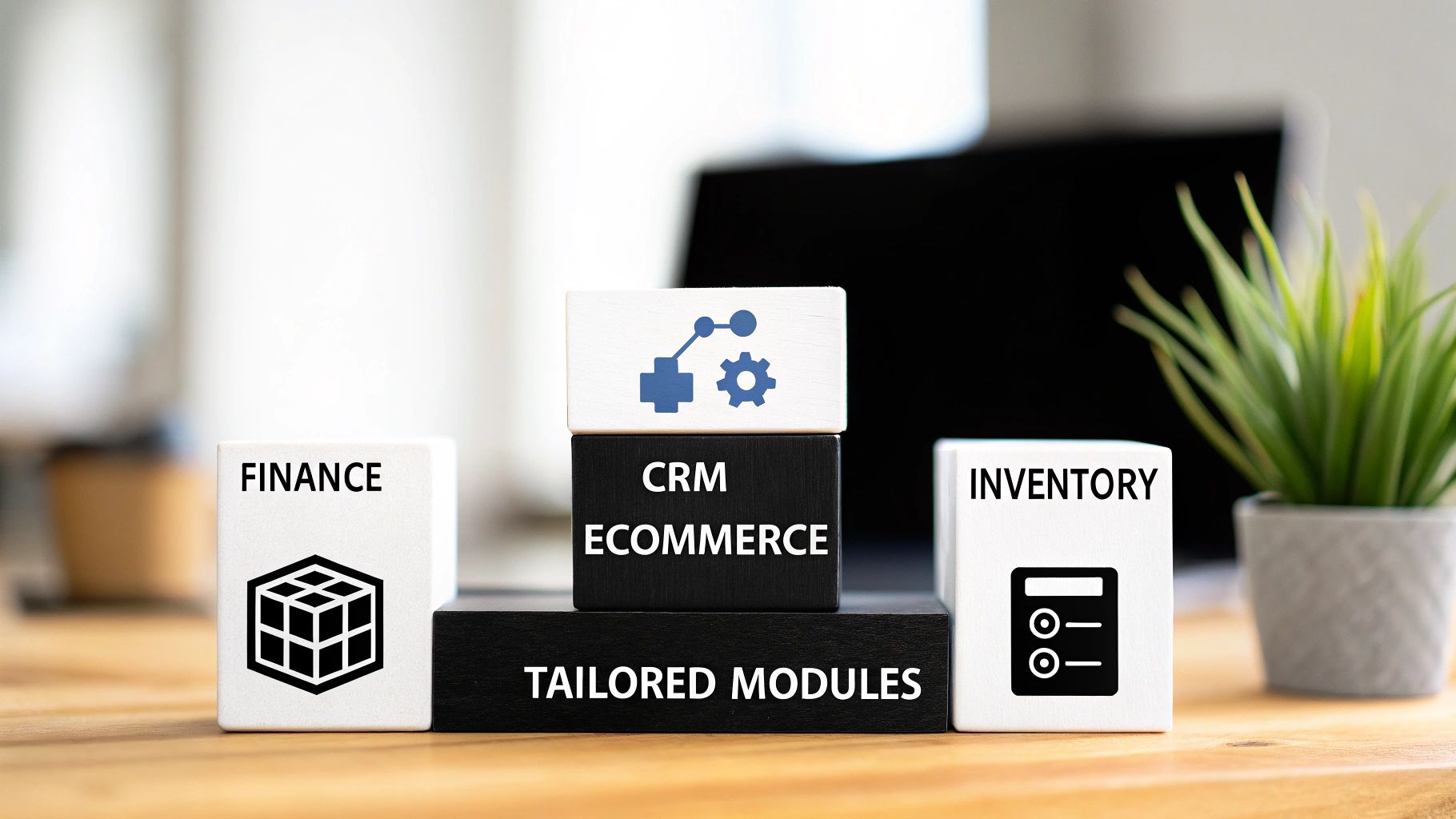
Think of an ERP system for small businesses less like a pre-packaged software suite and more like a custom-built toolkit. You wouldn't buy a massive toolbox filled with tools you'll never use, right? The same logic applies here. The smartest approach is to pick the specific modules that solve your biggest headaches right now.
This is about getting the quickest win and the best return on your investment. A modular system like Odoo is perfect for this. It lets you start with a lean, powerful foundation and then add new tools to your kit as your business grows and your needs change. It’s an approach that makes powerful business software genuinely accessible for Aussie SMEs.
Core Modules to Prioritise
So, where do you start? Most small businesses get the biggest bang for their buck by focusing on a few foundational modules. These are the workhorses that tackle the most common and frustrating operational challenges.
-
Financial Management: This is the absolute heart of your system. It’s what handles invoicing, tracks every dollar spent, runs payroll, and gives you a live, honest look at your cash flow. Imagine a service business in Sydney that can finally stop chasing manual timesheets and instead has invoices generated and sent automatically. That's a game-changer.
-
Customer Relationship Management (CRM): A good CRM pulls all your customer information into one place. Every email, phone call, and purchase history is right there. It empowers your sales team to track leads intelligently and build real, lasting relationships with customers.
-
Inventory Management: If you sell physical products, this isn't just nice to have; it's essential. It gives you a real-time count of every item you have, automates reordering so you never run out of your best sellers, and prevents you from tying up cash in slow-moving stock.
-
eCommerce Integration: This is the magic link between your online store and your back-end operations. When a customer clicks "buy" on your website, this module instantly updates inventory, creates the sales order, and talks to your accounting system. All without you lifting a finger.
How This Works in the Real World: A Practical Case
Let's ground this in reality. Picture a small manufacturing outfit in Adelaide constantly getting tripped up by supply chain delays. An Odoo inventory module gives them crystal-clear visibility into their stock levels and supplier lead times. The system can be set to automatically flag low stock and even draft purchase orders, ensuring production never grinds to a halt because someone forgot to order a crucial component.
Or how about an online retailer running on Shopify? A proper Shopify implementation integrated with an ERP means that every single online sale triggers a perfect chain reaction. The order is recorded, inventory is adjusted, and the financial data is synced. No more manual data entry. No more apologising to customers because you sold something you didn't have. This same powerful automation is just as effective for businesses on WooCommerce.
A modular ERP strategy lets you fix your biggest operational problems first. By starting with the essentials like finance and inventory, you build a solid foundation you can confidently expand on as your business evolves.
Expanding Your Toolkit
Once you’ve got the core of your business running like a well-oiled machine, you can start looking at what’s next. Maybe you want to add a project management module to track client work, or a human resources module to manage leave and onboarding.
You might even want to explore specialised add-ons for modern payment methods. For example, integrations like the Blockbee Odoo Plugin can be added to handle cryptocurrency payments seamlessly.
The key is to work with an expert who gets your business. A good Odoo partner in Sydney or Adelaide won't just sell you software. They provide local software development in Sydney and Adelaide, tailoring the system to fit your processes, not the other way around. That’s how an ERP stops being just another piece of software and becomes your unfair advantage.
Ready to build an ERP that actually solves your problems?
Get in touch with our team today for a free consultation. Let's design the perfect ERP toolkit for your business.
Cloud vs On-Premise ERP Deployment and Real Costs
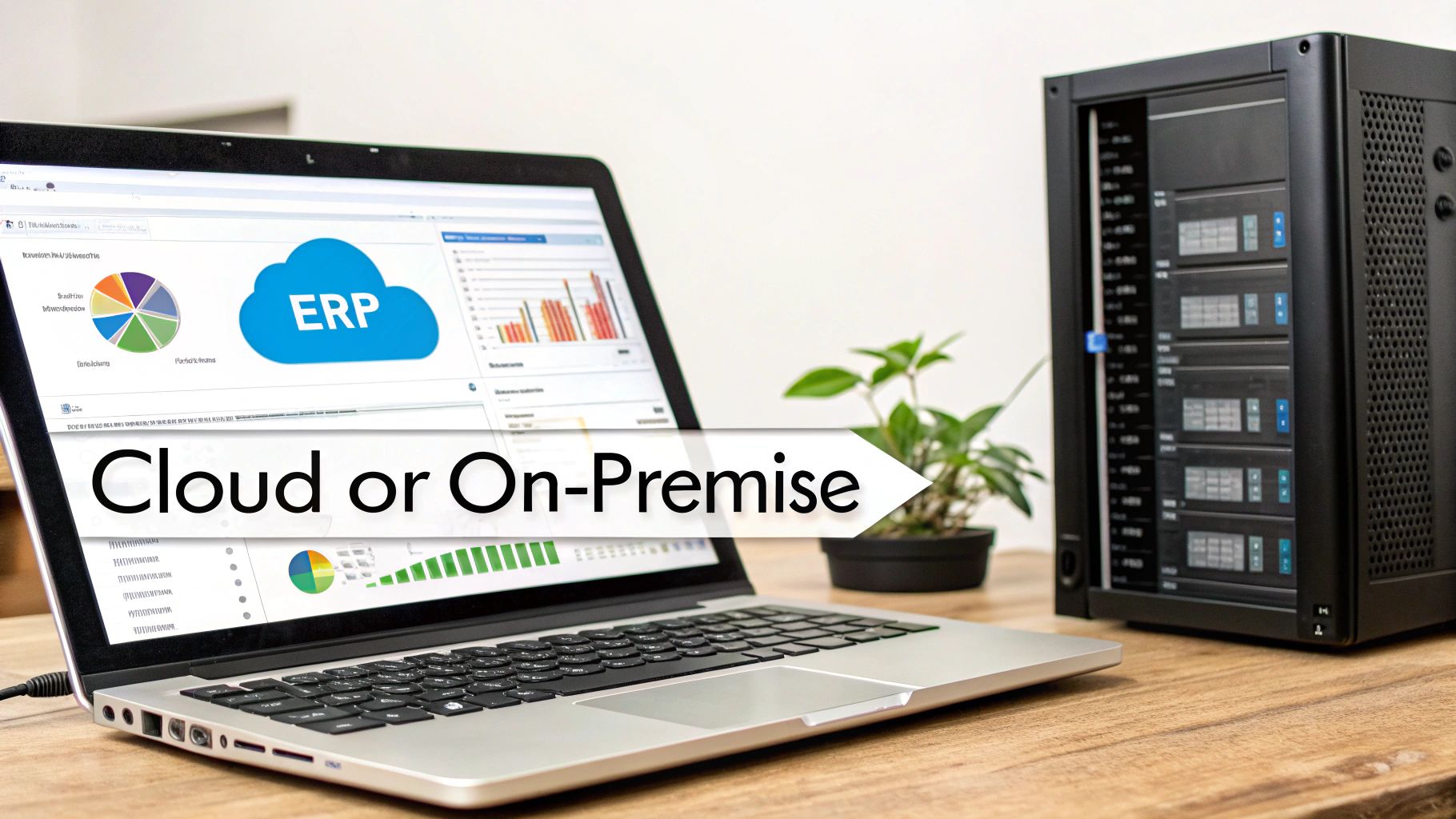
One of the first big questions you’ll face when choosing an ERP system for small businesses is deciding where it will live. Are you going to host it on servers in your own office (on-premise), or will you access it over the internet from a provider’s data centre (cloud)? This isn't just a technical detail; it's a decision that fundamentally shapes your costs, security, and ability to grow.
For a long time, on-premise was the only way to go. It meant a huge upfront spend on hardware, servers, and the IT team needed to keep it all running. Honestly, this model kept powerful ERP systems out of reach for most small businesses.
Thankfully, those days are over. Cloud-based ERP, often called Software-as-a-Service (SaaS), has completely levelled the playing field for Australian SMEs. It’s now the go-to choice for one simple reason: it transforms a massive, risky capital expense into a predictable, manageable operating expense.
The Cloud Advantage for Small Businesses
Here’s a simple way to think about it. An on-premise ERP is like buying a house. You own it outright, which sounds great, but you’re also on the hook for every single bit of maintenance, security, and expensive upgrades. It’s a massive commitment.
A cloud ERP, on the other hand, is like renting a modern, fully-serviced apartment. You pay a predictable monthly fee, and the provider takes care of all the upkeep, security, and infrastructure. This model gives you access to enterprise-grade power without the eye-watering, enterprise-grade price tag.
For a small business, the benefits are immediate and undeniable:
- Lower Upfront Costs: Forget about buying expensive servers or hiring a dedicated IT crew. Your investment goes directly into the software and getting it set up right, not into a room full of blinking lights.
- Scalability on Demand: As your business grows, your cloud ERP grows right alongside you. Need to add more users or new features? It's as simple as updating your subscription.
- Accessibility from Anywhere: Your team can log in and get to work securely from anywhere with an internet connection. This is a game-changer for remote teams, travelling staff, and multi-location businesses.
- Automatic Updates and Security: The provider handles all the technical heavy lifting—software updates, security patches, and data backups—so your system is always up-to-date and protected from threats.
Demystifying the Real Costs of ERP
So, what does an ERP really cost? While the million-dollar price tags of old-school systems are a thing of the past for SMEs, it’s still a significant investment that needs careful budgeting. Let's be transparent about the numbers.
For a small Australian business, a typical implementation ranges from AUD 45,000 to AUD 100,000. This project usually takes about three to six months and covers everything from software licenses and data migration to essential staff training. It’s a far cry from the AUD 450,000+ budgets you see in big corporate rollouts. One crucial part not to skimp on is training, which might cost AUD 5,000–15,000 but is absolutely vital to make sure your team actually uses the system to its full potential.
You're not just buying software; you're investing in a new foundation for efficiency and growth.
The most successful ERP projects are partnerships. Working with an expert Odoo partner in Sydney or Adelaide ensures your implementation is tailored to your unique business processes, from integrating your Shopify or WooCommerce store to customising financial workflows.
A Practical Case in Point
Imagine a retail business in Adelaide with a few stores and a growing eCommerce website. An on-premise system would demand a server at each shop plus another at head office, all networked and maintained by an IT pro. The upfront cost would be crippling.
By choosing a cloud Odoo implementation, they swap that headache for a predictable monthly fee. Now, their store managers, warehouse crew, and finance team can all see the same real-time data from any device, anywhere. When they open a new store, connecting it to the ERP is a simple configuration task, not a major IT project. To dive deeper into the nuts and bolts, you might find this detailed breakdown of cloud-based ERP solutions helpful.
This is the real power of modern software development in Sydney and Adelaide—it puts world-class tools within your reach. For most SMEs, the choice is clear: cloud ERP delivers the financial flexibility and operational agility you need to compete and win.
Are you ready to understand the specific costs for your business? Contact us for a personalised, no-obligation quote and let's build a solution that fits your budget and your ambition.
Your Step-By-Step ERP Implementation Roadmap
Bringing a new ERP system into your business can feel like a huge undertaking, but it doesn't have to be overwhelming. The secret is breaking it down. With a clear, structured roadmap, the entire project becomes a series of manageable steps, each one building on the last. A great implementation isn’t just about the tech; it’s about a methodical process that wires the system directly into your business goals from the very start.
We use a proven five-phase approach that cuts through the complexity. It’s designed to guide you from the initial idea to a fully functioning system that’s ready to power your growth. Understanding each stage helps you see around corners, line up your resources, and make sure your investment pays off.
Phase 1: Discovery and Planning
This is where we lay the foundation for success. Before anyone touches the software, we need to get crystal clear on what you’re trying to achieve. This phase is all about asking the big questions: What are our most painful operational bottlenecks? Which manual tasks are eating up all our time? What information do we desperately need to make smarter decisions?
Key activities include:
- Defining Clear Objectives: We need to set specific, measurable goals. Think less "improve efficiency" and more "reduce order processing time by 30%" or "get real-time inventory accuracy across all our locations."
- Mapping Your Current Workflows: We’ll document exactly how your business operates right now. This isn’t just an exercise; it's how we pinpoint the exact problems the new ERP system for small businesses is going to solve.
- Assembling the Project Team: You’ll need to pick a project manager and key people from each department who can be champions for the change.
Trying to rush through this planning stage is one of the most common ways these projects go off the rails. A solid plan is your compass, keeping everything on track and ensuring the final product actually solves your most pressing needs.
Phase 2: System Design and Configuration
With a solid plan in hand, we shift our focus to designing how the ERP will actually work for you. This is a deeply collaborative phase where we work together to translate your business needs into system functions. If you’re using a modular system like Odoo, this is where we configure the finance, inventory, and CRM modules to perfectly match your unique workflows.
This is exactly where the expertise of an Odoo partner in Sydney or Adelaide is worth its weight in gold. They don't just install software; they provide custom software development in Sydney and Adelaide to tailor the system so it fits your business like a glove—not the other way around.
Phase 3: Data Migration
Let's be honest: your data is one of your most valuable assets. Your customer lists, product details, and sales history are the lifeblood of your business. Moving all of it from your old systems into the new ERP is a critical step that’s far too easy to underestimate.
Think of it this way: migrating messy, inaccurate data is like putting dirty fuel into a brand-new engine. It just won’t run properly.
The process involves a few key steps:
- Cleansing the Data: We'll need to hunt down and remove duplicates, fix errors, and standardise formats across your existing spreadsheets and software.
- Mapping the Data: This is like creating a moving plan, deciding exactly where each piece of old information will live in the new system.
- Executing the Migration: We’ll run several test migrations first. This lets us catch and fix any problems before the final, official transfer.
A successful data migration means that from day one, your team is working with clean, reliable information. This builds trust in the new system and is absolutely essential for accurate reports and confident decision-making.
Phase 4: Testing and Training
Before you flip the switch, the system needs to be put through its paces. This is called User Acceptance Testing (UAT), and it involves your own team running through their everyday tasks in a test environment. They’ll process dummy sales orders, create invoices, and check inventory reports to make absolutely sure everything works as it should.
At the same time, we roll out training. This part is crucial for adoption. If your team doesn’t understand how to use the new system—or why they should—they’ll quickly slip back into their old, inefficient habits. Good training is always role-specific, showing each person how the ERP makes their job easier.
To get a deeper look at the entire process, you can explore our detailed guide on successful ERP system implementation.
Phase 5: Go-Live and Ongoing Support
Go-live is the big moment—the day your new ERP becomes the operational heart of your business. But the work doesn’t stop here. The first few weeks are a critical adjustment period, and having a dedicated support plan from your implementation partner is non-negotiable. They’ll be right there to troubleshoot issues, answer questions, and offer guidance as your team gets comfortable.
This ongoing support ensures a smooth transition and helps you get more out of the system over time. As your business evolves, you can continue to refine workflows and add new features, making sure the ERP grows with you.
A structured implementation turns what could be a complex, messy project into a predictable success story.
Ready to start your ERP journey with a partner you can trust? Contact Wistec today for a no-obligation consultation and let's build your roadmap to efficiency.
How to Measure the Real ROI of Your ERP System
An ERP system isn't just another expense on your profit and loss statement; it’s a strategic investment that should deliver a powerful, measurable return. But how do you get past the sales pitch and calculate the actual value it brings to your bottom line?
It all starts with a mindset shift. The real ROI isn't just about cutting costs—it's about building a smarter, more efficient, and scalable business. The goal is to answer the big question: "What results can I actually expect?" To do that, you need to track the right key performance indicators (KPIs) to get a clear before-and-after picture. This is how you turn your ERP from a perceived cost into a proven profit driver.
Key Metrics That Reveal True Value
Don't get bogged down tracking dozens of data points. Instead, zero in on the handful of metrics that directly reflect the health and efficiency of your operations. This is where the financial benefits of a well-executed Odoo implementation really start to shine.
- Reduced Administrative Hours: First, track the time your team sinks into manual data entry, wrangling spreadsheets, and pulling together reports. A single, unified system automates these chores, freeing up your people to focus on activities that actually grow the business.
- Improved Inventory Turnover: This KPI tells you how quickly you’re selling and replacing stock. An ERP gives you the real-time data you need to optimise stock levels, slash carrying costs, and stop money from getting tied up in dust-collecting inventory.
- Faster Order Fulfilment: How long does it take to get an order out the door after a customer clicks "buy"? An ERP can connect your Shopify or WooCommerce store directly to your warehouse and finance teams, drastically cutting down those processing times.
Here in Australia, the results speak for themselves. With cloud adoption growing by over 20% each year, small businesses are seeing 20-30% reductions in admin time and 10-20% savings on inventory costs. Most see a positive return within just 12 to 24 months.
Of course, a successful implementation is the foundation for achieving these returns. Following a structured process is non-negotiable.
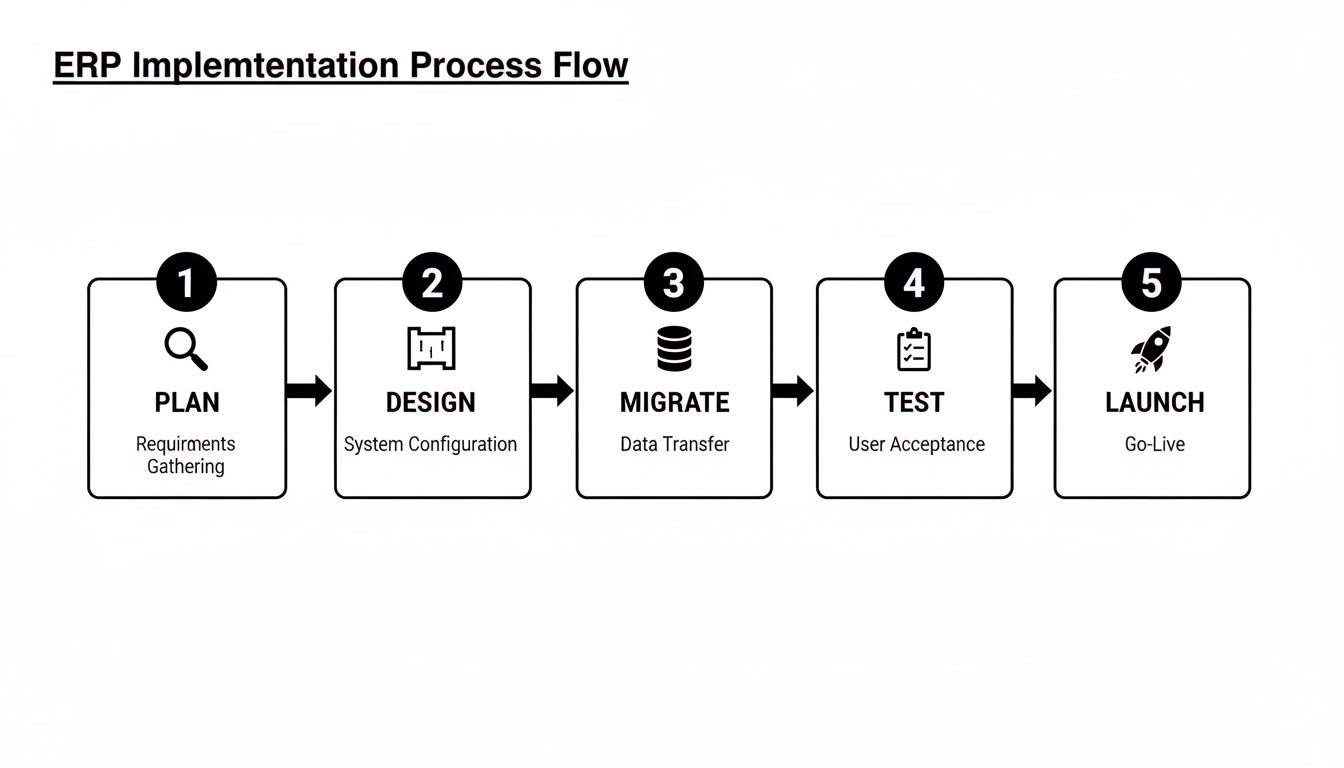
This roadmap shows that a clear, phased approach—from planning right through to launch and support—is what turns an ERP investment into real, tangible business value.
Real-World Cases That Prove the Payback
Theory is great, but let's look at how this actually works for Aussie businesses on the ground.
Practical Case 1: A Hospitality Business in Adelaide
A growing hotel chain was juggling separate, clunky systems for bookings, inventory, and accounting. The result? Inaccurate cash flow forecasts and constant stockouts of essential supplies. After their Odoo implementation, they finally had a single source of truth. The system automated purchase orders based on real-time occupancy rates, not only ensuring they never ran out of supplies but also improving their cash flow management by 15% in the first year alone.
For businesses that move physical products, the impact is often even more immediate.
Practical Case 2: A Logistics Company in Sydney
A Sydney-based logistics firm was plagued by delays caused by manual dispatching and inefficient route planning. By implementing an ERP with a dedicated logistics module, they automated their entire workflow. The new system optimised delivery routes on the fly and provided instant proof of delivery, cutting their fuel costs by 10% and boosting their on-time delivery rate to an incredible 98%. That single source of truth gave them a massive competitive edge.
These examples make one thing clear: a properly implemented ERP doesn't just manage your business; it gives you the data to make smarter decisions. And to make the most of that data, you need the right tools. Find out more about turning raw numbers into actionable insights in our guide to effective business dashboard reporting.
Ultimately, a great partner, like an expert Odoo partner in Sydney or Adelaide, makes sure your system is set up to deliver these kinds of results from day one. With our local expertise in software development in Sydney and Adelaide, we build solutions that pay for themselves.
We're More Than Just an ERP Vendor – We're Your Growth Partner
Picking the right ERP software is a huge step, but it's really only half the journey. The magic isn't in the software itself; it's in finding a partner who gets what makes your business tick and can mould the technology to fit how you actually work. That's the difference between buying another subscription and making an investment that fuels real growth.
At Wistec, we’re not just software installers. We build practical, growth-focused ERP systems for Australian SMEs. We know your retail store, manufacturing workshop, or service business has its own unique rhythm, and you can't just force that into a generic, one-size-fits-all box.
Local Odoo Experts Who Get It
As a leading Odoo partner in Sydney and Adelaide, we live and breathe this stuff. Our specialty is taking the incredibly flexible Odoo platform and shaping it to solve your most frustrating operational problems. Need a seamless Shopify implementation for your e-commerce store? Or maybe you're a manufacturer who needs to track every last screw and bolt? We make the system serve you, not the other way around.
- Here’s a practical case: A Sydney-based online retailer was tearing their hair out trying to keep their WooCommerce store stock levels in sync with their warehouse. We built them an Odoo implementation that became their single source of truth for inventory. Now, an online sale instantly updates everything, preventing overselling and even automating new purchase orders. The result? They've slashed their admin time by a massive 30%.
It's Bigger Than Just an ERP
A modern ERP should be the heart of your business, pumping data to every other system you use. With our deep roots in custom software development in Sydney and Adelaide, we don’t just stop at the ERP. We look at the entire picture, connecting your new system to a high-performance website or a custom mobile app to create one powerful, unified hub for your whole operation.
Choosing a partner isn’t just about technical chops. It's about finding a team that listens, understands where you want to go, and is genuinely invested in your long-term success. We're here to build relationships, not just software.
Your path to a more efficient, more profitable business starts with a simple chat. Let us show you how an ERP built just for you can become your biggest competitive advantage. It's time to stop fighting with disconnected spreadsheets and start building a solid foundation for growth.
Ready to build a system that works as hard as you do? Contact Wistec today for a no-obligation consultation to talk about your custom ERP project.
We Hear You: Answering Your Top ERP Questions
Taking the leap into ERP can feel like a big step, and it's only natural to have a few questions swirling around. Most of the small business owners we talk to are worried about the same things: how long it will take, if it'll play nice with their current software, and whether they’re even big enough to need one.
Let's clear the air and tackle those questions head-on.
How Long Does an ERP Implementation Actually Take?
For a typical small Aussie business, you're generally looking at a timeframe of three to six months for a standard Odoo implementation.
This isn't just a flick-of-a-switch process. That period covers the whole journey—from the initial deep dive and planning sessions, right through to migrating your data, training your crew, and hitting the 'go-live' button. The final timeline really depends on how complex your business is and which modules you need. Partnering with an experienced Odoo partner in Sydney or Adelaide is the key to keeping things on track and seeing a return on your investment, fast.
Can It Connect With the Software I Already Use?
Yes, and this is a non-negotiable feature of any good ERP today. Modern ERP systems for small businesses, especially flexible platforms like Odoo, are built to integrate seamlessly with the tools you already know and love. We’re talking about major eCommerce players like Shopify and WooCommerce, or even your trusty accounting software like Xero.
Think about it: a seamless, automated flow of information between your website, your warehouse, and your accounts. This isn't just a 'nice to have'; it's a game-changer that eliminates tedious, error-prone manual data entry for good. Our team has a ton of experience building these bridges with expert software development in Sydney and Adelaide.
Is My Business "Too Small" for an ERP?
Honestly, this is one of the biggest misconceptions out there. The clunky, expensive ERPs of the past are long gone. Today's cloud-based systems are built specifically for growing businesses—they’re affordable, flexible, and designed to scale with you.
If you’re drowning in a sea of disconnected spreadsheets, losing precious hours to manual admin, or struggling to get a straight answer from your own data, then you're not too small. You're ready. The beauty of a modular system is that you can start small with just what you need right now, then simply add new capabilities as your business grows.
Ready to get clear, straightforward answers tailored to your business? The team at Wistec is here to help you navigate your ERP journey with confidence.