

You're reconciling yesterday's Shopify orders against a point-of-sale export while a store manager messages that the last unit of a popular product has already sold. Finance has one revenue figure, the warehouse has another stock balance, and your ecommerce site is still accepting orders. Nobody is deliberately creating the problem. The systems aren't sharing the same operational truth.
That's the point at which retail enterprise resource planning stops being a back-office upgrade and becomes a retail control system. The right setup connects sales, inventory, purchasing, warehousing, finance and fulfilment without forcing your team to rebuild the same information in several applications. The wrong setup adds another expensive layer and leaves the original reconciliation work intact.
This Australian guide focuses on the integration reality. It covers what an Odoo ERP platform should own, what should remain in Shopify or WooCommerce, how to phase an Odoo implementation, and how to measure value through stock accuracy and fulfilment resilience rather than software savings alone.
Why Australian Retailers Are Rethinking Their Technology Stack
A multi-channel retailer can lose control of stock without losing a single sale. A customer buys a jacket in store, another places an online order through Shopify, and a marketplace order arrives before the ecommerce inventory update reaches the warehouse. Staff then check spreadsheets, email suppliers and manually correct product quantities. The business appears busy, but every correction consumes time that should go into buying, merchandising or customer service.
The pressure is structural, not temporary. Online retail accounted for 12.7% of total Australian retail turnover in June 2025, while Australia Post reported AUD 82.6 billion in online spend in 2025, up 14% year on year. Those figures are reported in the Australian retail outlook from KPMG. Customers now move between physical stores, websites, mobile experiences and delivery options without caring which system processes each step.
Fragmentation creates operational drag
The usual patchwork includes a POS application, Shopify or WooCommerce, accounting software, a warehouse tool, courier portals and spreadsheets. Each application may work well in isolation. The failure appears between them:
- Product data: Different descriptions, tax settings, barcodes or size and colour variants create duplicate records.
- Inventory events: A sale, return, transfer or damaged item may update one system but not the others.
- Order ownership: Staff can't always see whether an order is awaiting payment, picking, dispatch or a customer collection.
- Financial control: Finance spends the month reconciling sales, refunds, fees and settlement reports.
An ERP gives those events a shared home. In a well-designed Odoo implementation, POS transactions reduce available stock, ecommerce orders enter a controlled fulfilment workflow, purchasing responds to approved demand, and finance receives consistent sales and cost data.
Practical rule: Don't integrate every application simply because an API exists. First decide which system owns each record and each business event.
Australian retailers also need to read demand with local context. The ABS retail trade methodology publishes retail information for Australia and each state and territory, and explains that per-capita estimates use a rolling framework involving retail survey data and population estimates. A chain operating across Sydney, Adelaide and regional locations shouldn't assume one national sales pattern will produce reliable replenishment decisions.
Core Retail ERP Modules That Actually Drive Results
Retail ERP value comes from the connections between modules, not from collecting the longest feature list. A fashion retailer needs stock by style, size and colour. A homewares business needs purchasing rules that respect supplier lead times and carton quantities. An omnichannel chain needs one available-to-promise position across stores, warehouses and digital channels.
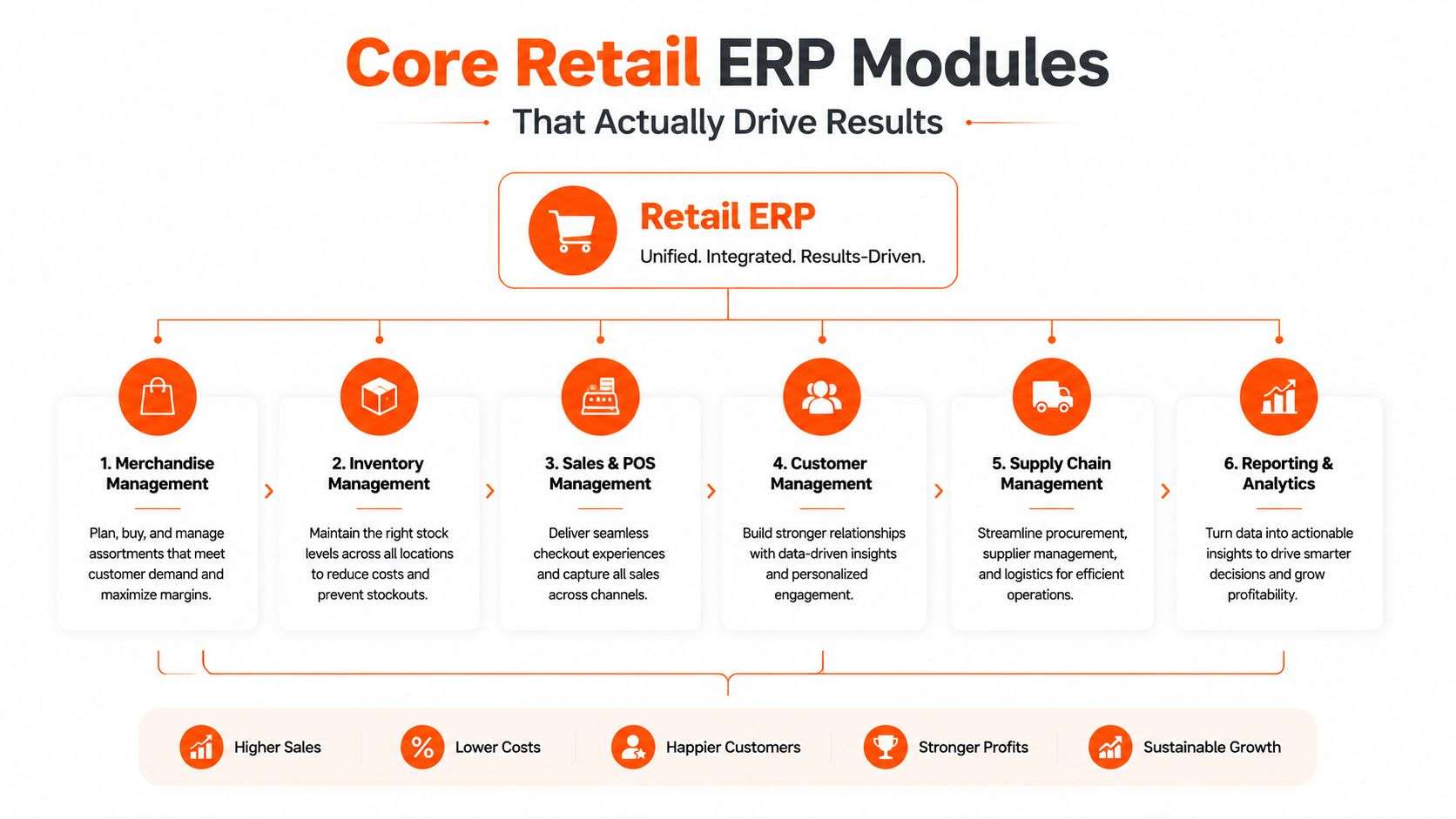
The core architecture should unify inventory, sales, warehousing, finance and customer data. An Australian wholesale and distribution implementation pattern also highlights EDI purchase orders, advance shipment notifications, invoicing, item maintenance and real-time inventory visibility across stores and warehouses, as described by Annexa's distribution solution overview.
Inventory and sales need to share events
Inventory management must distinguish on-hand stock, reserved stock, available stock, stock in transit and stock awaiting quality checks. That matters when an online customer sees a product that's physically present but already reserved for a store transfer.
A fashion example exposes the requirement quickly. The ERP should treat a style as a product family while preserving each size-colour combination as a sellable variant. Staff should be able to receive a carton, transfer selected variants between locations, process a return and see the resulting availability without editing a spreadsheet.
A retailer can also use inventory management for retail as a practical reference point when defining location, replenishment and stock-control requirements.
Purchasing turns demand into controlled action
Purchasing should combine reorder rules, minimum and maximum quantities, supplier lead times, open purchase orders and recent sales. A homewares retailer might configure a replenishment trigger for a fast-moving cookware line, but the buyer still needs approval controls for unusual demand, supplier constraints or seasonal ranges.
The module should create a recommended purchase order, not blindly buy every item below a threshold. Buyers need an exception queue that explains why the recommendation exists and lets them adjust it with an auditable reason.
Finance and fulfilment complete the loop
Finance should receive reliable order, refund, tax, payment and cost information. Warehouse workflows should cover receiving, putaway, picking, packing, dispatch, transfers and returns. POS integration then closes the operational loop by updating stock and revenue at the transaction point.
The nice-to-have list can wait. Advanced personalisation, complex loyalty logic or elaborate dashboards won't repair missing barcodes, unclear ownership or poor returns handling. Start with the workflows that prevent overselling and manual reconciliation.
Integrating ERP with Shopify and WooCommerce
Australian retailers commonly choose between Shopify and WooCommerce, so ERP integration needs to support the platform already generating demand. Shopify has 153,214 live stores and a 51.7% share across 296,288 tracked Australian online stores, while WooCommerce has 82,028 stores and 27.7%, according to Australian ecommerce platform data from Plug2Data.
Those platforms aren't interchangeable, and neither should be treated as the ERP. Shopify usually offers a more controlled commerce environment. WooCommerce gives developers deeper access to the WordPress application and database, but that flexibility creates more responsibility for plugin compatibility, security and release management.
| Integration Aspect | Shopify | WooCommerce |
|---|---|---|
| Product catalogue | Use Shopify product and variant identifiers, then map them to Odoo SKUs | Standardise WordPress, WooCommerce and ERP identifiers before synchronisation |
| Inventory | Push available-to-sell quantities from ERP, with clear reservation rules | Validate plugin and custom-code behaviour before enabling stock updates |
| Orders | Send paid, authorised and cancelled states through an agreed mapping | Account for gateway, plugin and custom checkout statuses |
| Fulfilment | Return shipment and tracking events to the storefront | Confirm that extensions preserve order and fulfilment data |
| Returns | Define whether Shopify initiates the return or Odoo controls the workflow | Avoid custom return logic that bypasses ERP stock movements |
| Maintenance | Prefer supported connectors or middleware with monitoring | Budget for testing after WordPress, plugin or theme changes |
Three integration patterns
A native connector is appropriate when product structures, order states and fulfilment rules are close to standard. It's faster to deploy, but it may not handle complex bundles, multi-warehouse allocation or unusual return paths without configuration.
Middleware works when the retailer needs transformation, routing, queues, retries, and monitoring across several applications. It adds a platform and another cost, but it can isolate ERP from storefront changes and make failures visible instead of dropping events.
Custom API development suits retailers with distinctive workflows, marketplace requirements or complex allocation logic. It provides control, but custom code becomes a product that must be documented, tested and supported. Retailers comparing platform economics should also review this TCO analysis for B2B platforms, because subscription cost alone doesn't represent integration and maintenance cost.
A disciplined Shopify implementation should make Odoo the source of truth for stock, purchasing and fulfilment, while Shopify owns the customer-facing browsing and checkout experience. A WooCommerce integration needs the same discipline, with extra care around plugins and custom statuses. An Odoo integration with Shopify should be designed around event ownership, not merely field matching.
Measuring ROI Beyond Cost Savings
The weakest ERP business cases promise savings without defining the operational problem. Retail leaders should build the case around what improves when the business has trustworthy data: fewer stock discrepancies, faster allocation, cleaner purchasing decisions, dependable fulfilment and better visibility of gross margin.
The Productivity Commission reports that retail payment systems save 46 million labour hours annually and deliver more than 50% cost efficiency versus cash transactions in its 2025 material. The same source reports that IT-enabled retail transformation, including point-of-sale stock monitoring and just-in-time inventory management, helped lift retail labour productivity by 93% between 1989–90 and 2013–14.
Those figures don't provide a guaranteed return for any individual retailer. They do support a practical conclusion: retail technology creates value when it connects the transaction to the stock position and the replenishment decision.
Build a baseline before selecting software
Measure the current process before configuring Odoo or another ERP:
- Inventory accuracy: Compare system availability with counted stock by location and product category.
- Stockout frequency: Record lost sales, substitutions and customer orders cancelled because stock wasn't available.
- Fulfilment quality: Track picking errors, partial shipments, late dispatches and incorrect collections.
- Buyer effort: Record time spent consolidating sales, checking supplier orders and correcting replenishment recommendations.
- Working capital: Review aged inventory, excess stock, stock in transit and purchase commitments.
Then assign ownership. The operations team should own stock accuracy. Ecommerce should own order-state quality. Finance should validate revenue and cost flows. Executives should review whether the combined improvements support growth and resilience.
Count benefits that don't appear as headcount savings
A reliable stock position can prevent an online oversell even when it doesn't reduce payroll. Automated replenishment can give a buyer time to negotiate with suppliers rather than copy product lines into purchase orders. Integrated returns can restore sellable inventory faster while directing damaged goods to the correct process.
Use conservative assumptions and separate hard savings from capacity gains. Document the source of each baseline, the process change that should create the benefit and the person responsible for measuring it after go-live.
Implementation Timeline and Phased Rollout Strategy
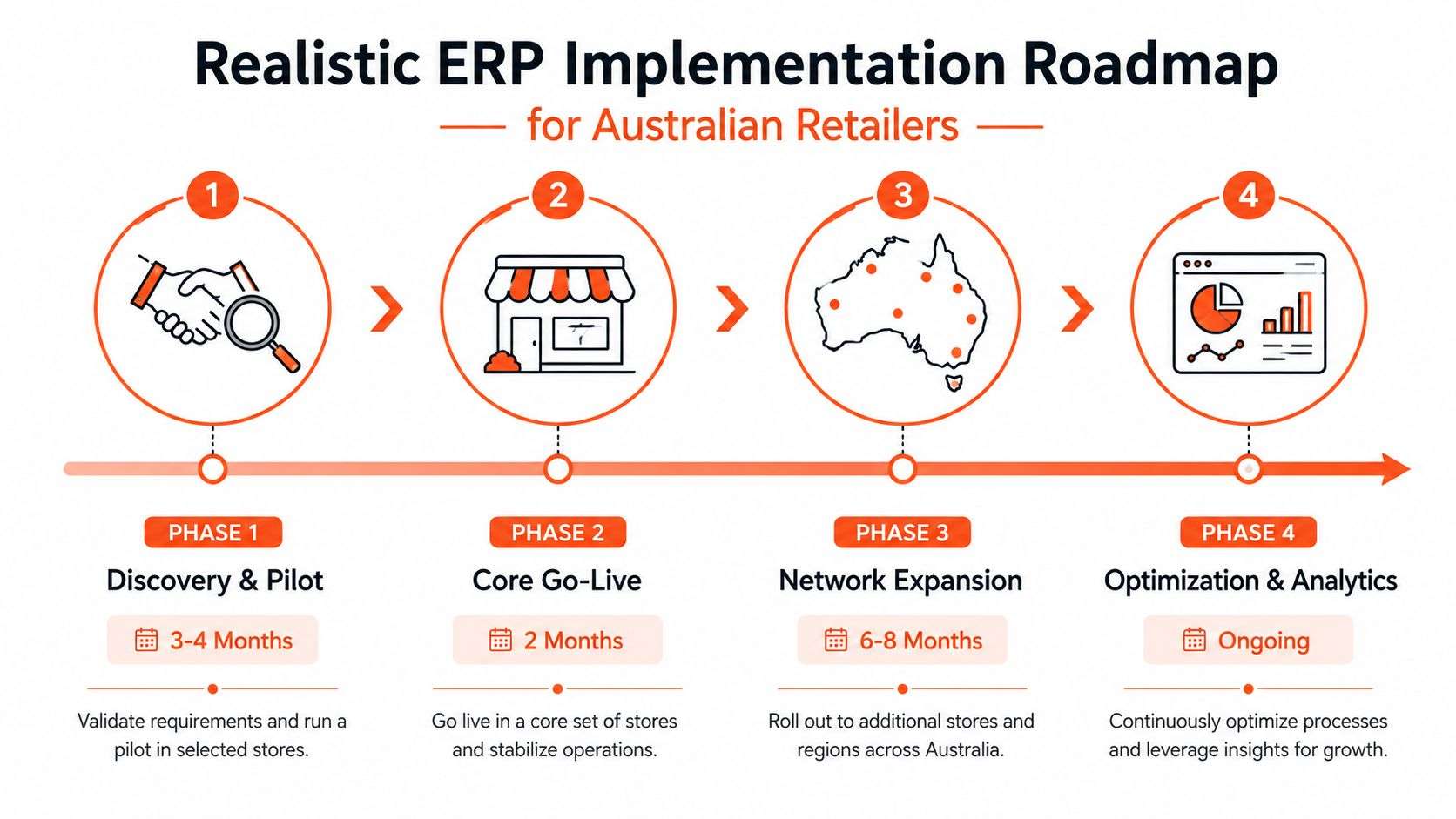
A retailer can have Shopify orders flowing correctly and still fail at receiving, replenishment or returns. Implementation must therefore change operating rules before screens are configured. Define how products are created, who approves purchases, when stock becomes available online and how exceptions are resolved across stores, warehouses and customer service.
Set the timeline according to data quality, integration complexity and the number of locations involved. Small and midsize businesses typically implement within three to nine months, while large businesses usually need six to 18 months. More than 50% of organisations choose a phased rollout, compared with about 21% using a big-bang approach, according to Australian ERP implementation data from ShopRank. Those figures are reference points, not a substitute for testing the retailer's actual workflows.
Phase one establishes control
Begin with financials, products, customers, suppliers, locations and inventory. Clean the catalogue before migration. Remove duplicate SKUs, assign barcode ownership, define units of measure and document how variants, bundles and kits behave.
Use a focused readiness checklist:
- Map ownership: Assign every important field and event to one system.
- Clean master data: Validate SKU, barcode, tax, cost and variant records.
- Test stock movements: Receive, transfer, sell, return, adjust and count representative products.
- Confirm financial mapping: Match payment methods, revenue accounts, tax treatment and refunds.
- Pilot narrowly: Select a representative store, warehouse or product range.
Do not connect every channel while these rules remain unsettled. A clean product record and reliable stock movement matter more than a large initial scope.
Phase two connects customer-facing channels
Add POS, Shopify or WooCommerce once stock and finance rules work in the pilot. Test paid, pending, cancelled, partially fulfilled, refunded and returned orders. Include store pickup, delivery, split shipments and stock allocation where those workflows apply.
Integration testing must cover timing as well as field mapping. Confirm what happens when Shopify or WooCommerce sends an order before the ERP receives a stock adjustment, payment confirmation or cancellation. Define which system owns order status, available stock and refund completion, then test duplicate messages and failed syncs.
Train staff on exceptions. Cashiers need a process for unreadable barcodes. Warehouse operators need instructions for short picks. Customer service agents need to see whether a refund has restored stock to sellable availability.
Phase three expands capability
Add advanced warehouse operations, demand planning, marketplace connections, EDI and analytics only after foundational flows remain stable through the pilot. Each extension adds failure paths, so assign an owner, test scenarios and a rollback plan.
Use an Odoo implementation partner when internal staff lack time to map processes, validate integrations or coordinate change across locations. The partner should document decisions and transfer knowledge rather than create an opaque dependency. Wistec's ERP system implementation service is one option for staged delivery.
Implementation advice: Go live with fewer modules and clean data before adding sophisticated automation. A workflow staff trust is more valuable than a broad configuration they routinely bypass.
Retail KPIs That Prove ERP Value
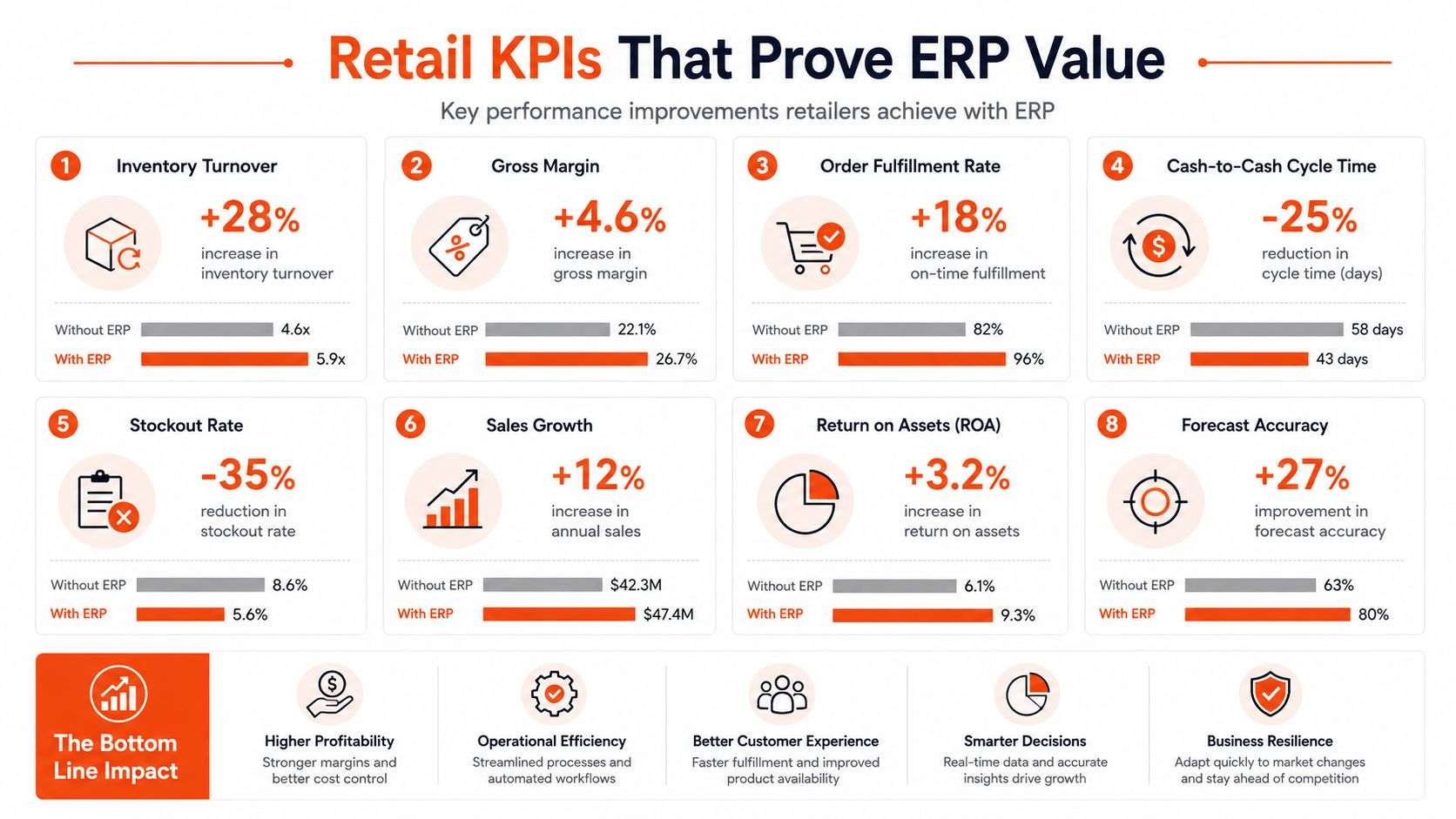
ERP value becomes credible when managers can connect a system capability to a retail outcome. Don't begin with a dashboard full of attractive charts. Begin with the decisions people make every day, then identify the metric that tells them whether the decision worked.
Inventory metrics reveal control
Inventory turnover shows how effectively the retailer converts stock into sales. Interpret it alongside margin, seasonality, supplier lead times and range strategy. A high ratio isn't automatically healthy if the business is understocked and losing sales.
Stockout rate is more actionable when segmented by channel and location. A product may be available nationally but unavailable to the customer's preferred store. ERP reporting should show the difference between no stock, reserved stock, stock in transit and stock that staff haven't processed correctly.
Carrying cost helps buyers discuss slow-moving stock in commercial terms. It should include the effects of storage, markdown exposure, financing and obsolescence, using the retailer's own accounting definitions.
Service metrics expose integration failure
Order fulfilment accuracy combines product, quantity, location and dispatch information. A high-level average can hide problems, so review errors by warehouse, carrier, product type and order source.
Returns are another useful test. Measure return authorisation time, inspection time, refund completion and the time taken to restore sellable stock. If the ERP records the financial refund but doesn't update inventory correctly, the customer process may look complete while the business remains operationally wrong.
Use a baseline and an owner
Before go-live, capture current values and definitions. After go-live, compare like with like and record the operational change that explains movement. Don't claim improvement because a new dashboard presents the data differently.
For digital sales, checkout performance still matters even when the ERP is functioning correctly. Retailers reviewing this area can use practical guidance on how to optimise checkout for higher sales, while keeping checkout ownership in the commerce platform and stock, fulfilment and financial ownership in the ERP.
A useful dashboard should answer operational questions quickly:
- What needs replenishment: Based on availability, demand and supplier constraints.
- What needs attention today: Exceptions such as failed synchronisation, short picks or unprocessed returns.
- Where stock is trapped: In transfers, reservations, receiving or quality inspection.
- Which channels are profitable: After discounts, fulfilment costs, payment fees and returns.
Common Misconceptions About Retail ERP
“ERP is only for large enterprise retailers.” A retailer doesn't need a national footprint to need controlled stock, purchasing and finance. Smaller chains often feel fragmentation more sharply because the same people perform buying, customer service, warehouse administration and reconciliation. A modular cloud platform such as Odoo can begin with core workflows and expand as locations and channels become more complex.
“Implementation always fails.” Poorly governed implementation fails. Common causes include unclear product ownership, untested returns, excessive customisation, weak staff training and a go-live date chosen before the data is ready. Phased delivery reduces the blast radius, but it doesn't remove the need for process decisions and operational testing.
“More integrations will fix our current tools.” Extra connectors can help when the underlying ownership model is sound. They won't fix duplicate SKUs, contradictory stock rules or an accounting process that relies on manual exports. Integration debt accumulates when every new requirement creates another script, spreadsheet or point-to-point dependency.
The big-suite fear is often misdirected
Retailers sometimes reject ERP because they assume every department must migrate at once. That isn't a sensible starting point. The better question is whether the first release controls the processes causing the most operational damage.
A mid-market retailer may keep Shopify as the storefront, retain a specialised payment service and use a carrier platform, while Odoo manages products, inventory, purchasing, order orchestration and finance. That architecture avoids overbuilding while creating a reliable operational backbone.
“ERP is too expensive.” The relevant comparison isn't the subscription against a spreadsheet. It's the total cost of disconnected systems, manual labour, missed sales, inaccurate purchasing, delayed financial visibility and integration maintenance. A disciplined business case should separate configuration, migration, training, support and future change.
“Customisation proves the system is flexible.” Custom code is justified when it protects a genuine competitive process or a necessary local workflow. It's a poor substitute for simplifying an unclear process. Configure standard Odoo behaviour where it fits, integrate adjacent tools where they have a clear role, and customise only where the business can explain the long-term value.
Frequently Asked Questions About Retail ERP
How long does Odoo implementation take for a 10-store retail chain?
There isn't a responsible universal answer. Scope, data quality, POS requirements, warehouse complexity, finance integration and Shopify or WooCommerce workflows determine the effort. Use the established Australian pattern as a planning reference, where small and midsize businesses commonly implement ERP within three to nine months, while larger businesses may need six to 18 months, according to the ShopRank implementation data.
Can we keep using Shopify while implementing ERP?
Yes. Shopify can continue to handle the storefront and checkout while Odoo becomes the operational source for products, stock, purchasing and fulfilment. Run controlled tests for order states, cancellations, refunds, returns, inventory reservations and shipment updates before enabling live synchronisation.
What's the difference between ERP and Shopify inventory management?
Shopify inventory management supports the commerce channel. Retail ERP connects inventory with purchasing, suppliers, warehouses, POS, finance, transfers, returns and wider customer operations. Shopify can remain the customer-facing system, but it shouldn't be expected to govern every back-office process in a multi-location retail business.
How should we migrate data from our current system?
Start with a migration inventory. Separate master data, open transactions, historical reporting requirements and records that can be archived. Clean product variants, barcodes, tax rules, suppliers, customers and locations before import, then reconcile opening stock and balances against signed-off source reports.
What support is needed after go-live?
Plan for monitoring, user support, integration alerts, reconciliation, security administration, report changes and periodic process reviews. The first support period should focus on exceptions, because failed webhooks, incorrect mappings and unusual returns usually appear after real trading begins. Document each resolution so the retailer becomes less dependent on individual staff members.
Wistec provides Odoo ERP implementation, integration and software development for Australian retailers, including Shopify and WooCommerce connections that align with operational workflows in Sydney and Adelaide. Visit Wistec to discuss your current stock, order and fulfilment gaps and plan a practical phased rollout.