

If your Shopify store is busy but your back office still relies on spreadsheets, you already know the pain. Orders flow smoothly through the storefront, but your team then spends hours reconciling stock, chasing customer details, and fixing fulfilment mistakes that should never happen.
This gap is exactly where Odoo integration with Shopify can transform the way your business operates. Shopify manages the selling, while Odoo ERP manages the operations behind it. Instead of moving data between disconnected systems, your team can use Odoo to centralise and control key business processes.
For Australian retailers, this separation makes a real difference. Managing multi-warehouse stock, GST-aware accounting, local fulfilment, and customer service becomes much harder when your systems don’t share accurate information. A well-planned Odoo implementation keeps your product, inventory, customer, and accounting data consistent, while Shopify remains the customer-facing channel that drives sales.
If you’re comparing Shopify implementation options or considering whether a separate WooCommerce stack could simplify your operations, start with one important question: which platform should own the truth, and which platform should present the sale?
The practical answer usually starts with a connector architecture, not a rebuilt storefront. That’s why so many AU businesses work with an ODOO partner Sydney Adelaide teams can trust, alongside software development Sydney Adelaide capability when the workflow needs more than a packaged app. For a broader view of the ERP side, see the way Wistec’s Odoo ERP software is positioned around operational control, not just data entry.
If you also track recurring revenue or subscriber behaviour, the storefront back end often needs the same discipline as analytics. That’s why a resource like best subscription analytics tools is useful context, because the integration isn’t just about syncing orders, it’s about getting dependable data into the right system before decisions are made.
Why Your Business Needs a Unified System
A growing Shopify business usually breaks in the same place, the team starts trusting screenshots more than the system. Sales staff see one stock figure, warehouse staff see another, and finance has a third version once refunds, payouts, and manual corrections have been entered. The business doesn’t need more heroics from the team, it needs one place where the operational truth lives.
That’s the logic behind Odoo–Shopify integration. The connector model links Shopify’s storefront activity with Odoo’s back-office processes for products, inventory, orders, customers, fulfilment, refunds, and payouts, using a two-way synchronisation model rather than a native built-in link, so Australian businesses can centralise operational data in Odoo while keeping Shopify as the primary sales channel. That structure is especially useful when the business runs multiple warehouses or depends on accounting-led reporting, because the operational view stays centralised instead of being scattered across apps. The Odoo App Store listing for the Shopify connector describes that broad sync coverage clearly, including returns, refunds, payouts, and customer data, which is exactly what you want when the back office matters as much as the storefront. Odoo Shopify connector overview

What disconnected systems cost you in practice
A retail team with disconnected systems ends up doing the same job three times. A customer places an order, someone copies it into the ERP, someone else adjusts stock, and someone in finance later reconciles the refund or payout. That workflow isn’t just slow, it creates avoidable errors, especially when a product has variants, multiple locations, or partial fulfilment.
The cleaner model is to let Odoo hold the catalogue and inventory truth, while Shopify handles the sale. In a user-obsessed operation, that means fewer “can you check this for me” moments and more time spent on orders that need judgement. It also gives your customer service team a single operational view, so they’re not trying to explain an order using fragments from different systems.
A practical example makes this obvious. A customer buys the last unit of a product in Sydney while the warehouse in Adelaide still has stock, and the team needs the right warehouse to receive the order without manual re-entry. With a unified system, that’s a routing problem the software can manage, not a fire drill the team has to solve.
Practical rule: if a person has to retype the same order more than once, the process is already too expensive.
The central idea is simple. Shopify should win on customer experience, and Odoo should win on operational control. If your business wants both, a unified system is the only setup that keeps the load on staff manageable as the catalogue, order volume, and warehouse complexity grow.
Choosing Your Odoo and Shopify Integration Path
Not every odoo integration with shopify should be built the same way. Some businesses need a connector they can switch on quickly, others need middleware, and some need a fully custom build because their fulfilment logic or accounting rules won’t fit a standard module. The wrong choice usually shows up later as maintenance pain, not on day one.
The four main paths
| Method | Best For | Avg. Cost | Flexibility | Maintenance |
|---|---|---|---|---|
| Odoo App Store connector | Standard retail and wholesale workflows | Lower | Moderate | Moderate |
| Middleware platform | Teams wanting faster rollout with less direct coding | Moderate | Moderate to high | Moderate |
| Custom development | Complex rules, bespoke fulfilment, special finance logic | Higher | High | Higher |
| API-based integration | Advanced control and tightly defined data flows | Higher | Very high | Higher |
An app-store connector is usually the fastest way to get value when the business process is fairly normal. The ecosystem has matured into repeatable deployments with modern Odoo versions such as v16+ and Odoo.sh, and the guides now describe OAuth, webhooks, and scheduled sync jobs rather than old manual data transfer patterns. That matters because the connector is no longer a one-off hack, it's an automation layer for orders, stock, customers, shipping, taxes, and fulfilment events. Shopify integration connector architecture
A middleware platform sits in the middle. It can be useful when you want to move quickly without commissioning a custom module immediately, especially if your team is already managing other apps in the same workflow. A custom API build gives you the most control, but it also creates the highest long-term dependency on whoever wrote it. For businesses with unusual warehouse rules or special accounting flows, that trade-off can still be worth it, but it shouldn't be chosen just because it sounds more advanced.
The constraint too many guides skip
A critical decision point is Odoo Online. Odoo's own forum states the Shopify connector is not possible in Odoo Online because Online doesn't support custom modules or third-party apps, which forces businesses to consider Odoo.sh or middleware instead. That's not a minor technical detail, it changes the entire architecture conversation before the first scope session starts. Odoo Online and Shopify connector limitation
If you're already on Odoo Online, don't assume a connector will magically fit. Decide whether you'll migrate, use middleware, or keep Shopify and Odoo more loosely connected for now. Teams that rush this step often discover the platform limitation after they've already committed time to configuration.
For businesses wanting broader web build support around the same integration, Wistec's web eCommerce development is the sort of service that can sit alongside ERP work when the storefront itself also needs attention.
The best path isn't the most technical one, it's the one your team can maintain without creating a second project every month.
Your Step-by-Step Implementation Blueprint
A rollout that works starts with access control and data mapping, not with sync buttons. In Shopify, create a custom app and grant only the scopes the integration needs, such as products, orders, inventory, customers, and fulfilments. That narrower permission set keeps exposure down while still allowing the connector to move the operational data your team relies on. Shopify custom app setup for Odoo integration
After the app is in place, add the access token in Odoo and test the connection before any live synchronisation begins. The mistake I see most often is teams pushing ahead with a full import before the store's warehouse structure has been mapped properly. If Shopify Locations are not matched to the right Odoo warehouses, inventory drift and misrouted fulfilment are likely in a multi-location Australian setup, especially when freight rules and stock handling differ across sites.
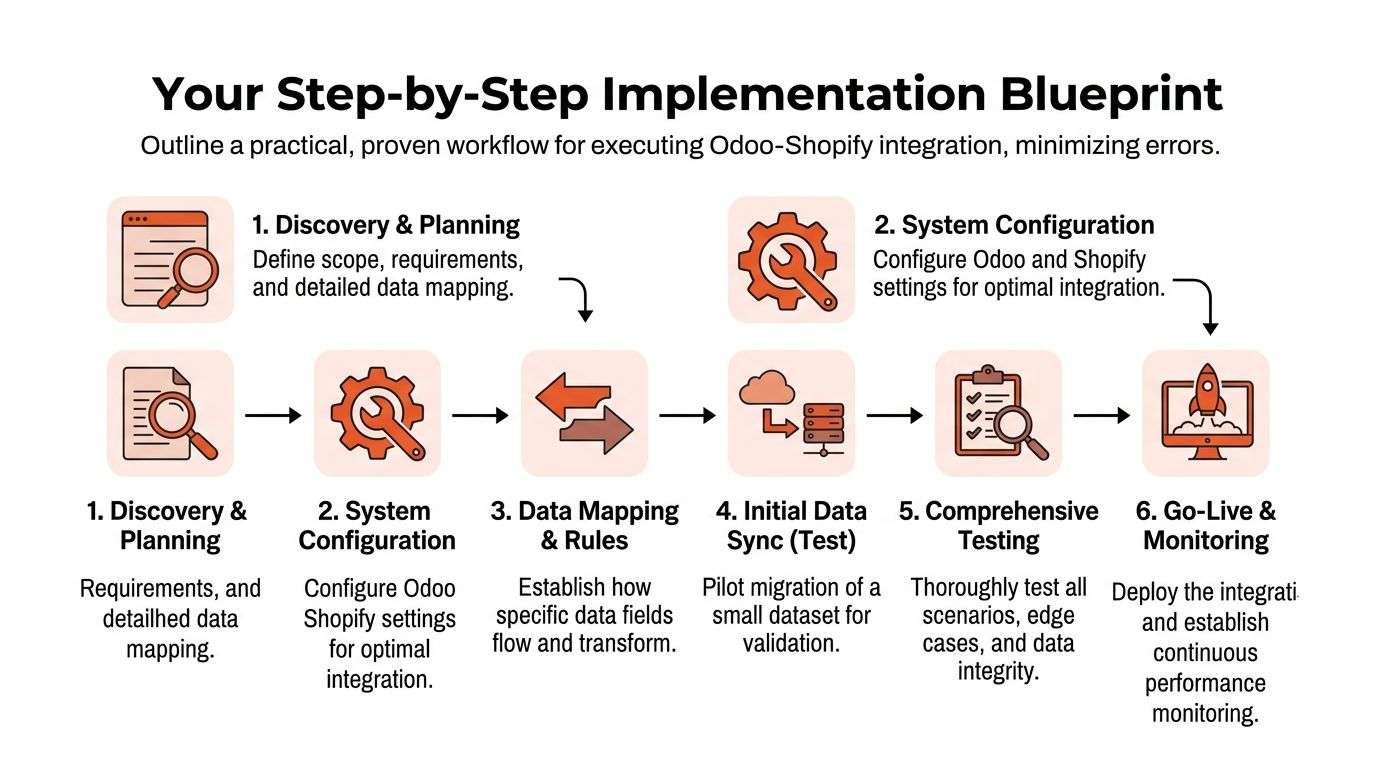
What the rollout should look like
The sequence matters more than many teams expect.
- Discovery and mapping first: Define which data belongs in Odoo and which data belongs in Shopify, then document warehouse and location relationships before any live sync begins.
- Shopify app creation next: Create the custom app in Shopify Admin, then grant only the required scopes for products, orders, inventory, customers, and fulfilments.
- Connector installation in Odoo: Paste the token into the Odoo connector and test the connection before importing data.
- On-demand import before automation: Run the first product import manually so you can confirm product logic, variants, and records are lining up correctly.
- Location-to-warehouse mapping: Match each Shopify Location to the correct Odoo warehouse before enabling live sync.
- Webhooks after validation: Turn on live webhook-based syncing once the data model is proven and the warehouse mapping is stable.
That order avoids rework. A six-step blueprint infographic outlining the professional workflow for integrating Odoo and Shopify business software systems. shows the same implementation flow, starting with tight API permissions and then moving through connection testing, initial import, and warehouse mapping before live sync is switched on.
For teams running POS and retail alongside online sales, the same discipline applies across channels. If the store, warehouse, and counter are not aligned, the integration turns into a patch rather than a system, which is why Wistec's POS software integration matters in wider retail architecture planning.
Mastering Data Sync and Automation Rules
The integration works only when each system has a clear job. Odoo should be the system of record for the product catalogue, inventory, and customer data, while Shopify should remain the source of truth for ecommerce transactions, with orders flowing from Shopify to Odoo via webhooks for fulfilment. That split keeps the storefront responsive without letting product control drift away from the ERP. Operational data flow between Odoo and Shopify
What should sync in which direction
Product information usually flows from Odoo to Shopify. If the catalogue is managed centrally in Odoo, changes to titles, variants, or inventory should publish outward so the storefront stays current without extra manual work. Orders should flow the other way, because Shopify is where the transaction begins and Odoo is where fulfilment, accounting, and stock reduction should happen.
My rule for clients: if a record can create accounting impact, it belongs in Odoo first.
That logic also keeps automation easier to reason about. A new product created in Odoo can be published to Shopify, then inventory changes can update the storefront in near real time. When an order arrives in Shopify, Odoo can create the picking operation and move the workflow towards fulfilment without someone re-entering the data by hand.
Automation rules that actually help
Well-designed rules should reduce manual decisions, not multiply them. For example, if a Shopify order is marked paid, the Odoo warehouse can generate the picking step immediately, which is a simple way to cut delay between sale and dispatch. If inventory levels change in Odoo, Shopify should be updated automatically so customer-facing stock remains honest.
This is also where customer service automation can sit beside ERP automation. If your team wants to reduce repetitive front-line queries, a resource like AI chatbots for Shopify customer service can complement the integration by handling routine customer interactions while Odoo and Shopify keep the operational records clean.
For implementation teams working in both retail and warehouse environments, the same data discipline applies across all channels. I've seen this approach work cleanly in eCommerce and in WooCommerce projects too, because the principle doesn't change, define the source of truth first, then automate around it.
Best Practices for a Bulletproof Integration
A reliable integration starts with validation, not optimism. The strongest setups do more than move data, they confirm that each record is authentic, matched correctly, and handled the same way every time. That difference matters in Australian operations where warehouse mistakes, refund delays, and stock mismatches quickly become support calls, backorders, and accounting cleanup.
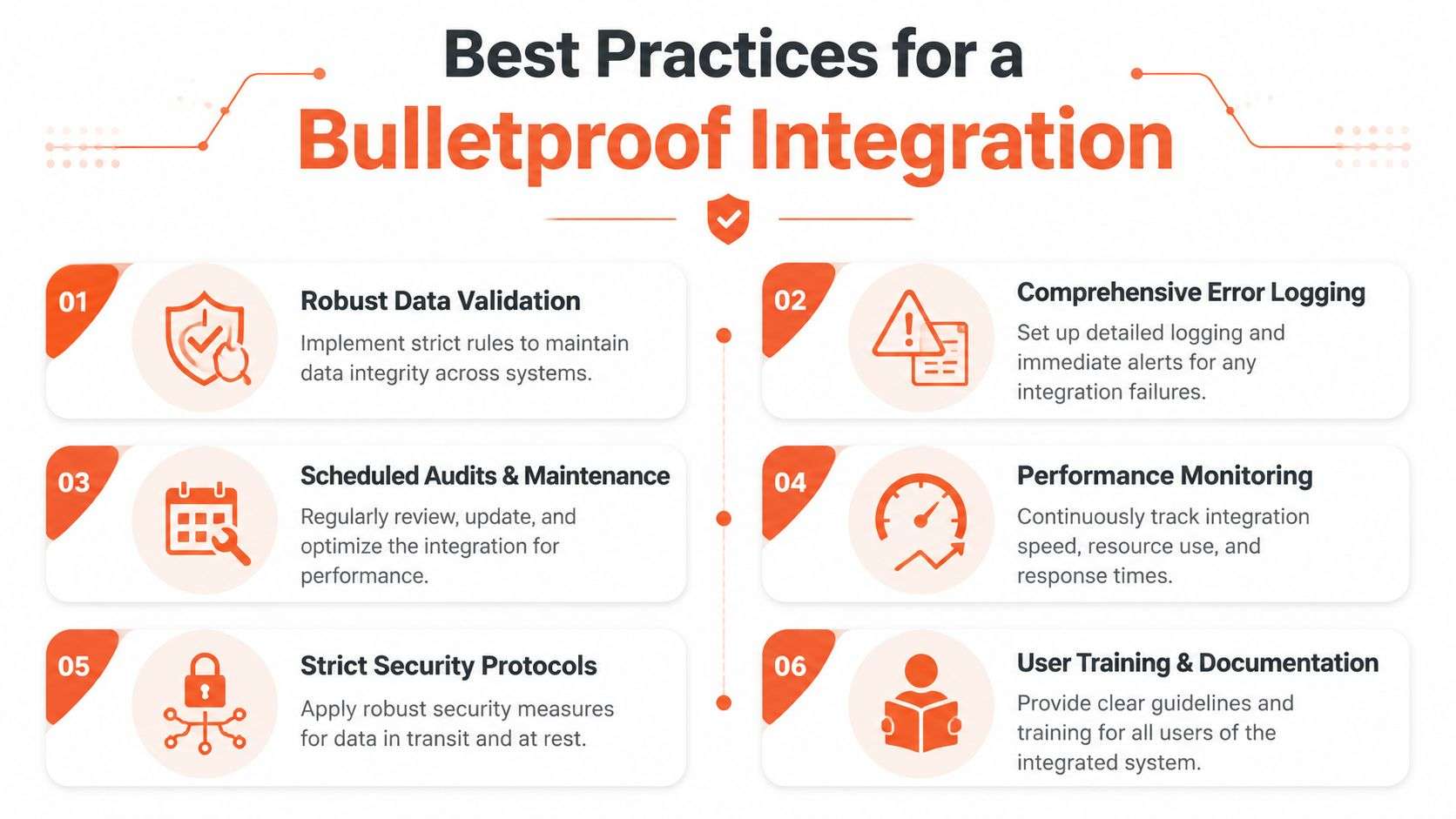
Security and identity checks
Webhook integrity is the first hardening step many teams skip. Configure order, refund, and fulfilment webhooks, verify HMAC signatures on every callback, and keep the logic idempotent so the same event does not create duplicate updates if Shopify sends it more than once. Common failure modes include missing or repeated order changes when events like orders/updated or refunds/create are not processed properly. Webhook integrity and SKU parity guidance
SKU matching needs the same discipline. Odoo's default_code should align with Shopify variant SKUs, because the sync depends on those values being identical. If the codes do not match, the system cannot confidently update the correct product, and the error often looks like a stock issue when it is really a mapping issue.
What to test before go-live
- Order creation: Place a real test order and confirm it lands in Odoo with the correct customer and line items.
- Inventory updates: Change stock in Odoo and verify the Shopify quantity updates cleanly.
- Refunds and fulfilment: Process each scenario and check the status movement in both systems.
- Variant matching: Confirm each Shopify variant points to the correct Odoo product record.
- Warehouse routing: Validate that each Shopify Location is still mapped to the correct Odoo warehouse.
- Error handling: Make sure failed syncs are logged clearly enough for staff to act on them.
The technical result can be near-real-time sync, but only when the mapping is complete and the webhook endpoints are registered correctly. Connector documentation and implementation guides describe sub-5-second propagation as achievable in practice, yet that only holds when the integration is configured properly and the event handling is clean. For teams that want to check implementation patterns against current connector behaviour, the guidance in Shopify's developer resources also helps frame what a reliable webhook flow should look like. Shopify webhook best practices
For teams in Sydney and Adelaide looking for implementation support, an ODOO partner Sydney Adelaide with software development Sydney Adelaide capability proves useful, because the work is not just installation, it is validating that the business rules survive real orders, refunds, and warehouse pressure.
Frequently Asked Questions about Odoo and Shopify
Can Odoo and Shopify work together without custom development
Yes, but the path depends on your Odoo deployment and how complex your business rules are. A connector is usually the cleanest option when you want standard product, inventory, order, and customer sync, but Odoo Online is a blocker for many connector approaches because it doesn't allow custom modules or third-party apps.
What should be the source of truth in an integration
In most retail cases, Odoo should own product data, inventory, customer records, and accounting-related information. Shopify should own the transaction moment, meaning the order starts there and then moves to Odoo for fulfilment and back-office processing.
Why is warehouse mapping such a big deal
Because a Shopify Location that isn't matched to the right Odoo warehouse will eventually create inventory drift. The stock may look right in one system and wrong in the other, and once that happens, fulfilment errors follow.
Is Odoo Online suitable for Shopify integration
Not when you need the official connector style deployment described in the Odoo forum. If your business is on Odoo Online, the practical path is usually to consider Odoo.sh or middleware, then decide whether your team wants a deeper integration or a lighter connection.
What usually causes sync failures
The most common causes are missing SKU parity, incomplete variant mapping, unregistered webhooks, and idempotency issues. If the connector can't confidently match a Shopify item to the correct Odoo record, it will either fail unnoticed or create duplicate confusion for the operations team.
Should customer records sync before orders
In practice, yes, because customer and product references need to exist before historical or live orders can be matched cleanly. A staged implementation, customer data first, then products and variants, then order history, is the safer sequence for preserving referential integrity.
How do I know which integration path fits my business
If your workflow is standard, a connector usually makes sense. If you have unusual finance rules, multiple warehouse exceptions, or custom warehouse logic, a middleware or API-based approach may be a better long-term fit.
Conclusion Your Next Steps with Wistec
A good odoo integration with shopify does more than sync data. It gives your business one operational truth, reduces manual re-entry, and lets your team spend time on orders and customers instead of cleaning up system conflicts. That's why the right answer isn't “connect everything”, it's “connect the right things in the right order”.
The main decision is architectural. If you're on Odoo Online, the integration path is constrained. If you're on Odoo.sh or considering a migration, you have more control over the connector, the automation rules, and the warehouse logic that makes the whole setup reliable in an Australian retail environment.
For businesses that need an Odoo implementation done properly, Wistec handles the practical mix of ERP configuration, shopify implementation, and supporting software development Sydney Adelaide work. As an ODOO partner Sydney Adelaide businesses can work with, Wistec focuses on making the integration operationally sound, not just technically connected.
If you want your Shopify and Odoo systems to work as one business process instead of two disconnected tools, Wistec can help plan, build, and refine the setup around your actual warehouse, accounting, and fulfilment needs. Visit Wistec to discuss an integration approach that fits your store, your operations, and the way your team really works.