

A customer finds the exact size she needs, pays, and gets a confirmation email. Two hours later your team cancels the order because the warehouse never had that stock. She doesn't blame your spreadsheets or your sync schedule. She blames your store, and she's already looking for a competitor who won't waste her time.
That's a USER OBSESSED MINDSET problem, not just a technical one. Good ERP eCommerce integration starts from what the buyer experiences and works backwards to the systems that must keep that promise.
Why ERP eCommerce Integration Matters
The cancellation above usually isn't caused by a broken website. It's caused by two systems telling different stories. The storefront showed available stock based on a file exported yesterday. The Odoo ERP showed that same stock reserved for a wholesale order, damaged, or sitting in a location that doesn't fulfil online orders. Staff discover the mismatch only after payment, when the cheapest fix is an apology and a refund.
That pattern repeats in other forms. A price changes in the ERP but not online. A customer updates her address at checkout but dispatch uses the old one. Finance can't match a payment to an invoice because the order reference changed between systems. Each issue looks small in isolation. Together they train customers not to trust what your store says.

Think of Two Offices That Must Agree
A useful analogy is two offices working from one set of facts. Your storefront is the front office. It presents products, takes orders, accepts payment, and answers the customer's first questions about availability and delivery. Your ERP is the back office and warehouse combined. It controls purchasing, stock movements, picking, invoicing, and reporting.
When those offices pass notes by hand, someone eventually copies a number wrong or works from an old note. ERP eCommerce integration replaces the hand carried notes with agreed, automatic handoffs. It forces you to decide which office is authoritative for each fact, instead of letting both edit everything and hoping they stay aligned.
Practical rule: If two systems can both change the same record, you don't have integration yet. You have two competing versions of the truth waiting for a busy day to diverge.
Connection Is Not the Same as Synchronisation
Teams often use three different ideas as if they're interchangeable. They're not, and confusing them leads to disappointing projects.
- Connection: Systems can exchange data at all, for example an order file moves from WooCommerce to Odoo once a day.
- Synchronisation: Shared records are kept aligned on an agreed schedule and direction, so product and stock data don't drift apart.
- Process integration: A complete business process runs across both systems, from checkout through reservation, picking, shipment, invoicing, and any later return or refund.
A connection can be live while the process is still broken. Orders may arrive in the ERP, but if stock isn't reserved, taxes don't map correctly, and shipment status never returns to the storefront, staff still do the work manually. Judge a project by the completed process the customer feels, not by whether an API call succeeded in a test.
Decide the System of Record Before You Build
There's no universal ownership table that fits every retailer, manufacturer, and wholesaler. There is, however, a set of decisions you can't skip. Write them down before development starts.
- Products and variants: Usually created once in the ERP or a product system, then enriched for selling online.
- Prices and taxes: Often governed by the ERP, especially where customer specific pricing or complex tax rules apply.
- Stock: The ERP and warehouse should own physical and reserved quantities, while the storefront displays what's available to promise.
- Customers and orders: The storefront captures them, the ERP validates and fulfils them, and both need a shared reference so support can trace one order end to end.
- Financial entries: Invoices, payments, credits, and adjustments belong in the ERP accounting records, not recreated from storefront reports.
Your answers may differ where, for example, marketing owns rich product content that the ERP was never designed to hold. That's fine. What matters is that staff, developers, and your ODOO partner Sydney Adelaide or platform specialist are all working from the same written decision, not from assumptions discovered during testing.
Why the Timing Matters in Australia
The scale of Australian online retail leaves little room for once a day reconciliation. Australia Post reported that Australian households spent more than A$69 billion online in 2024, up 12% year on year, while 9.8 million households participated in online shopping. At that volume, a stale stock file doesn't create one awkward cancellation. It creates a queue of them during every promotion.
Start your own assessment with three questions. Where do customers see information your operations can't support? Which records do staff retype between systems today? Which exceptions, such as backorders, split shipments, and returns, have no agreed owner? The answers tell you whether you need a simple connection, a redesigned workflow, or better data governance underneath both.
Compare Integration Architectures and Middleware
The cheapest integration on paper is often the most expensive one you own. A quick point to point script may move orders on day one, then fail unnoticed after a plugin update, with no retry queue and no one alerted. Architecture choice is really a choice about who maintains mappings, who sees errors, and how painful change will be in two years.
The Main Options in Plain Terms
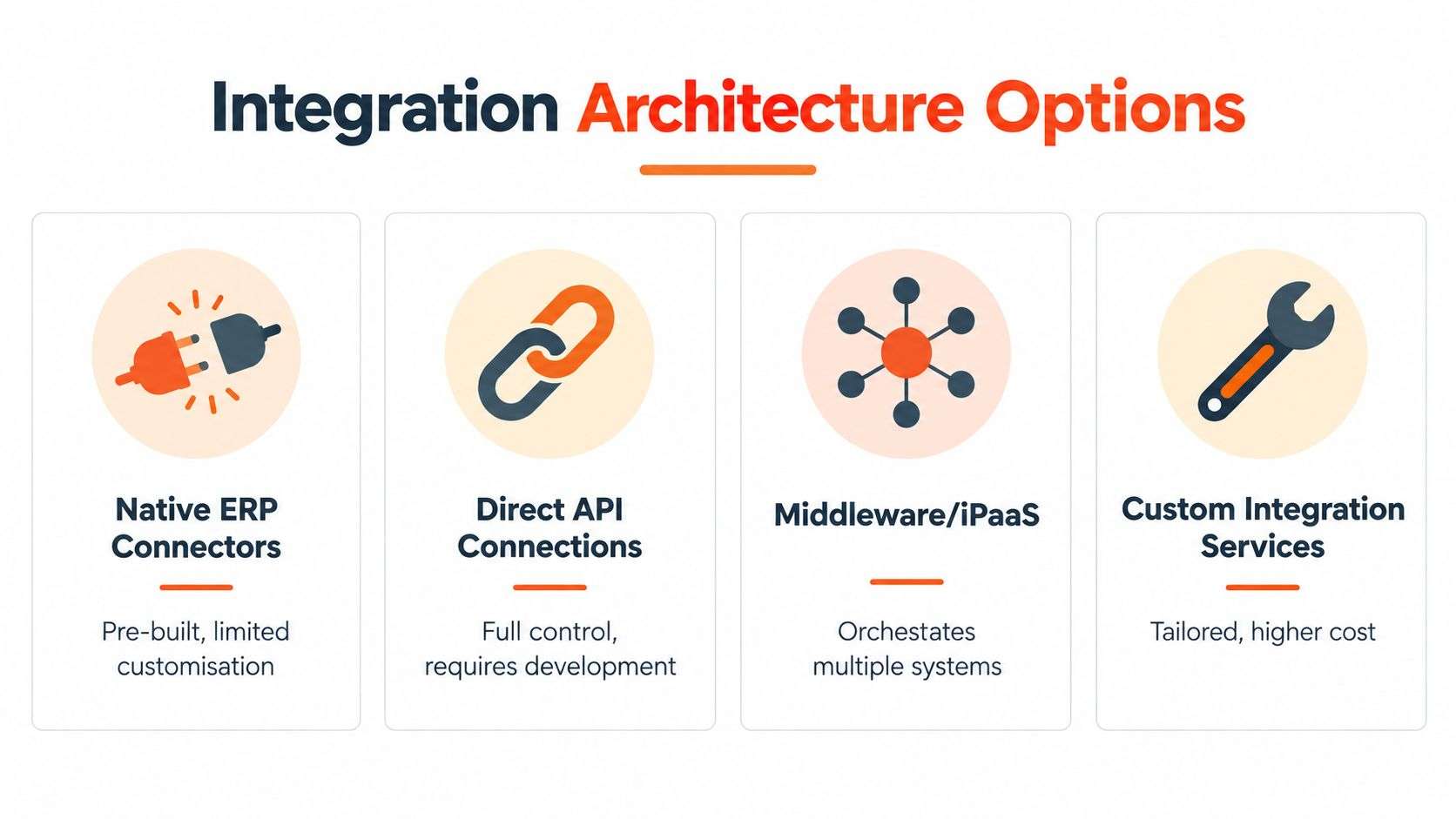
Native ERP connectors are prebuilt for a specific platform pairing. They're the fastest route when your processes are close to standard, but you'll work within the connector's assumptions about taxes, stock locations, and order states. Test your exceptions against those assumptions before you commit, not after.
Direct API connections give your developers full control over timing and business logic. That control suits a stable, well documented process with unusual rules. It also means your business owns monitoring, error handling, and every future API change. Teams undertaking software development Sydney Adelaide businesses rely on should budget for that ownership explicitly.
Middleware or iPaaS places a managed layer between systems to orchestrate flows, transform data, queue retries, and centralise logs. It earns its cost when you're connecting several channels, marketplaces, warehouses, or a finance system alongside the store. It adds another vendor and subscription to govern, so it isn't automatically justified for one simple store.
Custom integration services build flows where standard connectors can't represent your pricing, manufacturing, or fulfilment rules. They offer the closest fit and the highest responsibility for documentation and upgrade testing.
Match the Architecture to a Real Case
A small WooCommerce catalogue selling from one warehouse, with standard pricing and no marketplace channels, can often run well on a proven connector, provided someone checks its error log daily. Adding middleware there may buy complexity you never use.
A multi channel Shopify operation is different. Orders, returns, and stock need to stay consistent across the store, physical locations, and marketplaces, so central orchestration and visible retries protect you during peak trading. A complex Odoo implementation, where manufacturing and purchasing determine what's available to sell, may justify custom logic around availability rules even if the basic order flow uses a standard connector.
Don't ask which option is best in general. Ask who will notice at 7am on a Monday when orders stop flowing, and how they'll know.
Manual bridges, such as exported spreadsheets and rekeyed orders, still count as an architecture, just one staffed by people. They're defensible at very low volume for a short period. They become indefensible once they set customer expectations the business can't reliably meet.
Trace Data Flows and Synchronisation
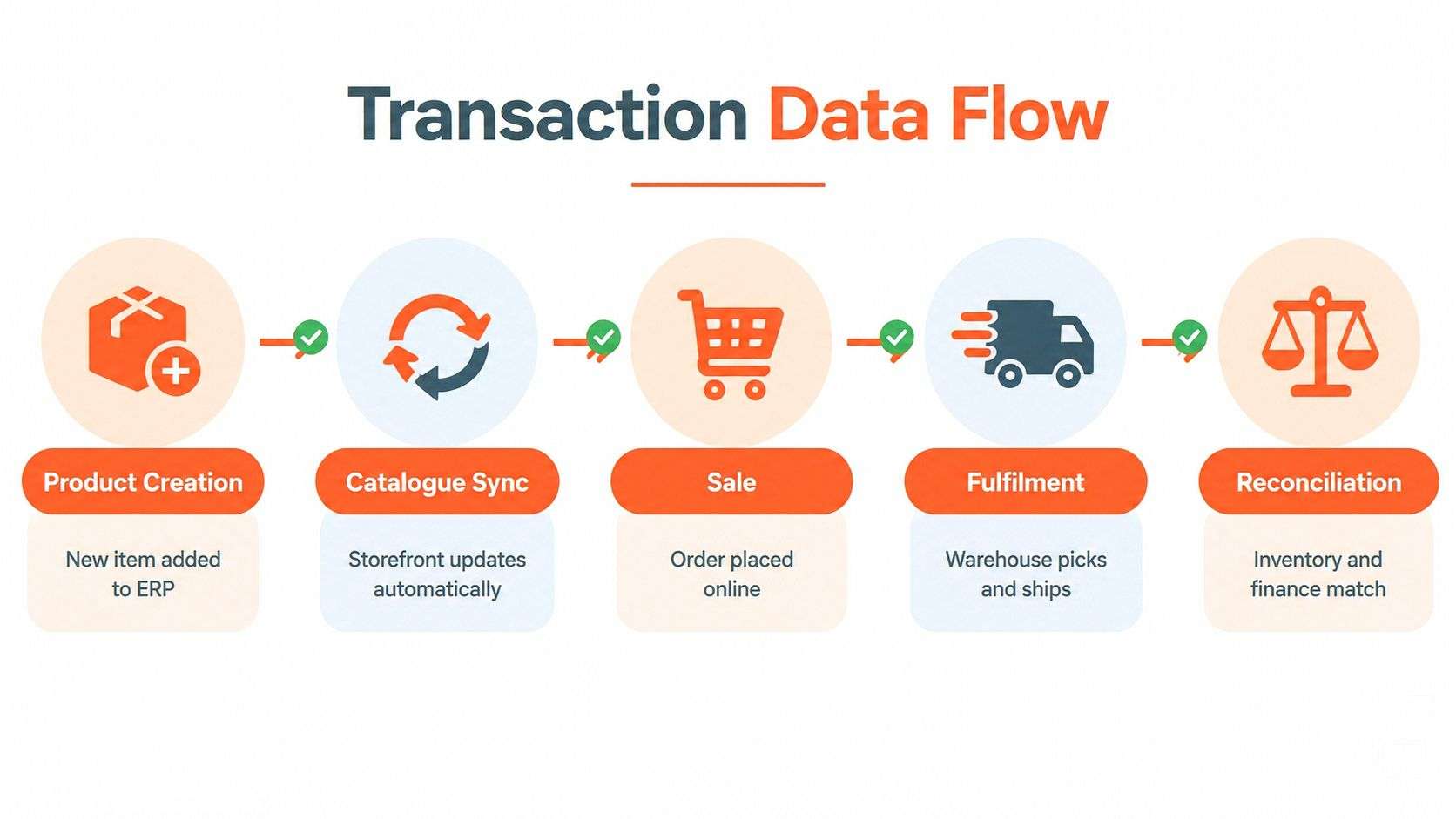
Follow one transaction and most integration weaknesses reveal themselves. A product is created, priced, published, sold, picked, shipped, invoiced, and sometimes returned. At each step a different record changes hands, and the receiving system needs to confirm it accepted that change. Without acknowledgements, you're assuming delivery rather than verifying it.
What Moves and in Which Direction
Products, prices, and available stock generally flow from Odoo ERP to the storefront. Orders, customer details, and payment references flow back. Shipment confirmations, tracking, cancellations, and refund outcomes then update the customer's view. Taxes and freight charges need explicit mapping at both ends, because a correct order total can still produce an incorrect invoice if components are classified differently.
Each entity deserves its own frequency. Catalogue descriptions rarely need instant updates. Stock availability and order transfer usually do need to be near real time, because delay there is immediately visible to buyers. Real time never means instant anyway. It means fast enough, with queuing and retries, that normal trading doesn't create conflicts.
Design for Conflicts and Retries
Two controls prevent most silent damage. Idempotency means that if the same order message is sent twice after a timeout, the ERP creates one order, not two. Concurrency handling means that when a warehouse adjustment and a web sale touch the same stock record at once, you have a rule for which update wins and how the loser is reported.
Identifier discipline underpins both. Use a stable product key across systems, keep units of measure consistent, and distinguish physical stock, reserved stock, and stock available to promise. The value of that discipline is documented by GS1 Australia, which reports standards based implementations can raise inventory accuracy from 63% to 95%, reduce out of stocks by 50%, and increase counting throughput from roughly 200 to more than 12,000 items per hour. Those gains come from trustworthy identifiers and events, not from syncing bad data faster.
Use a Split Shipment as Your Stress Test
Take an order for three items where two ship today and one ships next week from another location. The storefront must show a partial shipment, not mark the whole order complete. The ERP must keep the third item reserved or backordered, invoice according to your policy, and release stock correctly if the customer cancels the balance. Finance, support, and the customer should all be able to reconstruct the same story.
If your design handles that sequence cleanly, everyday orders will feel easy. For warehouse depth behind these flows, review how warehouse management and ERP systems coordinate stock movements before you finalise mappings.
Choose Shopify, WooCommerce or Odoo
Platform selection goes wrong when it's treated as a website decision isolated from operations. You're choosing who maintains the storefront, how much customisation you'll govern, and how commerce data will reach inventory, fulfilment, and finance. A Shopify implementation, a WooCommerce build, and an Odoo commerce rollout distribute that responsibility very differently.
The operating context keeps growing too. The ABS reported seasonally adjusted online retail sales of A$4.537 billion in April 2025, rising 7.3% from April 2024, and A$4.704 billion in June 2025, with 13.0% year on year growth. Whichever platform you pick must hold up as order volume and channel count rise, not just look good at launch.
Commerce Platform Integration Comparison
| Consideration | Shopify | WooCommerce | Odoo |
|---|---|---|---|
| ERP fit | Connects to an external ERP through connectors, APIs, or middleware | Connects through plugins, APIs, or custom development | Commerce can sit inside the broader Odoo ERP environment |
| Customisation | Strong within platform patterns and apps | Highly extensible, with more responsibility on your team | Process customisation across sales, stock, manufacturing, and accounting |
| Operational ownership | Platform handles much of the storefront infrastructure | You govern hosting, plugins, updates, and security patching | You govern the integrated business processes and configuration |
| Best suited to | Retailers prioritising a managed storefront and proven checkout | Businesses wanting control over the site and content model | Businesses wanting commerce tied closely to back office operations |
| Watch out for | App and connector assumptions that don't match ERP rules | Plugin conflicts and inconsistent customisations | Treating Odoo implementation as only a website project |
Shopify suits teams that want the storefront largely managed while integration concentrates on stock, orders, fulfilment, and finance. Delivery experience still needs deliberate design, and Routelink's Shopify integration guide is a useful companion when you're mapping how delivery promises and updates reach the customer.
WooCommerce suits businesses that value control over content, checkout behaviour, and extensions, and that can govern updates and custom code properly. Odoo suits businesses where the hard problems are operational, such as manufacturing lead times, complex stock, or multi step fulfilment, because commerce decisions can be designed alongside those processes.
Geography doesn't change the architecture, but local workshops help when warehouse and finance staff need to test real scenarios together. Whether you engage an ODOO partner Sydney Adelaide team, a Shopify specialist, or a WooCommerce developer, ask each one the same questions about system of record, exception handling, monitoring, and upgrade ownership. Compare the answers, not the sales presentations.
Secure Data and Meet Compliance Obligations
Security added the week before launch is mostly theatre. By then credentials are already shared, webhooks already accept unsigned messages, and nobody knows which plugins touch order data. Build controls into the integration design while you're mapping flows, when they're cheap to add and easy to test.
Controls That Belong in the Design
- Least privilege credentials: Give each connection only the access its flow needs, so a compromised storefront key can't rewrite accounting records.
- Webhook validation: Verify that order and payment notifications came from the platform before acting on them.
- Audit trails: Retain who or what changed a price, stock figure, or refund, and when, so disputes can be resolved from evidence.
- Dependency inventory: Record every connector, plugin, and library in the chain, with an owner responsible for patching it.
- Tested recovery: Practise restoring service and reconciling orders after an outage, including offline procedures staff can follow.
These aren't abstract precautions. Australia introduced mandatory ransomware reporting on 30 May 2025 for businesses with annual turnover of at least A$3 million and certain critical infrastructure entities. Your escalation path and evidence trail need to exist before an incident, and the detailed guidance on data privacy and compliance obligations for Australian businesses is worth working through with whoever owns risk in your organisation.
Turn Consumer Remedies into Workflow Requirements
Australian Consumer Law obligations become integration requirements the moment a customer reports a faulty or misdescribed product. Your Shopify or WooCommerce return shouldn't sit in an inbox. It should create a return authorisation or service case in Odoo ERP, guide warehouse receipt and inspection, calculate the correct refund or arrange the replacement, and post the accounting adjustment.
Change of mind returns and faulty goods follow different remedy and approval paths, so the workflow needs to distinguish them at intake. Test partial refunds, shipping charge refunds, replacements, delayed delivery, and cancellations as named scenarios with expected outcomes. This article isn't legal advice, and businesses with complex obligations should confirm their approach with a qualified adviser. What integration can do is make the agreed compliant process the easiest one for staff to follow every time.
A policy page doesn't protect a customer. A tested workflow that produces the right remedy, refund, and record does.
Learn From Practical Integration Cases
Feature lists tell you what software can do. Worked cases tell you whether your design survives contact with real orders. The scenarios below are representative patterns drawn from common Australian retail and manufacturing operations. Use them as acceptance tests, not as promises about any specific business outcome.
A Shopify Order From Payment to Ledger
A customer pays for two products held at one warehouse. The order flows to Odoo, which validates the customer, reserves stock, and creates a picking task. The warehouse picks and packs, shipment confirmation and tracking return to Shopify, and the customer sees progress without contacting support.
Finance then invoices from the fulfilled order and matches the payment reference captured at checkout. Your acceptance test should prove that a failed order transfer is retried and alerted, that a cancelled order releases its reservation, and that support can trace the whole journey using one reference in both systems.
WooCommerce and the Two of Three Problem
A buyer orders three units. The warehouse has two. Without an agreed rule, staff improvise, and customers get inconsistent treatment. Define the rule in advance and build it into the integration.
You might ship two and refund one, hold the order and contact the customer, or offer a substitute. Any of those can be right for the right business. What's never right is letting the storefront promise three, the ERP ship two, and the customer discover the difference at the door. Test the chosen rule with warehouse and support staff watching the records it creates.
Odoo Manufacturing Behind the Storefront
A manufacturer sells a finished product online, but availability depends on components and production capacity. Showing only finished stock understates what can be promised, while ignoring component shortages overstates it. In an Odoo implementation, the available to promise logic can consider finished goods, planned production, and component constraints, then present a realistic lead time online.
Your test case should remove a key component and confirm the storefront promise changes before anyone can buy against it. That single test protects customers from delays your production team already knew about.
The Return That Tests Everything
Returns expose whether integration covers the full customer lifecycle. An October 2025 Australian retail analysis estimated an A$20 billion reverse logistics challenge, with return processing costing 20 to 65% of an item's original value and fashion return rates reaching 30%. An integration that automates outbound orders but leaves returns to email and spreadsheets can grow revenue while steadily eroding margin.
Trace one return through authorisation, freight, receipt, inspection grading, refund timing, and the decision to restock, refurbish, discount, or write off. The ERP should hold that record because each outcome changes stock value and accounting treatment. If your team can't run that scenario end to end in testing, you're not ready to scale the outbound flow either.
Calculate Costs and Build a Credible ROI Case
Most integration budgets fail because they price the visible build and ignore the work around it. Licences and developer hours are easy to quote. Data cleansing, exception design, testing, training, and monitoring are where dependable systems are made, and where underfunded projects start cutting corners they will repay later in support tickets.
Build the Full Cost Picture
Structure your estimate in layers so decision makers can see what they're approving and what happens if a layer is reduced.
- Platform and connector costs: ERP and commerce licences, connector or middleware subscriptions, and any marketplace or shipping services in scope.
- Design and build: Process mapping, system of record decisions, data mapping, configuration, and custom development for rules standard tools can't express.
- Data preparation: Removing duplicate products and customers, fixing units of measure, and standardising identifiers before they're synchronised everywhere.
- Security and testing: Access design, webhook validation, end to end scenario testing, and recovery rehearsal.
- People and change: Training warehouse, finance, and support staff, documenting exceptions, and covering the slower period while new routines settle.
- Run and improve: Monitoring, mapping changes for new channels, upgrade testing, and periodic review of failed syncs and exception rates.
For a structured view of how these layers affect an ERP budget, work through the ERP implementation cost breakdown alongside your own estimates. Hidden costs deserve named lines too. Brittle custom code, licence lock in, stale stock during transition, and returns handled outside the integrated workflow all consume money whether or not they appear in the project plan.
Quantify Benefits Without Inventing Them
A credible ROI case measures your current operation first. Count the hours staff spend rekeying orders, reconciling payments, and correcting stock. Record how many orders are cancelled or partially refunded because availability was wrong, and how long support takes to answer a basic where is my order question.
After launch, measure the same things. Avoided manual work, faster fulfilment, fewer overselling incidents, cleaner reconciliation, and more consistent service are legitimate benefit categories, but only your baselines turn them into defensible numbers. Resist vendor supplied savings percentages that weren't derived from your volumes and processes. Finance will trust a modest, measured case over an impressive borrowed one.
Finance test: If a benefit can't be tied to a baseline your own team measured, present it as a qualitative improvement, not a dollar figure.
Opportunity cost belongs in the discussion as well. Every month spent maintaining a fragile manual bridge is a month not spent opening a new channel or improving delivery options. Frame delay as a cost with operational consequences, while keeping it separate from hard savings.
Turn the Case into a Phased Roadmap
Approval should lead to a sequence that reduces risk at each step. Start with discovery, where process owners from sales, warehouse, finance, and support agree the system of record decisions and exception rules. Follow with data mapping and security design, then connector configuration or custom build in a test environment using realistic products, prices, and customers.
Pilot with a limited catalogue or channel before full launch. During the pilot, reconcile every order daily and log every exception, because that log becomes your improvement backlog. Expand only when stock accuracy, order creation, and financial posting are boringly reliable.
Define acceptance tests in writing before go live. Cover stock reservation, split shipment, cancellation, backorder, payment mismatch, partial refund, full return with inspection, and recovery from a failed sync. Each test needs an expected customer visible outcome and an expected ERP record, signed off by the team that owns that process.
Version your mappings, keep reusable test data, and review integration dashboards as part of normal operations, not only after complaints. Businesses comparing paths can discuss their specific processes with Wistec, which provides Odoo implementation, Shopify implementation, WooCommerce integration, and custom software development Sydney Adelaide companies use to connect commerce with operations. Bring your exception list to that conversation. It reveals more about the right architecture than any catalogue size or order count.
Answer Common ERP Integration Questions
Which Approach Works for Shopify and WooCommerce
Both platforms integrate well when system of record decisions are made first. A Shopify implementation typically uses a connector, API, or middleware to exchange orders, stock, fulfilment, and refunds with the ERP. WooCommerce offers similar routes, with more responsibility on your team to govern plugins and custom code. Choose based on your exception rules and maintenance capacity, not on connection speed alone.
When Is Middleware Worth Paying For
Middleware earns its place when several systems must stay coordinated, such as multiple stores, marketplaces, warehouses, and finance tools. Central queuing, transformation, and error visibility reduce the number of fragile point to point links. For one store with standard processes, a well supported connector is often the proportionate choice.
How Often Should Stock and Orders Synchronise
Synchronise by consequence, not by habit. Orders and available stock should move in near real time because delays create overselling and customer disappointment. Product content and non urgent catalogue changes can run on a schedule. Whatever frequency you choose, add acknowledgements, retries, and alerts so failures are visible the same day.
Which Records Should the ERP Own
In most designs the ERP owns stock quantities, purchasing, fulfilment status, invoices, payments, credits, and final financial records. The storefront owns the buying experience and captures orders and customer input. Product ownership can be shared carefully, with core identifiers and pricing governed in the ERP and rich selling content managed where marketing works best. Write the split down and test it.
How Should Returns Be Handled
Treat a return as a first class transaction, not an email thread. Authorisation, receipt, inspection, refund or replacement, restocking or write off, and the accounting adjustment should form one traceable flow across the storefront, warehouse, and Odoo ERP. That structure also supports your consumer obligations, since the ACCC states that online sellers must provide appropriate remedies when products or services fail to meet consumer guarantees, with repair, replacement, refund or compensation depending on the circumstances.
How Long Does Implementation Planning Take
There's no honest fixed duration without knowing your catalogue quality, channels, exceptions, and existing systems. Planning takes as long as needed to document processes, clean critical data, and define acceptance tests with warehouse, finance, and support involved. Compressing that work rarely shortens the project. It moves the effort into post launch firefighting, where customers can see it.
A customer obsessed integration isn't measured by how many systems are connected. It's measured by accurate availability, honest delivery promises, consistent remedies, and records your own team can trust. Get those right and the technology choices, whether Odoo, Shopify, or WooCommerce, become much easier to defend.
If your storefront and ERP are telling customers different stories, talk to Wistec about an Odoo implementation, Shopify or WooCommerce integration designed around your real fulfilment, returns, and finance processes. We'll map your system of record decisions and exception rules before recommending an architecture, so you can invest with confidence. Start the conversation at Wistec today.