

Monday morning in a busy Australian clinic has a familiar rhythm. The phones won't stop, a patient is marked as a no-show, Medicare has bounced a claim, and a doctor wants the full history now, not after lunch. If your front desk is copying the same details into two systems and your practice manager is chasing errors across spreadsheets, your software isn't supporting the business, it's creating drag.
Medical practice management software sits at the centre of that problem. It handles the operational work of a clinic, scheduling, registration, eligibility, billing, claims, payments, and reporting, while the EHR handles clinical notes and care records. In Australian healthcare, that separation matters because the scale is enormous, with 1.84 million workers in the healthcare and social assistance sector in August 2024, and the Medical and Other Health Care Services industry recording AUD 171.8 billion in annual turnover in 2022–23 (Grand View Research).
The wrong setup costs time every day. The right one removes duplicate entry, reduces rework, and gives reception, billing, and clinicians the same source of truth. If you're comparing vendors, planning a migration, or trying to work out whether your current stack is merely clumsy or underpowered, this guide is for you.
What Medical Practice Management Software Really Does
A clinic does not need more software noise. It needs one operational backbone that keeps the front desk, billing team, and practitioners working from the same record. That is the job of medical practice management software, or PMS. It handles the admin and revenue work that keeps the practice moving, while the EHR records the clinical side of the visit.
The difference between admin flow and clinical flow
PMS starts before the consult and continues after the invoice. It captures patient demographics, books appointments, checks eligibility, generates bills, posts payments, and produces reporting so managers can see what is happening across the practice. The EHR, by contrast, holds notes, diagnoses, observations, and treatment records.
That separation matters because clinics break down when they treat PMS as a side system. Front office staff need speed, billers need clean data, and clinicians need a dependable way to find the right patient record without asking someone to retype it. If those flows are separated badly, every handoff becomes a risk.
A useful reference point for clinics comparing vendors is the healthcare services environment itself, because the market is large enough to justify proper workflow design, not patchwork admin tools. For a broader view of how health-focused systems are being applied in practice, see scaling digital health companies from Ekipa AI, and for a local service overview, the healthcare and medical professionals page is a relevant starting point.
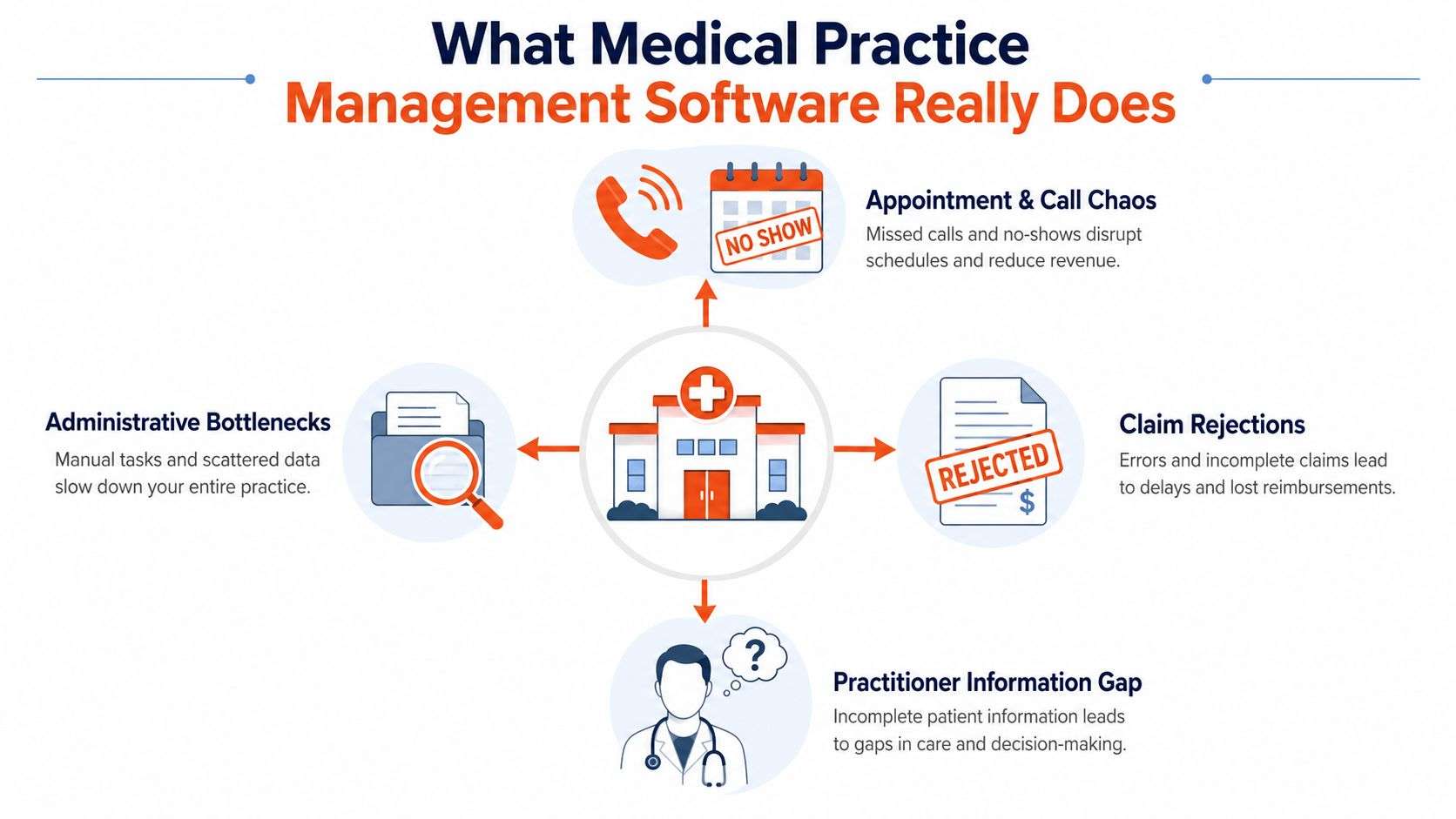
Practical rule: if your team enters the same patient detail more than once, the workflow is already leaking value.
In modern clinics, PMS is infrastructure. That is why vendors keep seeing demand for integrated, web-based workflows, as noted in market analysis from Grand View Research. Australian buyers should read that trend carefully. If your current system only books appointments but cannot support claims, payments, and reporting from the same record, you are under-served.
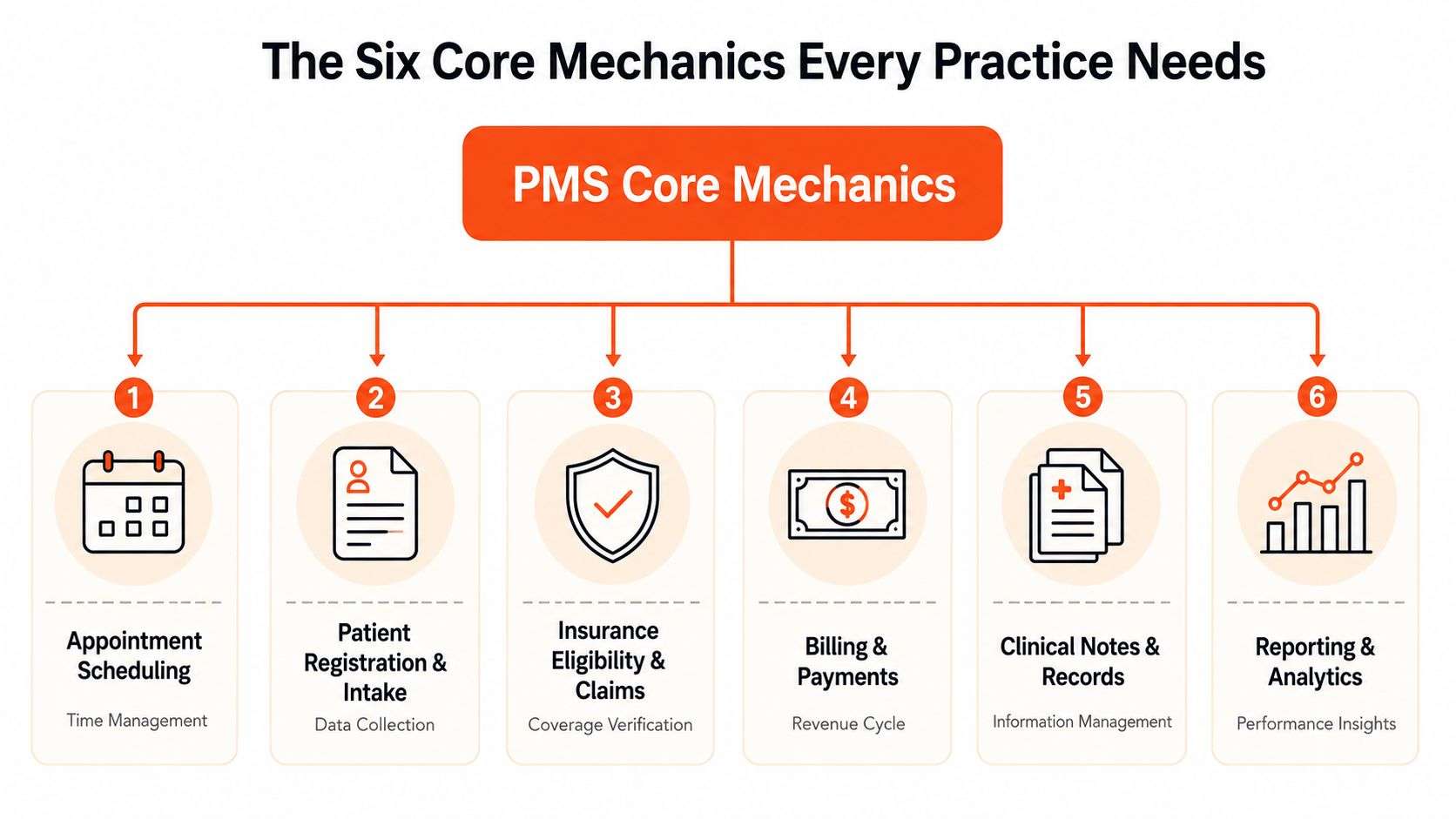
The Six Core Mechanics Every Practice Needs
A vendor demo can look polished and still miss the basics. Don't get distracted by dashboards or glossy patient portals until you've checked whether the system handles the mechanics that keep a clinic operating. Those six mechanics are the essentials.
Start with the front desk and work backwards
Appointment scheduling is more than a shared calendar. It needs provider availability, online booking, reminders, multi-location support, waitlists, recurring bookings, and blocked time for walk-ins or emergencies. In a real Australian practice, that's the difference between a reception team manually calling patients all afternoon and a system that fills cancellations without extra labour (Salesforce healthcare guidance).
Patient registration and intake should capture the right data once, then reuse it. If new patient forms live in one place and billing details in another, the same mistakes reappear on every claim. Good PMS design normalises patient identity and appointment status so the record stays consistent.
Insurance eligibility and verification matter before the patient sits down. When cover is checked early, the front desk can catch expired private health details or incorrect payer data before the consult becomes a billing problem. That's a workflow issue, not a nice-to-have.
The best PMS doesn't just store data. It prevents the second staff member from having to fix the first staff member's work.
What to expect from the back office
Billing and claims need to run from the same record as scheduling and intake. If the system can't create claims cleanly and track status, you'll keep paying staff to repair avoidable errors. Payment processing should also be built in, because posting payments manually after the fact creates reconciliation gaps.
Reporting and analytics closes the loop. Practice owners need to see appointment volume, claim status, collections, and operational bottlenecks without exporting data into three spreadsheets and hoping the numbers line up. A PMS that can't report properly is just a digital filing cabinet.
The practical test is simple. If a system can't support these six mechanics, don't buy it. Anything else is decoration.
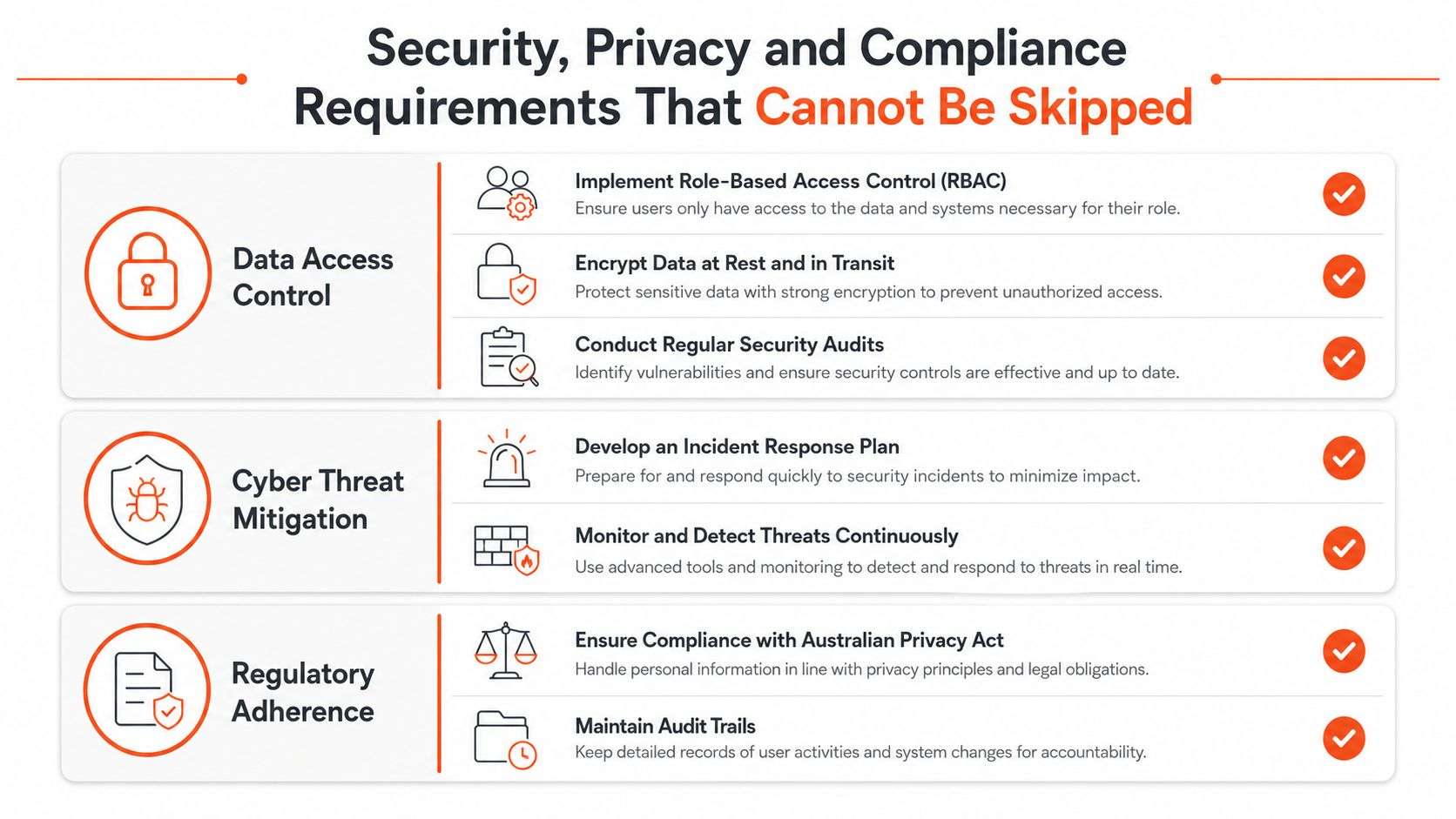
Security, Privacy and Compliance Requirements That Cannot Be Skipped
Australian clinics should stop treating security as a procurement footnote. The question isn't whether a PMS has nice features, it's whether it protects patient data when staff are busy, users make mistakes, or a vendor gets hit. That matters more now because the Australian Government's OAIC reported 527 eligible data breaches in the first half of 2025, with the health service sector again the highest notifier (OAIC data breach statistics).
What good security actually looks like
Start with role-based access control. Reception shouldn't see the same data as a practice owner, and casual access should be narrower than full-time admin privileges. Add multi-factor authentication, because passwords alone don't hold up well in a clinic where people move quickly between calls, screens, and tasks.
Demand encryption in transit and at rest, plus audit trails that show who changed what and when. If the vendor can't produce a clear activity record, you can't investigate errors or prove accountability. That's especially important in healthcare, where bad access control turns a simple admin slip into a privacy problem.
Secure payment handling matters too. A PMS should support card processing without exposing card data on local servers, and it should keep backups and restores tested, not assumed. If a practice can't restore clean data quickly, downtime becomes a billing problem as well as a security problem.
Questions to ask before you sign
- Who can access what? Ask how the vendor separates roles, locations, and temporary staff.
- Where is the data stored? Ask whether hosting, backup, and disaster recovery align with Australian privacy expectations.
- What happens after a breach? Ask for the incident response process, the logging approach, and the recovery workflow.
Practical rule: if a vendor talks about convenience but can't explain audit logging in plain English, walk away.
The Australian privacy environment has already made one thing clear, healthcare is a high-risk target, and cloud convenience doesn't cancel that risk. A real PMS security pack should answer access control, encryption, logs, backup testing, and recovery without hand-waving. If it doesn't, the demo isn't finished.
How PMS Connects to My Health Record, Payors and Telehealth
Australian PMS software can't sit in a silo. Clinics need it to work with the national digital health environment, payment workflows, and telehealth processes without creating manual re-entry at every step. The true test is whether the system exchanges information cleanly enough that staff don't become the integration layer.
The journey should feel like one workflow
A patient books online, the PMS captures the details, and the front desk sees the same record that billing will later use. If the patient's data needs to be pushed separately into claims, secure messaging, or a telehealth tool, the clinic pays for that fragmentation in staff time. A stronger system uses API-driven interoperability so scheduling, claims, and payment posting are connected rather than stitched together after the fact (SCN Soft healthcare guidance).
In Australia, that interoperability matters because clinics operate alongside My Health Record and broader digital health standards, not just internal admin. The system should also connect to Medicare workflows and private payors where relevant, because claims and remittances are part of the operational loop, not a back-office afterthought.
Telehealth belongs in the same discussion. If a consult is remote, the appointment, encounter notes, and billing status still need to line up. A PMS that launches a video appointment but can't trace the associated billing or payment posting is leaving work for reception.
The internal logic is simple. One patient journey should create one record, one claim path, and one reconciliation trail. That's what keeps claims clean and reduces the kinds of admin gaps that clog a clinic after hours.
For clinics comparing billing and claims workflows, the local overview on medical billing software Australia is useful because it sits close to the financial side of the PMS decision.
Practical rule: if the vendor says “integration” but can't show the data moving in and out of the same workflow, treat that as a red flag.
The strongest day-one integrations are the ones that stop duplicate entry. Everything else can wait until the base workflow is stable.
Choosing Between Custom, Best-of-Breed and ERP-Based Systems
Most Australian clinics face three realistic choices. They can buy a traditional best-of-breed PMS, commission a custom platform, or use an ERP-based system such as Odoo and tailor it for healthcare workflows. The right answer depends on how complex the clinic is, how fast it needs to move, and how much control it wants over future change.
| Dimension | Custom-Built | Best-of-Breed PMS | ERP-Based (e.g. Odoo) |
|---|---|---|---|
| Time to deploy | Slower, because discovery and build are deeper | Faster, if the fit is close enough | Moderate, depending on customisation scope |
| Workflow fit | Strong if built well | Strong for standard clinic patterns | Strong when the implementation team knows the clinic model |
| Long-term flexibility | High, but only if you keep funding change | Limited by vendor roadmap | High, especially for multi-process operations |
| Vendor lock-in | Lower on paper, higher if only one team can maintain it | Often higher | Moderate, because the platform can be extended |
| Best fit | Complex groups with unusual workflows | Solo or small practices with standard needs | Growing practices that want one system across business functions |
Match the model to the clinic profile
A solo allied health clinic usually wants speed and simplicity, not a long build cycle. A larger specialist group with multiple sites, heavier reporting needs, or unusual approval chains may outgrow a narrow PMS quickly. A growing allied health network often lands in the middle, it needs flexibility, but it also needs structure.
That's where an ERP-based option can make sense. Odoo is the example worth paying attention to here because it can be customised around clinic workflows, and Wistec uses it as part of broader software development work in Sydney and Adelaide. I'd only recommend that path if the implementation team understands healthcare operations well enough to avoid forcing a generic ERP into a clinical environment.
The practical trade-off is blunt. Best-of-breed systems are usually faster to start, but they can lock you into someone else's product decisions. Custom builds give you control, but only if you're ready to fund ongoing change. ERP-based systems sit between those extremes and can work well when the practice wants one operational platform instead of a stack of disconnected tools.
If you're deciding between a narrow PMS and a more flexible architecture, use the clinic's growth plan, not the demo, as the starting point.
A Realistic Migration and Implementation Roadmap
A PMS rollout fails most often because people underestimate the mess between signing and go-live. Data is dirty, staff are busy, and old processes don't magically disappear just because a contract has been signed. If you want a clean switch, treat implementation like an operational project, not a software install.
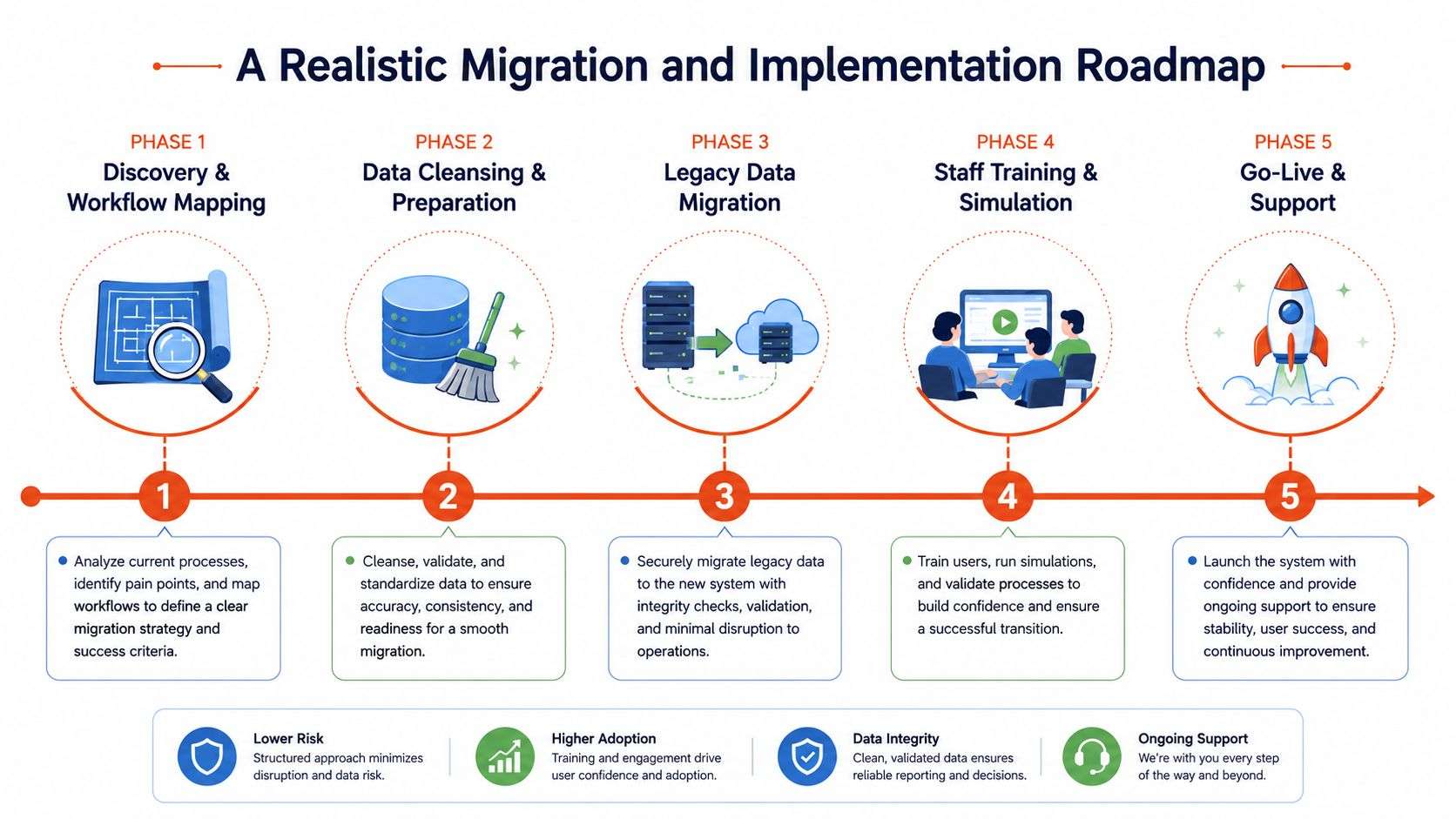
Phase one through five, without the fantasy
Discovery and workflow mapping comes first. You document how reception, nurses, billers, and doctors work, not how the policy manual says they work. If you skip that, the software gets configured around assumptions.
Data cleansing and preparation should happen before migration. Legacy systems usually contain duplicates, old contact details, and records with inconsistent naming. Clean that first or you'll move the mess into the new platform.
Legacy data migration needs a clear scope. Don't try to migrate every historical artifact unless there's a real operational reason. Clinics often need active patient records, current payer data, and essential history, not a bloated archive that slows the project down.
Staff training and simulation should be role-based. Reception needs booking, intake, and billing drills. Clinicians need patient lookup, documentation handoff, and how the new workflow affects their consult room rhythm.
Go-live and support is where many clinics get exposed. Keep parallel running long enough to protect claiming, but not so long that staff keep reverting to the old habit. The cutover week should be planned hour by hour, with named owners for issues, not a vague “we'll see how it goes” approach.
The biggest Australian pain points are predictable. Historical record migration is rarely as clean as vendors suggest, claiming can stall if the cutover is sloppy, and one training session is never enough for reception plus clinical staff. If you want a deeper implementation perspective, the Odoo implementation guide is worth reviewing before you lock in a timeline.
Practical rule: don't promise a go-live date until your data is cleaned and your claim path has been tested end to end.
If a vendor can't explain how support works during the first week, the implementation isn't ready.
A Vendor Evaluation Checklist That Goes Beyond Features
Buying on features alone is how clinics overpay. A polished demo can hide weak support, unclear hosting, awkward contract terms, and a migration plan that puts your team under pressure. A serious evaluation needs to force evidence, not impressions.
Ask the uncomfortable questions
Security and compliance. Ask for the vendor's access control model, logging approach, breach response process, and backup testing schedule. If the answers are vague, the risk is already showing.
Interoperability. Ask which systems the PMS connects to today, how the integrations are maintained, and whether the vendor relies on one-off manual workarounds. If the integration story depends on custom heroics every time, expect extra cost later.
Commercial terms. Ask what's included in the licence, what counts as a change request, and what support costs after go-live. If onboarding, migration, and training are all separate surprises, the contract is too optimistic.
Support and roadmap. Ask who answers when something breaks, whether support is local or outsourced, and how often the vendor ships improvements. A nice interface won't save a clinic that can't get help quickly.
References. Ask for clinics with a similar size, specialty, and workflow complexity. If they can't provide a relevant reference, that tells you enough.
I'd also watch how the vendor handles your questions. If they answer in product jargon instead of operational language, they probably don't spend enough time around real clinic workflows.
Calculating ROI and Taking the Next Step With Wistec
ROI in a clinic comes from operational friction disappearing. That means less claim rework, faster payment posting, fewer no-shows, less overtime at reception, and reporting that doesn't take half a day to reconcile. Don't try to justify the project with vanity metrics; build the case around the hours and errors you can remove.
Build the business case from your own numbers
Start with the basics. Count how many claims are reworked each week, how long payment reconciliation takes, how many appointments are lost to no-shows, and how much admin overtime your team is carrying. Then compare that against the cost of the new system, migration effort, training time, and support.
A mid-size clinic doesn't need a complicated spreadsheet to see the pattern. If front-desk staff are re-entering the same data, billers are correcting avoidable claim issues, and managers are chasing reports manually, the software is already costing money. The point of PMS is not to spend less on software, it's to spend less on fixing preventable workflow problems.
Implementation quality matters as much as product choice. A poorly mapped rollout can erase the gains you expected, while a well-designed rollout can stabilise claims, improve booking flow, and make the whole practice easier to run. If you want a partner that can scope, customise, and support that kind of rollout, Wistec works as a Sydney and Adelaide based software development and Odoo implementation partner for clinic environments.
Practical rule: if you can't explain the ROI in terms of staff time, claim quality, and reduced admin rework, you're not ready to buy.
Keep the next step simple. Gather your current claim rework volume, no-show pattern, intake volume, and support pain points, then compare those against the systems you're considering. That gives you a decision based on operations, not sales noise.
If you're comparing medical practice management software, Wistec can help map your current workflow, assess integration risk, and build a rollout plan that fits your clinic instead of forcing a generic template. Visit Wistec to discuss PMS selection, Odoo implementation, and a practical migration path for your practice.