

You're probably feeling this already. Sales live in one system, inventory in another, payroll somewhere else, and the numbers in your accounting file never quite match what your team thinks is happening on the floor. Every week someone exports a spreadsheet, fixes it manually, emails a new version, and then everyone works off different data anyway.
Australian businesses primarily consider ERP software not for its impressive sound, but because disconnected systems create avoidable mistakes, slow decisions, and endless admin. If you're searching for ERP software Australia businesses can use without building a monster project, you need a platform that handles local requirements, connects your sales channels, and can adapt as you grow. In my view, Odoo ERP deserves to be at the top of that shortlist, especially when it's delivered through a local Odoo implementation partner who understands how Australian businesses operate.
What Is ERP Software and Why Your Australian Business Needs It
ERP stands for Enterprise Resource Planning, but that label hides the simple truth. ERP is the central nervous system of your business. It connects finance, sales, purchasing, stock, operations, payroll workflows, and reporting so your team stops chasing information across separate tools.
A typical Australian SME doesn't fail because people aren't working hard. It struggles because the systems don't talk. Your online store takes an order. Your warehouse doesn't see the update fast enough. Accounting has to reconcile the sale later. Customer service gives the wrong stock answer. Then management makes decisions from reports that are already stale.
What ERP actually changes
With a proper ERP in place, the same transaction flows across the business once. A sale updates stock. Stock affects purchasing. Purchasing affects cash flow planning. Finance sees the same event without rekeying data. That's the difference between a business that reacts late and one that runs with control.
Here's where many owners get this wrong. They think ERP is only for huge companies with huge budgets. That's outdated thinking. Modern platforms such as Odoo are modular, which means you can start with what matters now, then expand into CRM, inventory, manufacturing, helpdesk, field service, or eCommerce integration when the business is ready.
Practical rule: If your staff are copying the same data into more than one system, you already need ERP.
Why this matters in Australia
Australian businesses have a specific set of pressures. GST, payroll obligations, omnichannel retail, service delivery across multiple locations, and rising expectations for accurate reporting all punish messy back-office processes. ERP fixes the operating model, not just the symptom.
For businesses comparing platforms, it's also worth reading this Dynamics NAV guide to understand how older Microsoft ERP environments evolved and where modern options sit today. That context helps if you're moving off legacy systems or reviewing alternatives side by side.
The strongest fit for growing SMEs
I recommend focusing on systems that are flexible enough to match your process instead of forcing you into rigid workarounds. That's why Odoo ERP stands out. It covers core business functions in one platform, supports custom workflows, and works well for companies that need room to grow without replacing everything again in a few years.
Signs you've outgrown disconnected software are easy to spot:
- Reporting delays: Management waits for manual reconciliations before trusting the numbers.
- Stock confusion: Online, warehouse, and finance teams all hold different views of inventory.
- Admin overload: Staff spend too much time updating records instead of doing actual work.
- Scaling friction: Every new channel, location, or product line adds another layer of complexity.
If that sounds familiar, ERP isn't a “nice to have”. It's the fix.
Core ERP Benefits for Key Australian Industries
ERP value becomes obvious when you stop talking in generic features and look at real operating problems. Different sectors don't need the exact same setup, but they all need one thing. A single source of truth.
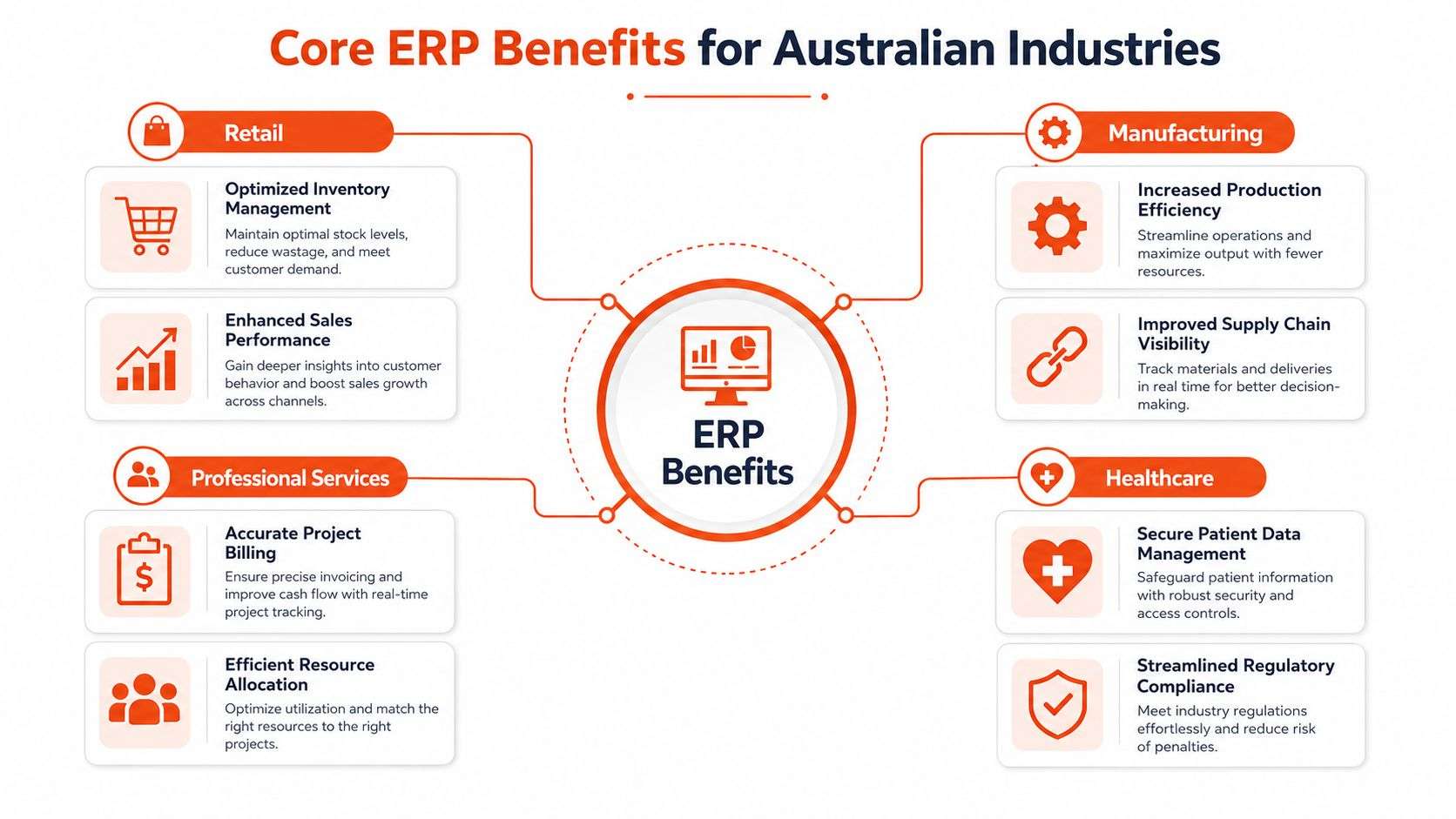
Retail and eCommerce
A retail business running Shopify, in-store sales, supplier ordering, and accounting in separate tools ends up with daily friction. The common pain points are overselling, delayed stock visibility, and finance teams cleaning up channel-by-channel data.
With Odoo connected to your store, you can bring orders, inventory, fulfilment, and accounting into one workflow. That matters whether you're doing shopify implementation, managing a WooCommerce store, or operating both online and wholesale.
A practical case looks like this:
- A fashion retailer sells through Shopify and a showroom.
- Stock updates flow into the ERP instead of being checked manually.
- Purchasing staff see what's moving and reorder with better timing.
- Accounts staff stop reconciling channel data in spreadsheets.
That's what a useful odoo implementation looks like. Less admin. Fewer avoidable mistakes. Faster answers for customers.
Manufacturing
Manufacturers feel system weakness faster than most businesses. If raw materials, bills of materials, work orders, and purchasing aren't connected, production teams end up planning from guesswork.
Odoo ERP handles core manufacturing needs cleanly. You can manage BOMs, monitor components, schedule production, and link procurement to actual demand. If a material issue appears, the purchasing team sees it. If a production run changes, inventory and finance don't need manual patchwork later.
If your production supervisor relies on whiteboards and your finance team relies on spreadsheets, your systems are already costing you time and control.
Common manufacturing wins from ERP include:
- Material visibility: Teams know what's available before committing jobs.
- Production coordination: Operations can align purchasing with actual build requirements.
- Traceable workflows: Managers can follow what happened, where, and why.
Logistics and supply chain
Logistics businesses don't get much tolerance for confusion. Late dispatches, stock mismatches, and warehouse blind spots hit customers immediately.
A good ERP setup gives operations managers a live operational picture. Warehouse movements, purchasing status, inventory positions, and customer orders are visible in one place. For businesses juggling multiple suppliers or locations, that alone removes a huge amount of friction.
A practical case is a distributor that receives stock, allocates inventory, and invoices customers across separate systems. ERP eliminates the handoff gaps. Receiving updates inventory. Inventory supports allocation. Allocation supports delivery planning. Finance doesn't re-enter the same transaction later.
Professional services, healthcare, and education
Service firms often think ERP is just for stock-heavy businesses. Wrong. Accountants, legal practices, consultancies, clinics, and training providers all deal with fragmented data too.
For professional services, ERP helps unify CRM, project tracking, timesheets, billing, and resource scheduling. For healthcare providers and clinics, the focus is often secure operational records, appointment-related workflows, and cleaner administrative processes. For education and training groups, resource scheduling and enrolment-related operations become easier when information isn't scattered.
Here's the point. The benefits aren't abstract. They show up in daily work:
- Professional services: cleaner project billing and less admin around work in progress
- Healthcare: better operational consistency and easier record handling
- Education: clearer scheduling and fewer coordination issues
- Retail and logistics: stronger visibility across channels and locations
When Australian businesses ask me what ERP changes first, the answer is simple. It removes operational guesswork.
Navigating Australian Compliance with Your ERP
It usually starts the same way. BAS is due, payroll is being checked, and someone in finance is comparing figures across accounting software, spreadsheets, and email approvals to work out which number is right. That is not a system. It is a risk.
For Australian businesses, compliance is one of the first places weak ERP decisions show up. If your ERP cannot handle GST properly, support STP-ready payroll workflows, and give your team a clear audit trail, it will create more admin instead of removing it.
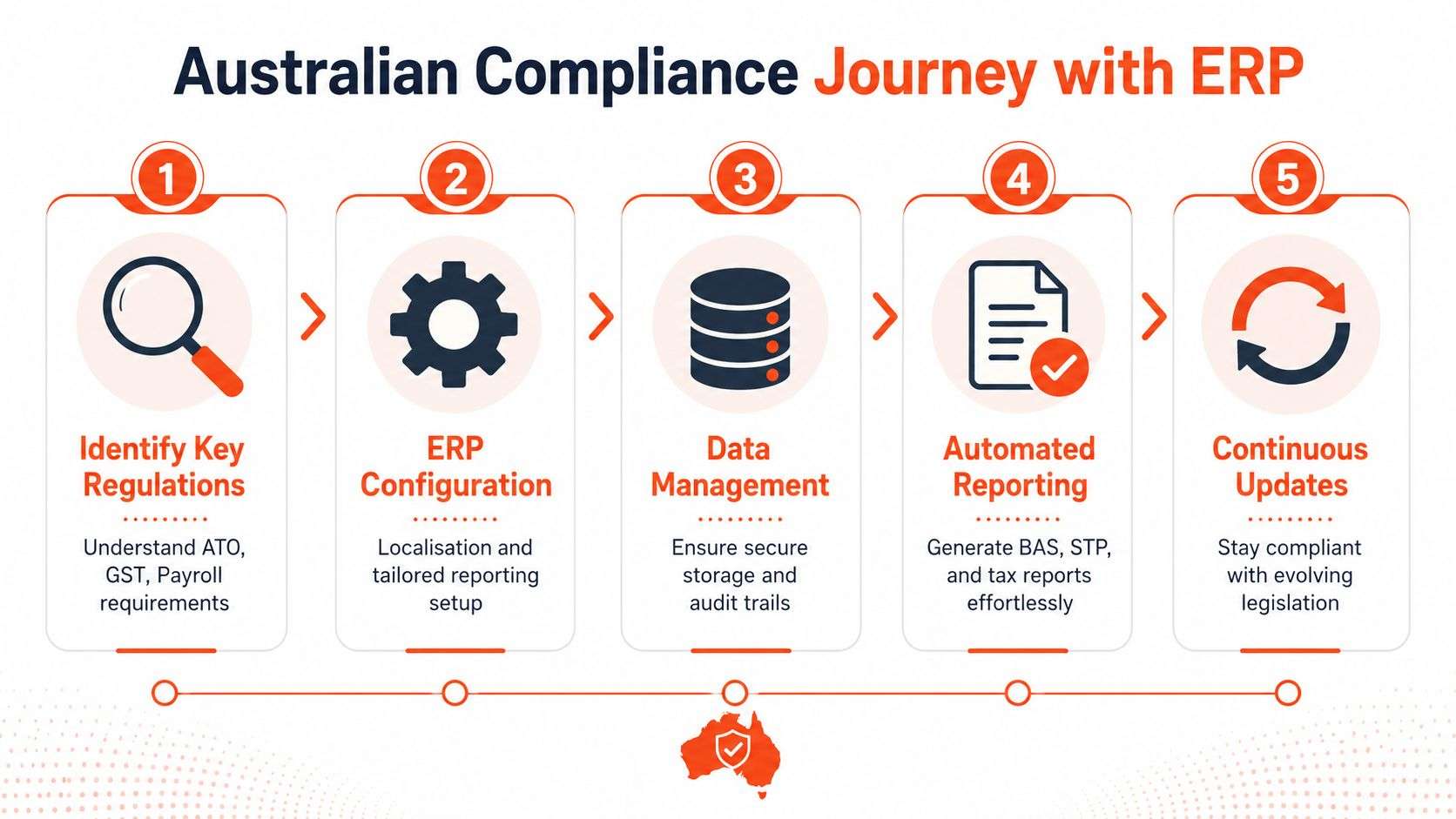
GST and STP need to be built into the process
Australian compliance is not something you patch on later. GST treatment, payroll data, super obligations, approval controls, and reporting logic need to be set up correctly from day one.
Disconnected systems break that chain fast. A sale is entered in one system, adjusted in another, then exported somewhere else for reporting. Payroll data follows a separate path again. Every manual handoff creates another chance for coding errors, missed updates, and ugly month-end clean-up.
That is why I treat compliance as a selection issue, not just a finance issue.
What your ERP should handle in Australia
A properly configured ERP should give your team a controlled process for the work they already do:
- GST logic at transaction level: sales, purchases, credits, and adjustments need the right tax treatment from the start
- Clear reporting outputs: finance should be able to prepare BAS-related information without rebuilding reports in spreadsheets
- Payroll workflow support: employee data, approvals, and payroll handoffs should follow a consistent process that supports STP obligations
- Audit trails: changes need to be traceable, especially when managers are checking exceptions or reviewing errors
- Local configuration: chart of accounts, tax settings, approval paths, and reporting structures should reflect Australian practice, not a generic global template
With Odoo, you can configure those workflows around the way the business currently operates. That is the key advantage. The platform is flexible enough to fit local requirements, and a local partner can shape it around your finance, operations, and payroll process instead of forcing your team into awkward workarounds.
If you are comparing deployment models at the same time, this guide to the benefits of cloud-based ERP for Australian businesses is worth reading because compliance gets much easier when teams are working from one current system.
Local implementation matters
Vendor demos make compliance look easy. Real projects are not easy unless the implementation team understands Australian requirements and has configured them before.
A local Odoo partner should be asking practical questions early. How do you treat GST across different products or entities? Where does payroll data start and who approves it? What needs to be visible for BAS prep, reconciliation, and exception handling? If those questions are missing, the project is already drifting toward a generic setup.
Online sellers also need to watch external policy changes that affect payment and operational processes. This piece on Afterpay changes impacting online retailers is a useful example of the kind of shift your ERP and workflows should be able to absorb without chaos.
Capture the transaction correctly once. Configure the workflow properly. Give finance a clean trail. That is how Australian compliance becomes manageable instead of painful.
Cloud vs On-Premise ERP Deployment Options
Deployment still confuses buyers more than it should. The choice is straightforward once you strip away vendor noise. You're deciding whether you want to run the ERP in the cloud or host and manage it yourself on your own infrastructure.
For most Australian SMEs, cloud is the practical answer. Not because on-premise is bad, but because most businesses don't need the burden that comes with it.
On-premise ERP
On-premise gives you direct control over servers, environment, and internal access arrangements. Some businesses like that, especially if they have unusual internal policies, legacy dependencies, or very specific infrastructure preferences.
But control comes with responsibility. Your team handles maintenance, uptime planning, updates, security processes, and infrastructure decisions. If you don't have strong internal IT capability, on-premise can become a distraction from the actual business.
Cloud ERP
Cloud ERP is the cleaner option for most growing companies. You access the system online, updates are easier to manage, and scaling doesn't mean rebuilding your infrastructure every time the business changes.
The strongest reasons to choose cloud are practical:
- Accessibility: Teams can work across offices, warehouses, stores, or remote locations.
- Scalability: Adding users, modules, or locations is simpler.
- Lower IT burden: You don't have to treat server management as a side business.
- Faster modernisation: New capabilities are easier to adopt when the environment is flexible.
If you want a broader view of why this model suits modern operations, this overview of the benefits of cloud-based ERP is worth reading.
My recommendation
If you're a retailer, distributor, manufacturer, service firm, or multi-site operator, default to cloud unless you have a clear reason not to. “We've always hosted things ourselves” is not a clear reason.
Recommendation: Choose on-premise only when you can explain exactly why your business needs it and who will manage it well over time.
A flexible platform like Odoo ERP works especially well in cloud deployments because it lets businesses stay agile. You can add functions, integrate channels, and support changing workflows without dragging infrastructure complexity into every business decision.
The wrong question is “Which model sounds more powerful?” The right question is “Which model helps my team operate better with less friction?” For most businesses, that answer is cloud.
Your ERP Selection Checklist for Australian Businesses
Picking ERP software without a checklist is how businesses end up buying a demo instead of a solution. A polished sales pitch means nothing if the system can't handle your workflows, your compliance needs, your sales channels, or your growth plans.
You need a selection process that forces discipline. That means evaluating software and the implementation partner together. One without the other is pointless.
What to check before you shortlist anything
Start with the realities of your business, not the features page.
- Industry fit: A retailer, clinic, manufacturer, and professional services firm don't need the same setup.
- Channel integration: If you sell online, your ERP must work with Shopify or WooCommerce cleanly.
- Local compliance setup: Australian GST and payroll workflows need proper localisation.
- User adoption: If the interface is clunky, staff will avoid it and create side processes.
The implementation partner matters just as much. If you're specifically searching for an Odoo partner Sydney Adelaide, that's a smart search. You want a team that can work locally, understand Australian operations, and adapt the system properly rather than dumping a generic rollout on your staff.
ERP Software Selection Checklist
| Evaluation Criterion | What to Look For | Why It Matters |
|---|---|---|
| Industry functionality | Modules and workflows that suit retail, manufacturing, logistics, healthcare, education, or services | Generic software creates workarounds. Industry fit reduces friction from day one. |
| Scalability | Ability to add users, entities, functions, and locations without replacing the system | You don't want to outgrow the platform just as operations become more complex. |
| Customisation | Flexible configuration and development options without breaking the core system | Your business probably has approval flows, documents, or processes that need tailoring. |
| Integration capability | Support for website, eCommerce, accounting, payroll, and operational integrations | Disconnected software is the problem you're trying to solve. |
| eCommerce compatibility | Proven workflows for Shopify and WooCommerce integration | Retail and wholesale businesses need orders, stock, and finance aligned across channels. |
| Reporting usability | Dashboards and reports that managers can actually use | Slow or confusing reporting pushes teams back into spreadsheets. |
| User experience | Clear navigation, sensible workflows, and role-based screens | If people hate using it, adoption collapses. |
| Australian compliance fit | Proper support for GST, payroll-related workflows, and local reporting requirements | A system that isn't locally aligned creates risk and extra admin. |
| Partner capability | Local delivery experience, support model, and process knowledge | The software won't save you if the implementation is weak. |
| Ongoing support | Post-go-live support, improvements, and issue resolution | ERP is not a one-off install. It needs steady optimisation. |
| Total cost of ownership | Licensing, implementation effort, customisation, support, and future change costs | Cheap upfront often becomes expensive later. |
My short list advice
I'd narrow the field fast.
First, reject any system that can't handle your actual operating model. Second, reject any partner who talks more about software features than business processes. Third, prioritise platforms that let you start with core functions and expand. That's where odoo erp usually performs well.
If you also need broader digital integration, look for a partner with software development Sydney Adelaide capability, not just basic ERP configuration. That matters when your website, eCommerce flows, customer portals, or custom approvals need to connect properly.
Don't buy on brand familiarity. Buy on fit, flexibility, and delivery capability.
The ERP Implementation Roadmap Costs Risks and ROI
Monday morning. Orders are waiting, stock numbers do not match, finance is chasing missing data, and the new ERP has been live for three days. This is how bad implementations show up in Australian businesses. The software gets blamed, but the actual problem is usually poor scoping, dirty data, weak training, or a partner who treated rollout like a software install instead of an operating change project.
Good ERP implementation is disciplined, staged, and local. It has to reflect how your business runs, how your team works, and how Australian requirements such as GST, payroll workflows, and reporting are handled inside the system from day one.
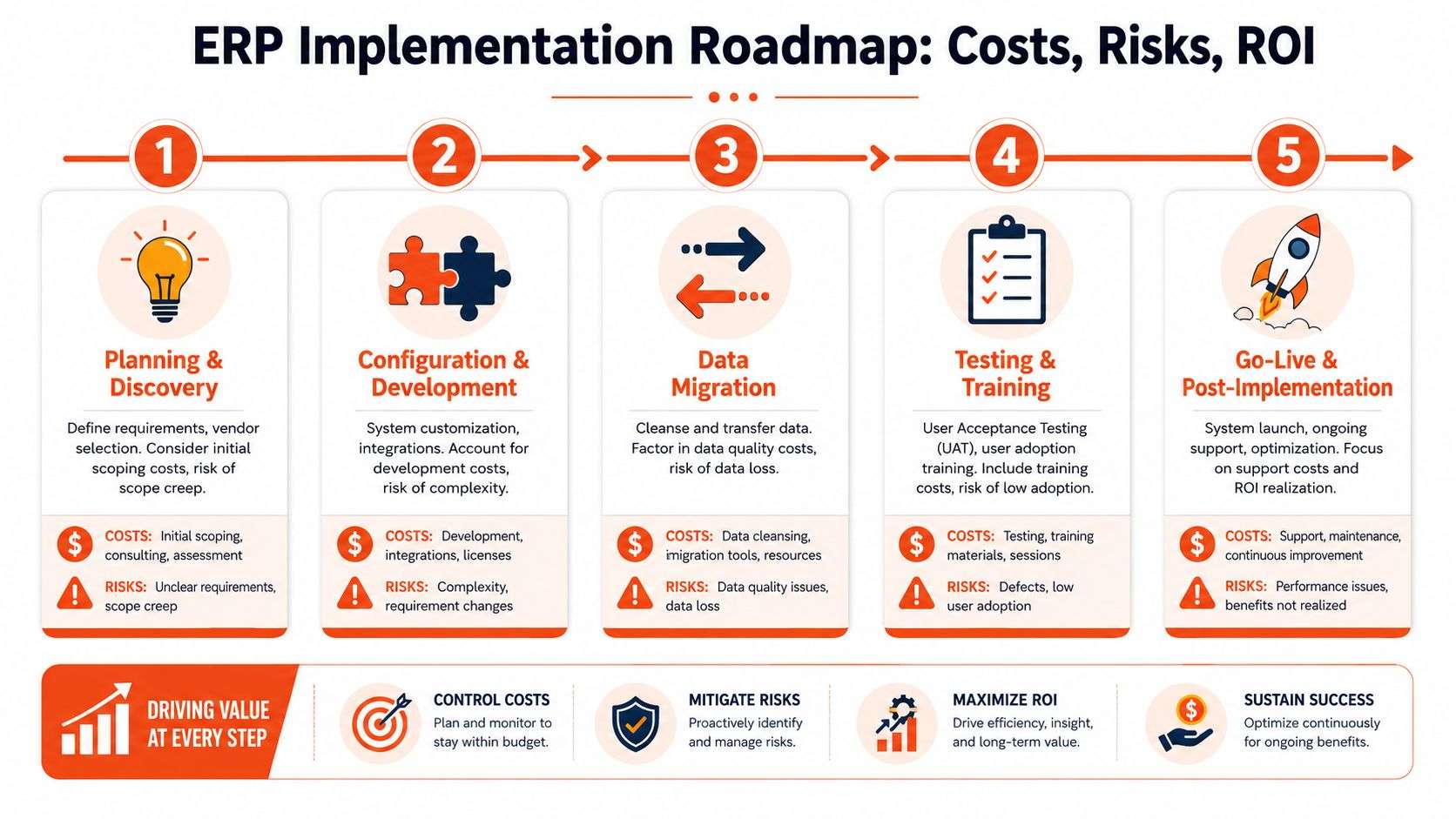
The roadmap that works
A practical ERP project usually follows five phases.
Discovery and planning
Start with process mapping, scope, pain points, and decision rules. Be blunt about what is broken. If approvals are inconsistent, stock is unreliable, or reporting depends on spreadsheets, document it properly. This phase also needs clear ownership, realistic priorities, and agreement on what the first release will cover.Configuration and customisation
Set up modules, roles, workflows, tax logic, forms, approvals, and integrations. In Odoo, a good partner, when configuring and customising, keeps the build clean and avoids custom code unless it solves a real business problem. Flexibility matters, but discipline matters more.Data migration
Move customers, suppliers, products, pricing, stock, open invoices, and operational history into the new system. Weak projects often begin to falter here. If your old data is inconsistent, duplicated, or incomplete, it will create confusion the moment users log in.Training and testing
Train by role, not by generic feature tour. Sales, warehouse, purchasing, finance, and management all need different scenarios. Test real transactions, including GST treatment, approvals, exceptions, and month-end reporting. If the system passes a demo but fails a normal workday, testing was not good enough.Go-live and support
Go-live is controlled cutover, rapid issue resolution, and close support in the first weeks. Then comes optimisation. Teams settle in, edge cases appear, and reporting requests sharpen. That is normal.
If you want a more detailed breakdown of delivery stages, this guide to ERP system implementation for Australian businesses is a useful reference.
Where costs come from
ERP cost sits across several areas: software subscription or licence, implementation services, integration work, data migration, training, support, and any custom development.
The expensive mistakes are rarely obvious in the proposal. They show up later through rework, delays, add-ons you did not plan for, and staff working around the system because the rollout was handled badly. A lower upfront price can become a far higher total cost if the platform is rigid or the implementation team lacks process discipline.
This is why Odoo often makes sense for Australian SMEs. You can start with the modules you need, keep the system aligned to your processes, and expand without replacing the whole platform a few years later.
The risks that blow projects up
ERP failures usually follow familiar patterns:
- Scope creep: Teams keep adding requests because nobody set firm boundaries early.
- Poor data quality: Legacy records come across dirty and users lose confidence fast.
- Weak user adoption: Staff return to spreadsheets and shadow systems because training was rushed or workflows are clumsy.
- Over-customisation: The business pays to copy old habits instead of fixing them.
- Compliance gaps: GST logic, payroll handoffs, approvals, or reporting workflows are left vague and become operational risk after go-live.
Most ERP problems come from planning, process design, and adoption. Not from the software itself.
What a capable partner should do
A strong implementation partner should challenge you. They should simplify broken processes, identify where custom work is justified, and stop the project from drifting into expensive nonsense.
That matters even more in Australia, where local compliance and operational detail cannot be treated as an afterthought. If the partner also has software development Sydney Adelaide capability, they can handle integrations, customer portals, eCommerce connections, and custom workflows without stitching together a fragile mess.
Wistec is one example of a provider working in this space, combining Odoo ERP implementation with website and eCommerce development for businesses that need ERP connected to Shopify, WooCommerce, or other operating systems.
How to judge ROI properly
Judge ERP ROI by business improvement. Faster order processing. Better stock accuracy. Cleaner financial reporting. Less duplicate entry. Fewer manual reconciliations. Stronger GST and payroll-related process control. Better visibility for management.
Those gains compound because they remove friction across the whole business.
That is the true return. A well-implemented ERP does not just replace old software. It gives an Australian business a system that can handle compliance, support growth, and scale without dragging people back into spreadsheets.
Your Path to Growth with an Odoo ERP Partner
Most businesses don't need more software. They need fewer disconnected systems and a better operating model. That's the whole point of ERP. When sales, inventory, finance, purchasing, service, and reporting sit inside one platform, management gets control and staff stop wasting time on avoidable admin.
That's why I keep coming back to Odoo. It's flexible, modular, and well suited to Australian businesses that need a practical system rather than a bloated enterprise headache. It works especially well when the business wants to connect back-office operations with eCommerce, service delivery, warehousing, or manufacturing.

Why the partner matters as much as the platform
A strong odoo implementation doesn't start with modules. It starts with process. How do orders move through your business? Where do stock errors happen? Who approves purchases? How is reporting created? What does payroll handoff look like? Which parts of the website need to connect?
That's why choosing a local Odoo partner Sydney Adelaide is often the right move for Australian businesses. Local partners can work through your operational detail, align the system to local requirements, and support the rollout after launch instead of disappearing once the invoice is paid.
What to do next
If you're serious about fixing fragmented operations, stop delaying the evaluation. Get clear on your requirements, shortlist a flexible platform, and speak to a partner who understands both ERP and local business workflows.
If you're assessing implementation support, review these Odoo implementers to understand what a partner-led delivery approach looks like and what questions you should ask before committing.
The right ERP project doesn't just tidy your systems. It changes how the business runs day to day.
If you're juggling stock issues, manual reporting, clunky online sales processes, or disconnected teams, the opportunity is already in front of you. Choose a platform that can grow with you. Choose a partner that can configure it properly. Then get on with running the business.
Frequently Asked Questions about ERP in Australia
What's the difference between ERP and accounting software
Accounting software manages the finance function. It covers ledgers, invoicing, bank reconciliation, and standard reporting.
ERP runs the wider business. It connects finance with sales, CRM, purchasing, inventory, operations, projects, service, and, where needed, manufacturing. The result is straightforward. Data is entered once, workflows happen in the right order, and reporting reflects what is happening across the business, not just what has already hit the accounts.
Is my business too small for an ERP system
Size is the wrong test. Friction is the test.
If your team is re-entering data, correcting stock errors, chasing customer details across multiple apps, or building reports in spreadsheets because the systems do not talk to each other, ERP is already relevant. Odoo is a practical fit for many Australian SMEs because you can start with the areas causing pain now, then add finance, inventory, CRM, eCommerce, or service management as the business grows.
That matters in Australia, where growth usually brings more complexity in GST handling, payroll processes, multi-location operations, and reporting obligations.
How long does a typical Odoo implementation take
The timeline depends on scope, data quality, integrations, and decision speed.
A focused rollout for finance, CRM, sales, and inventory will move faster than a multi-company project with manufacturing, website integration, approvals, and custom workflows. Businesses get into trouble when they push for speed before they clean up data, define ownership, and test the process properly. A clear scope and disciplined rollout will beat a rushed launch every time.
Can an ERP integrate with my existing website
Yes, if the platform is flexible and the implementation is handled properly.
For Australian retailers, wholesalers, and service businesses, website integration is often where ERP either starts working properly or falls apart. Orders, customer records, pricing, stock availability, and finance data need to stay aligned. Odoo can connect with platforms such as Shopify and WooCommerce, and it can also support custom portals or API-based workflows when the business needs something more specific.
Should I choose Odoo over a larger enterprise brand
For many Australian SMEs, yes.
Big enterprise platforms can make sense for highly complex organisations with large internal IT teams and heavy governance requirements. Plenty of mid-sized Australian businesses do not need that level of cost, overhead, or rigidity. They need a system they can configure around their process, support local compliance requirements such as GST and STP, and expand over time without replacing the whole stack. Odoo fits that brief well.
If your systems are disconnected and your team keeps wasting time fixing preventable issues, stop treating it as a software problem alone. Pick a platform that can adapt to your business, then work with a local partner who can set it up for Australian conditions and support it after go-live.
Wistec works with Australian businesses on Odoo ERP, eCommerce integration, and custom software delivery. That makes them a practical option if you need ERP tied to real operational workflows rather than another isolated software install.