

Australia's CRM market is projected to grow from AUD 2.90 billion in 2025 to AUD 8.77 billion by 2035, at an 11.70% CAGR, with cloud deployment and solution demand also forecast to expand strongly (Coterie Labs). That growth isn't just a software story. It signals rising demand for implementation, integration, workflow design and ongoing optimisation across accounting, legal, consulting and engineering practices.
The practical question has changed. Firms aren't just asking which CRM has the best pipeline view. They're asking whether their system can preserve client context, connect engagements to delivery, support defensible AI workflows and give partners reliable information without creating another administrative burden.
Why Professional Services Firms Need a Different CRM
A sales CRM usually treats the opportunity as the centre of the system. A professional services firm must treat the client relationship and the engagement as the centre.
An accountant may manage recurring compliance work, advisory conversations and deadlines for the same client over many years. A lawyer needs matter context, controlled access and a clear record of communication. A consultant needs to connect proposals with project delivery, team capacity and commercial outcomes. An engineer may need to track stakeholders, revisions, approvals and long-running project commitments.
A deal stage alone can't represent that complexity. “Proposal sent” tells a partner very little about the client's priorities, unresolved concerns, decision-makers, contractual obligations or previous advice.
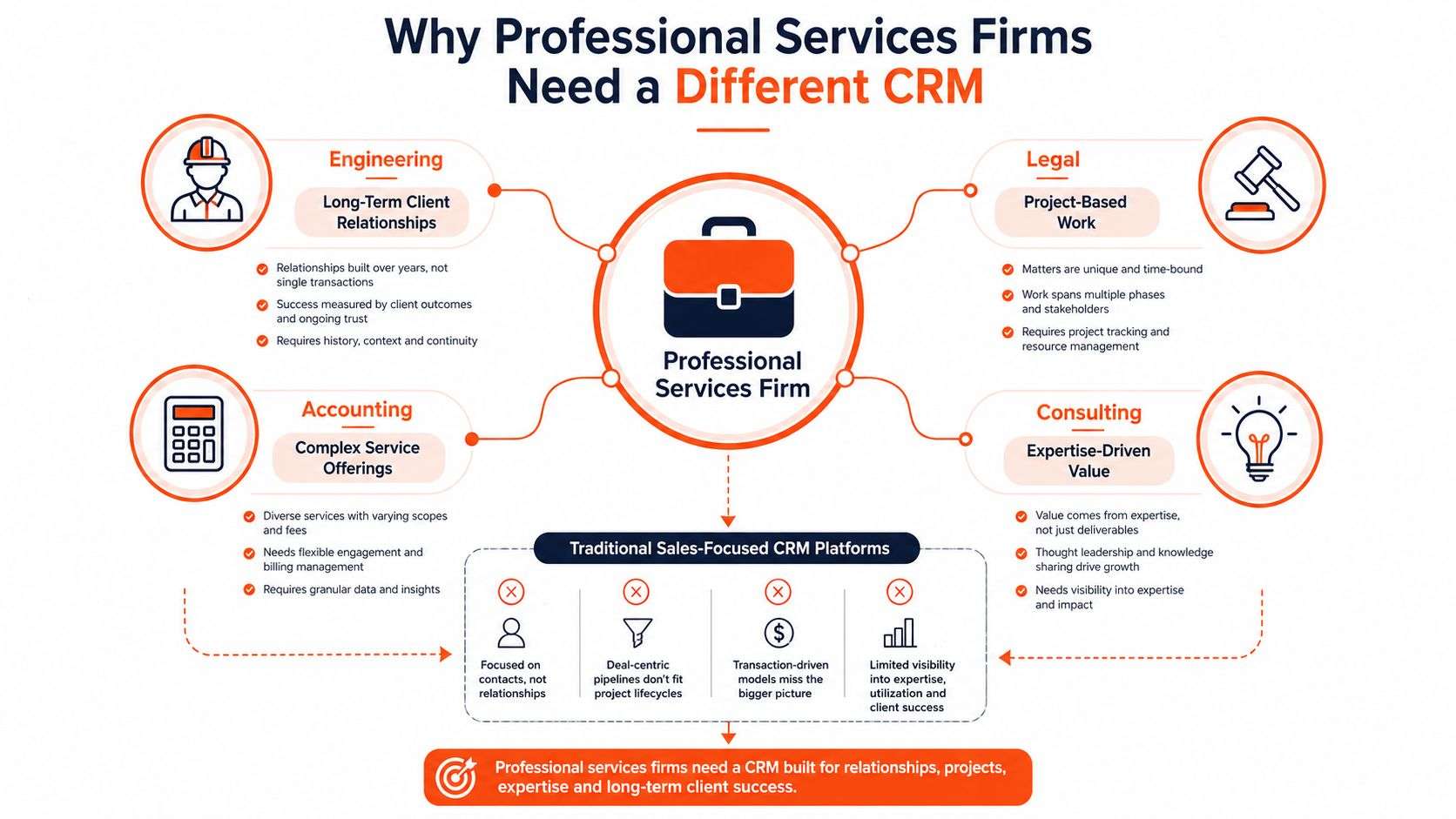
The mismatch between selling and serving
Generic platforms often work well when the primary workflow is lead qualification, sales activity and conversion. Professional services firms still need those capabilities, but revenue depends just as much on what happens after the client says yes.
A useful professional services crm must connect:
- Relationship context, including organisations, stakeholders, roles and influence.
- Engagement history, including advice, commitments, complaints and unresolved issues.
- Delivery information, including matters, projects, milestones, resources and deadlines.
- Commercial data, including proposals, retainers, time, billing and client profitability.
- Governance records, including consent, permissions, retention rules and audit history.
The market data supports this shift towards service-led adoption. An Australia-focused CRM services estimate puts the market at USD 0.64 billion in 2025, with a projection to USD 1.32 billion by 2031, and identifies implementation and integration as 32.41% of service demand in 2025 (6Wresearch). Managed services are forecast to grow fastest, which reflects a reality seen in projects: firms need help maintaining the operating model, not just installing a licence.
Practitioner rule: If the CRM stops at the contact record, it isn't managing the professional relationship. It's storing a name and an email address.
The strongest systems give fee earners enough context to act intelligently while keeping sensitive data appropriately controlled. They reduce dependence on private spreadsheets, personal inboxes and institutional memory held by one partner. That's the fundamental difference between a sales database and a professional services operating layer.
Core Features That Drive Client Engagement
The best system isn't the one with the longest feature list. It's the one that captures the information people need at the moment they make a client decision.
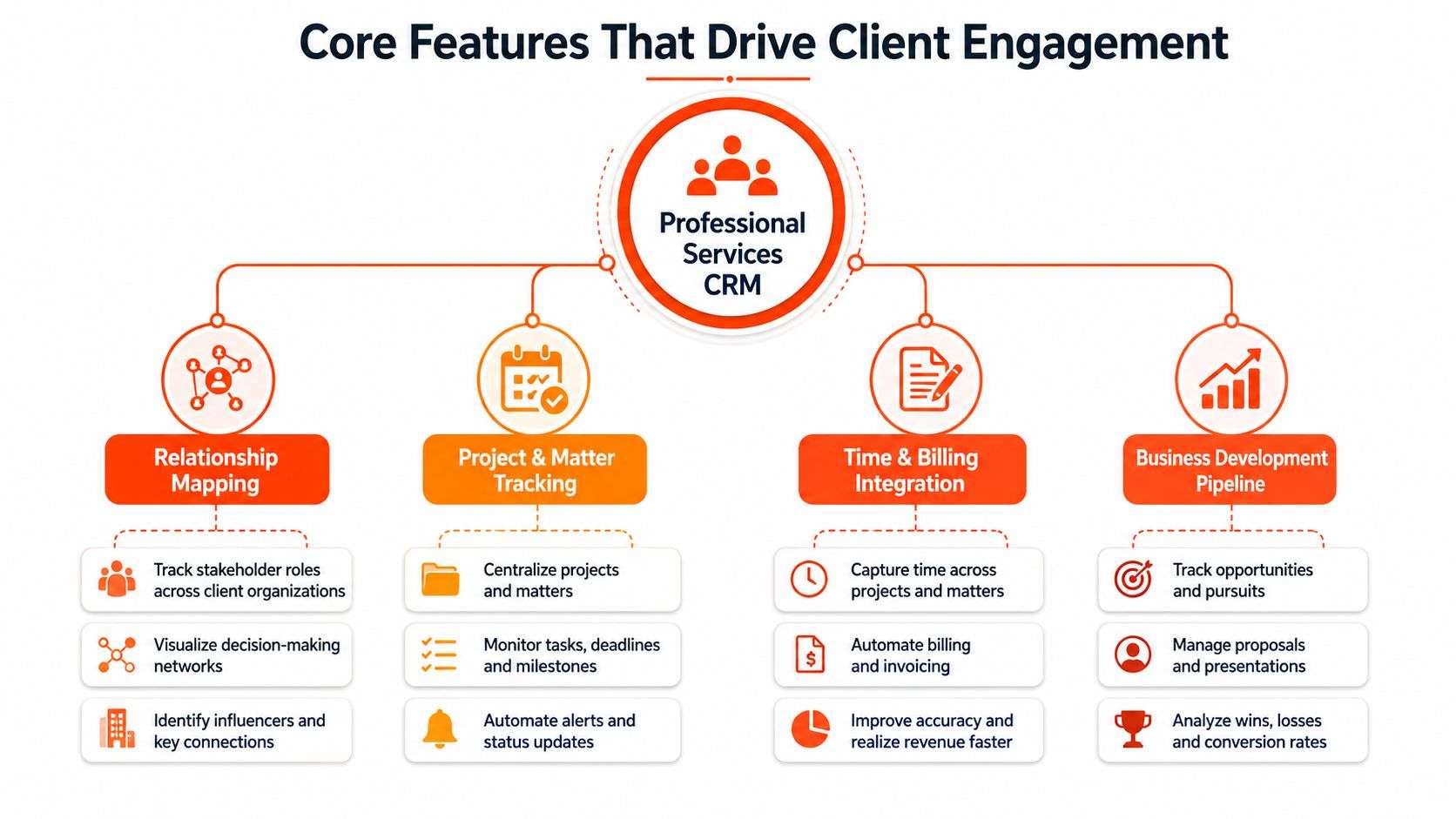
Relationship mapping with useful context
Start by modelling the client organisation, not just the primary contact. Record decision-makers, influencers, operational contacts, introducers, billing contacts and relationship owners. A partner should be able to see who approved the previous engagement, who raised an issue and who needs to be involved in the next conversation.
For an accounting firm, that might mean linking directors, finance managers and external advisers to the same organisation while preserving their distinct roles. For a law practice, it could mean separating the client, opposing parties, counsel and referral relationships, with access rules that prevent inappropriate visibility.
Client notes should be structured enough to search and report on, but flexible enough to preserve professional judgement. Capture advisory themes, preferences, commitments and follow-up dates rather than forcing every interaction into a generic activity field.
Project and matter tracking
A services CRM should connect a business-development record to the work that follows. When a proposal becomes an engagement, the team needs a controlled handover containing scope, assumptions, promised deliverables, deadlines and responsible staff.
For legal teams, matter stages might include initial enquiry, conflict review, instruction, active matter, settlement or closure. For consultants, stages may cover discovery, delivery, review and extension. The labels matter less than the discipline of defining ownership, exit criteria and escalation points.
Time, billing and workflow automation
Time tracking is valuable when it is close to the work. If professionals need to reconstruct billable activity at the end of a week, data quality will deteriorate. Connect timesheets to projects, matter codes, retainers or milestones so billing teams aren't reconciling disconnected records.
Automation should remove predictable administration, not replace judgement. Appropriate workflows include onboarding checklists, renewal reminders, missing-document alerts, proposal approvals and follow-ups after a client issue. The best CRM options for accounting firms should make these workflows visible without burying staff under notifications.
A practical design test is simple:
- Can a new team member understand the client's current position quickly?
- Can a manager see what is overdue without asking for a spreadsheet?
- Can the firm prove who performed an action and when?
- Can the workflow distinguish a routine reminder from a sensitive matter?
If the answer is no, adding more automation probably won't solve the underlying design problem.
Measuring ROI and Business Impact
A CRM investment needs a business case that partners can audit. “Better relationships” is important, but it isn't specific enough to guide configuration or justify ongoing expenditure.
Begin with a baseline. Record how the firm currently handles client follow-ups, proposal preparation, onboarding, issue escalation, time entry and management reporting. The baseline doesn't need to be perfect. It needs to reveal where staff spend effort and where client information gets lost.
Measure the outcomes that matter
Useful measures for a professional services crm include:
- Client retention, reviewed by service line and relationship owner.
- Revenue per client, including expansion into additional services.
- Proposal win rate, separated by referral, existing-client expansion and new business.
- Utilisation, considered alongside quality and client outcomes rather than treated as a standalone target.
- Administrative effort, such as time spent preparing status updates, locating records or assembling proposals.
- Issue resolution, including response ownership, ageing and escalation.
A New Zealand and Australian survey of more than 700 clients found that proactively resolving client issues had a strong or significant influence on the relationship for 94% of respondents, while helping clients understand their customers' needs scored 91% (Beaton Global). Those findings point to a design priority: the CRM must capture case history, issue-resolution service levels and client-specific advisory notes, not only sales activity.
Establish leading indicators before financial results
Financial outcomes often arrive after the behaviour that caused them. During rollout, monitor whether staff are recording meaningful interactions, whether owners are assigned to open issues, whether handovers contain the required information and whether partners can find current engagement context.
A useful ROI calculation should include both measurable savings and commercial effects. Time saved on administration can be estimated from reduced duplicate entry and fewer manual reports. Commercial value may come from earlier renewal conversations, better visibility of client needs or more consistent follow-up on proposals. Don't claim causation where the data only shows correlation. A trustworthy business case distinguishes observed results from hypotheses still being tested.
The CRM should make good client management easier to repeat, not merely make poor process more visible.
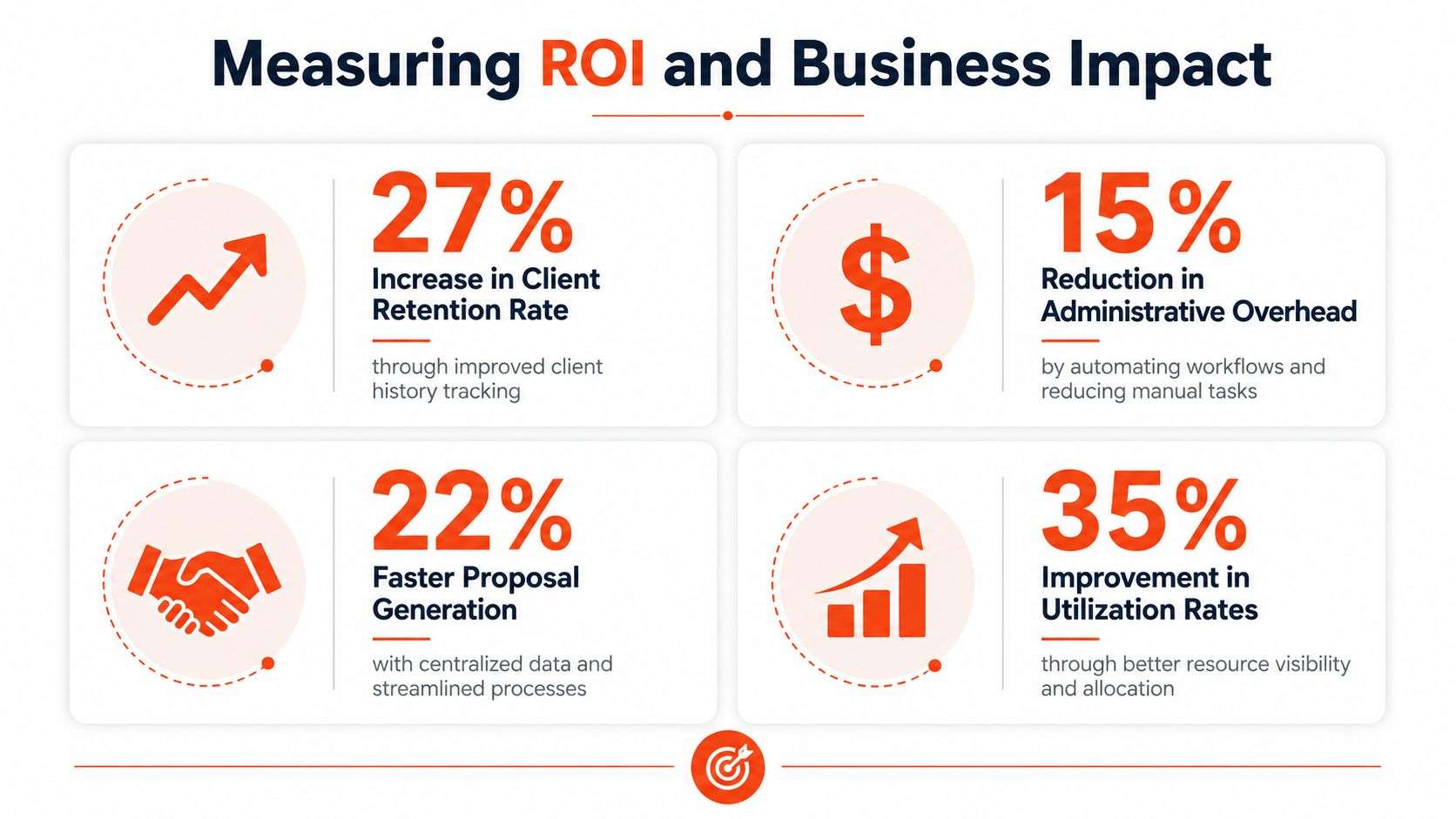
The infographic below includes illustrative metric examples, but firms should replace those figures with their own baseline and verified results.
Selecting the Right Platform for Your Practice
Platform selection should start with operating requirements, not a software demo. Ask vendors to demonstrate a real client journey, from first enquiry through proposal, engagement delivery, billing, renewal and issue resolution. A polished sales pipeline can hide serious gaps in delivery and governance.
| Criteria | Generic CRM | Professional Services CRM |
|---|---|---|
| Client model | Contacts, accounts and sales opportunities | Organisations, stakeholders, engagements and relationship ownership |
| Delivery connection | Usually requires project integrations | Links proposals to matters, projects, milestones and tasks |
| Commercial visibility | Sales forecasts and deal values | Time, billing, retainers, project margin and client value |
| Workflow design | Lead and sales automation | Onboarding, approvals, deadlines, escalations and renewals |
| Data structure | Often sales-led and activity-focused | Context-rich records for advice, issues, documents and commitments |
| Governance | Standard permissions and logs | Role-based access, retention, consent and AI decision records |
| Implementation | May appear quick but require customisation later | More discovery upfront, with configuration aligned to services delivery |
Generic flexibility versus operational fit
A horizontal CRM can be a sensible choice for a firm with a straightforward sales process and a separate, effective delivery platform. It becomes less attractive when staff must maintain duplicate records across CRM, project management, accounting and document systems.
Odoo ERP deserves consideration where the firm wants CRM, project management, invoicing and operational workflows connected in one environment. Its flexibility is an advantage when the practice has distinctive processes, but flexibility also creates responsibility. Poorly governed customisation can produce confusing screens, inconsistent fields and upgrade complications.
For an Odoo implementation, ask:
- Which functions are standard, and which require custom development?
- Where will Australian client data be stored?
- How will the partner handle migration, testing and rollback?
- What permissions can be applied at organisation, matter and document level?
- How are upgrades, support and post-go-live changes managed?
- Can users complete their daily work without duplicate entry?
The local market supports a serious partner-selection process. A 2026 ranking assessed more than 500 Australian consulting firms and identified 34 top CRM players, using criteria that included implementation expertise, project track record, industry recognition and CRM offerings (Consultancy.com.au). Software capability matters, but implementation judgement usually determines whether the platform becomes useful.
Implementation Roadmap and Change Management
CRM implementation fails when the project team treats configuration as the main event. The difficult work is agreeing how partners, managers, administrators and fee earners should record, retrieve and act on client information.
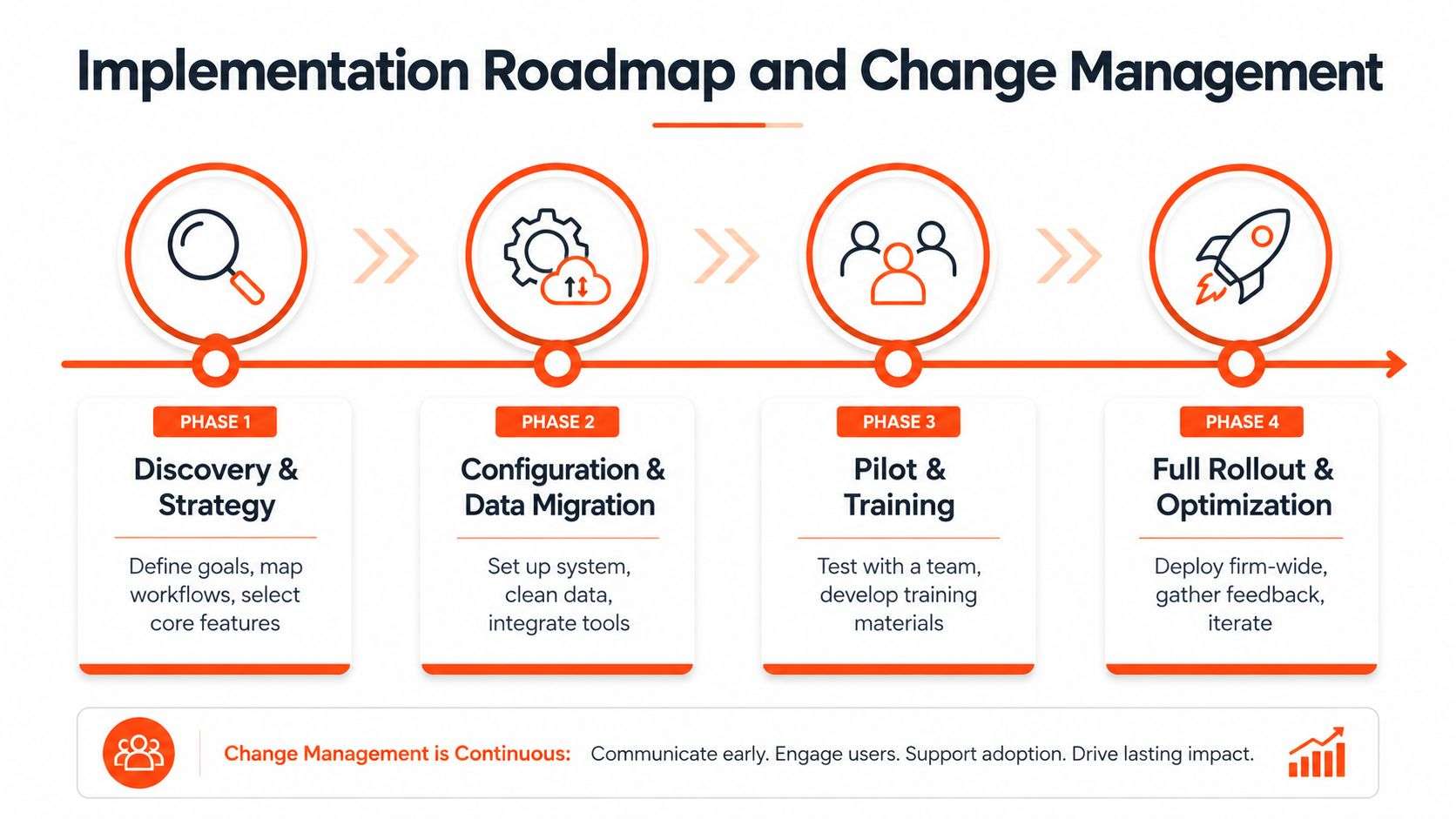
Phase one, discovery and process mapping
Document the current journey for a real engagement. Follow an accounting client from enquiry to onboarding and recurring compliance work. Follow a legal matter from intake to closure. Follow a consulting opportunity from qualification to proposal, resource planning and delivery.
Identify decisions, handovers, required documents, approvals, exceptions and reporting needs. Don't automate a process just because it exists. Remove unnecessary steps before reproducing them in the system.
Phase two, data preparation and configuration
Data migration is where many projects lose credibility. Establish ownership for duplicates, outdated contacts, incomplete organisations and sensitive notes. Define what moves, what stays archived and what must be reviewed before becoming visible to users.
Configure the smallest useful release. Core objects might include organisations, contacts, opportunities, engagements, tasks, issues and documents. A firm can add advanced automation after staff trust the basic records.
Australian Odoo implementation budgets commonly fall into distinct ranges. Small-to-medium projects using 2 to 8 modules typically range from AUD 15,000 to AUD 60,000, while more complex mid-market implementations are often AUD 60,000 to AUD 150,000; Odoo licensing starts at approximately AUD 34 per user per month for all apps included, according to Australian Odoo implementation guidance. Treat these as planning ranges, not a quote. Data condition, integrations, customisation and governance requirements can materially affect the final scope.
Phase three, pilot and training
Choose a pilot group that represents real work, not only enthusiastic users. Give them specific scenarios, such as creating an opportunity, recording an advisory note, escalating a client issue or handing a signed proposal to delivery.
Training should be role-based. Partners need relationship visibility and approvals. Administrators need data quality controls. Fee earners need fast, low-friction updates. Managers need dashboards they can trust.
The workflow automation approach for law firms is useful when designing legal processes because it keeps automation tied to matter ownership, deadlines and review points rather than treating every event as an automatic action.
Phase four, rollout and optimisation
Roll out in controlled groups, publish clear definitions and appoint internal champions. Measure adoption through useful behaviour, not log-in counts. If users avoid a field, find out whether it's unnecessary, unclear or too difficult to complete.
Adoption test: A professional will use the CRM when it gives them relevant context faster than their inbox can.
Schedule post-go-live reviews for data quality, workflow friction, reporting accuracy and permission issues. The operating model should evolve, but changes need governance so every team doesn't create its own version of the system.
Navigating AI Governance and Privacy Compliance
AI-assisted CRM changes the risk profile of client management. A tool that drafts a follow-up email, summarises a matter or prioritises an issue may save time, but it also introduces questions about data use, accountability, accuracy and review.
Australia-focused reporting identifies December 2026 automated decision-making disclosure expectations as a reason for stronger documentation and governance in AI-led CRM workflows (Mordor Intelligence). This is the gap generic CRM guides often miss. The question isn't only whether a platform has AI features. It's whether the firm can explain how those features operate within a defensible control framework.
Build review into the workflow
A compliance-ready setup should define:
- Role-based permissions, so staff see only the client, matter and document information required for their work.
- Audit trails, recording relevant AI-assisted actions, human approvals, changes and outcomes.
- Consent management, linking communication preferences and lawful use of client information to the relevant record.
- Retention rules, identifying when records should be reviewed, archived or deleted.
- Human review points, especially before AI-generated communications or prioritisation affects a client, matter or commercial decision.
- Model and prompt governance, documenting which tools are approved and what information must not be entered.
A useful control is to separate AI assistance from final authority. The system may suggest a priority or draft wording, but a named professional should review the result where the decision affects a client's rights, obligations, confidentiality or service experience.
The Australian Privacy Act guidance can help firms frame privacy work alongside system design. The implementation team should involve legal, risk, IT and practice leadership early. Don't bolt governance on after the automation has already spread across email, notes and task queues.
Integration Strategy and Next Steps
A standalone CRM creates another place for staff to update. An integrated platform creates a usable operating picture.
For a professional services firm, the important connections usually include accounting, document management, email, project delivery, invoicing and reporting. The objective isn't to connect every available application. It's to remove the duplicate entry that causes records to diverge.
Connect the commercial and delivery lifecycle
Odoo ERP can connect CRM activity with project management, invoicing and financial reporting. That gives leadership a clearer relationship between pipeline, delivery commitments and commercial performance, provided the data model and ownership rules are agreed before integration work begins.
An online business may need a different connection. A Shopify implementation can link website activity and customer acquisition data to the broader client record, while WooCommerce may suit organisations that want an open WordPress-based commerce environment. In Australia, Shopify is the largest tracked e-commerce platform in the available 2026 dataset, with 153,214 stores and 51.7% of 296,288 online stores, compared with WooCommerce at 82,028 stores and 27.7% (Plug2Data). That platform distribution supports practical implementation guidance, but selection should still follow operational requirements, ownership and integration capability.
A firm considering software development Sydney Adelaide should assess whether its technology partner can handle APIs, permissions, testing, monitoring and support, not only front-end changes. The same applies when selecting an Odoo partner Sydney Adelaide. Local availability is useful, but delivery experience in professional services workflows matters more than geography alone.
For broader integration planning, these Sensoriium CRM integration tips provide a useful perspective on connecting marketing automation with CRM data. Apply the same discipline to professional services: define the source of truth, map ownership, document exceptions and test what happens when a record changes.
Wistec offers Odoo ERP implementation, CRM customisation, website development across Shopify and WooCommerce, mobile app development and software solutions for Australian businesses. Its role is relevant where a firm wants discovery, integration and custom development considered as one programme rather than as disconnected technology purchases.
Start with a short discovery exercise:
- List the client records your teams maintain today.
- Mark where information is duplicated or inaccessible.
- Choose the client and delivery outcomes that matter.
- Define privacy, retention and AI review requirements.
- Invite an experienced implementation partner to validate the operating model before selecting modules.
Visit Wistec to discuss a compliance-ready professional services CRM, Odoo implementation, integration strategy or custom software development for your accounting, legal or consulting practice. Bring your current workflows, systems and governance concerns, and ask for a discovery conversation focused on what your team needs to deliver better client outcomes.