

You're probably dealing with the same mess I see in a lot of Australian operations, orders landing in Shopify or WooCommerce, dispatch happening in spreadsheets, drivers chasing changes on WhatsApp, and the warehouse still printing run sheets because nobody trusts the live system yet. That setup works until it doesn't. One late Saturday wave, one missed ETAs chain, and the whole customer experience starts leaking through the cracks.
That's why logistics mobile app development has shifted from a nice extra to the control layer that sits between storefront, ERP, dispatch, and the field. In Australia, where routes stretch across metro, regional, and remote pockets, the value of real-time visibility is even sharper than in denser markets. The right mobile layer gives dispatchers a current view, gives drivers one source of truth, and gives customers the confidence that the delivery is moving.
Why Australian Operators Are Rebuilding Logistics Around Mobile
A Sydney specialty retailer can survive a busy weekday on phone calls and printed dockets. Saturday is where it falls apart. The warehouse team is checking messages in WhatsApp, the dispatcher is retyping job notes, and the driver leaves with yesterday's version of the run sheet. The customer does not care that the delay came from manual communication, they just see a missed promise.
Mobile is filling that gap because logistics now depends on visibility, not just movement. Australia's delivery networks stretch across dense city corridors and long regional legs, so a dispatcher cannot rely on a single phone call to know where a parcel, truck, or technician is at any point in the run. A mobile app puts route status, proof of delivery, and exception handling into the same workflow. That is why it is becoming the operational backbone for retailers, 3PLs, and manufacturers.
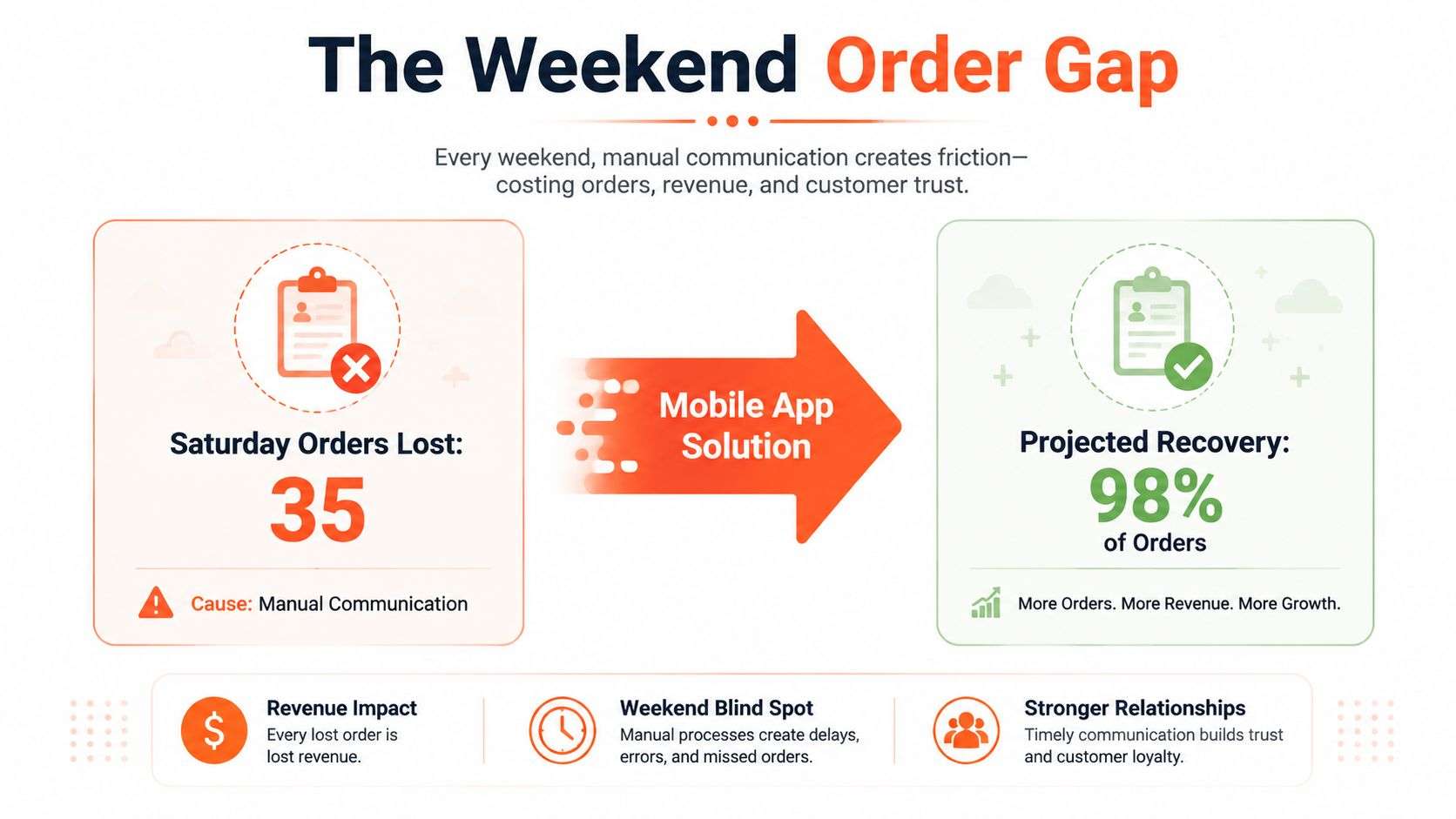
The commercial pressure is real. A logistics technology guide projects the digital logistics market will reach USD 54.14 billion by 2029 with a 17.6% CAGR, and notes that last-mile delivery costs can account for up to 50% of total transportation costs source. That is exactly why mobile-first dispatch and tracking matters so much in Australia. If your team can remove friction from the last mile, the savings show up across every route, every driver, and every missed stop you do not have to recover.
A mobile app does not replace your ERP or storefront, it stops them from drifting out of sync with the road.
If you are already running fleet processes in a mature platform, it helps to treat the mobile app as the live execution layer around the back office, not a separate project. Operators comparing fleet management software in Australia usually end up at the same question, how do we make the people on the ground work from the same truth as the people in planning?
Discovery Before Design
Skipping discovery is the fastest way to pay for the same app twice. I've seen teams go straight into UI screens with no agreement on who owns dispatch, who approves exceptions, and what happens when an order changes after cut-off. The result is always the same, rework, integration pain, and a pilot that looks fine in demos but falls over in live use.
Build the scope from user roles and trip stages
Start with the people who will touch the app. Dispatchers need queue visibility, drivers need route clarity and proof-of-delivery capture, managers need exceptions and KPI views, and end customers usually only need clean notifications and ETA updates. That sounds obvious, but a lot of logistics mobile app development budgets get blown because the team designs for “everyone” and ends up pleasing nobody.
Map the trip lifecycle from order ingestion through to delivery confirmation. If the app has to receive orders from Odoo ERP, pull storefront orders from Shopify or WooCommerce, and push status back into invoicing or customer service, those touchpoints need to be documented before a line of code is written. An Odoo implementation in Sydney or Adelaide usually anchors the back office, so the mobile app should be designed around that system of record rather than fighting it.
Use a worksheet before you quote
A one-page discovery worksheet saves more money than a glossy scope deck. Keep it practical:
- User roles, list who creates jobs, who dispatches, who drives, who signs off exceptions.
- Data owners, name the system that owns orders, addresses, inventory, customer records, and proof-of-delivery evidence.
- Integration boundaries, decide what the app reads, what it writes, and what only flows one way.
- SLA expectations, set what “fast enough” means for order sync, notifications, and status updates.
- Offline behaviour, define what the driver can still do if coverage drops.
The point is to make the software development team in Sydney or Adelaide quote against real operational decisions, not hopeful assumptions. If you want a partner that already thinks this way, Wistec's mobile app development design approach covers discovery, process mapping, technical validation, development, QA, system integrations, and offline requirements.
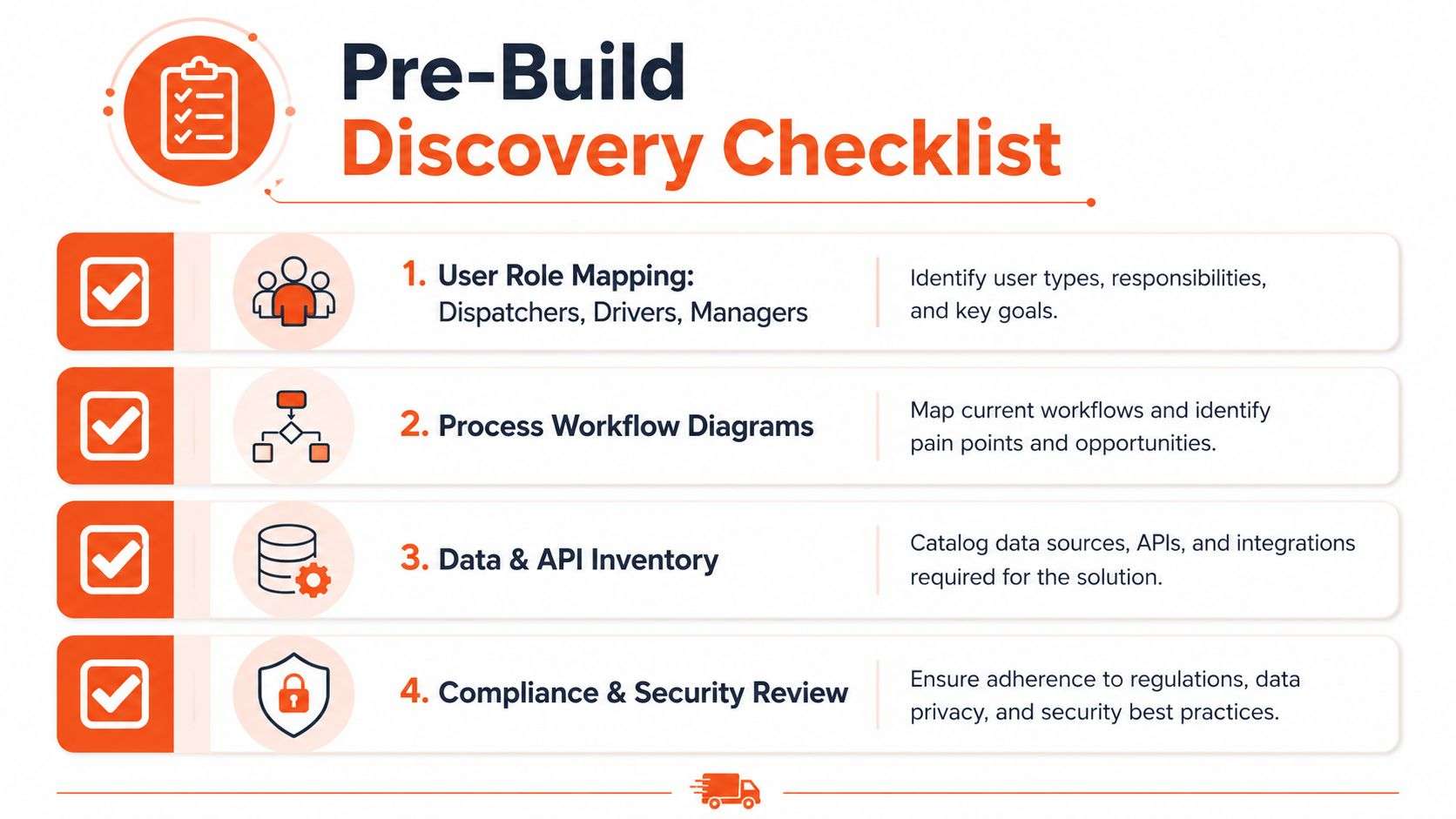
A good discovery pack ends with one thing, a scope brief that can survive contact with the warehouse floor. If it can't explain where orders come from, who can override a route, and what happens when sync fails, the project isn't ready yet.
Choosing Native, Hybrid, or Cross-Platform
The stack choice matters more in logistics than in a lot of other app categories because the device is part of the job. Drivers run long shifts, battery life matters, GPS matters, and coverage isn't reliable in every corridor of Australia. A beautiful interface that drains the phone or freezes offline is still a failed app.
Match the stack to the operating reality
Native iOS and Android builds make sense when you need the most dependable access to device features, especially for telematics hooks, Bluetooth peripherals, and heavy offline use. That's often the right call for a national fleet operator with stable internal demand and a long roadmap. The trade-off is obvious, you're maintaining two codebases and two release paths.
Cross-platform stacks like React Native or Flutter usually fit better for retailers and smaller 3PLs building their first driver app. You get one shared codebase, which usually speeds up delivery and makes early iteration easier. For a team proving the workflow before scaling, that can be the pragmatic choice, especially if the core need is order sync, tracking, and proof of delivery rather than deep hardware integration.
Hybrid web shells are the lightest option, but they're the weakest in field conditions. They can be fine for low-risk portals or admin wrappers, yet they tend to struggle with offline resilience and complex device interactions. If you're sending drivers into blackspots or using the device as a core operational tool, that's where hybrid starts to feel thin.
If you want a practical discussion of hybrid app deployment strategies, it's worth reading before you lock in a stack. The main lesson is simple, deployment convenience doesn't fix poor field fit.
Practical rule: choose native when the device is mission-critical, choose cross-platform when speed to pilot matters, and avoid hybrid shells for anything that has to keep working in weak coverage.
A quick decision matrix
| Situation | Better fit | Why it usually wins |
|---|---|---|
| National fleet with telematics and strict uptime expectations | Native | Strongest device access and offline control |
| Retailer launching a first driver app | Cross-platform | Faster pilot, lower duplication, easier early change |
| Admin-only or light workflow tool | Hybrid | Good enough if device demands are low |
For teams comparing vendors, multiplatform mobile app development can be a useful middle ground when you need one delivery team and a single app codebase without committing to a fully native build.
Core Features Tiered for MVP, Growth, and Scale
A logistics app gets expensive when every stakeholder insists on every feature on day one. The smarter pattern is to ship the operational spine first, prove it in live work, then add the richer controls once the team has trust in the workflow. That keeps logistics mobile app development focused on value rather than wish lists.
What belongs in each release tier
The MVP tier should cover real-time GPS tracking, automated route optimisation, digital proof of delivery, and customer notifications. That gets dispatch out of the phone-call loop and gives customers a clear trail of what's happening. It also gives operators the baseline visibility needed to reduce manual follow-up and improve service consistency.
The growth tier adds driver management dashboards, payment integration, and analytics/reporting. At that point, the app starts helping with operational accountability, cash flow, and planning. It's where managers can see patterns in delivery success, average delivery time, and recurring exceptions rather than relying on gut feel.
The scale tier is where advanced dispatch logic comes in, including dynamic dispatch, multi-stop optimisation, and predictive ETAs. Those features are useful once order volume, route density, and exception handling are all large enough that humans can't keep up manually. They're powerful, but they only pay off when the underlying data is already clean.
| Tier | Features | Primary Outcome | Likely Integration |
|---|---|---|---|
| MVP | GPS tracking, route optimisation, digital proof of delivery, customer notifications | Fewer missed deliveries and less manual chasing | Maps, order feed, notification service |
| Growth | Driver dashboards, payment integration, analytics/reporting | Faster reconciliation and tighter operational control | ERP, payment gateway, BI layer |
| Scale | Dynamic dispatch, multi-stop optimisation, predictive ETAs | Better fleet utilisation and stronger planning accuracy | TMS, telematics, routing engine |
The key is to tie each feature to a real operational outcome. If a function doesn't reduce missed deliveries, speed up invoicing, or improve route decision-making, it probably belongs in a later release.
Integrating Odoo, TMS, Telematics, and Your Storefront
A logistics app only earns its place when it sits cleanly between the systems already running the business. For most Australian operators, that means Odoo ERP on the back end, a TMS for planning, telematics for vehicle insight, and either Shopify or WooCommerce on the storefront side. If the app can't talk to those systems without becoming brittle, it becomes another silo.
Keep the mobile app decoupled from ERP upgrades
A thin middleware layer, usually an API gateway or queue, is what stops the mobile app from breaking every time the ERP changes. That matters in practice, because an Odoo partner Sydney Adelaide team may upgrade workflows, add custom fields, or change invoice logic while drivers are still on the road. The app should be insulated from that churn.
A sensible flow looks like this. Orders come in from Shopify or WooCommerce, the middleware validates and normalises them, Odoo becomes the source of truth for inventory and invoicing, the TMS plans the run, and the mobile app receives the dispatch payload. Vehicle location and status then flow back the other way through telematics and completion events.
For teams deciding between event-driven and scheduled sync, webhook-based updates are better when you need dispatch visibility fast. Polling still has a place for slower systems or legacy platforms, but it introduces delay and unnecessary load. A WooCommerce implementation can feed new orders into the dispatcher view within seconds when webhooks are configured properly and the integration layer is built to handle retries cleanly.
If you're evaluating custom API integration for ERP systems, the main idea to carry into logistics is that the integration should preserve the ERP as the system of record while letting the mobile layer move fast.
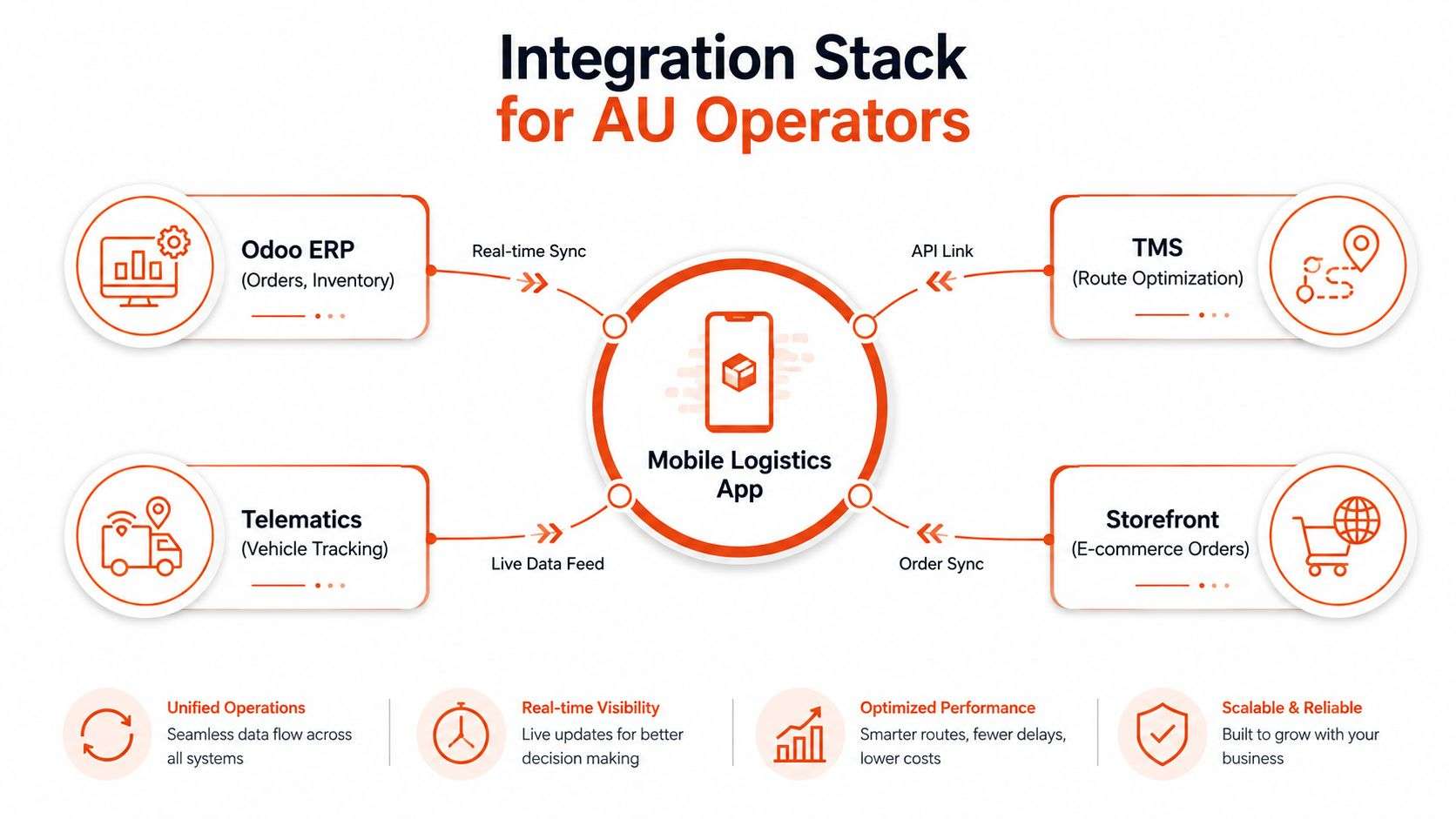
Don't hardwire the app to one platform's quirks. Make the integration layer absorb the complexity, not the driver.
The other practical advantage is maintenance. When the storefront, ERP, or telematics vendor changes a payload, the middleware is where you absorb the fix, not in every mobile screen.
Security, Compliance, and Testing for AU Field Operations
Field apps carry live customer data, route details, signatures, and sometimes payment references. They also live on devices that leave the warehouse every morning, which changes the risk profile immediately. If you don't design for that reality, you're asking drivers and dispatchers to carry sensitive operational data around in unsecured pockets.
Lock down the device and the audit trail
The baseline security stack for logistics mobile app development should include encrypted local storage, certificate pinning, role-based access, secure boot and jailbreak detection, and strong audit logs for proof-of-delivery events. Those controls reduce the damage if a phone is lost, tampered with, or used by someone who shouldn't have access. They also make it easier to prove who captured what, and when.
Australian compliance isn't just a checkbox. The Australian Privacy Principles govern how personal information is handled, and the Notifiable Data Breaches scheme becomes relevant if a breach reaches reportable territory. Transport and chain-of-responsibility obligations can add state-level requirements on top, so the app needs a data model and access model that can stand up to scrutiny.
Test the app where the work happens
Testing should happen on real routes, not just in a desk environment. Metro pilots catch dense stop sequences, while regional runs expose the weak coverage and slow handovers that hidden office demos never show. That's also where store-and-forward sync gets proven, because drivers need the app to keep collecting proof even when the network drops.
For a detailed testing checklist, mobile app testing best practices are worth reviewing before launch. The main point is that test scripts should match actual dispatch behaviour, not abstract QA happy paths.
A security review before launch should cover:
- Data storage, confirm local data is encrypted and cleared correctly on logout or device reset.
- Identity and access, check that roles limit what drivers, dispatchers, and managers can see.
- Transport security, verify secure API communication and certificate handling.
- Device trust, test jailbreak, root, and tamper detection.
- Evidence integrity, make sure signatures, photos, timestamps, and GPS trails can't be altered.
- Incident response, define who gets notified if a breach or sync failure happens.
A partner in Sydney or Adelaide should be able to walk through that checklist without improvising. If they can't, they haven't built enough field software.
Cost, Timeline, and Post-Launch KPIs in the AU Market
A logistics rollout in Australia usually gets expensive when the app has to sit between store orders, ERP data, fleet activity, and field proof. That cost is not just code. It includes the work needed to make Odoo ERP, Shopify, WooCommerce, telematics, and dispatch rules agree with each other, then hold up under Australian operating and compliance requirements.
One industry report places Australia at AUD 50,000 to AUD 300,000 for logistics app development, about USD 35,000 to USD 215,000, which gives a fair sense of how quickly integrations and compliance lift the budget in the AU market source. Lean MVP builds sit much lower because the scope is narrower, with one Australia-focused guide pointing to a USD 10,000 to USD 26,000 range for smaller starts.
What the money usually buys
At the lower end, the spend usually covers a usable dispatch and tracking app, not a full supply chain platform. The core package is order visibility, route status, proof of delivery, notifications, and an admin view that operations can trust without calling IT for every update. Once the scope widens, the budget starts absorbing deeper integrations, more complex routing logic, richer reporting, and tighter coordination across drivers, dispatch, and back office teams.
The commercial case is straightforward. A logistics guide notes that operational efficiency can improve by 15–30% through route optimisation and automation, and AI route optimisation can reduce miles driven by up to 20% annually source. That kind of gain is why fleets keep funding these programs, because last-mile work often carries the heaviest cost pressure in the transportation chain.
A delivery plan that works in the real world usually follows this sequence:
- Discovery, align scope, owners, and integration points.
- Design, shape dispatcher and driver flows around how the operation already runs.
- Build, connect the app to ERP, TMS, telematics, and storefront systems.
- Pilot, run the app on live routes and fix the friction points.
- Roll out, expand once the data and workflows are trusted.
Those stages matter because the cost is not just software build time, it is the cost of changing how a live operation behaves. The most common mistake is pushing too far into features before the business rules, data flow, and handover points are settled.
The KPIs that separate useful apps from shelfware
Strong logistics apps stay useful after launch because they keep improving the day-to-day operation. The numbers that matter are operational, not vanity metrics. DhiWise's logistics app guide points to 70%+ repeat transactions, under 20% churn, and 90%+ on-time delivery as meaningful targets within 12 to 18 months source.
For Australian operators, the post-launch scorecard should track the following:
- On-time delivery rate, because customers judge the platform by the outcome, not the interface.
- Proof-of-delivery completion, because clean evidence keeps billing and disputes moving.
- Driver app adoption, because a workflow fails if the field team avoids it.
- Revenue per stop, because the platform should improve route economics, not just record them.
A logistics MVP can still move fast if discovery is disciplined and the scope stays tight. Once an Odoo ERP implementation enters the picture, the schedule usually stretches, because inventory, invoicing, and operational rules have to be aligned before the app can be trusted in production. Shopify and WooCommerce can feed orders into the dispatcher view quickly, but only if the integration design is agreed early and tested with live payloads.
Maintenance does not end at release. Security patches, API changes, map and notification service updates, and ongoing tuning all become part of the operating model as routes, customer expectations, and fleet patterns change. In logistics, that is normal work, and it is why the cheapest quote is rarely the least expensive project.
FAQ
How long does a logistics MVP really take to ship?
A focused MVP can move quickly if the scope stays limited to dispatch, tracking, and proof of delivery. In Australian projects, the main variable is usually not the screen build, it is the time needed to agree on workflow ownership, data flow, and integration boundaries before development starts.
What does an Odoo ERP implementation add to the timeline?
It adds coordination time because order, inventory, and invoicing rules need to be mapped before the mobile app can rely on them. If Odoo is the system of record, the project needs proper discovery, integration testing, and sign-off from operations and finance.
How do Shopify and WooCommerce storefronts feed orders into the dispatcher view?
They usually send new orders through webhooks into a middleware layer, which validates the data and passes it into the dispatch workflow. That keeps the app responsive without making it depend directly on storefront quirks.
What does ongoing maintenance look like once the app is live?
It usually includes API adjustments, security patches, device and OS compatibility updates, and small workflow changes as the operation grows. In logistics, maintenance is part of keeping the field team productive, not an afterthought.
If you're planning logistics mobile app development for a retail, manufacturing, or 3PL operation in Sydney or Adelaide, Wistec can help map the workflow, integrate Odoo, Shopify, or WooCommerce, and build the mobile layer that dispatchers and drivers use. Visit Wistec to start a discovery conversation with a team that builds practical software around real Australian operations.