

A lot of ecommerce redesigns start the same way. A Sydney owner looks at a homepage that looks polished on desktop, but the mobile cart keeps leaking buyers, shipping questions keep hitting support, and stock numbers don't match what the warehouse team can ship. That's not a branding problem. It's a conversion problem, and in Australia it sits inside a market where online retail spending reached AU$69 billion in 2024, up 12% year-on-year, according to the National Retail Association's reporting as summarised in this Australian ecommerce design overview.
Treating the site like a brochure is the fastest way to waste that demand. Australian stores need mobile-first layouts, visible search, clear filtering, fast product pages, and a checkout that doesn't make people work for the total. The practical question isn't whether the site looks good. It's whether the design helps buyers move from product discovery to payment without friction, and whether the storefront reflects the way the business fulfils orders.
Why an AU Ecommerce Redesign Is a Revenue Decision
I've seen retailers spend weeks arguing over banner copy while the actual problem sat in the checkout flow. A buyer in Melbourne taps through on a phone, spots a product, then drops off when shipping costs appear too late or the form asks for too much. That is a revenue issue, because design is shaping whether the sale finishes or falls apart.
Australian ecommerce design needs to be judged against how people shop online here. The local market is now mainstream enough that the job is not getting a store online, it is stripping out the friction that stops people buying once they have arrived. A home page, category page and checkout have to act like sales tools, and the broader market has been moving that way for some time, as reflected in Australia Post's eCommerce Industry Report.
What changed for the buyer
Buyers now want the key facts early. They want to know what something costs, whether it ships to their area, when it will arrive, and whether the checkout will ask for unnecessary details. If those answers are buried, they leave.
The trade-off is straightforward. More visual polish often means less clarity if it crowds out the buying path. That pressure shows up hardest on mobile, where tap targets, short forms and clear calls to action matter more than decorative content. The stores that perform are the ones that keep the page focused on the next action.
Practical rule: if a design element does not help the buyer decide, trust the store, or complete the order, it should justify the space it takes on the page.
For a redesign, that means you are not just choosing colours and sections. You are deciding how much attention goes to navigation, product discovery, shipping transparency and checkout completion. A serious ecommerce build starts there, then moves into platform choice, UX structure, integrations and launch discipline.
Discovery, Goals and the Brief That Saves the Build
Before anyone opens Figma or starts a theme demo, the brief has to answer what the store is for. A DTC retailer, a wholesale manufacturer, a hospitality brand and a logistics business do not need the same ecommerce structure. The same is true for a Shopify rebuild, a WooCommerce migration, or an online store that needs to sit on top of odoo erp with live inventory and order sync.
The discovery questions that matter
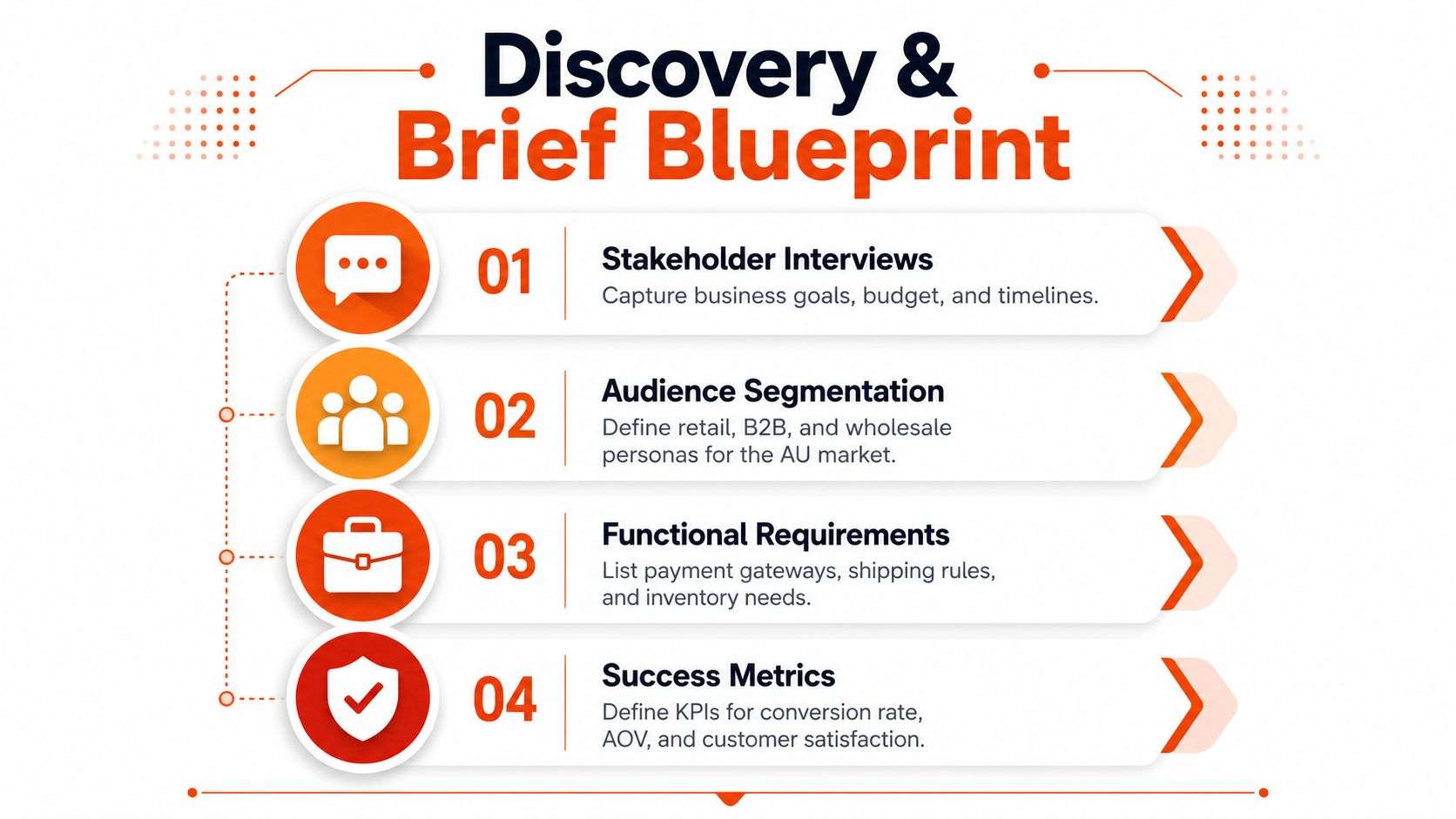
Start with stakeholder interviews. Ask who owns stock, who handles fulfilment, who approves content, who manages returns, and who will live with the new workflow after launch. Then separate audiences by behaviour, not just by industry label. A retailer may need consumer buying journeys, while a manufacturer may need stockist access, trade pricing and repeat ordering.
A useful project brief includes these checkpoints:
- Audience groups: retail, wholesale, B2B, hospitality, logistics, or mixed channels.
- Primary journeys: browse, compare, add to cart, request quote, reorder, or account login.
- Content inventory: product categories, product names, images, delivery locations and rates, payment information, FAQs, returns policy, terms and conditions, and privacy policy, matching the structure recommended in this ecommerce content planning guide.
- Functional requirements: payment gateways, shipping rules, tax handling, inventory rules, and customer support paths.
- Success measures: conversion quality, average order value, support deflection, and checkout completion.
The biggest discovery mistake is vague goals. “We want it to look modern” tells the designer nothing. “We need fewer checkout drop-offs on mobile” gives the team something to solve. Another common miss is ignoring compliance or tax inclusions until late, which creates expensive rework once page templates are already approved.
The brief also has to protect the build
A written brief keeps the project honest when opinions start multiplying. It should say what must be visible on product pages, what must appear in checkout, and what can be deferred until after launch. If the business sells through stockists and DTC, that needs to be explicit too, because the product page, pricing logic and account structure can't be designed sensibly without that split.
If the brief doesn't mention who the store serves and how orders are fulfilled, the homepage will end up carrying problems that belong in operations.
That's why I treat discovery as the first design deliverable. It removes guessing, gives developers a buildable scope, and stops the store turning into a bundle of unrelated ideas.
Shopify vs WooCommerce as a Design Canvas
Platform choice isn't just a technical decision. It shapes what the design can do, how quickly a team can ship changes, and how much control the business keeps over the storefront. For a client who asks how to design ecommerce website pages without painting themselves into a corner, the answer starts with whether they want a managed system with constraints or a more flexible build with more ownership and maintenance.
How the platform affects the design system
Shopify is usually cleaner for teams that want a predictable theme structure, faster rollout, and fewer moving parts in the front end. It suits brands that need strong merchandising, dependable checkout behaviour, and a manageable content workflow. WooCommerce fits better when the site needs more control over custom product data, account logic, or WordPress-led content operations.
If the business expects deep ERP alignment, the platform choice matters even more. A product catalogue with stock rules, trade pricing, back-orders, or multi-step fulfilment often benefits from a build that can express those rules clearly in the user interface, not just store them in the backend.
| Dimension | Shopify | WooCommerce |
|---|---|---|
| Design control | Theme-led, structured, fast to deploy | More flexible templates and component control |
| Ownership | Lower operational overhead | More ownership of hosting and upkeep |
| Performance discipline | Easier to keep tight with the right theme | Depends heavily on hosting and plugin hygiene |
| ERP fit | Strong when integrations are well planned | Strong when complex content and rules need custom handling |
| Best fit | Brands wanting speed and consistency | Manufacturers, wholesalers, and content-rich stores |
For a useful reference point on the platform trade-off, this Shopify vs WooCommerce comparison is a practical starting point.
When the choice becomes strategic
Shopify Plus or headless starts to make sense when a brand has multiple regions, more complex merchandising, or a need to decouple front-end design from commerce logic. WooCommerce stays attractive when the business already runs WordPress content, has in-house technical support, or needs more freedom in how product pages are structured.
The mistake is choosing the platform on preference alone. The right choice depends on catalogue complexity, internal capability, and how tightly the storefront must connect to operations. For manufacturers and wholesalers, a solid WooCommerce build can be the better canvas. For retail brands that want speed and polish without heavy maintenance, Shopify is often the cleaner call.
If you're weighing a replatform or a rebuild, I'd also look at the team model. A small internal marketing team can usually handle Shopify more comfortably. A business with custom workflows, ERP dependencies and local technical support needs may prefer a team that also covers software development sydney Adelaide, so the storefront, integrations and back-office logic are built as one system.
UX and Information Architecture That Convert
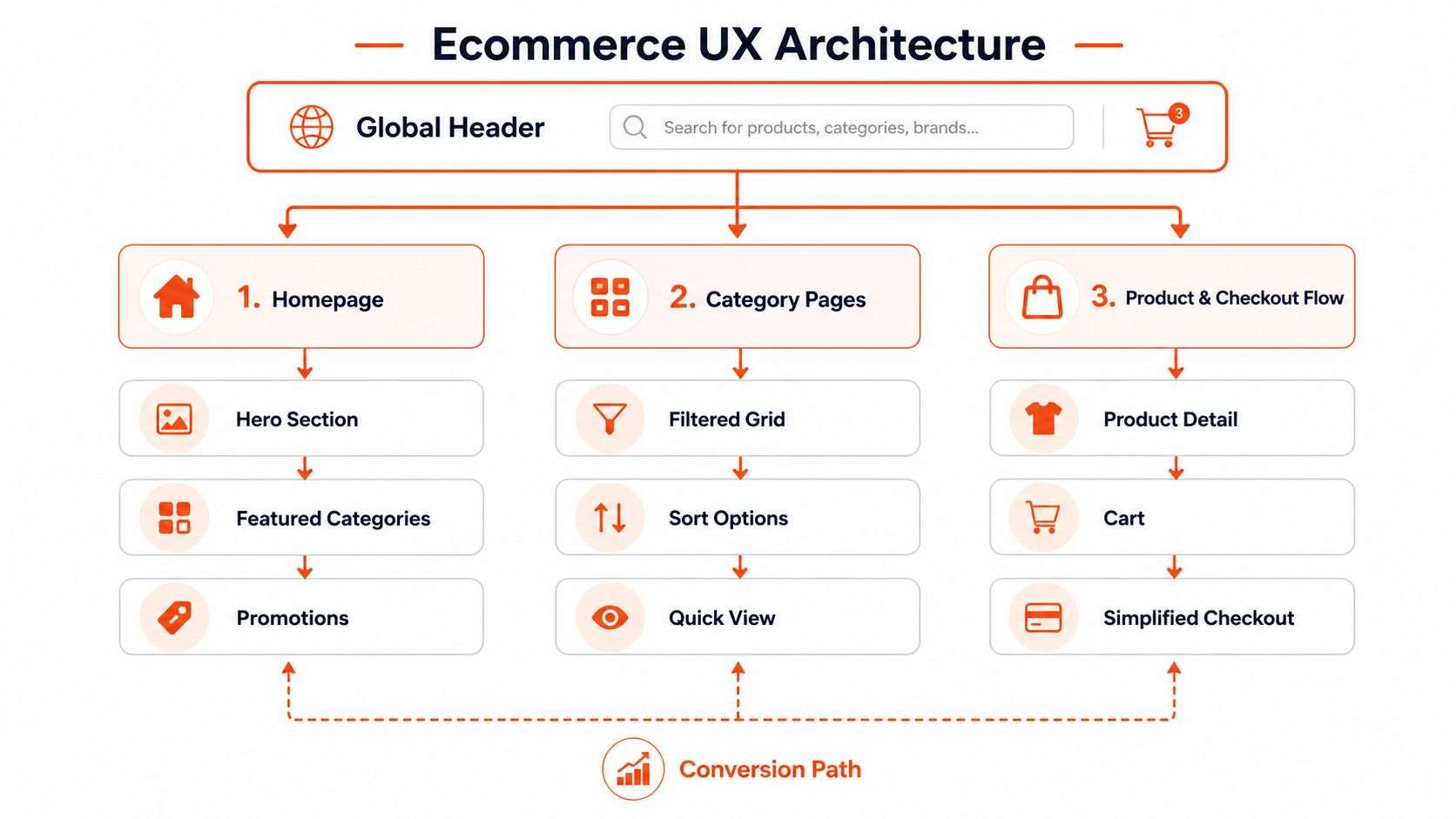
A store can look polished and still lose sales if shoppers have to work too hard to find the right product, delivery detail, or checkout step. The structure has to do practical work, so the homepage, category pages, product detail pages and checkout each carry one clear job. If the navigation fights the buying path, the site feels busy without helping revenue.
Build the page hierarchy around purchase intent
Baymard's ecommerce UX guidance recommends placing the cart link in the upper-right of the sitewide header, and that remains a sensible default for most stores. It gives shoppers a fixed point of reference as they move between category pages and products. On product and cart pages, the details that affect the decision need to sit above the fold, including the product name, price, main image, options, stock status, shipping timing, and the primary add-to-cart CTA, so users can decide without unnecessary scrolling, as outlined in Baymard's ecommerce UX best practices.
The homepage should earn its place in the path to purchase. Too many promos, sliders and announcement bars turn it into a traffic jam, especially on mobile where the viewport is small and every extra banner competes with the product path. A better approach is to let the homepage direct shoppers into the right category or collection as quickly as possible.
Design for mobile scanning, not desktop decoration
A good mobile menu is short, clearly labelled and broken into manageable chunks. Users on phones do not get the same overview as desktop users, so clear category names, visible current location, and well-placed search reduce the amount of guessing needed to keep moving.
AU-specific trust signals belong in the structure, not hidden in footer links. Show the ABN, a short returns summary, delivery ETA language that makes sense locally, and the most important payment details near the action. If the store serves regional buyers, surface delivery reality early, because postcode-based shipping rules and courier cut-offs affect whether the order should be placed at all.
A Sydney CBD shopper, a Perth buyer and a regional customer do not read the same way. The best builds account for that with sensible postcode messaging, shipping calculators that reflect real carrier coverage, and labels that tell the buyer whether express delivery is available before they commit.
The product page should answer the buyer's objections before the buyer has to hunt for them.
If you want a deeper process view of layout and page hierarchy, these UX design principles are worth reading alongside your wireframes.
A practical rule is to keep the strongest visual section tied to the next decision. On category pages, that usually means subcategories and filters. On product pages, it means the buy button and purchase-critical information. On checkout, it means the form and payment step, not marketing content. For stores with repeat buyers, it also means planning for account visibility and easy reordering, because the second purchase should take less effort than the first.
Post-purchase design matters too, because customers do not stop caring once they click buy. Clear order confirmation, fulfilment updates, and return instructions reduce support load and build trust for the next order, so it is worth a separate pass to optimize post-purchase flows.
Integrations That Make the Storefront Operationally Honest
A storefront can look polished and still mislead the buyer. If stock is wrong, shipping is vague, or tax changes late in the process, the design is failing even when the interface looks clean. Integrations belong in ecommerce design because they shape what the customer can trust.
Design what the customer sees from what the systems know
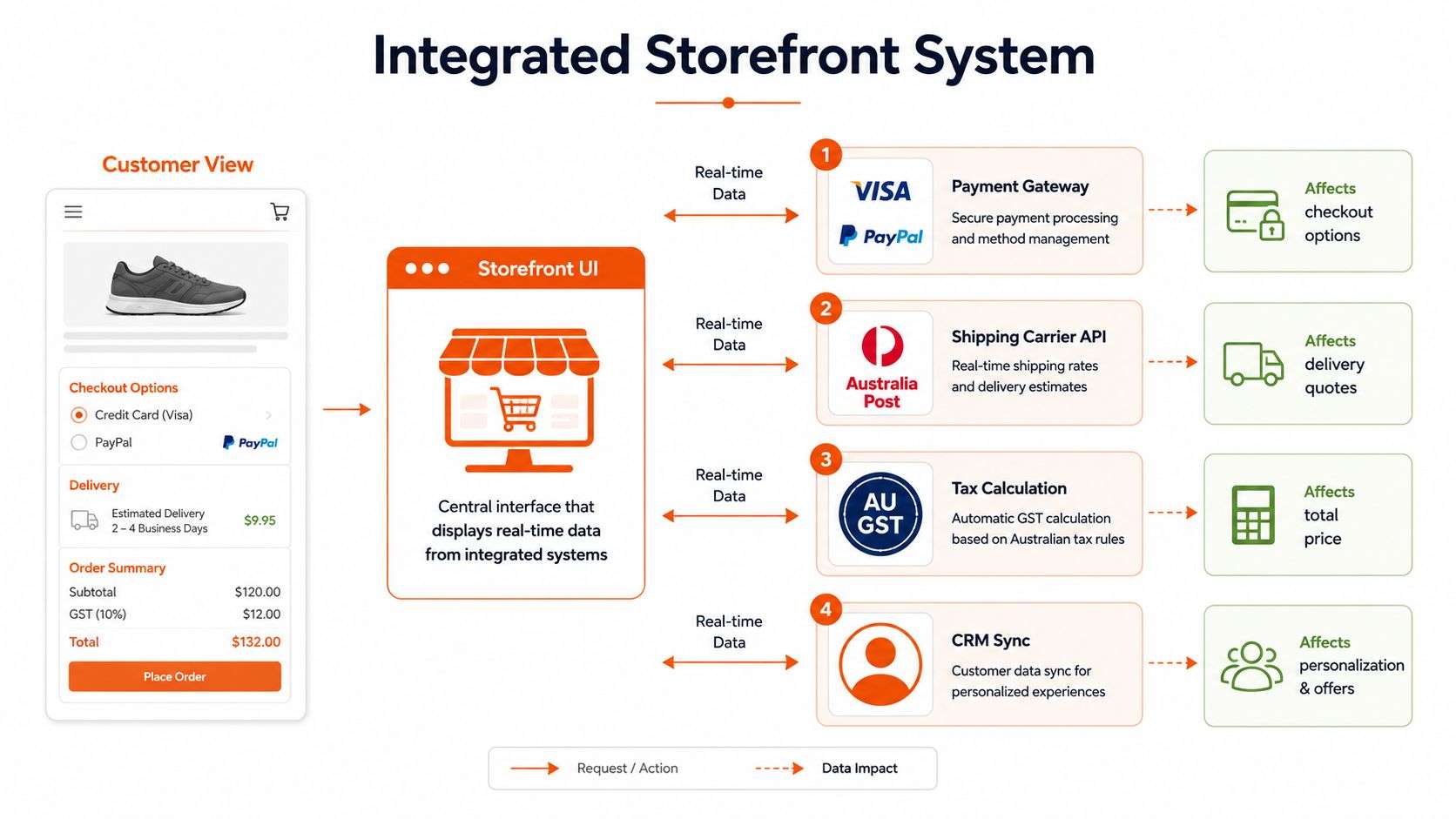
In an Adelaide manufacturer-DTC hybrid, the product catalogue might sit in Odoo ERP, while the front end runs on Shopify or WooCommerce. If that setup is planned properly, the customer sees accurate stock status, realistic delivery options, and the right tax-inclusive price. If it is not, the customer sees “add to cart” on an item that is already unavailable, which creates support tickets and wasted fulfilment effort.
Shipping logic needs the same treatment. The delivery quote, the ETA language, and the serviceability rules should come from the data model, not from generic copy written after the fact. If the site promises one thing and operations deliver another, trust drops quickly.
For a broader look at how operational data should surface in the customer experience, see our customer portal. The same rule applies on the storefront. Buyers should not have to guess whether the system knows where the order is going or what the final total will be.
Pick integrations that support the buying flow
Here is the practical stack logic:
- Payments: the gateway has to be visible, reliable, and easy for first-time buyers to use. See payment gateway integration guidance for how this affects checkout design.
- Shipping: carrier APIs need to support live quotes or clearly defined delivery rules.
- Tax: GST and other pricing logic should appear early enough to avoid surprises.
- CRM sync: customer data should flow back into service and remarketing systems without manual re-entry.
If operations cannot trust the storefront data, they will stop trusting the site, and every future decision gets slower.
Choosing the right implementation partner matters. An Odoo partner Sydney, Adelaide should understand not only ERP configuration but also how those rules show up on product pages, carts, and checkout screens. The best integration work does not just move data. It keeps the buyer experience aligned with the warehouse, finance, and service teams.
For stores using Shopify or WooCommerce, the design needs room for integration states, such as unavailable stock, freight restrictions, and order confirmations that reflect the actual operational model. That is what makes the storefront honest.
SEO, GEO and Core Web Vitals for AU Ecommerce
Search visibility and conversion performance should be designed together. A store that ranks but loads badly still leaks revenue, and a store that loads well but gives search engines thin product templates will struggle to attract qualified traffic. For Australian ecommerce, the work has to cover both traditional SEO and the way generative engines surface answers.
Build the templates for search and trust
Product and category pages need unique titles, useful descriptions and structured data that clearly identify the product, the business, and the relevant local context. FAQ blocks help because they answer buyer questions directly and give generative engines concise material to summarise. That matters even more when the store serves Australian shoppers who are checking delivery, returns and local support before they buy.
The page should also reflect the brand and business entity clearly. That includes visible contact details, policy pages, and trust copy that helps both people and search systems understand who they're buying from. If the business has a local footprint, local business signals and organisation data help reinforce that relationship.
Performance is part of the design system
For technical SEO and UX work, the Core Web Vitals thresholds commonly used are LCP ≤ 2.5 seconds, CLS ≤ 0.1, and INP ≤ 200 ms at the 75th percentile, as noted in this ecommerce performance guide. That means design choices like heavy hero assets, layout shifts from unreserved spaces, and third-party script bloat aren't just technical annoyances, they affect whether the page feels usable.
Australia's mobile environment makes this more important. With 33.6 million mobile connections in early 2026, equal to 123% of the population, as reported in this mobile design overview, responsive navigation, compressed media, large tap targets and deferred non-essential scripts become design basics, not refinements.
If you're doing the keyword work properly, use SEO keyword analysis to map category intent before writing templates. That keeps the content from drifting into brand fluff while missing the phrases people search.
A developer handoff should include this order of work:
- Unique metadata for categories and products.
- Schema for product, FAQ, organisation and local business.
- Image optimisation with sensible filenames and alt text.
- Font and script control so layout and interaction stay stable.
- FAQ content placed before the end of the page, not hidden away.
The point isn't to chase rankings in isolation. It's to make the store faster to load, easier to read and more trustworthy to buy from.
Testing, Launch and the First 30 Days
The launch date is where many ecommerce projects either become useful or become expensive. A design can look complete in staging and still fail when real payments, shipping rules and inventory sync are switched on. That's why the last phase needs a checklist, a cutover plan and a clear optimisation cadence.
Test the things that break revenue first
QA should start with devices, not just browsers. Check the homepage, category pages, product pages, cart and checkout on phones and desktops, then test accessibility basics like contrast, focus states, form labels and keyboard navigation. Make sure all payment methods work, shipping quotes resolve correctly, and any tax-inclusive totals appear where the buyer expects them.
If the build includes an odoo implementation, test the overlap carefully. Product creation, stock updates, order import, customer records and fulfilment status should all flow in the right direction before launch. A broken sync can make the store look fine while the warehouse team is dealing with phantom stock.
This is also where checkout hygiene matters. Baymard's checkout research shows that a poor checkout experience remains a common failure point, with most sites performing at mediocre or worse levels. That's why guest checkout, clear delivery timing, and simple form handling deserve as much attention as the visual design.
Run launch like an operations change, not a website publish
The cutover should include redirects, analytics, and event tracking from day one. If old URLs aren't mapped properly, search visibility and returning traffic take the hit. If events aren't configured, the team can't see where buyers are dropping out.
A practical first-30-days plan looks like this:
- Day 1 to 3: monitor checkout completion, payment errors, shipping failures and broken templates.
- Day 4 to 10: review search terms, product page engagement and abandoned carts.
- Day 11 to 20: refine navigation labels, form wording and promotional placements.
- Day 21 to 30: adjust the highest-friction pages using real buyer behaviour, not opinions.
A realistic build in Australia usually depends on catalogue size, integrations and approvals. A straightforward Shopify or WooCommerce redesign is faster than a rebuild that includes ERP sync, custom shipping logic and content migration. The primary cost driver is rarely the theme itself. It's the amount of operational complexity the storefront has to represent cleanly.
Launch is not the finish line. It's the first chance to see where the design still gets in the way.
For teams asking what the storefront partner handles, Wistec can cover ecommerce website design, Shopify implementation, WooCommerce configuration, and Odoo integration alongside discovery, UX flows, QA and launch planning. If you're comparing options for a Sydney, Adelaide or remote AU project, that mix matters because the design, build and operational workflow stay connected.
FAQ
How long does a Shopify or WooCommerce redesign usually take in Australia?
It depends on content, integrations and approvals. A simple rebuild moves faster than a store that needs Odoo ERP, shipping logic, tax rules and catalogue migration.
What does an Odoo ERP integration do for an online store?
It connects product, stock, order and customer data so the storefront reflects what operations can really fulfil. That helps reduce overselling, manual re-keying and fulfilment confusion.
How much shipping and tax transparency should appear on product pages?
Enough to prevent surprises. Show the likely delivery timing, any regional restrictions and whether pricing is tax-inclusive before the buyer reaches checkout.
What usually drives ecommerce design cost?
Catalogue complexity, custom product data, ERP sync, shipping rules, content migration, QA and the level of frontend customisation. Simple themes cost less to build than systems that have to mirror real operations.
If you want a store that converts, stays honest with stock and shipping, and doesn't fall apart when systems connect, talk to Wistec about Shopify, WooCommerce and Odoo implementation. Visit Wistec to discuss a practical ecommerce build for your Australian business, then turn the design brief into a store your team can run.