

Orders are coming in from Shopify. A staff member keys in a phone order from a repeat customer. Someone in the warehouse checks stock manually because the website says an item is available, but the shelf says otherwise. Then a customer asks why half the order shipped and the other half hasn't moved.
That's the point where many Australian businesses start searching for what is an order management system and whether they need one.
If that sounds familiar, you're not dealing with a sales problem. You're dealing with a coordination problem. The business has orders, demand, products, staff, suppliers, couriers, and systems. What it doesn't have is one reliable place that decides what stock is available, where an order should be fulfilled from, and what should happen next.
Your Business Has Orders But Lacks Order
A common pattern looks like this. Shopify handles online sales. WooCommerce still runs an older product line. Phone orders sit in email. A spreadsheet tracks stock. The warehouse team keeps a separate list for urgent dispatches. Finance doesn't see the same status the customer service team sees.
At first, that patchwork feels manageable. Then growth exposes every weak point.
A best-selling SKU shows as available online, but it's already been promised to another channel. A staff member re-enters customer details and swaps one delivery suburb for another. A split shipment gets handled ad hoc, so the customer receives one parcel and three apology emails. None of this is unusual. It's what happens when order handling depends on people remembering steps instead of a system enforcing them.
The signs usually show up before the business names the problem
You might notice it in operations before you notice it in reporting:
- Stock confusion: the website, warehouse, and sales team all believe different numbers.
- Dispatch delays: staff spend time checking availability instead of shipping.
- Channel friction: Shopify, WooCommerce, phone, and POS orders don't land in one queue.
- Customer frustration: support chases order status manually because nobody trusts the system.
- Cash pressure: too much money gets tied up in the wrong stock, which is why it also helps to unlock cash flow with smart PO management when purchasing and replenishment need better discipline.
An Order Management System (OMS) is the operational layer that brings those moving parts into line. Think of it as the central nervous system for your orders. It receives orders from every channel, checks stock, decides where fulfilment should happen, and pushes accurate status updates back to staff and customers.
Practical rule: If your team is using spreadsheets to reconcile orders across channels every day, you're already paying for the absence of an OMS.
For many SMEs, this doesn't mean buying a giant standalone platform. It often means implementing order management properly inside a broader Odoo ERP environment, where sales, stock, invoicing, and fulfilment can work from the same record. If you're unsure whether the problem is big enough yet, these signs your business needs an ERP system are usually the clearest checkpoint.
How an OMS Unifies Your Entire Order Lifecycle
The simplest way to understand an OMS is to think of it as a digital control tower. Planes are still taking off, landing, taxiing, and refuelling. The tower doesn't do each job itself. It coordinates the sequence, priorities, and visibility so the whole airport doesn't grind into chaos.
That's what an OMS does for orders.

Order capture
The first job is pulling orders into one place. That includes online stores, marketplace activity, phone orders, email orders, and in-store sales if you run POS.
Before an OMS, staff jump between tabs and inboxes. One order arrives in Shopify, another in WooCommerce, another from a sales rep. Priority depends on who shouts loudest.
After an OMS, every order enters a common workflow. The business gets one queue, one status logic, and one place to check what's been received and what still needs action.
Inventory sync
Here, most businesses either gain control or lose it.
An OMS acts as the single source of truth for inventory availability, and modern platforms can handle hundreds of millions of inventory updates daily with millisecond response times in cloud commerce environments, as noted by Fluent Commerce's explanation of OMS fundamentals. That matters because inventory changes faster than many owners realise. Sales, transfers, returns, purchase receipts, damaged stock, and reserved stock all affect what's available.
Before an OMS, the website may show stock that has already been committed elsewhere. After an OMS, availability is synced centrally, so the system makes decisions using current data instead of yesterday's spreadsheet.
The fastest way to create order errors is to let each sales channel maintain its own version of stock.
Order routing
Once an order exists and stock is confirmed, the next question is where it should be fulfilled from. For Australian SMEs, this gets practical quickly. One item might be in Sydney, another in Adelaide, and a third held by a third-party logistics partner.
A decent OMS routes orders based on stock location, service area, delivery timing, or business rules. Without that logic, staff choose manually and usually choose based on habit, not efficiency.
Before, one warehouse gets overloaded while another sits on stock. After, the system allocates work where it makes the most operational sense.
Fulfilment and dispatch
This is the warehouse moment. Pick, pack, and handoff need to happen cleanly.
- Before: team members work from printed emails, handwritten notes, or inconsistent lists.
- After: the OMS triggers structured fulfilment steps, so staff know what to pick, what's partial, what's backordered, and what's ready now.
The improvement isn't just speed. It's fewer preventable mistakes.
Shipping and tracking
Dispatch isn't the end of the order lifecycle. It's the start of the customer's waiting period.
A well-connected OMS helps push shipping details into the process so labels, dispatch status, and tracking information don't sit in separate systems. Before that, customer service has to chase the warehouse. After that, the order record tells the story.
Returns and post-sale handling
Returns are where weak order processes show themselves. If nobody can see what was sold, what was shipped, and what was received back, refunds turn into a manual investigation.
A proper OMS gives returns a controlled path. The order is still visible, the stock can be assessed, and finance isn't guessing what should be credited.
Choosing Your System OMS ERP or WMS
Business owners hear three acronyms repeatedly. OMS, ERP, and WMS. The confusion is understandable because they overlap, and software vendors often blur the lines.
The clearest analogy is a hospital. The OMS is the admissions and patient flow team. The WMS is the surgical theatre and ward operations team. The ERP is the hospital-wide system that also covers finance, procurement, staffing, records, and administration. Each has a job. Problems start when one system is forced to act like all three.
OMS vs WMS vs ERP a quick comparison
| System | Primary Focus | Core Function |
|---|---|---|
| OMS | Order flow across channels | Captures, validates, allocates, and tracks orders from sale through fulfilment and return |
| WMS | Warehouse execution | Manages bin locations, picking, packing, stock movement, and warehouse task control |
| ERP | Whole-of-business operations | Connects sales, purchasing, inventory, finance, CRM, projects, and reporting |
Where each system earns its place
An OMS is strongest when the business sells across multiple channels and needs clean order visibility. It decides what should happen to an order.
A WMS matters most when warehouse complexity grows. If you're managing structured pick paths, stock locations, wave picking, or high-volume dispatch, a warehouse tool becomes valuable. It decides how warehouse work gets done.
An ERP gives leadership the wider picture. It links operations to accounting, purchasing, customer data, and planning. It answers whether the business is making money on the orders it's processing.
For many SMEs, separate systems create more trouble than capability. The handoffs become the problem. One team updates the warehouse system, another updates finance, and someone else reconciles what happened to the actual order.
Microsoft notes that this kind of architecture works best when it integrates financial data and customer activity to eliminate human error in manual entries, ensuring near real-time insight into inventories for both the business and the buyer, thereby optimizing costs and increasing efficiency, as outlined in its overview of order management system architecture.
What works: one connected operating model where orders, stock, customers, and finance follow the same transaction record.
What doesn't: using the eCommerce platform as the operational brain of the business.
Why integrated platforms are gaining ground
Odoo ERP changes the discussion. Instead of stitching together a standalone OMS, a separate warehouse tool, and disconnected accounting, many businesses use Odoo to bring those processes into one platform. That doesn't eliminate specialisation. It reduces duplicated data entry and status mismatches.
If you're weighing the practical difference between warehouse tools and broader business platforms, this guide to WMS and ERP systems is a useful comparison.
There's also a cost and implementation angle. In Australia, Odoo's Standard ERP plan is listed at $34.30 per month for the first 12 months, then $43 per month, while the Custom plan with Odoo Studio, Multi-Company, and External API capabilities is $52 per month initially, then $65 per month, according to Wise's overview of Odoo pricing in Australia. For growing businesses, that pricing often makes integrated order management more accessible than owners expect.
Practical OMS Use Cases Beyond Retail
A Brisbane wholesaler takes orders in Shopify, a sales rep enters phone orders in the ERP, and the warehouse fulfills from two locations plus a 3PL. By midday, customer service is already chasing three versions of the truth. That is the point where an OMS stops being a retail feature and starts acting like operational control.

Manufacturing in Sydney and Adelaide
Manufacturers feel order problems early because one sale affects purchasing, scheduling, production, and dispatch.
A Sydney fabricator might receive one customer order with custom variations, split delivery dates, and components sourced from different suppliers. If sales, inventory, and production are disconnected, promised dates are usually optimistic. Purchasing reacts late, jobs get resequenced on the floor, and margin slips through overtime, expedite fees, or partial shipments.
A connected OMS changes the sequence. The order checks material availability, triggers procurement for shortages, and gives production a live view of what has been sold. In Odoo-led environments, that matters because the sales order can flow into manufacturing and stock movements without staff rekeying the same details in multiple systems. For Australian SMEs, the return is practical. Fewer promise-date disputes, less manual chasing, and better use of local labour and supplier capacity.
Logistics and multi-location fulfilment
Transport, distribution, and wholesale operations rely on timing more than almost any other sector. The issue is rarely taking the order. The issue is deciding where it should be fulfilled, whether it should be split, and how the customer gets accurate updates.
An OMS handles those decisions consistently. It can route based on stock location, freight rules, customer priority, or delivery windows. It also records partial shipments properly, which sounds minor until finance tries to invoice what left the building.
This becomes more important when stores, vans, warehouses, and trade counters all hold stock. Businesses that are linking in-store and warehouse activity usually get better results from a POS software integration strategy that keeps stock and sales records aligned than from treating the POS as a separate island.
Hospitality and service delivery
Hospitality businesses process orders even when they do not call them that. Event packages, room service, venue stock requests, group bookings, and supplier replenishment all move through the same basic lifecycle. Request, allocation, delivery, reconciliation.
A hotel group with multiple venues might need to coordinate guest requests, kitchen inventory, bar stock, and supplier purchasing in one operating flow. If those steps sit in separate systems, staff solve problems by phone and spreadsheets. If they sit in one order process, managers can see what is committed, what is short, and what needs approval before service breaks down.
Healthcare and controlled inventory
Healthcare adds tighter controls. Stock accuracy is tied to patient care, compliance, and traceability.
A clinic group ordering consumables across locations needs to know what is on hand, what has been reserved, and what has expired or requires replenishment. Manual workarounds create obvious risk. An OMS linked to inventory and purchasing reduces hand-keying, gives clearer approval trails, and makes transfers between sites easier to audit.
Professional services and project-based ordering
Service firms often miss the fact that they already run order workflows. They just call them projects, milestones, onboarding, or procurement.
A consulting firm in Adelaide might need to coordinate client-approved hardware purchases, contractor bookings, staged invoices, software licences, and installation dates. Each item has dependencies. If one piece slips, the rest of the project usually follows. An OMS approach helps by treating those dependencies as part of one commercial workflow instead of scattering them across email, accounting, and project tools.
Recurring revenue businesses have another layer again. If subscriptions, renewals, upgrades, and billing events are part of the customer lifecycle, it helps to compare your stack with other subscription management platforms for SaaS so the OMS supports recurring orders instead of only one-off transactions.
A less discussed Australian angle
Australian SMEs also deal with a level of supply chain fragmentation that generic OMS articles often ignore. One business may sell through Shopify and WooCommerce, fulfill through a warehouse plus a 3PL, buy from importers and local suppliers, and still expect finance to close the month cleanly. The problem is not volume alone. It is coordination across systems that were never designed to share one order record.
That is why sector fit matters more than retail terminology. Analysts at Alpha FMC argue that order management models in Australia's superannuation sector need to evolve beyond standard retail definitions to handle institutional data and compliance requirements, in its analysis of OMS evolution in the Australia superannuation market. The lesson for a business owner is straightforward. Choose an OMS based on the approvals, audit trail, service complexity, and integration load you have, especially if Odoo ERP is going to sit at the centre of a mixed Shopify, WooCommerce, warehouse, and finance setup.
Integrating Your OMS with Odoo Shopify and WooCommerce
A Sydney retailer takes orders through Shopify, sells spare parts on WooCommerce, processes trade orders by phone, and dispatches from a warehouse in Western Sydney plus a 3PL in Melbourne. Sales looks healthy. Operations still feels messy because each system holds a different version of the same order.
That is the integration problem an OMS has to solve.
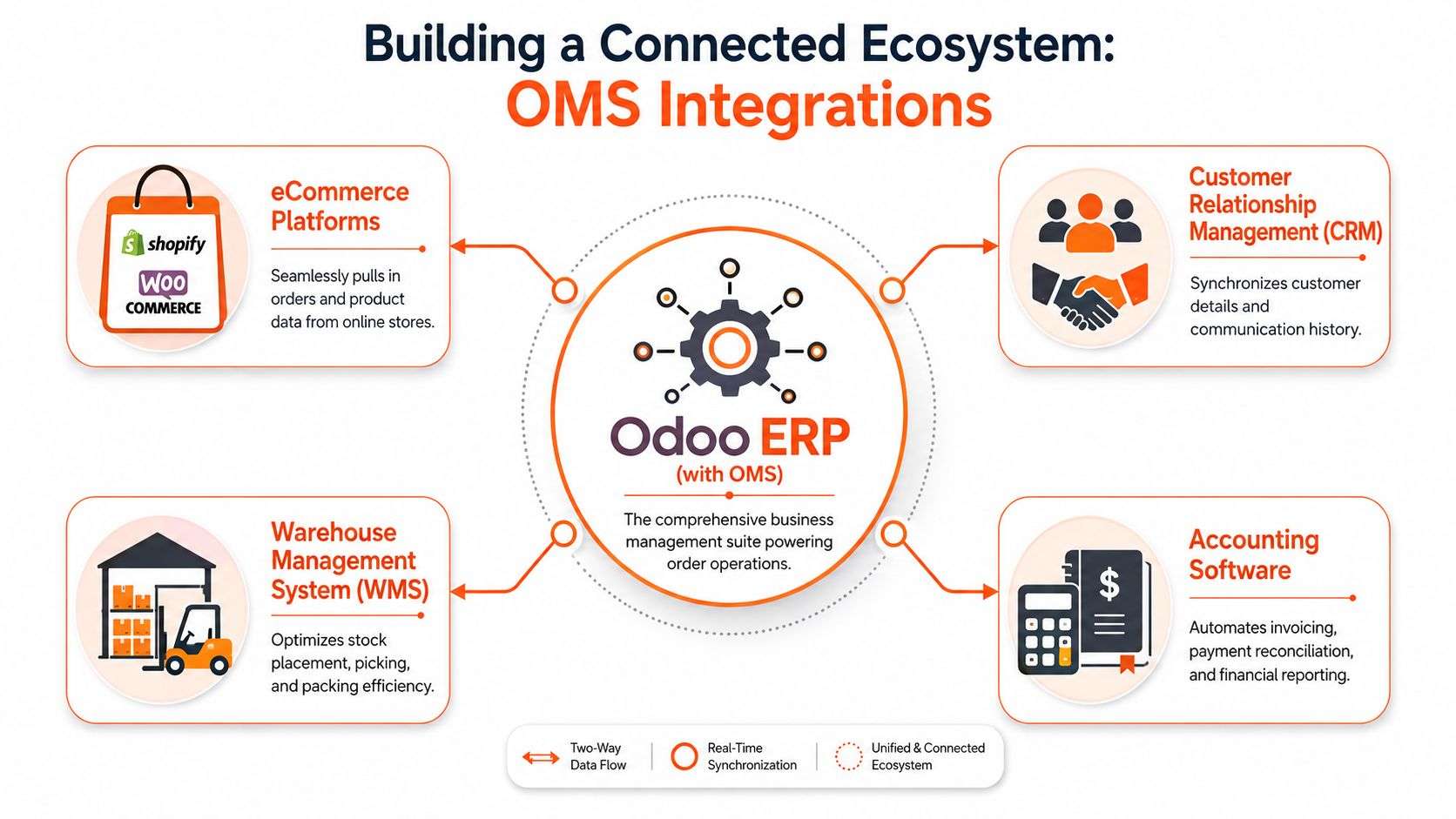
For many Australian SMEs, the practical model is a hub-and-spoke setup with Odoo ERP at the centre. Shopify and WooCommerce capture demand. Odoo holds the operational record that finance, warehouse, customer service, and purchasing can work from without rekeying data or arguing over stock numbers.
Why the hub matters
The system that owns the order usually controls the downstream pain.
If Shopify acts as the master record, phone and wholesale orders often sit outside the main workflow. If WooCommerce owns product data while invoicing happens elsewhere, staff spend month-end reconciling exceptions. If stock updates arrive late from the warehouse, the website can sell inventory that is already gone. None of that sounds dramatic until refunds rise, pick errors increase, and customer service starts chasing answers across three screens.
A well-set-up hub fixes that by giving each team one operational truth. Odoo receives the order, checks stock and pricing rules, pushes fulfilment tasks to the right place, and returns status updates to the sales channel. Staff stop stitching the process together by hand.
What a practical integration looks like
A useful Shopify implementation does more than pull in order headers. It should sync customers, products, variants, tax treatment, payment status, shipping method, fulfilment updates, and returns data in a way that matches how the business operates. The same standard applies to WooCommerce.
In practice, the flow usually looks like this:
- Sales channels create demand: Shopify, WooCommerce, sales reps, and POS feed orders into one process.
- Odoo applies control: stock availability, pricing, customer terms, GST handling, and fulfilment rules are checked centrally.
- Operations work from one record: warehouse, finance, and support teams see the same order status, not local copies.
- Updates flow back to the channel: customers get accurate dispatch and delivery information without staff sending manual emails.
The test is simple. If staff still export CSV files, retype tracking numbers, or check two systems before answering a delivery question, the integration is only half built.
The trade-offs Australian SMEs need to handle
Australian fulfilment has more edge cases than generic OMS guides usually admit. Businesses often split stock across states, use a mix of in-house dispatch and 3PLs, and rely on supplier-direct shipping for slow-moving lines or bulky items. Those decisions make commercial sense. They also put pressure on order routing, stock allocation, freight costing, and promised delivery dates.
NetSuite's Australian order management overview is a useful reference for ERP order management capabilities in local operations, especially around split shipments and drop shipping. For an SME, the question is not whether those features exist. It is whether they can be configured in a cost-effective way inside your ERP and kept stable as channels, suppliers, and carriers change.
That comes down to setup quality. Product data has to be clean. Warehouse locations have to reflect reality. Shipping rules have to match how orders are picked, packed, and billed. An OMS cannot compensate for bad operational design.
Local support and POS integration
The Australian Odoo partner market gives SMEs access to local implementation help, which matters once freight rules, GST treatment, and channel-specific exceptions start piling up. A partner should understand more than module names. They should be able to map how a WooCommerce order, a Shopify return, a trade account invoice, and a warehouse transfer affect each other in their business operations.
If POS is part of the mix, proper POS software integration belongs in the same design workshop. Store sales, online orders, and back-office inventory need to follow the same stock and customer logic, or the business ends up with a polished front end and a messy back office.
From Evaluation to ROI Your OMS Implementation Plan
Choosing an OMS is not a software shopping exercise. It's an operating model decision. If the wrong system goes in, the business still has the same friction, only now it's paying licence fees for it.
What to evaluate before you commit
Use a short checklist and be ruthless about it:
- Channel fit: Can it handle Shopify implementation needs, WooCommerce orders, direct sales, and POS without manual re-entry?
- Inventory logic: Can it support real stock visibility across locations, not just one warehouse?
- Fulfilment rules: Can it cope with split shipments, partials, and supplier dispatch arrangements?
- Finance connection: Does the order flow cleanly into invoicing and reconciliation?
- Local support: Can you get practical help from an Australian team when workflows need adjustment?
- Scalability: Will the setup still make sense when order volume, users, or locations increase?
What good implementation actually looks like
The businesses that get value from odoo erp don't try to turn everything on at once. They start with the operational pain that hurts most, then expand.
Successful Odoo ERP implementation in Australia requires a phased approach starting with critical modules, test migrations before full deployment, and thorough user acceptance testing including pilot runs to identify and resolve integration roadblocks early, as explained in Envertis' guidance on overcoming Odoo implementation challenges in Australia.
That approach works because it mirrors real business risk. Start with order flow, stock, and invoicing if those are the pain points. Test with real users. Run a pilot. Fix what breaks while the scope is contained.
Implementation advice: Don't judge a system by the demo. Judge it by how well it handles your messiest real order scenario.
Where ROI usually shows up
Return on investment rarely arrives as one dramatic event. It shows up in the daily friction that disappears.
You see it when staff stop retyping order details. You see it when stock promises become more reliable. You see it when finance, warehouse, and customer service stop arguing about status. You also see it when management can make purchasing and fulfilment decisions without waiting for someone to consolidate spreadsheets.
For businesses comparing options in software development Sydney Adelaide, the ultimate win is not adding another app. It's building one reliable operational backbone.
If your orders are spread across Shopify, WooCommerce, POS, spreadsheets, and disconnected back-office tools, it's time to clean up the operating model. Wistec helps Australian businesses with Odoo implementation, Odoo ERP integration, Shopify implementation, WooCommerce projects, and practical software development in Sydney and Adelaide. If you want a clear view of what an OMS should look like in your business, book a no-obligation conversation and map the process properly before you buy anything.