

You're usually not thinking about payment infrastructure when the business is growing well. You're thinking about stock that needs syncing, invoices that need matching, mobile checkout that feels clunky, and the support email that says, “The customer paid but we can't see the order.”
That's when payment gateway integration stops being a website task and becomes an operations problem.
In Sydney and Adelaide, we see this across retail, hospitality, healthcare, subscriptions, training businesses, and B2B service firms. A simple plugin setup might work for a small catalogue. It won't be enough if you need refunds to flow into accounting, recurring charges to line up with your CRM, or online orders to land cleanly inside Odoo ERP, Shopify, or WooCommerce without manual fixing.
Why Your Payment Gateway Integration Matters Now More Than Ever
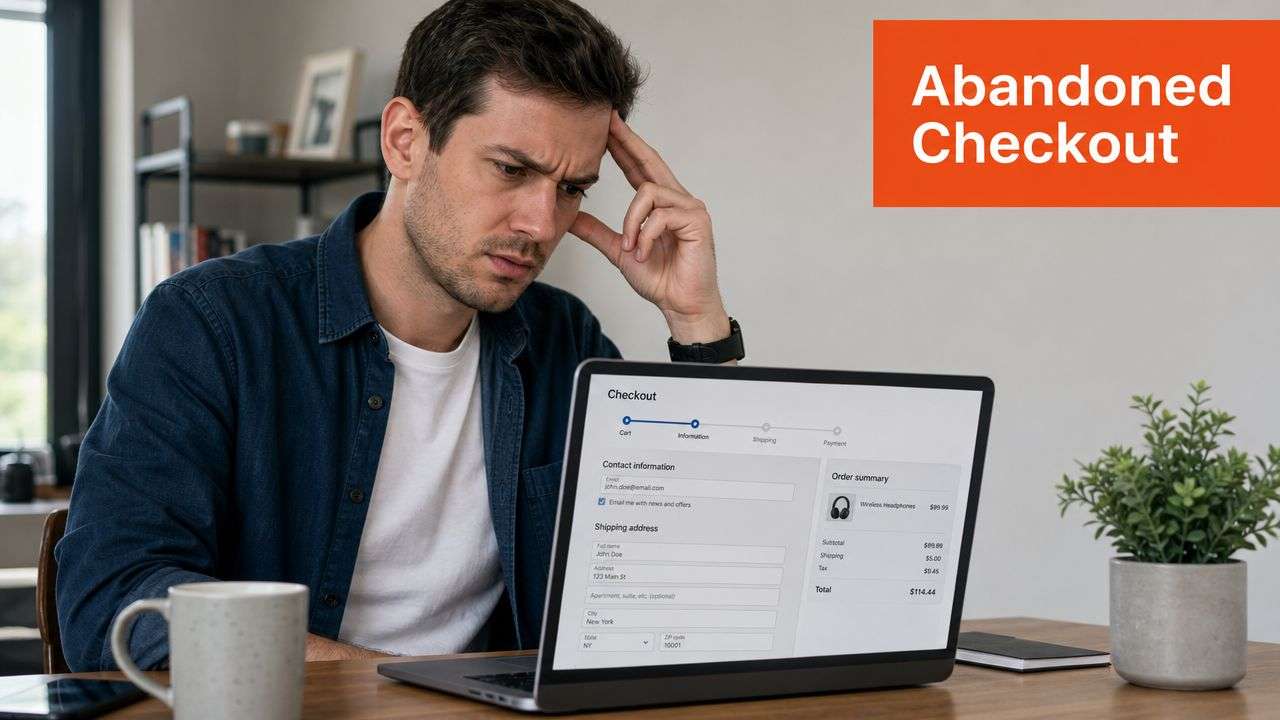
A common scenario looks like this. A customer adds products to cart, reaches checkout, tries to pay on mobile, gets an awkward redirect, then gives up. Another customer completes payment, but the order status doesn't update. Your team starts checking bank deposits, email confirmations, and admin screens to work out what happened.
That friction is expensive because it hits sales, support, and trust at the same time.
Australia has already shifted to digital first payments
For Australian businesses, this isn't a trend you can wait out. The Australian market has already moved decisively toward electronic payments. Australians made 43.7 billion non-cash payments in 2023, with a total value of A$113.5 trillion, and cash accounted for only 13% of in-person consumer payments in 2022, down from 69% in 2007, according to this summary of data from the Australian Payments Network and Reserve Bank of Australia in Transferty's discussion of payment gateway integration trends.
That changes the role of a gateway. It's no longer a bolt-on payment form. It's part of your core business infrastructure.
Practical rule: If customers can buy, book, subscribe, or pay an invoice through your business, your payment flow needs the same design discipline as your sales process and your accounting workflow.
What business owners often miss
The issue usually isn't “Can we accept cards?” It's whether the payment flow matches how the business operates.
Examples from day-to-day projects:
- Retail stores with eCommerce: The online checkout works, but refunds don't sync back to stock or finance.
- Clinics and service businesses: Deposits are taken online, but failed captures aren't visible to staff.
- Subscription businesses: The first charge succeeds, then recurring billing, dunning, and invoice handling are treated as separate problems.
- Wholesale and multi-channel firms: Shopify, WooCommerce, and Odoo implementation happen in silos, so payment data lands in different places.
A good payment gateway integration reduces handoffs. Staff don't need to cross-check three systems to confirm a payment. Customers don't wonder whether they were charged. Finance doesn't need to reconcile from scratch at month end.
That's the shift. In Australia, payment acceptance is now expected. The advantage comes from making it secure, reliable, and connected to the rest of your systems.
Choosing Your Integration Path and Gateway
Before anyone touches code, installs an app, or starts a Shopify implementation, the first decision is architectural. You're choosing how the payment flow will behave, how much control you'll have, and how much compliance and testing your team is prepared to own.
The cleanest projects start with requirements first. That means defining the checkout model, payment methods, currencies, refund behaviour, subscription needs, and operational constraints before API work begins. That sequence is consistent with Softjourn's payment gateway integration roadmap, which also warns that teams often under-scope non-functional requirements and leave refund or subscription workflows too late.
Integration methods compared
| Integration Type | Best For | Pros | Cons |
|---|---|---|---|
| Hosted checkout | Smaller businesses, fast launch projects, lower internal technical capacity | Faster to deploy, lower PCI burden, provider manages more of the payment surface | Less control over branding, extra redirect step, weaker control of user journey |
| Direct API integration | Businesses that need tailored checkout UX, deeper system integration, stronger operational control | More control, cleaner user experience, easier to align with complex ERP and workflow logic | More engineering effort, stronger compliance discipline, more testing required |
| Plugin integration | Shopify, WooCommerce, and other common platforms | Quick setup, lower development cost, useful for standard payment flows | Can become limiting when workflows are customised, plugin conflicts and upgrade issues are common |
How to decide in the Australian context
Local fit matters more than many merchants expect. A gateway has to support your currency setup, your customer mix, and the payment methods your buyers want to use. If you serve both domestic and cross-border customers, that affects gateway selection, settlement handling, and support expectations.
Use these decision questions early:
- Where do customers pay? Website only, mobile app, invoices, in-store, or all of them.
- How much control do you need? A plugin is fine for basic checkout. It’s not fine if you need a highly customized UX or deep order-state logic.
- What happens after payment? Think beyond authorisation. Refunds, recurring billing, failed payments, accounting sync, and customer notifications matter.
- Which platform is driving the project? Shopify implementation, WooCommerce setup, custom app development, or Odoo ERP integration each changes the practical path.
- Who owns support when things fail? This sounds obvious, but many businesses don’t define it until the first payment issue hits production.
Hosted and plugin options reduce development overhead. Direct API integration gives you much better control, but only if you’re ready to test and monitor it properly.
For businesses with stores, POS, and online channels, gateway selection should also align with broader commerce architecture. If online sales, in-store transactions, and stock movements need to stay in sync, your payment choice should be made alongside POS software integration planning, not after it.
What works and what doesn’t
What works is choosing the simplest integration that still fits your real operating model.
What doesn’t work is picking a gateway because the logo is familiar, then forcing your business process to fit the gateway’s limitations. That’s how teams end up with manual refunds, broken subscriptions, and finance staff reconciling from exports instead of from the system of record.
The Core Technical Integration Process
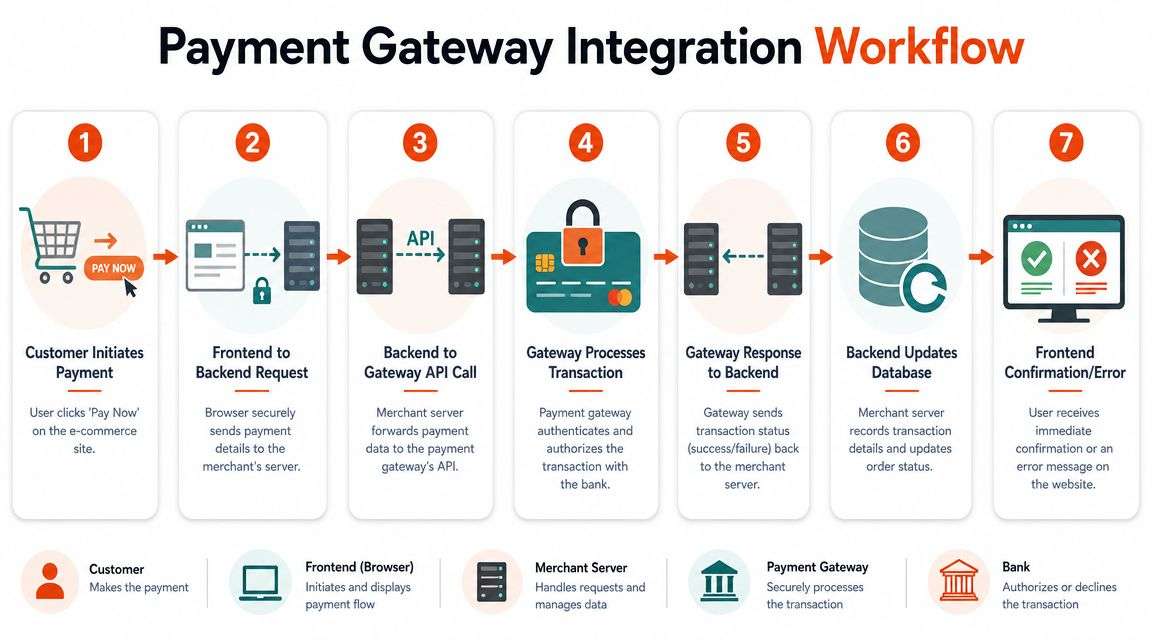
Under the hood, most payment gateway integration projects follow the same pattern. The customer sees a checkout form in the browser or app. Your server handles the sensitive business logic, talks to the gateway securely, and updates your internal systems.
That separation matters because payment logic shouldn’t live entirely in the browser.
The practical architecture that holds up in production
The most reliable model is a two-layer architecture. Stripe’s guidance describes this as a client-side checkout component paired with a server-side endpoint that creates payment intents or charges, handles secret keys, validates requests, and performs post-payment actions. That approach keeps sensitive card data off merchant servers when prebuilt payment components are used, as outlined in Stripe’s guide to integrating a payment gateway into a website.
In plain terms:
- The customer clicks Pay Now.
- The client-side checkout collects payment input through secure components.
- Your backend receives the request over HTTPS.
- The backend creates the payment object with the gateway.
- The gateway processes the transaction.
- Your system waits for verified status updates.
- Order records, confirmations, and downstream systems update.
Where teams get into trouble
The failures are rarely unfamiliar. They’re usually basic architecture mistakes:
- Secret keys in client code: This is a direct security problem and a sign that the integration was structured incorrectly.
- Business logic in the browser: Browsers aren’t trusted environments for payment orchestration.
- No server-side validation: Orders get created against assumptions rather than verified gateway events.
- No clear system boundary: eCommerce, ERP, accounting, and CRM all think they own the payment status.
A payment page can look polished and still be fragile. The technical quality is evident later, when a delayed confirmation, refund, or partial failure needs to be handled efficiently.
PCI thinking without making it abstract
Many owners hear “PCI DSS” and assume the project has become too complex. In practice, the integration design changes the burden. If you use provider-hosted fields or prebuilt UI components correctly, your systems can avoid directly handling sensitive card data.
That doesn’t remove the need for discipline. It means the engineering task shifts toward secure API design, access control, logging, webhook handling, and infrastructure hygiene.
A few implementation habits consistently help:
- Use sandbox environments properly: Test authorisations, declines, duplicate submissions, and refund states before go-live.
- Separate configuration by environment: Keep test and live credentials isolated.
- Design for asynchronous outcomes: Payment success isn’t always instantaneous from the perspective of your business system.
- Map status changes early: Decide which statuses create orders, trigger emails, reserve stock, or generate invoices.
If your broader stack includes ERP, fulfilment, custom apps, or warehouse workflows, the gateway integration should be treated as part of your wider API strategy. In this context, API integration planning saves a lot of rework later.
For merchants trying to unify checkout with downstream fulfilment and customer operations, it also helps to look at examples of seamless platform integration beyond payment alone. The important lesson is that checkout rarely stands alone. It affects fulfilment timing, order visibility, and internal support workflows from the first day of launch.
Mastering Webhooks and Reconciliation
A payment being authorised is not the end of the story. It’s often the start of the process that creates an operational mess if the integration was done hastily.
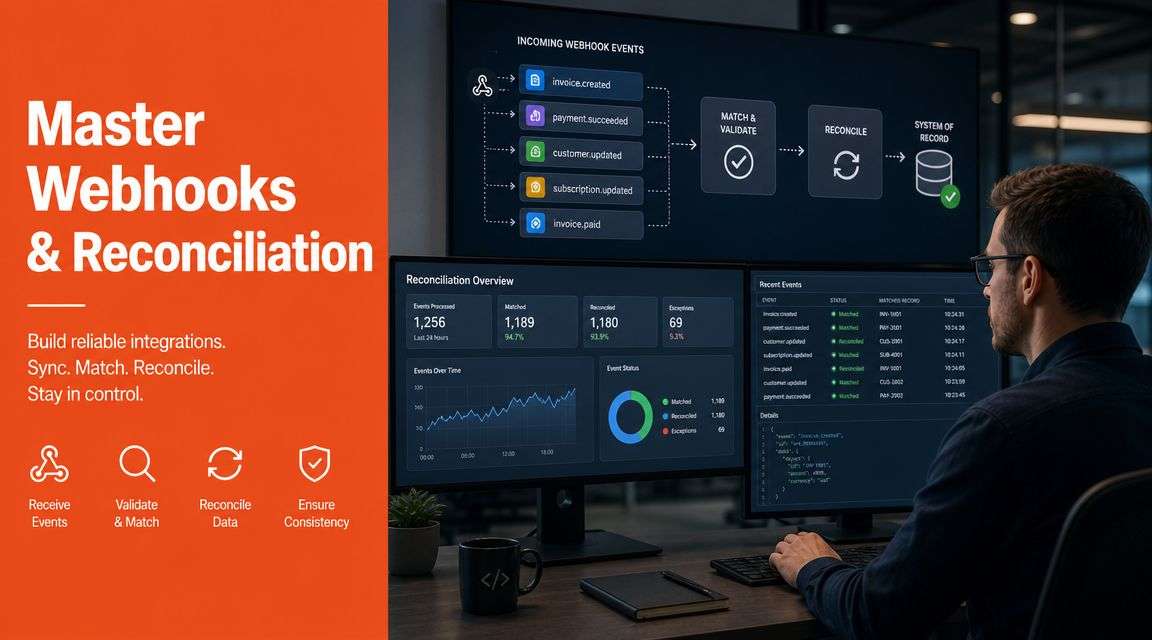
Webhooks matter. A webhook is the gateway’s way of telling your system what happened after the initial request. That might be a successful capture, a failure, a refund, or another status change that your staff and systems need to know about.
Why relying on the first response causes real problems
A lot of teams build around the initial success response from the checkout flow. That’s not enough. Payment systems are asynchronous. If you mark an order as fully paid before webhook confirmation, you invite bad data into inventory, fulfilment, and accounts.
Typical symptoms include:
- Orphaned orders where the customer thinks they paid, but the order didn’t complete properly
- False positives where the order is marked paid before the final gateway event confirms it
- Refund confusion where support processes a refund, but the ERP or accounting platform never reflects it
- Reconciliation delays because finance has to compare gateway exports against internal records manually
What a good webhook flow looks like
A sound implementation is boring in the best way. The system receives the webhook, verifies it, checks whether the event was already processed, updates the correct order or invoice, records the result, and triggers the next business action.
That business action varies by platform:
- In Shopify, it may update order state and trigger fulfilment rules.
- In WooCommerce, it may move an order into processing while keeping plugin logic consistent.
- In Odoo ERP, it may post payment status against a sales order, invoice, or subscription record so operations and finance see the same truth.
The cleanest reconciliation process starts before launch. If event mapping, idempotency, and error logging aren’t defined early, the finance team ends up fixing technical debt with spreadsheets.
Reconciliation is a business design task
Reconciliation isn’t just an accounting exercise. It’s the process that confirms your internal order records match gateway activity and eventual deposits. If your gateway, website, and ERP don’t agree on status definitions, your reporting will drift.
For Australian businesses using Odoo implementation as part of a broader digital overhaul, this is where the ERP earns its keep. Payment events can feed sales, inventory, invoices, and finance from a single workflow instead of being patched together across disconnected systems.
A practical reconciliation checklist:
- Define payment states clearly: Authorised, captured, failed, refunded, pending.
- Store gateway reference IDs: You’ll need them for support and finance tracing.
- Log webhook failures visibly: Silent failures are the worst kind.
- Retry safely: Duplicate handling matters. You want reliability without double updates.
- Test refunds and partial refunds: Many teams skip this and pay for it later.
If this sounds more operational than “technical”, that’s the point. Mature payment gateway integration is really about keeping customer experience, back-office accuracy, and support workflows aligned.
Platform Specifics for Shopify, WooCommerce, and Odoo ERP
The principles stay the same across platforms. The implementation details don’t. A payment setup that’s sensible for Shopify can be the wrong choice for WooCommerce, and both can fall short if the primary requirement is to feed a larger Odoo ERP workflow.
Shopify implementation decisions
Shopify makes payment setup look simple, and for straightforward stores, it often is. The trap is assuming the plugin or native gateway configuration solves the whole payment lifecycle.
That’s fine when your needs are basic. It becomes limiting when you need custom checkout rules, post-payment logic, ERP sync, subscriptions, or specialised fulfilment workflows. In those cases, a proper Shopify implementation usually involves app behaviour review, webhook coordination, and a clean mapping between order statuses and internal systems.
For businesses weighing custom work against default platform behaviour, this review of Shopify limitations and solutions is useful because it frames where native convenience stops being enough.
WooCommerce gives flexibility and responsibility
WooCommerce is attractive because it’s flexible. You can customise heavily, choose from many gateway plugins, and integrate with broader WordPress workflows. That same flexibility creates fragility when too many plugins try to influence checkout, order state, tax, shipping, and notifications at once.
What tends to work:
- keeping the payment stack lean
- choosing plugins with clear support and update discipline
- testing order creation, refunds, and email triggers together
- treating plugin updates as change-managed releases, not casual maintenance
If you sell products with legal or category-specific payment constraints, checkout design needs extra care. Businesses in regulated categories can learn a lot from this guide to mastering WooCommerce regulated product payments, especially where payment method restrictions and fulfilment rules intersect.
Custom websites and mobile apps need stronger architecture
A custom stack gives you the best room to shape UX, but it also means your team owns more decisions. SDK selection, tokenisation approach, webhook architecture, retry logic, and observability all matter much more than they do in a plugin-first setup.
For software development Sydney Adelaide teams working on custom commerce or service platforms, the recurring mistake is building the checkout neatly and leaving operations for later. That’s backwards. Payment success screens are easy. Reliable settlement handling and business-state updates are where the engineering quality shows.
Odoo ERP is where integration starts to compound value
This is the part many businesses overlook. If payments sit outside the ERP, staff end up re-entering data, matching records manually, and resolving timing issues across departments. When the gateway is connected properly to Odoo ERP, the payment event becomes part of a wider business workflow.
That can include:
- sales order confirmation
- invoice updates
- subscription handling
- inventory allocation
- customer account history
- finance reconciliation
For businesses planning an Odoo implementation, payment gateway integration shouldn’t be postponed until after go-live. It should be designed as part of the ERP model from the start, especially when online sales, service bookings, or recurring invoices are involved.
As an ODOO partner Sydney Adelaide businesses can work with, Wistec is one option for connecting online payments to Odoo, Shopify, WooCommerce, and broader operational workflows without leaving finance and fulfilment disconnected. That matters most when the project is not just “add checkout”, but “make the business run through one system of record”.
Payment data becomes more valuable when it stops living only in the storefront and starts informing stock, invoicing, subscriptions, and customer service.
Avoiding Pitfalls and Future Proofing Your Payments
A live payment integration isn’t finished. It’s just deployed. The systems that hold up over time are the ones designed for change, failure handling, and operational visibility.
One overlooked issue is single-provider dependence. Many guides still assume one gateway, one processor, one path. In practice, processor flexibility and failover can matter a lot, especially for merchants with cross-border sales or multiple channels. As noted in AltexSoft’s discussion of payment gateway integration and orchestration, newer models allow one integration to route transactions to multiple processors, which helps protect merchants from outages and gives more control over fees and approval performance.
The pitfalls that keep recurring
These are the problems that show up repeatedly in real projects:
- Refunds were never tested: The team proved payments can be taken, but not reversed cleanly.
- Monitoring is too thin: Failures occur, but no one knows until customers complain.
- The checkout works but operations don’t: Paid orders, failed captures, and charge-related events don’t line up inside core systems.
- The gateway is tightly coupled to one storefront: Migration becomes painful because payment logic is buried in theme code or plugin behaviour.
- Security is treated as a one-off task: It needs maintenance, review, and disciplined configuration. For a useful operational overview, this PledgeBox security guide is a solid companion read.
What future-proofing looks like in practice
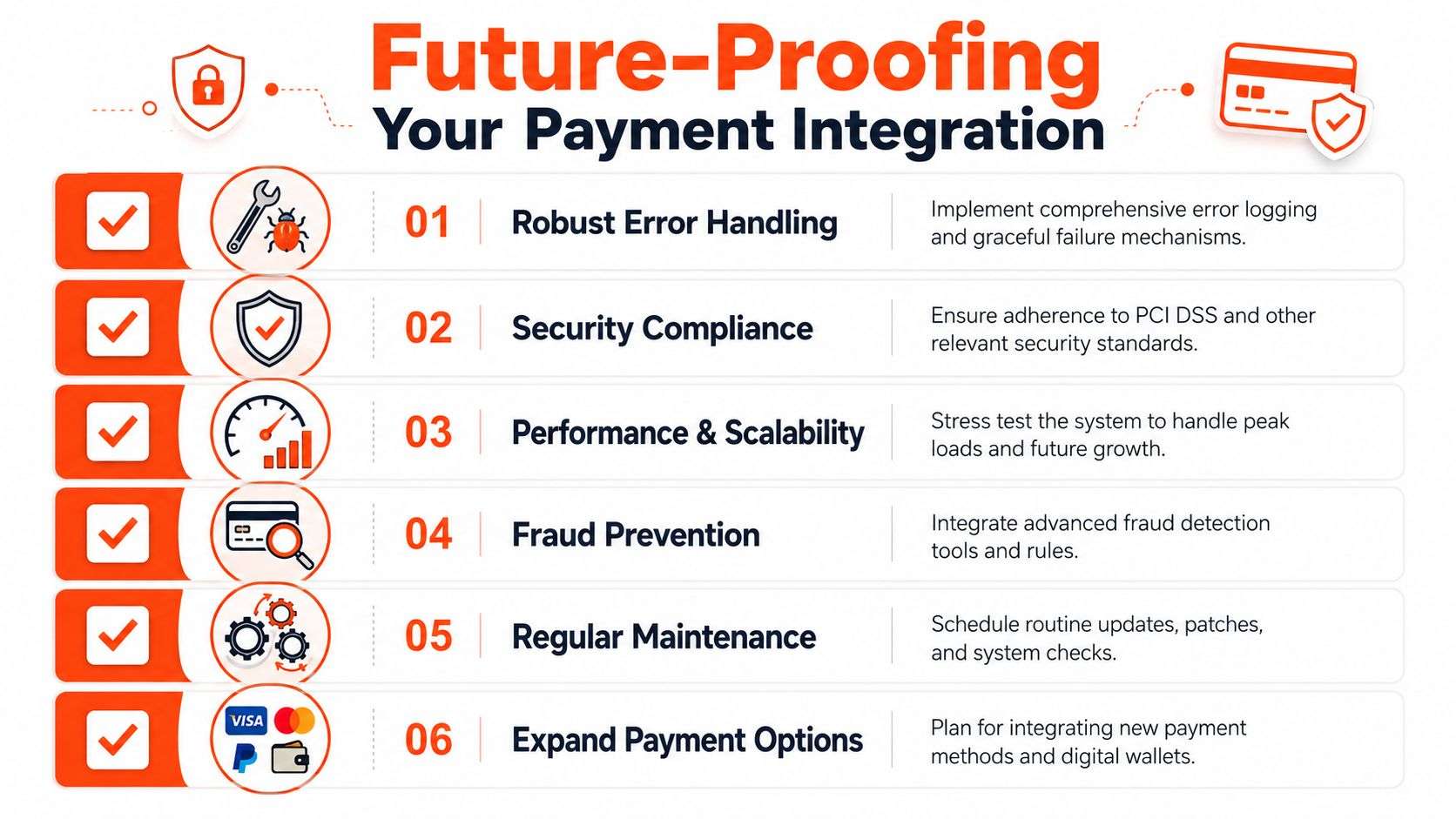
Good future-proofing is mostly good engineering and good operational design:
- Abstract the payment layer: Don’t hard-wire business logic to one provider if you may need to switch later.
- Document event handling: Staff turnover shouldn’t turn payment support into archaeology.
- Plan for new methods: Wallets, account-based payments, subscriptions, and local method changes should fit your architecture.
- Keep platform and ERP boundaries clear: Storefronts sell. Internal systems govern order, stock, and finance truth.
- Review support workflows regularly: If the first-line support team can’t trace payment status quickly, the integration is still too opaque.
For businesses investing in software development Sydney Adelaide teams can support over the long term, the focus of the conversation should shift beyond “Which plugin?” to “How resilient is our payment stack if volumes, platforms, or providers change?”
That’s the difference between a checkout feature and a payment infrastructure.
If your business needs payment gateway integration that works across Shopify, WooCommerce, custom applications, or Odoo ERP, talk to Wistec. We help Australian businesses design practical integrations that connect checkout, operations, and finance properly, so your team spends less time fixing payment issues and more time running the business.