

Email and cloud services play a crucial role in modern communication and collaboration. When selecting tools for personal or business use, it’s important to understand their functionalities and differences. This article compares POP email, Google Workspace, and OneDrive, highlighting their unique features, strengths, and limitations.
1. POP Email (Post Office Protocol)
What It Is:
POP email operates as a standard protocol for retrieving email messages from a mail server to a local device. Once the emails are downloaded, the system typically deletes them from the server unless you configure it to retain copies.
Key Features:
- Simple Functionality: POP email works well for individuals with basic email needs.
- Offline Access: By storing emails locally, POP email allows users to access messages even when offline.
- Limited Synchronization: Since emails are downloaded to one device, they are inaccessible on other devices, limiting flexibility.
Use Case:
POP email is best suited for individuals with basic email requirements who access their messages from a single device. However, it lacks advanced features such as collaboration, cloud storage, and synchronization, making it unsuitable for businesses or team-oriented tasks.
Limitations:
Lacks Collaboration Tools: POP email focuses solely on email retrieval and does not support file sharing or team communication, restricting its functionality for modern workflows.
No Cloud Backup: Emails are stored locally, so they may be permanently lost if the device is damaged or compromised.
2. Google Workspace
What It Is:
Google Workspace serves as a comprehensive cloud-based suite of productivity tools. It includes Gmail, Google Drive, Docs, Sheets, Calendar, and Meet, designed to meet the needs of both personal and business users.
Key Features:
- Integrated Tools: Google Workspace combines Gmail with powerful collaboration tools like Google Docs, Sheets, and Slides, streamlining productivity.
- Cloud Storage: With Google Drive, users can store files in the cloud and access them from anywhere.
- Collaboration: Teams can edit and share documents in real time, enhancing teamwork and efficiency.
- Device Synchronization: The platform automatically syncs emails, files, and settings across all devices, ensuring a seamless experience.
- Security: Built-in two-factor authentication and advanced security options protect user data and accounts.
Use Case:
Google Workspace works perfectly for businesses, teams, and individuals who need seamless collaboration, secure cloud storage, and productivity tools integrated with their email service.
Benefits Over POP Email:
Advanced features, such as Google Meet for virtual meetings and custom email domains for branding, provide added functionality and professionalism.
Google Workspace centralizes access to emails, files, and team collaboration tools, simplifying workflows.
Its scalability supports growth, from small businesses to large enterprises.
3. OneDrive
What It Is:
OneDrive serves as Microsoft’s cloud storage solution and often comes bundled with Microsoft 365. This bundle includes essential applications like Word, Excel, PowerPoint, and Outlook.
Key Features:
- Cloud Storage: OneDrive allows users to store and share files, ensuring access across multiple devices.
- Integration with Microsoft 365: It syncs seamlessly with Office applications, enabling users to create and edit files effortlessly.
- Collaboration: Users can collaborate on documents in real time, with version control ensuring changes are tracked.
- Offline Access: Files can be downloaded for offline use, with updates automatically syncing when reconnected to the internet.
Use Case:
OneDrive works exceptionally well for individuals and businesses deeply integrated into the Microsoft ecosystem. It offers robust file storage and collaboration capabilities, though it does not function as an email solution like Google Workspace.
Benefits Over POP Email:
With a larger storage capacity, it accommodates emails, documents, and multimedia more effectively than POP email.
OneDrive reliably backs up files and ensures access from any device, eliminating the limitations of single-device usage.
Its collaboration tools significantly enhance productivity by supporting teamwork and real-time edits.
Key Differences at a Glance
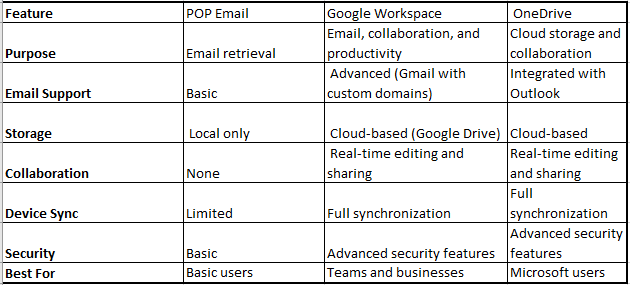
Conclusion
Choosing between POP email, Google Workspace, and OneDrive depends on your specific needs for email and cloud services.
First, consider that while POP email may suffice for basic, single-device email usage, it is an outdated option with limited functionality.
Next, Google Workspace provides a comprehensive productivity suite, making it an excellent choice for collaborative teams and businesses aiming to streamline their operations through advanced email and cloud services.
Meanwhile, OneDrive serves primarily as a cloud storage solution with collaboration features, making it best suited for users working within the Microsoft ecosystem and needing reliable email and cloud services integration.
Ultimately, for businesses and advanced users, transitioning to modern cloud-based solutions such as Google Workspace or OneDrive delivers significant benefits, including improved productivity, enhanced scalability, and stronger security.